Overview
CKEditor AI turns your editor into an agent that reads, writes, and edits documents, and keeps your markup intact.
Ask it to rewrite a paragraph, check a whole contract against your style guide, translate a manual, or fetch live data during a chat. The same agent runs behind a chat panel, a one-click action, and a backend job with no editor open.
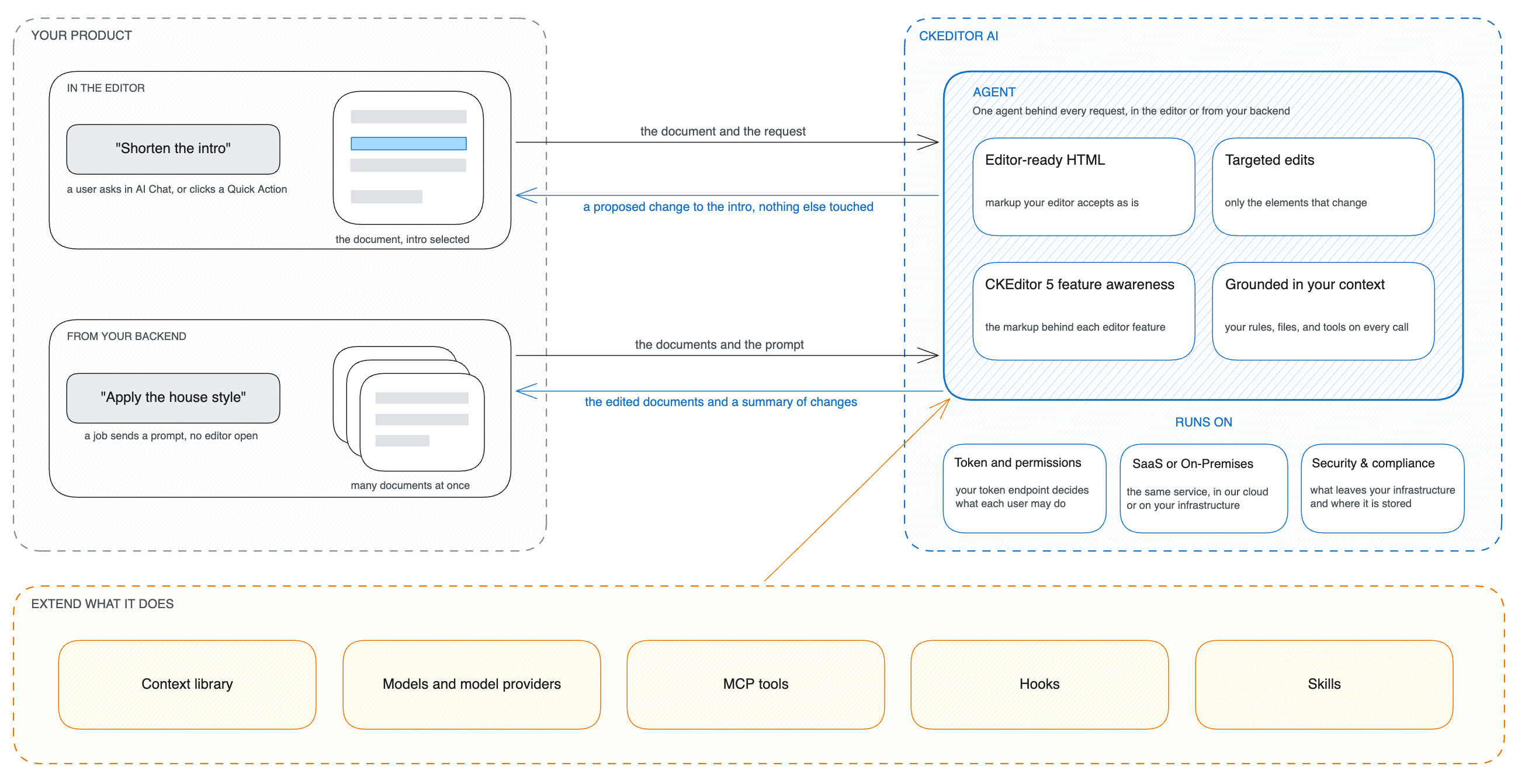
The agent is an HTTP service. It edits rich text HTML, one element or the whole document, and it knows the markup CKEditor 5 produces. The CKEditor AI plugin connects the editor to it, and your backend calls the same endpoints.
To run your first call against a real document in a few minutes, see Quick start.
The difference from building on a general-purpose agent is in what you get back, and in how much you have to build and maintain yourself.
- We maintain CKEditor 5 compatibility. The agent knows the markup behind each editor feature, and we update it with every editor release. Doing this in-house means tracking every editor and model release yourself.
- Humans stay in the loop. The agent returns a proposed change per element, not a rewritten document. In the CKEditor AI plugin, each one arrives as a track-changes suggestion, and a person accepts or rejects it as they would a colleague’s edit.
- Your markup stays intact. A general-purpose agent returns new text, and there is no guarantee that tables, CSS classes, or unrelated sections survive. The agent changes only the necessary elements and leaves the rest alone.
- Long documents are supported. A long document does not fit in one model call. The agent reads the parts a request needs and can apply one instruction across the whole document.
To learn how the agent handles a request, see How CKEditor AI works.
You can extend the agent in several ways:
- Context library holds reusable prompts and files in your environment, such as your house style or a glossary. You reference them by ID instead of pasting them into every request.
- Model providers are the models the agent runs on. On SaaS we operate them, and Models lists them. On-premises you configure at least one provider yourself, from the major cloud providers to any OpenAI-compatible service.
- MCP tools connect the agent to your systems through MCP servers, so it can look up current data or perform actions while it works. MCP resources can also be added to a context as files.
- Hooks connect the agent to a service you already run. Your service can answer the request itself, refuse it, or add context before the agent replies.
- Skills teach the agent the markup behind a CKEditor 5 feature, so it returns content the editor accepts.
Each extension pairs with some endpoints and not others. See Compare extensions before you plan an integration around one.
The table shows what each use case does and which extensions it uses.
| Use case | What it does | Extensions |
|---|---|---|
| Check drafts against your style guide | Reviews a draft against your own style guide and suggests corrections | Context library |
| Fetch data from your systems | Lets writers ask the chat for live data from your internal systems instead of pasting it in | MCP tools |
| Extend your agent’s capabilities | Brings your company’s own agent into the editor chat alongside ours | Hooks, Context library |
| Moderate content with your own rules | Applies your own rules to what the chat may answer | Hooks |
| Edit documents from your backend | Edits documents automatically in a backend job, with your own checks applied | MCP tools, Context library |
The two scenarios built on hooks need an on-premises deployment.
- In CKEditor 5: the CKEditor AI plugin adds AI Chat, AI Quick Actions, AI Review, and AI Translate to the editor. The CKEditor 5 AI documentation covers what they do and how to configure them, and this guide covers the token endpoint, the deployment, and the extensions.
- From your backend: Document Processing edits documents with no editor open. You send one or more documents with a prompt and get back the edited documents and a summary of what changed.
Both paths call the same HTTP endpoints, and REST API lists them. CKEditor 5 can call Document Processing too, through a gateway, and Using CKEditor AI programmatically covers it.
- SaaS is our cloud. You call our API and we operate the service.
- On-Premises runs the same service as Docker containers on your own infrastructure.
Most of this guide applies to both. A page that applies to one deployment only says so at the top, and Features that need an on-premises deployment lists them.
Security & compliance covers what data leaves your infrastructure, where it is processed and stored, and for how long. Use it for security reviews.
- Authentication covers the token your requests carry, from the one you get for testing to the endpoint you run in production.
- Permissions define what each user’s token may do.
- Usage and billing reports what your environment and each of your users consumed.
- REST API links the API reference and lists versioning, pagination, limits, and error codes.
To evaluate CKEditor AI, start a 14-day free trial or talk to sales for a larger deployment.