Hooks
Hooks connect a service you host to CKEditor AI. When a user sends a chat message, CKEditor AI calls your endpoint first, and your endpoint decides whether our agent answers. Use hooks when your own agent or your policy checks must see every message. This page covers when to use a hook, what a deployment needs, and what a hook can do.
Hooks run in chat only. Actions, reviews, and Document Processing do not call hooks. To learn how a chat message is answered, see How CKEditor AI works.
Your users see no difference. Replies and document edits arrive as they do without a hook. See What comes back in the response for what the response carries.
Hooks work on on-premises deployments only. The endpoint a hook calls is part of the deployment configuration. See On-Premises.
- Policy enforcement: your hook checks every message against your rules and refuses the ones that break them.
- Answers from your own systems: the user asks about data you hold. Your hook reads that data and answers the user.
- Drafts from your data: your hook collects the data the message needs and passes that data to our agent as context and instructions. Our agent writes the reply or edits the document from what you sent, and your hook can state which of the two the turn produces.
Hooks need an on-premises deployment, because the hook endpoint is part of the service configuration. If you are still evaluating one, start with On-Premises.
You build and operate:
- An HTTPS service: CKEditor AI ships no endpoint for hooks to call. Every chat reply waits for your service, so it must answer within the timeout you set.
- Signature verification: we sign every call with a shared secret, and your service rejects calls that did not come from us.
You configure one endpoint for the whole deployment: the URL, the timeout, and the shared secret. Every environment calls the same URL, and each call carries an environmentId, so your service knows which environment it is answering for.
Each call carries the current message, its attachments, and the IDs of the open documents, but no document text and no earlier messages. To read those, your service calls our REST API with credentials of its own.
A chat turn is one user message and the reply to it. Every event follows the same exchange:
- We send your endpoint the turn data: who the user is, what they asked, which documents are open, and what they attached.
- Your endpoint returns a decision: each event has its own decisions, because it fires at a different point in the turn.
- Your endpoint can stream progress: the user sees what your service is doing while it works.
- We apply the decision: the turn goes on from there.
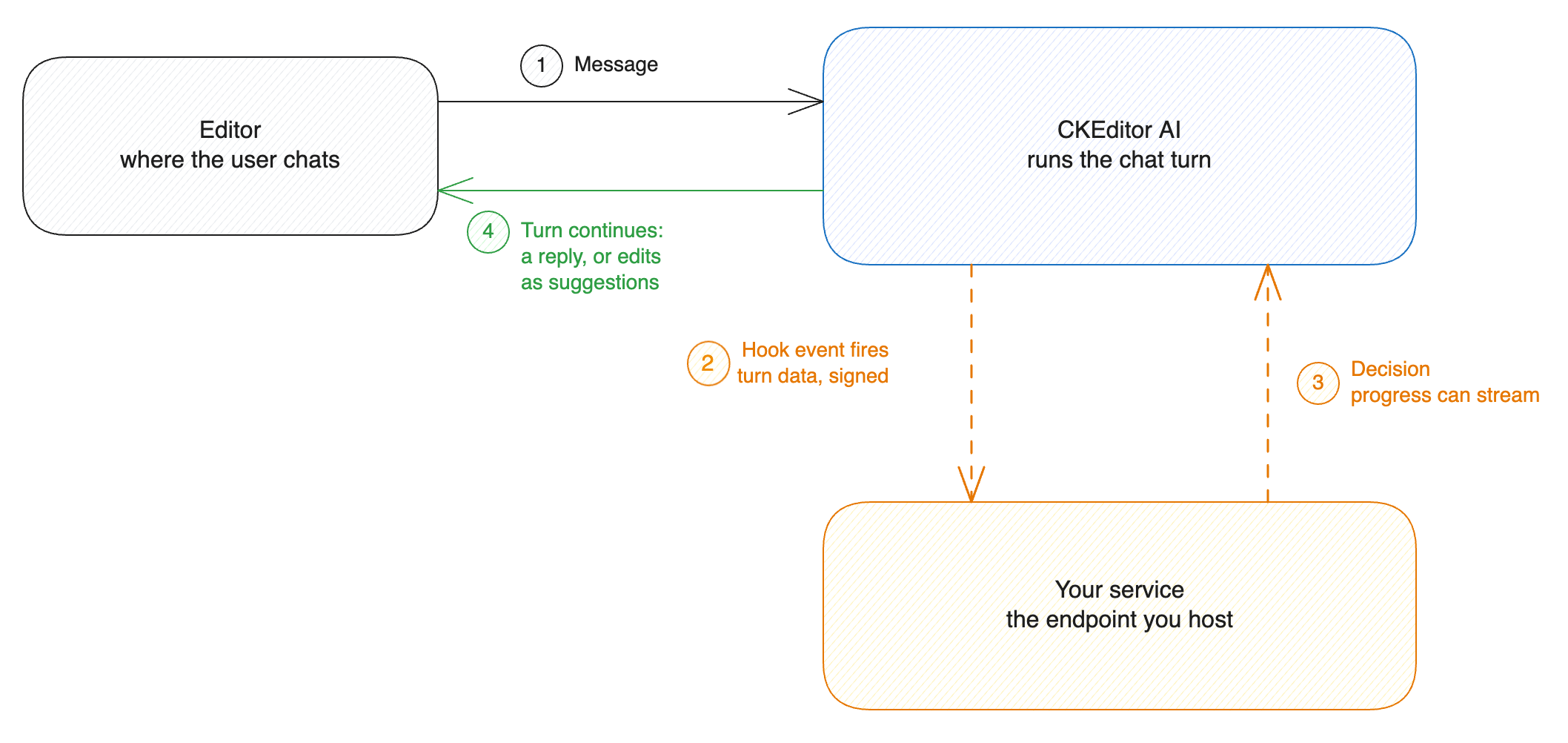
A chat turn runs in stages, and each stage can fire a hook event.
| Event | When it fires |
|---|---|
turn.start |
After the user sends a message. Before our agent runs. |
The contract is versioned. New events arrive without breaking your handler.
At turn.start, nothing has been generated yet. Your endpoint decides whether our agent runs at all:
- Halt: your endpoint answers the user. That answer becomes the assistant’s message, and our agent never runs.
- Continue: your endpoint hands the turn to our agent, with any context and instructions that should shape the result. It can also state how the turn ends: a chat answer, edits to the whole document, edits to the user’s selection, or a chat answer with edits. When it states nothing, we decide from the user’s message and the instructions and context your endpoint sent.
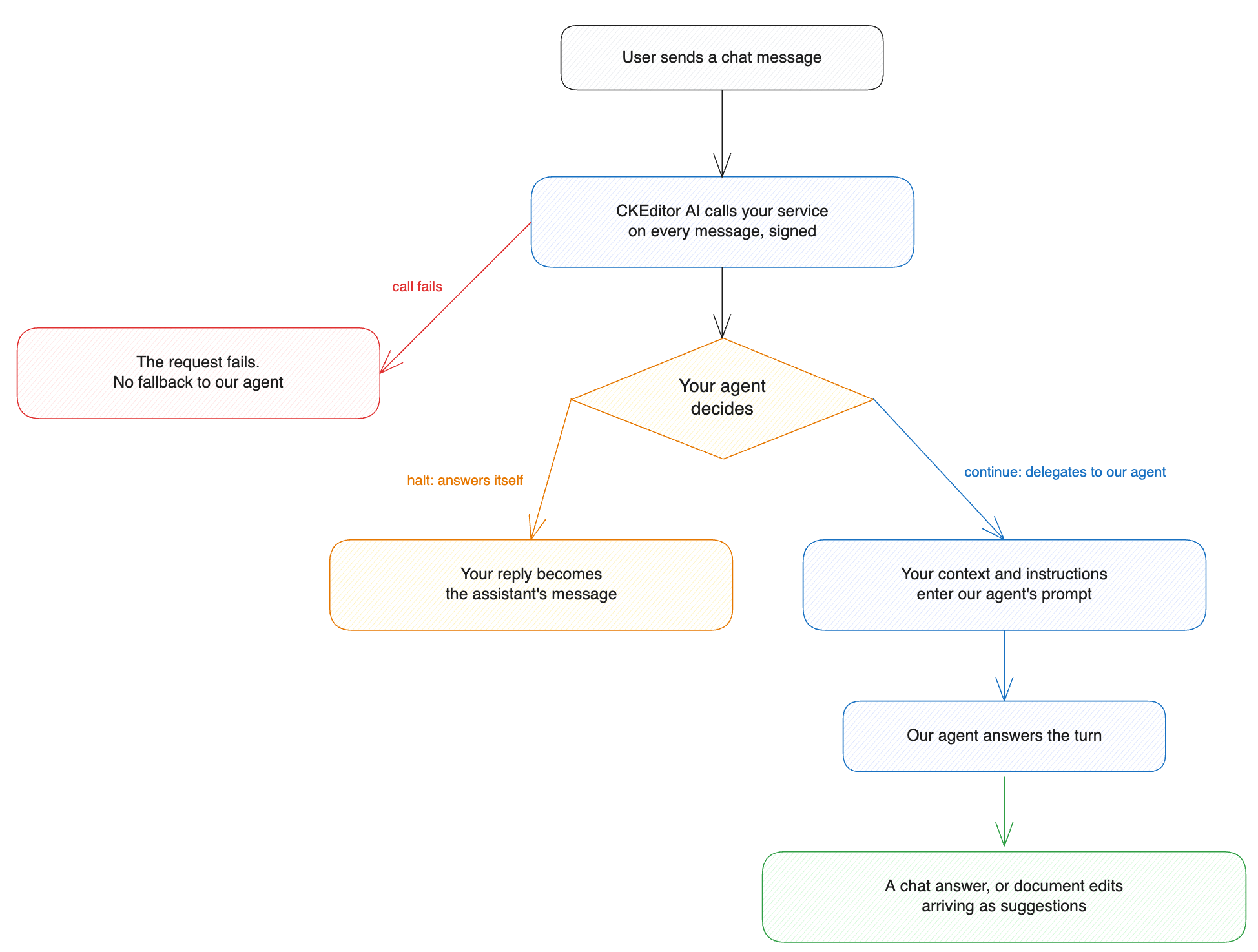
A failed hook call fails the user’s request, and we do not fall back to our own agent. While your endpoint is down, no chat turn completes.
We call your endpoint before our own checks run. Content moderation and prompt-injection detection guard our agent, not yours. Screen what reaches your endpoint yourself.
The use-case pages walk through these patterns:
- Extend your agent’s capabilities connects your existing agent. Your agent answers from your systems or briefs our agent to draft the reply.
- Moderate content with your own rules puts your screening service in front of our agent to refuse the messages your rules forbid.
- Hooks is the technical reference: the configuration, the request your endpoint receives, how we sign calls, the decisions your endpoint can return, and a complete example endpoint.
- Model providers runs our agent on models you choose. With a hook, your agent owns the decisions, and the reasoning stays on your models.