Extend your agent’s capabilities
This scenario runs on on-premises deployments only, because it uses hooks. A hook calls a service that you host. See On-Premises.
This page shows one way to set this up. The extensions it uses fit this scenario, and other combinations work too. See Ways to use it and Choose an extension for the full list.
An advisory company has an agent that queries its deal database and starts back-office jobs such as an independence check. Consultants draft engagement reports in CKEditor 5. The company wants consultants to call its agent from the editor’s chat and use CKEditor AI for document edits.
A hook sends each chat message to the company’s agent before the CKEditor AI agent runs. The company’s agent either answers the message itself or forwards the message to the CKEditor AI agent together with the data the company’s agent looked up.
A consultant asks the chat to run the independence check on an engagement, and the company’s agent starts the job and answers in the chat. The consultant then asks to insert the deal review findings into the report. The company’s agent fetches the findings and forwards the message, and the CKEditor AI agent makes the edit in the document.
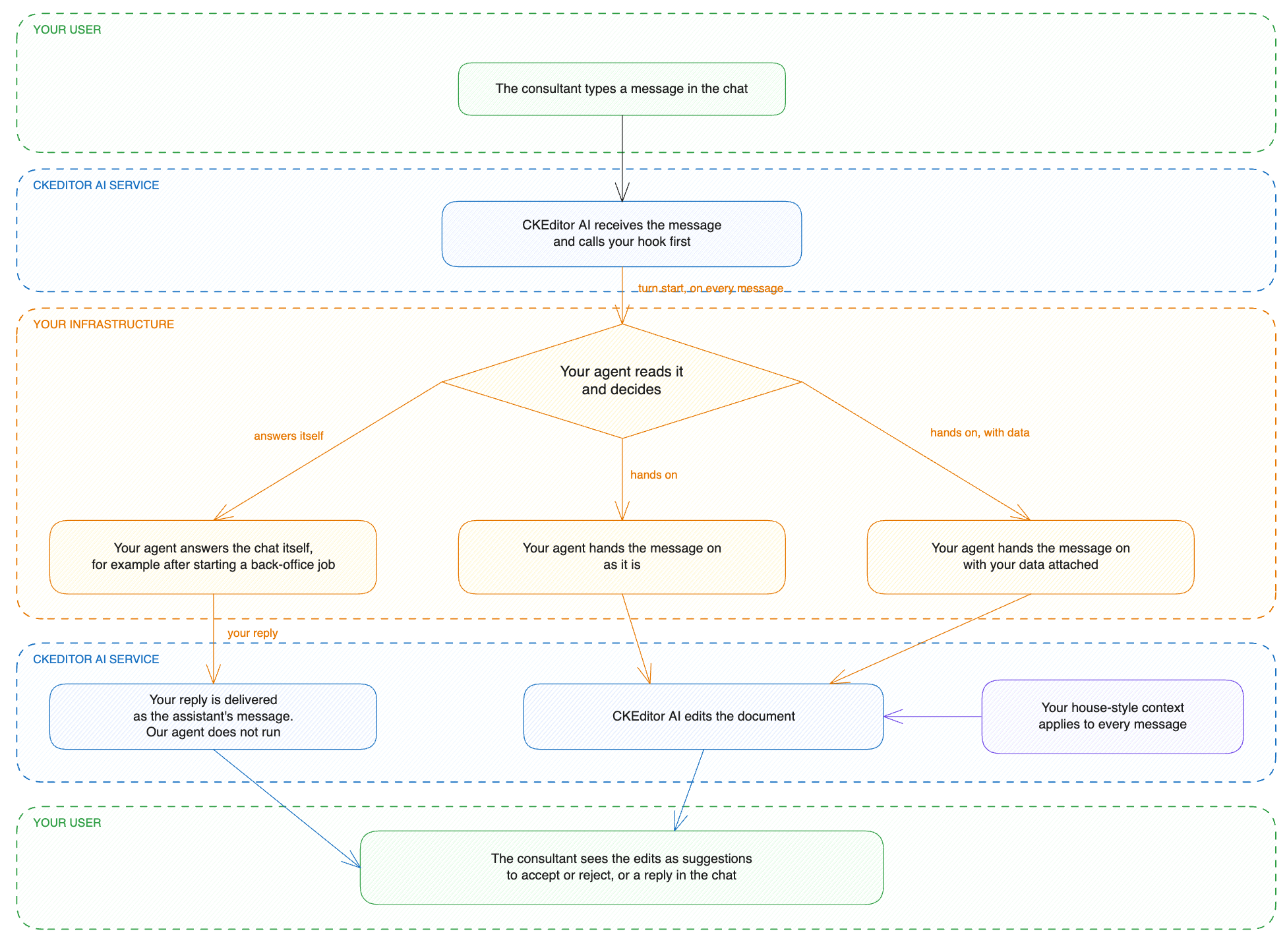
You keep your agent, and CKEditor AI does not replace it. You build one HTTPS endpoint that connects CKEditor AI to your agent.
- Host an HTTPS endpoint that verifies the signature on every call.
- In the endpoint, send the message to your agent and return its decision.
- Enable the
turn.starthook in the deployment configuration. Set its URL to your endpoint and set the shared secret. - Create a context with your house style and apply it automatically to conversations.
- Both agents in one chat: consultants call your agent from the editor. Your agent answers a message itself, or it forwards the message to CKEditor AI together with the data it looked up.
- House style on every edit: the CKEditor AI agent applies the context on every run, so your agent does not send the rules with each message.
- Hook endpoint for your own agent in Node.js has the context, the hook configuration, the endpoint code, and the requests that run one message through it.
- Hooks covers what a hook can do, when to use one, and what a deployment needs.
- Context library covers applying a context automatically to conversations.