
How Coauthor works
When your agent connects to Coauthor, it gets instructions that tell it how to use the tools and skills. This page follows one request from a user to an agent, from opening a session to the edits that reach the document.
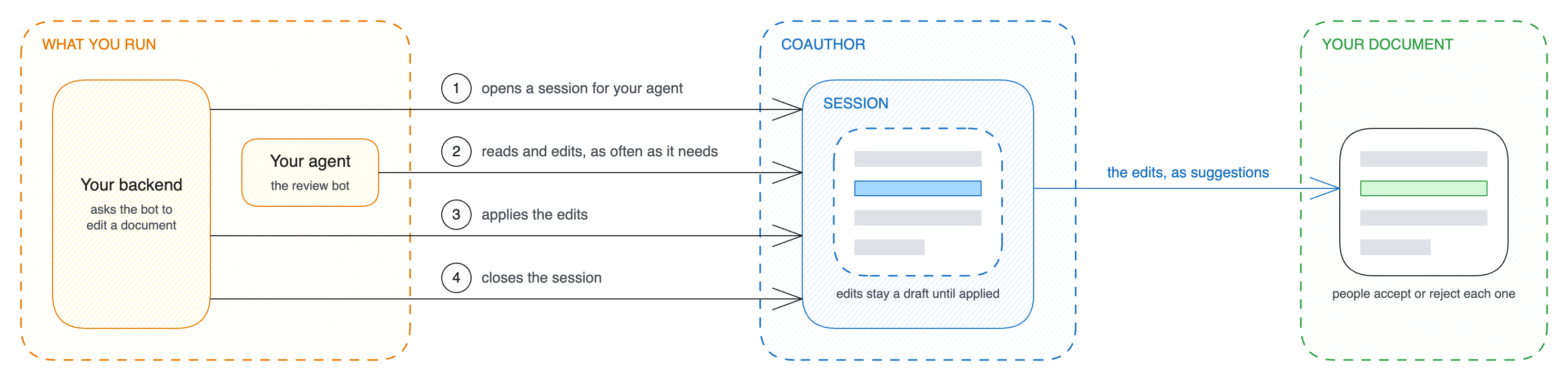
First, Coauthor opens an editing session. The agent edits the text inside this session. The session works on a copy of the document, so users do not see the agent’s edits right away. The edits reach the document only when your backend or the agent applies them. Comments are different: they go into the document at once.
Each session has an actor: the user or bot on whose behalf the agent works. A session lasts one hour unless you ask for longer, and at most one day. Unapplied edits are discarded when the session ends.
The agent loads skills that describe the features of your editor and what the agent can do with them, such as charts or footnotes. Coauthor takes these skills from your editor bundle, which holds your editor configuration.
The agent calls the editing tools that fit its task. For example, it searches the document for only the parts that need to change, and edits just those parts. The API reference lists every tool.
Coauthor checks that every edit is correct before it accepts the edit. It loads the result in CKEditor 5 with your editor bundle, which has the same configuration as the editor your users work in. It rejects an edit that would remove a comment or a suggestion, or break the structure of the document. Coauthor tells the agent why it rejected the edit, so the agent can correct it and try again. An accepted edit stays a draft until it is applied.
Applying sends the edits to the document in one step. Changes are synchronized through real-time collaboration and appear in all open editors, just like edits made by other users.
When you open a session, you choose when the edits go in and who applies them:
- By default, edits of the text wait until your backend applies them.
- Each edit can go in as soon as the check accepts it. A chat needs this, so that people see the agent work.
- The agent can apply the edits and close the session itself.
The agent’s comments and replies go into the document at once. So do its decisions on suggestions and the revisions that it saves or restores, but the agent can make these only in a session where it applies its own edits.
You also choose whether the edits go in as direct changes or as suggestions. The actor is the author of each suggestion, and people accept or reject each one. A token can allow suggestions only, so that its agent never changes the document directly. See Authentication. The API reference describes every option of a session.
Suggestions need Track Changes in your editor bundle. Some changes cannot be represented as individual suggestions. For example, removing a table column empties the column instead of removing it.
People can keep editing while the agent works, and the agent’s edits merge with their changes. More than one agent can also work on one document, each in its own session.
If a person changes the document after the agent’s last read, the agent learns it on its next read or search. An agent that edits from an old read can still overwrite a change that it never saw. For long editing operations, have the agent reread the document to avoid overwriting concurrent changes.
- Quick start gets a first agent editing one of your documents.
- Connect an agent shows the steps of a session in your own code.
- Security and compliance explains how your documents stay yours, and which guardrails your agent needs.