
Quick start
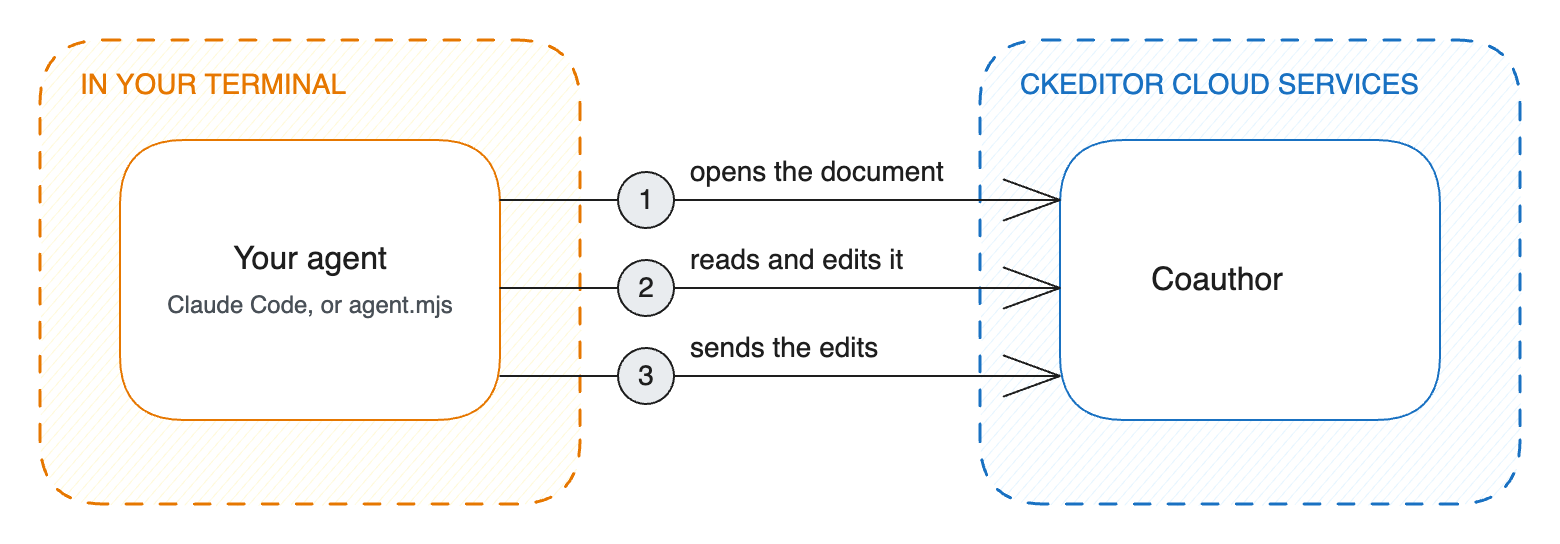
In this guide, you’ll use an agent to edit a document and see its changes appear in CKEditor 5 as suggestions. You’ll run the editor in your browser and the agent in your terminal.
This guide has two examples: Claude Code, and a small agent of your own. You prepare the project and the document once, then follow one example or both.
Prerequisites
- A trial environment with Coauthor turned on. Sign up for the CKEditor Premium Features 14-day free trial, then contact us to turn on Coauthor for the environment.
- Your license key. In the Customer Portal, open License keys.
- The values of your environment. In the Customer Portal, open Cloud environments, then your environment. The CKEditor configuration tab shows the environment ID, the WebSocket URL, and the development token URL. On the Access credentials tab, create an access key. On the API secrets tab, create an API secret.
- Node.js 22 or later.
- Claude Code, for the first example.
- An API key of a model provider, for the second example. This guide uses Anthropic.
Create a folder, and install the packages in it:
npm init -y
npm install ckeditor5@49.0.0 ckeditor5-premium-features@49.0.0 esbuild joseThen save your values in a file named .env in the same folder. Copy each value from the Customer Portal as it is:
# Cloud environments > your environment > CKEditor configuration
ENVIRONMENT_ID=<your environment ID>
WEBSOCKET_URL=<your WebSocket URL>

# Cloud environments > your environment > Access credentials, API secrets
ACCESS_KEY=<your access key>
API_SECRET=<your API secret>
The scripts read this file. Keep it on your computer, because it holds your keys.
Cloud Services checks and applies the agent’s edits with a copy of your editor, called the editor bundle. To learn more about it, see the Editor bundle guide and the ready-to-use webpack examples.
Save this script as upload-bundle.mjs. It builds an editor with the same plugins as editor.html in the next step, and uploads that editor:
import { createHmac } from 'node:crypto';
import { build } from 'esbuild';

process.loadEnvFile();

const { ENVIRONMENT_ID, WEBSOCKET_URL, API_SECRET } = process.env;
const BUNDLE_VERSION = 'coauthor-quick-start';

// 1. Build the editor as one file that sets the `CKEditorCS` global.
const { outputFiles } = await build( {
	stdin: {
		contents: `
			import { ClassicEditor, CloudServices, Essentials, Paragraph, Heading, Bold, Italic, List, Table } from 'ckeditor5';
			import {
				Comments, TrackChanges, DocumentCompare,
				RealTimeCollaborativeEditing, RealTimeCollaborativeComments, RealTimeCollaborativeTrackChanges
			} from 'ckeditor5-premium-features';

			class CKEditorCS extends ClassicEditor {}

			CKEditorCS.builtinPlugins = [
				CloudServices, Essentials, Paragraph, Heading, Bold, Italic, List, Table,
				Comments, TrackChanges, DocumentCompare,
				RealTimeCollaborativeEditing, RealTimeCollaborativeComments, RealTimeCollaborativeTrackChanges
			];

			globalThis.CKEditorCS = CKEditorCS;
		`,
		resolveDir: import.meta.dirname
	},
	bundle: true,
	format: 'iife',
	minify: true,
	write: false
} );

// 2. Upload it with the version that `editor.html` names. The API secret signs the request.
const url = new URL( `https://${ new URL( WEBSOCKET_URL ).host }/api/v5/${ ENVIRONMENT_ID }/editors` );
const body = JSON.stringify( {
	bundle: outputFiles[ 0 ].text,
	config: { cloudServices: { bundleVersion: BUNDLE_VERSION } }
} );
const timestamp = Date.now();
const signature = createHmac( 'sha256', API_SECRET ).update( `POST${ url.pathname }${ timestamp }${ body }` ).digest( 'hex' );

const response = await fetch( url, {
	method: 'POST',
	headers: { 'Content-Type': 'application/json', 'X-CS-Timestamp': String( timestamp ), 'X-CS-Signature': signature },
	body
} );

if ( response.status === 201 ) {
	console.log( `Uploaded the editor bundle ${ BUNDLE_VERSION }.` );
} else if ( response.status === 409 ) {
	console.log( `The editor bundle ${ BUNDLE_VERSION } is already uploaded.` );
} else {
	throw new Error( `The upload answered ${ response.status }: ${ await response.text() }` );
}Run it:
node upload-bundle.mjsYou upload the bundle once. If you run the script again, it tells you that the bundle is already there.
Save this page as editor.html. Put your license key, your development token URL, and your WebSocket URL in it. The page loads CKEditor 5 v49.0.0, the same version as the bundle.
<!DOCTYPE html>
<html lang="en">
	<head>
		<meta charset="UTF-8" />
		<title>Coauthor - Quick start</title>
		<link rel="stylesheet" href="https://cdn.ckeditor.com/ckeditor5/49.0.0/ckeditor5.css" />
		<link rel="stylesheet" href="https://cdn.ckeditor.com/ckeditor5-premium-features/49.0.0/ckeditor5-premium-features.css" />
		<style>
			main { display: flex; gap: 16px; }
			#editor-container { flex: 1; }
			#sidebar { width: 300px; }
		</style>
	</head>
	<body>
		<main>
			<div id="editor-container">
				<div id="editor">
					<h2>Pricing</h2>
					<p>Every plan includes real-time collaboration and unlimited documents.</p>
					<figure class="table">
						<table>
							<tbody>
								<tr><td>Plan</td><td>Price</td><td>Seats</td></tr>
								<tr><td>Starter</td><td>$10 per month</td><td>1</td></tr>
								<tr><td>Pro</td><td>$30 per month</td><td>5</td></tr>
								<tr><td>Team</td><td>$50 per month</td><td>20</td></tr>
							</tbody>
						</table>
					</figure>
					<h3>Billing</h3>
					<ul>
						<li>You pay per account, not per seat.</li>
						<li>A yearly plan costs the same as ten months.</li>
					</ul>
				</div>
			</div>
			<div id="sidebar"></div>
		</main>

		<script src="https://cdn.ckeditor.com/ckeditor5/49.0.0/ckeditor5.umd.js"></script>
		<script src="https://cdn.ckeditor.com/ckeditor5-premium-features/49.0.0/ckeditor5-premium-features.umd.js"></script>

		<script>
			const {
				ClassicEditor,
				CloudServices,
				Essentials,
				Paragraph,
				Heading,
				Bold,
				Italic,
				List,
				Table
			} = CKEDITOR;
			const {
				Comments,
				TrackChanges,
				DocumentCompare,
				RealTimeCollaborativeEditing,
				RealTimeCollaborativeComments,
				RealTimeCollaborativeTrackChanges
			} = CKEDITOR_PREMIUM_FEATURES;

			ClassicEditor.create( {
				attachTo: document.querySelector( '#editor' ),
				licenseKey: '<YOUR_LICENSE_KEY>',
				plugins: [
					CloudServices, Essentials, Paragraph, Heading, Bold, Italic, List, Table,
					Comments, TrackChanges, DocumentCompare,
					RealTimeCollaborativeEditing, RealTimeCollaborativeComments, RealTimeCollaborativeTrackChanges
				],
				toolbar: [
					'undo', 'redo', '|', 'heading', '|', 'bold', 'italic', '|',
					'bulletedList', 'insertTable', '|', 'comment', 'trackChanges'
				],
				cloudServices: {
					tokenUrl: '<YOUR_DEVELOPMENT_TOKEN_URL>',
					webSocketUrl: '<YOUR_WEBSOCKET_URL>',
					bundleVersion: 'coauthor-quick-start'
				},
				collaboration: {
					channelId: 'pricing'
				},
				sidebar: {
					container: document.querySelector( '#sidebar' )
				},
				comments: {
					editorConfig: {}
				}
			} );
		</script>
	</body>
</html>Open editor.html in your browser. The editor creates the document pricing in your environment, with the content of the page. The next time the page opens, it loads the document from Cloud Services instead.
Keep the page open while you work.
In this example, Claude Code edits the document. It needs one file, claude-code.mjs.
Save this script as claude-code.mjs. It prints the settings that Claude Code needs to connect to Coauthor, with a token signed with your access key:
import { SignJWT } from 'jose';

process.loadEnvFile();

const { ENVIRONMENT_ID, WEBSOCKET_URL, ACCESS_KEY } = process.env;
const COAUTHOR_URL = `https://${ new URL( WEBSOCKET_URL ).host }/toolkit/v1/environments/${ ENVIRONMENT_ID }`;

const token = await new SignJWT( {
	user: { id: 'quick-start-user', name: 'Quick start user' },
	auth: {
		toolkit: {
			permissions: [ 'sessions:open', 'sessions:read', 'sessions:tools', 'sessions:apply', 'sessions:close' ],
			documents: { pricing: {} },
			mode: 'suggest'
		}
	}
} )
	.setProtectedHeader( { alg: 'HS256' } )
	.setAudience( ENVIRONMENT_ID )
	.setSubject( 'quick-start-user' )
	.setIssuedAt()
	.setExpirationTime( '1h' )
	.sign( new TextEncoder().encode( ACCESS_KEY ) );

console.log( JSON.stringify( { type: 'http', url: `${ COAUTHOR_URL }/mcp`, headers: { Authorization: `Bearer ${ token }` } } ) );Add Coauthor to Claude Code, and ask for a change:
claude mcp add-json ckeditor "$( node claude-code.mjs )"
claude 'Open the document pricing and add an item to the Billing list: You can cancel at any time.'Allow the ckeditor tools when Claude Code asks. Claude Code opens a session, edits the document, and applies its edits. The new item arrives in the editor as a suggestion by Quick start user.
In this example, a small agent of your own edits the document. It needs one file, agent.mjs, and the AI SDK.
Install the AI SDK in the project folder:
npm install ai @ai-sdk/mcp @ai-sdk/anthropicAdd your Anthropic API key to .env:
ANTHROPIC_API_KEY=<your Anthropic API key>
Then save this script as agent.mjs. It opens a session on pricing and lets a model edit the document with the tools of Coauthor. Then it applies the edits and closes the session:
import { anthropic } from '@ai-sdk/anthropic';
import { createMCPClient } from '@ai-sdk/mcp';
import { generateText, isStepCount } from 'ai';
import { SignJWT } from 'jose';

process.loadEnvFile();

const { ENVIRONMENT_ID, WEBSOCKET_URL, ACCESS_KEY } = process.env;
const DOCUMENT_ID = 'pricing';

// Coauthor runs on the host of your WebSocket URL.
const COAUTHOR_URL = `https://${ new URL( WEBSOCKET_URL ).host }/toolkit/v1/environments/${ ENVIRONMENT_ID }`;

// The backend token lets this script open, apply, and close sessions on `pricing`.
const backendToken = await new SignJWT( {
	auth: {
		toolkit: {
			permissions: [ 'sessions:open', 'sessions:read', 'sessions:apply', 'sessions:close' ],
			documents: { [ DOCUMENT_ID ]: {} },
			mode: 'suggest'
		}
	}
} )
	.setProtectedHeader( { alg: 'HS256' } )
	.setAudience( ENVIRONMENT_ID )
	.setSubject( 'quick-start-backend' )
	.setIssuedAt()
	.setExpirationTime( '1h' )
	.sign( new TextEncoder().encode( ACCESS_KEY ) );

async function send( path, body ) {
	const response = await fetch( `${ COAUTHOR_URL }${ path }`, {
		method: 'POST',
		headers: { Authorization: `Bearer ${ backendToken }`, 'Content-Type': 'application/json' },
		body: body === undefined ? null : JSON.stringify( body )
	} );

	if ( !response.ok ) {
		throw new Error( `${ path } answered ${ response.status }: ${ await response.text() }` );
	}

	return response.status === 204 ? null : response.json();
}

// 1. Open a session. Quick start agent becomes the author of the suggestions.
const session = await send( '/sessions', {
	target: { type: 'live', documentId: DOCUMENT_ID },
	actor: { id: 'quick-start-agent', name: 'Quick start agent' },
	mode: 'suggest'
} );

try {
	// 2. Connect with the session token, and let the model call the tools.
	const coauthor = await createMCPClient( {
		transport: { type: 'http', url: `${ COAUTHOR_URL }/mcp`, headers: { Authorization: `Bearer ${ session.token }` } }
	} );
	const { text } = await generateText( {
		model: anthropic( 'claude-sonnet-5-5' ),
		tools: await coauthor.tools(),
		instructions: coauthor.instructions,
		prompt: process.argv[ 2 ],
		stopWhen: isStepCount( 30 )
	} );

	await coauthor.close();
	console.log( text );

	// 3. Apply the edits. They reach the document as suggestions.
	await send( `/sessions/${ session.id }/apply` );
} finally {
	// 4. Close the session.
	await send( `/sessions/${ session.id }/close` );
}You don’t need to provide additional CKEditor 5 instructions in the agent’s prompt. Coauthor tells the model how to use its tools.
First add a comment, so that you can see later that the agent keeps it. In the editor, select $30 per month in the table, click Comment, and write “Is this price still current?”.
Then ask your agent for a change:
node agent.mjs 'Raise the price of the Pro plan to $35 per month.'When the agent is done, the script prints the agent’s answer. In the editor, a suggestion by Quick start agent appears: “Replace: $30 with $35”. The comment remains attached to the price. Accept or reject the suggestion, as you would a colleague’s.
- Connect an agent takes the steps of
agent.mjsinto your application. - Document types covers applications without real-time collaboration.
- Set up your environment builds an editor bundle with the plugins of your own editor.