
Editing Toolkit with agent apps such as Claude or ChatGPT
Let users start editing tasks in an agent app such as Claude or ChatGPT, and review the results in CKEditor 5 in your application. The agent reads and edits the document on the server through Coauthor, which checks every edit against your editor. The changes arrive in your application as Track Changes suggestions.
In the video, a user asks ChatGPT to change a document in the company’s app. The app passes the edit to Coauthor, and the change arrives in the editor as a suggestion that the user reviews.
- Your users already work in an agent app, and want to ask it for changes to the documents in your application instead of copying text between the two.
- People should review each change in your application before it becomes part of the document.
- The agent must keep what your editor needs, such as tables, links, and comments. Coauthor refuses each edit that your editor would not keep, and tells the agent why.
There are three ways to connect an agent app to Coauthor:
- Your own app in the agent app – You build an app or plugin for the agent app. Your backend signs users in, finds their documents, and passes the edits on to Coauthor. This works for all users of your application.
- A connector to Coauthor – Users add Coauthor to the agent app themselves and sign in with your company login. You only register your login server.
- A developer tool – Technical users connect a tool such as Claude Code to Coauthor with a token from your backend.
You build an app or plugin for the agent app, backed by your own backend, which works as the MCP server that the agent app calls. Your backend signs each user in, offers your own tools, such as finding a document by name, and passes the document tools on to Coauthor’s MCP endpoint, in a session that it opens for the user.
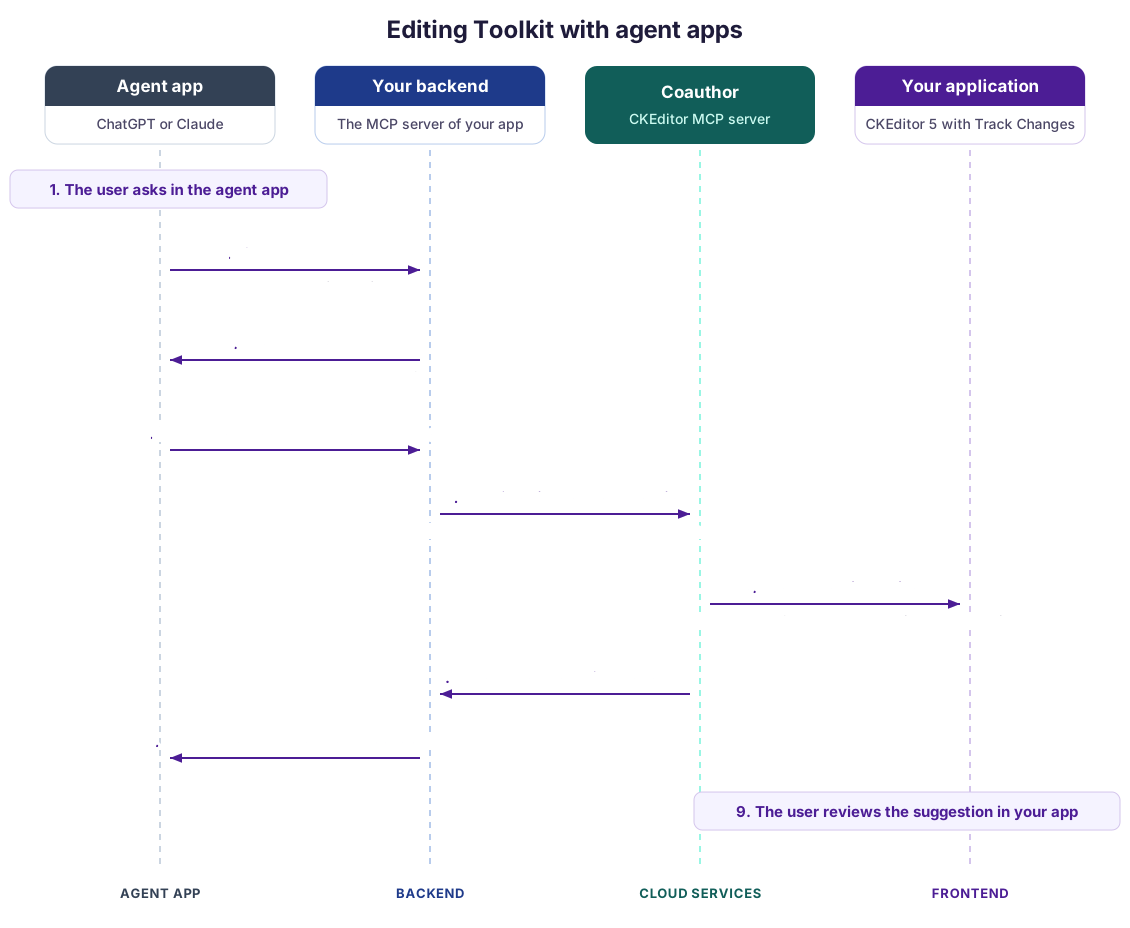
- The user asks for a change in the agent app.
- The agent app calls your tool to find the document.
- Your backend returns its ID, but only if the signed-in user may edit it.
- The agent app calls a document tool, such as
editDocument, with that ID. - Your backend passes the call on to Coauthor, in a session that it opened on the document with a backend token. The user is the actor of the session, and the session is in suggest mode, so every edit becomes a suggestion by the user.
- Coauthor checks the edit against your editor. With real-time collaboration, the suggestion reaches everyone who has the document open.
- Coauthor answers that the edit was made, or refuses it and says why.
- Your backend returns the answer to the agent app, which reports it to the user.
- The user reviews the suggestion in your application.
Your backend keeps the Cloud Services token and decides which documents each user reaches. Your app can also show its own UI in the agent app, such as a summary of the changes, through MCP Apps. That UI is part of your app. Without real-time collaboration, your backend sends the document when it opens the session and saves the changed document afterward, as the backend agent workflows guide describes.
To publish the app, follow the documentation of the agent app for apps or connectors that use MCP.
Users add Coauthor as a custom connector in the agent app, with the MCP address of your Cloud Services environment, and sign in at your own login server over OAuth. Coauthor accepts the tokens of the login server that you register, so you build no app. Coauthor has been tested with Microsoft Entra ID as the login server.
The agent app opens its own sessions, on documents with real-time collaboration, and each edit reaches the document at once. The suggestions show the user who signed in. The user names the document by its ID, because the agent app has no tool of yours to find it.
A developer tool such as Claude Code connects to the MCP address of your environment with a token that your backend signs for the user. The tool sends the token in a header, so nobody signs in. Like a connector, it works on live documents and needs the document ID.
- Access to Coauthor, which is in early access. Your Cloud Services environment needs an editor bundle with the same plugins as your editor, including
DocumentCompareand Track Changes. See Coauthor setup. - The Track Changes integration in your editor, so that users can review the suggestions. The editor needs no
DocumentCompareorProposedChangesfor this approach. - For your own app: a backend that signs users in, signs tokens with an access key of your environment, and works as an MCP server for the agent app.
- For a connector: a login server that Coauthor accepts, registered for your environment.
- For the connector and developer tools: real-time collaboration, because the agent app opens its own sessions on live documents.
- Coauthor (CKEditor MCP) – The backend part of the toolkit, which runs your editor on the server.
- Backend agent workflows – Run agents from your backend, without an agent app.
- Track Changes – Review the suggestions.
- Editing Toolkit overview