The global editing readiness checklist: what to test in your editor before you ship to RTL and CJK markets

32min read
|Key takeaways
- Test six key areas: RTL and bidirectional editing, CJK input, complex scripts, tables and lists, pasting from Word, and accessibility.
- Make sure content saves correctly: Check that language settings and formatting stay intact after saving and reopening content.
- Test on real devices: Use the browsers and keyboards your customers actually use, including Safari, WKWebView and Android.
- Let your editor handle the complexity: Your team should be able to focus on building a great product without worrying about how different languages behave in the editor.
- CKEditor 5 supports all six areas: It's built to handle different languages and the technical challenges that come with them.
Building a product for users around the world? Your editor needs to work just as well in Arabic, Japanese and Korean as it does in English.
Supporting different languages can introduce challenges that aren’t always obvious. Something that works perfectly in English might not work the same way for someone typing in Arabic or Japanese.
The best way to catch these issues is to test before launch.
We’ve put together a checklist of 25 things to help you make sure your editor is ready for users around the world.
We’ll also show you how CKEditor 5 can help along the way.
Why testing in English isn’t enough for global users
Just because your editor works well in English doesn’t mean it’ll work the same way in other languages.
Arabic, Japanese and Korean introduce different challenges. Text direction can change, keyboards behave differently and even simple actions like selecting or pasting text can cause issues.
That’s why testing your editor in different languages matters. You want to make sure people can use it naturally, regardless of where they are or what language they’re typing in.
A lot of this comes down to how browsers handle text editing. Most rich text editors use a browser feature called contenteditable, which allows users to edit content directly on a page. How it behaves can vary depending on the browser, device and keyboard being used.
An example we’ll use throughout this checklist
Imagine a B2B platform preparing to launch in Saudi Arabia and Japan.
Employees in Saudi Arabia need to write policies in Arabic while including English product names. Teams in Japan need to create reports in Japanese, sometimes using their phones. The HR team also needs to import documents from Word.
These are everyday tasks, but they can reveal problems that wouldn’t come up during English testing.
We’ll use this example throughout the checklist to show what can go wrong and how to test for it.
| Term | What it means |
| Localization testing | Checks that software works in one specific locale: its language, script, input methods and conventions |
| Internationalization (i18n) testing | Checks that software can support any locale: encoding, direction support, no hardcoded strings |
| Globalization testing | Both together: internationalization testing plus localization testing for every target locale |
| Bidirectional (bidi) text | Text that mixes right-to-left and left-to-right runs, such as an Arabic sentence containing an English product name |
| Input Method Editor (IME) | The input layer CJK users type through: keystrokes become provisional text, then the chosen candidate is committed |
| Composition session | The IME lifecycle between composition start and commit, while the text on screen is still provisional |
| Grapheme cluster | One user-perceived character, stored as one or more Unicode code points |
Languages behave differently
Different languages have different rules for how text is displayed and handled. Your editor needs to account for these differences.
- Arabic and Hebrew are written from right to left, but numbers, links and English words still read from left to right.
- Mixed languages can make something as simple as moving your cursor or selecting text more complicated.
- Some characters are more complex than they look. A Korean syllable or family emoji might appear as a single character, but the software may need to process several code points to display it correctly.
Input methods behave differently
People also type differently depending on the language and device they’re using.
For example, Japanese, Chinese and Korean users often rely on an Input Method Editor (IME), which lets them choose characters as they type.
This creates a few things to watch out for:
- Text isn’t always final when it appears. An IME lets users build and select characters before confirming them.
- Mobile keyboards can change text after it’s typed. Android keyboards, for example, may automatically replace words through predictive text.
- Some editor features can interfere with typing. Autosave, undo and real-time collaboration need to account for how these keyboards work. Otherwise, users may experience missing or incorrect text.
Document structures multiply edge cases
Every table cell, list item and heading is a container that can carry its own direction and language.
- An English cell inside an Arabic table has to read left to right inside a right-to-left table.
- A Japanese word composed inside a nested list has to commit exactly as it does in a plain paragraph.
- A paragraph converted to a heading has to keep its dir and lang.
Accessibility introduces another validation layer
Screen readers need lang on every language change, and every editor action has to work from the keyboard in both text directions.
- WCAG 2.2 success criterion 3.1.2 (Language of Parts, Level AA) requires language changes inside content to be marked.
- The European Accessibility Act has applied since 28 June 2025.
- 13.5% of the top 1,000,000 home pages do not even declare a page-level language (WebAIM Million 2026), so language marking inside authored content cannot be left to chance.
What should your editor handle for you?
Before testing, it’s worth understanding what your application needs to manage and what your editor should already handle.
Your application is responsible for the overall user experience and how content gets published. Your editor should handle the technical details of typing and formatting content correctly.
This is especially important when supporting different languages, since browsers and keyboards don’t always behave the same way.
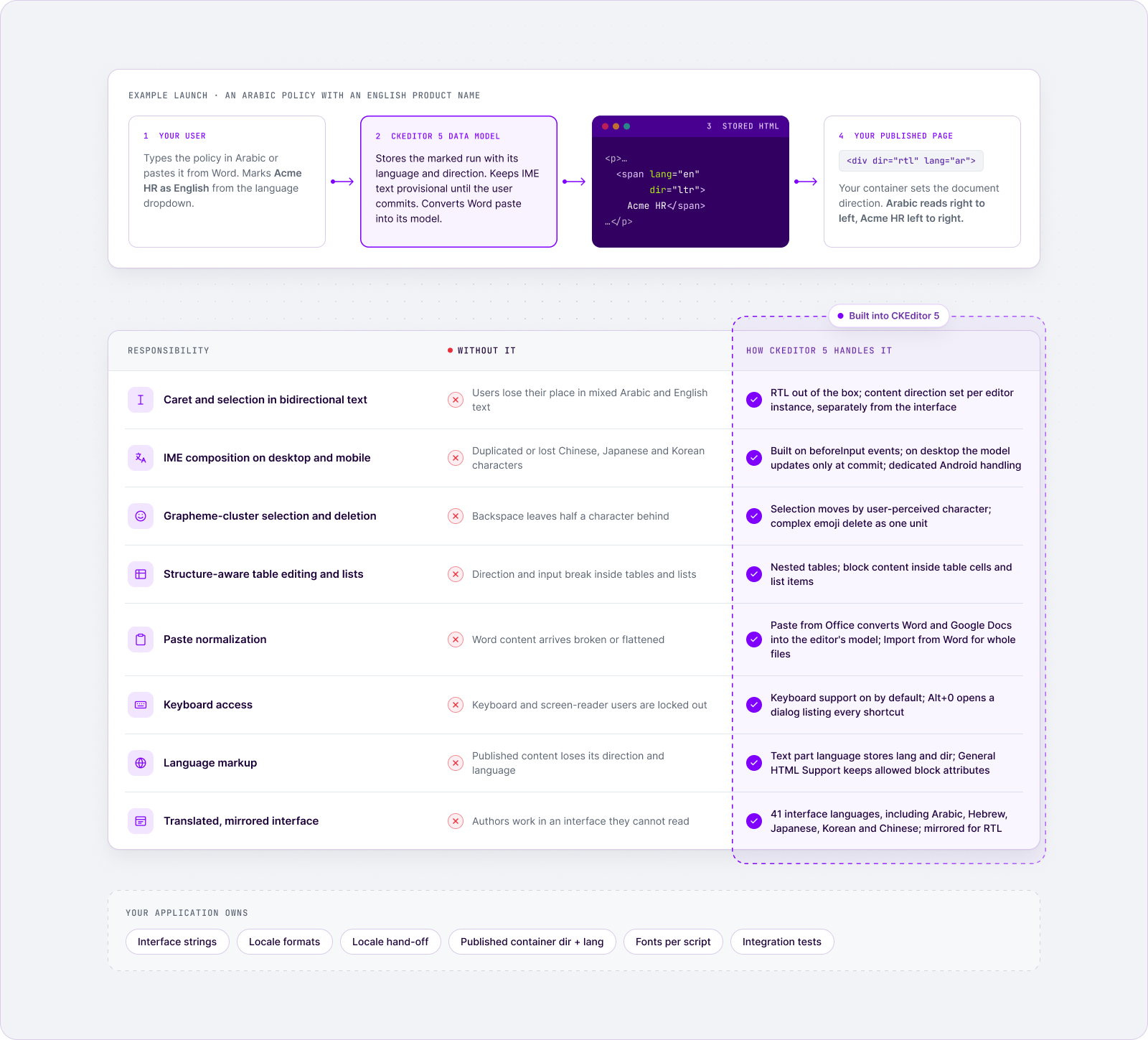
Application localization responsibilities
Six items stay with your team:
- Interface strings outside the editor: menus, dialogs, validation messages and notification emails, through your translation workflow and localization QA.
- Locale formats: dates, numbers, currencies and sort order.
- Locale hand-off: passing the interface language and the content language to each editor instance.
- Published container: setting dir and lang on the element that renders saved content, or published content renders in the page's default direction.
- Fonts: a font stack that covers every target script, so Arabic and CJK text never falls back to empty boxes.
- Integration testing: your plugins, your autosave, your collaboration layer and the WebView you ship into.
What your editor should handle
Your editor should handle eight key areas to make sure everything works as expected. We’ll look at where issues can come up and how CKEditor 5 addresses them.
| Engine responsibility | What breaks without it | How CKEditor 5 handles it |
| Caret and selection in bidirectional text | Users lose their place in mixed Arabic and English text | RTL support out of the box, with content direction set per editor instance |
| IME composition on desktop and mobile | Duplicated or lost CJK characters | An input layer built on the browser's beforeInput events, with dedicated Android handling |
| Grapheme-cluster deletion and selection | Backspace leaves half a character behind | Selection moves by user-perceived character; complex emoji delete as one unit |
| Structure-aware table editing and lists | Direction and input break inside tables and lists | Nested tables, and block content inside table cells and list items |
| Paste normalization | Word content arrives broken or flattened | Paste from Office for Word and Google Docs, plus Import from Word for whole files |
| Keyboard access | Keyboard and screen-reader users are locked out | Keyboard support on by default, with a built-in shortcut help dialog |
| Language markup | Published content loses its direction and language | Text part language writes lang and dir into the content |
| Translated, mirrored interface | Authors work in an interface they cannot read | 41 interface languages, mirrored for RTL |
CKEditor 5 keeps a custom data model, with a Model-View-Controller architecture, between user input and the rendered output. Browser and keyboard differences are resolved in that one layer instead of in your application code.
Why owning global editing behavior creates permanent maintenance
The engine layer never stays finished, because the browsers, keyboards and Unicode data beneath it keep changing.
| Maintenance driver | What it costs a team that owns the engine layer |
| Browsers revise their input event models | Composition handling has to be re-verified after browser releases |
| Operating systems ship new keyboards and IMEs | The mobile rows of the test matrix reopen |
| Unicode adds characters and emoji sequences every year | Deletion and selection rules need updating as new sequences arrive |
| Input handling gets rebuilt, not patched | CKEditor 5 has rebuilt its IME handling for CJK and its emoji deletion |
What this means for your release plan:
- Re-run the checklist on every editor upgrade and major browser release, because those are the moments input handling can change.
- Take engine fixes as editor updates, not as patches in your own code: CKEditor 5 ships 3 to 4 regular releases a year.
- Pin one version for the launch window if you need stability: the CKEditor 5 LTS Edition keeps a version on security and compatibility fixes for up to 3 years, with no breaking changes.
What running this checklist takes
For an engineering manager planning the launch, the checklist needs a small team and real hardware, not a new department.
| What it takes to run | Detail |
| People | One QA engineer with the corpus and its expected results runs nearly every check |
| Native reviewers | Linguistic review stays with your localization QA; native reviewers also agree deletion units in scripts such as Devanagari and Thai |
| Hardware | Physical devices for the mandatory cells: an Android phone, an iPhone, a Mac and a Windows machine |
| Timing | Corpus and pseudolocalization before translation; requirement checks with the locale build; platform cells as a launch gate |
Build the global editing test matrix
Before you run a single requirement test, fix the combinations you will run it on: five axes, not a browser list. Build the corpus first, prune the matrix by usage in your target RTL and CJK locales, and keep the known outliers regardless of share.
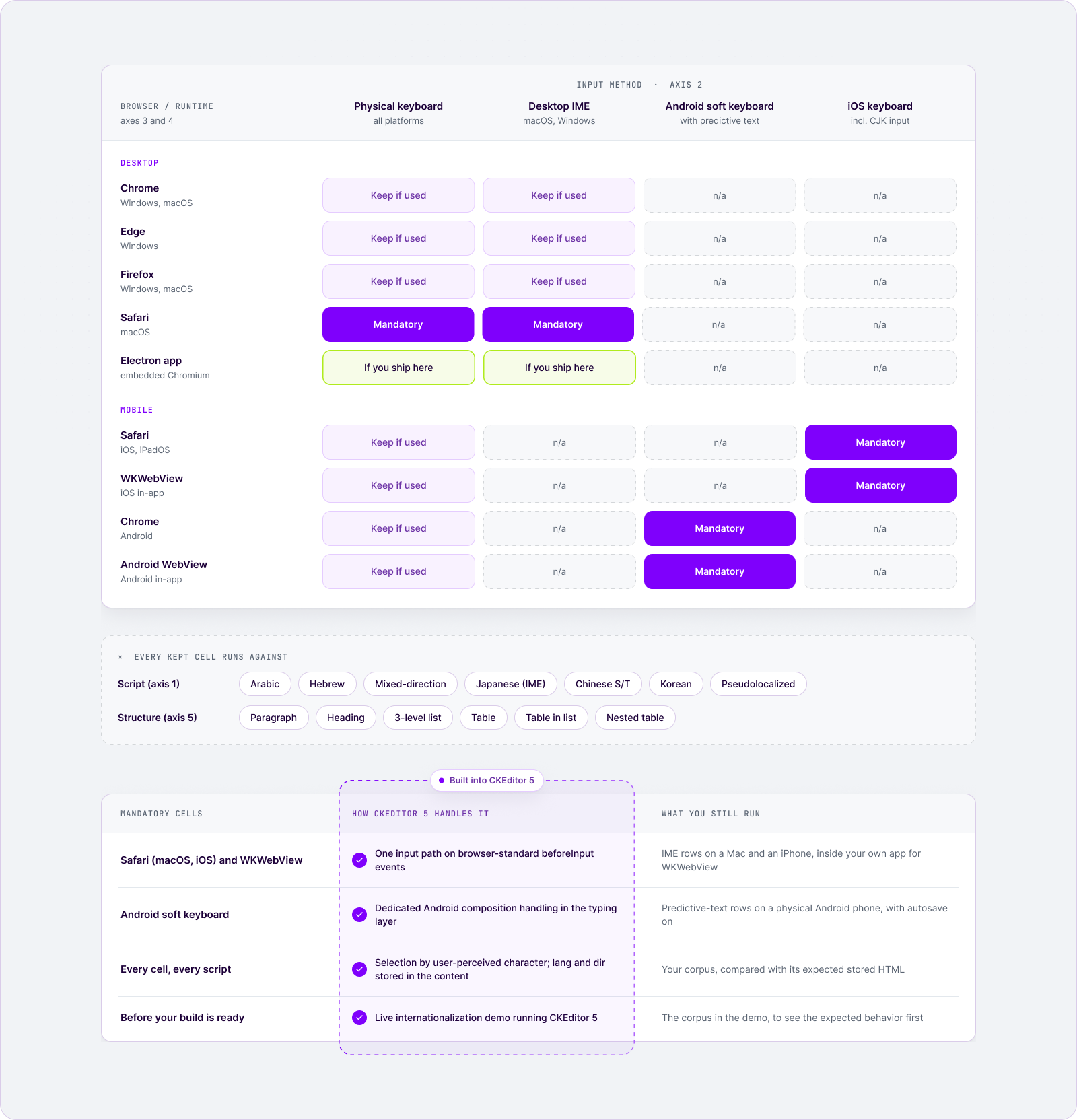
| Axis | Minimum coverage | Always keep | Prune by |
| Language and script | The 7 corpus fixtures below | The mixed-direction string | Target locales |
| Input method | Physical keyboard, desktop IME, Android soft keyboard, iOS keyboard | Android with predictive text | Usage in target locales |
| Browser and operating system | Chrome, Safari, Firefox, Edge × macOS, Windows, iOS, Android | Safari on macOS and iOS | Browser share in target locales, not global share |
| Device and runtime | Desktop, tablet, phone, WKWebView, Android WebView, Electron | The WebView you ship into | Where your product is embedded |
| Document structure | The 6 containers below | Table inside a list item | Never prune |
Prioritize by product type: Regulated documents start in Word, live in tables and go through procurement review
| Product type | Test first | Why |
| Collaboration and digital workplace | IME composition while others edit the same document; the Android cells | The input path meets the collaboration layer on every keystroke |
| CMS and DXP | Stored dir and lang in published output; heading semantics; pseudolocalization | The stored HTML is what every language version publishes |
| FinTech, InsurTech and GRC | Word paste and import; tables; conformance evidence (WCAG 2.2, EN 301 549, European Accessibility Act) | Regulated documents start in Word, live in tables and go through procurement review |
Language and script
Build a version-controlled test corpus of real strings, each with its expected result, because testers who choose their own input avoid the cases that break.
| Fixture | Why it is in the corpus |
| Pure Arabic and pure Hebrew paragraphs | Verify rendering and basic caret movement |
| Arabic and Hebrew with embedded English | Exercise direction resolution, where most bidirectional bugs live |
| An Arabic sentence with an English product name, a URL, a number and parentheses | Four resolution rules in one fixture, and the highest-yield string in the corpus |
| Japanese kanji and kana, typed through an IME | Runs the composition lifecycle, which pasting skips |
| Chinese in Simplified and Traditional characters | Font fallback and line breaking differ between them |
| Korean Hangul | Syllables compose from individual letters during input |
| Persian with a zero-width non-joiner (ZWNJ) and Persian (Extended Arabic-Indic) digits | ZWNJ is invisible but controls how letters join, so paste cleanup that strips it changes the word; the digits exercise direction resolution |
| Pseudolocalized English (accented, expanded, bracketed) | Surfaces hardcoded strings and layout overflow before any translation exists |
- Do not use reversed Latin text: it renders right to left but has no direction of its own to resolve.
- Keep the corpus in the repository: one fixture then feeds a manual test, an automated assertion and a bug report.
Input method
Test with real input on real devices, because synthetic input skips the composition session.
| Input method | Platforms | Why it needs a real device |
| Physical keyboard | All desktops | Baseline for every other row |
| Desktop IME | macOS, Windows | Candidate window position and commit timing |
| Android soft keyboard with predictive text | Android | Rewrites words after they are typed |
| iOS keyboard, including CJK input | iOS, iPadOS | Composition inside Safari and WKWebView |
- Playwright’s keyboard.insertText() dispatches only an input event, with no keydown, keyup or keypress, and its documentation demonstrates it with a Chinese character.
- A real IME runs a composition session before any text lands, so an automated test can pass on a path no user takes.
Browser and operating system
Cover four browsers across four operating systems, then prune by browser share in your target locales, never by global share.
- Browsers: Chrome, Safari, Firefox and Edge.
- Operating systems: macOS, Windows, iOS and Android.
- Keep regardless of share: Safari as its own row, every cell where an IME meets a mobile browser, and Android soft keyboards with predictive input.
- Why: usage-based pruning removes unusual cells first, and unusual cells are where composition handling is least consistent.
Desktop, mobile and WebView
Treat each WebView as its own target, because the host application’s configuration is part of what you test.
- Separate targets: WKWebView, Android WebView, Electron and in-app browsers.
- Physical devices: run the mandatory cells on real hardware, because device clouds are weak at soft-keyboard and predictive behavior.
Document structure
Run every requirement in six containers:
- A plain paragraph.
- A heading.
- A three-level list.
- A table.
- A table inside a list item.
- A table nested inside a table cell.
Record every cell you skip, with a date and a reason. A written decision is a decision; a silent omission turns up later as a customer bug report.
Requirement 1 - Right-to-left and bidirectional editing
RTL support is not a stylesheet flip. Test caret, selection, mixed content and stored direction as four separate behaviors, and pass each one only after a save and reload.
Launch risk: in the example launch, an Arabic policy with an English product name looks perfect in the editor and publishes left to right, and an English QA pass never notices.
What breaks in RTL and bidirectional editing
| Failure | What the user sees | Why it is expensive |
| Visual caret movement | The caret appears to travel backwards through embedded English | Users lose track of where their typing lands |
| Split selection | Two highlighted blocks, copied in draw order | Text is silently corrupted when pasted elsewhere |
| Misresolved neutral characters | Parentheses on the wrong side, fragmented URLs and numbers | Every mixed-language document looks broken |
| Direction stored only in the view | Correct while editing, left to right once published | Nobody in QA sees it |
What production-grade RTL behavior looks like
- The caret moves in logical order across direction boundaries, and Home and End land at the logical start and end of the line.
- Selections stay contiguous and copy in logical order.
- Parentheses, punctuation and digits resolve to the correct side.
- The dir attribute and the lang attribute are written into the stored content, not only applied on screen.
- The editor interface mirrors for RTL users.
- Interface language is set independently of content direction, because an English-speaking author editing Arabic content is a real configuration.
What to test for RTL and bidirectional editing
| Fixture | Action | Expected result |
| Arabic string with embedded English | Press the right arrow ten times from the line start, then Home and End | Logical movement across the boundary; Home and End land logically |
| Same string | Shift+arrow across the boundary, copy, paste into a plain text field | One contiguous highlight; pasted text in logical order |
| Arabic sentence with product name, URL, number and parentheses | Type it (do not paste it), then inspect | Parentheses on the correct sides, number reads left to right, URL intact |
| Any of the above | Save, reload, inspect the stored HTML | dir and lang present; content renders correctly after reload |
| English interface, Arabic content | Configure both, then edit | Toolbar in English, content right to left, each following its own setting |
Type the mixed string rather than pasting it: paste takes a different code path, and Requirement 5 tests it.
How CKEditor supports RTL and multilingual editing
When working with different languages, your editor needs to display text correctly and preserve its formatting when content is saved.
CKEditor 5 supports right-to-left editing across the interface and document content. It also lets users work with content in a different language from the editor’s interface, including changing text direction within a document.
| Level | What CKEditor 5 does | Evidence |
| Interface | Mirrors toolbars, dropdowns and buttons when an RTL language is active, in any of 41 fully translated interface languages | RTL languages support |
| Interface overflow | Groups toolbar items that do not fit into a dropdown by default, so longer translations and higher zoom levels keep every action reachable | Toolbar grouping docs |
| Document | config.language.content sets the content language separately from the interface, so an English interface can edit Arabic content; the setting drives default alignment and what screen readers and spell checkers assume | Setting the language of the content |
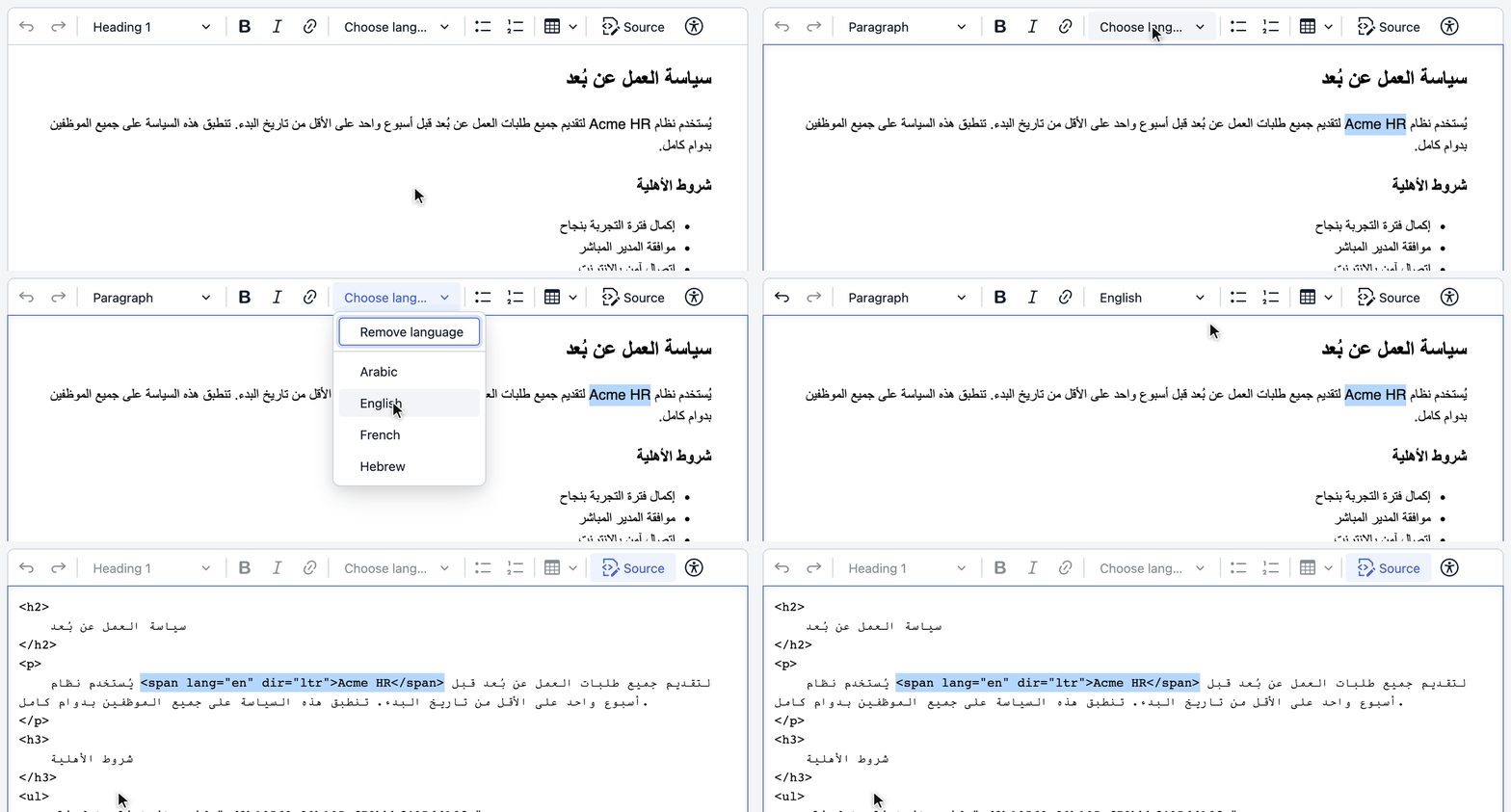
| Phrase | Marks the language of a selected run and stores it as a <span> carrying both lang and dir | Docs and source code |
| Block attributes | General HTML Support can be configured to keep dir and lang on paragraphs and headings when content is loaded, pasted and saved | General HTML Support docs |
- Maturity: RTL support has shipped in CKEditor 5 since 2019, starting with the release that introduced RTL language support, and ongoing work is tracked in the open in the RTL support issue.
- Verify it: paste your corpus into the CKEditor 5 internationalization demo, mark an Arabic quotation inside English text from the language dropdown, then check the stored HTML for lang and dir.
- Your integration check: confirm that the page rendering saved content sets dir and lang on its container.
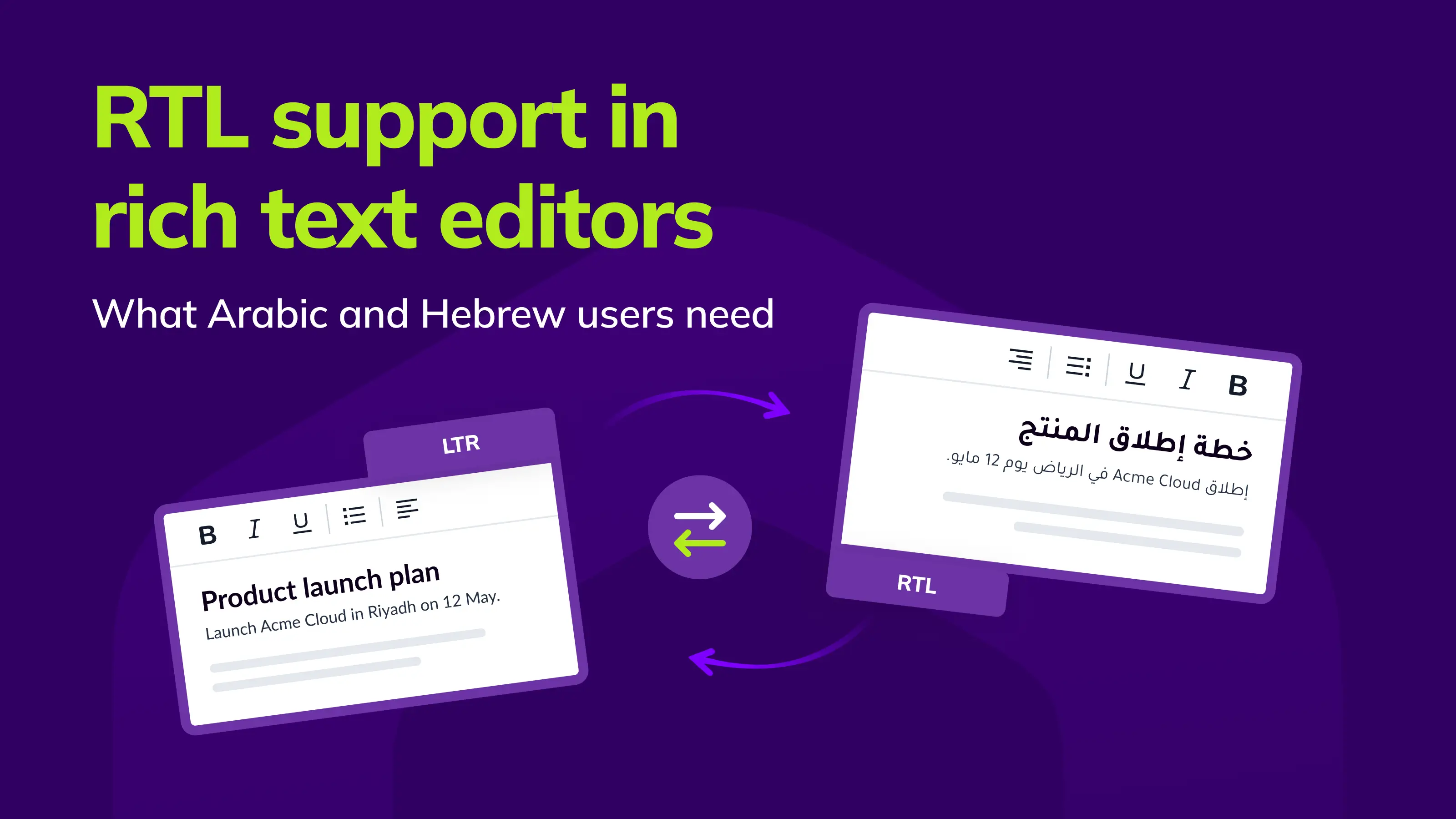
Learn more about RTL support in rich text editors.
Requirement 2 - Japanese, Chinese and Korean input
When typing in languages like Japanese or Chinese, users often rely on an Input Method Editor (IME) to choose the right characters as they type.
The editor needs to let users finish typing before other features, like autosave or undo, interfere with the text.
What can go wrong: Imagine someone in Japan writing a report on their Android phone. If the editor doesn’t handle IME input correctly, characters might disappear or appear twice. To the user, it simply looks like typing isn’t working.
The IME lifecycle in four steps:
- The user starts typing and the IME enters a composition state.
- Provisional candidate text appears in the editor.
- The user selects a candidate.
- The IME commits the final text.
Between steps 1 and 4, the text on screen is not yet the user’s text.
What breaks during IME composition
| Failure | Typical trigger |
| The committed word lands twice | Provisional and committed text handled as two inserts |
| Provisional text is saved | Autosave fires mid-composition |
| Undo lands mid-composition | The undo stack records keystrokes instead of the commit |
| A counter counts candidates | A character counter reads provisional text |
| The session is interrupted | A collaborator's change arrives mid-composition |
| The model diverges from the screen | The Android keyboard rewrites a word after the fact |
| Formatting leaks | The commit inherits or drops bold, link or heading formatting |
| The first character is lost, or CJK punctuation doubles | The runtime or the application changes the DOM as composition starts, as in the WebView2 report cited in the test matrix |
| Enter commits the candidate and also submits or splits the paragraph | A keydown handler that ignores isComposing (keyCode 229) |
| The caret jumps after the commit | A framework re-render resets the DOM selection mid-session |
What correct IME behavior looks like
- The committed word is stored exactly once.
- The undo stack holds one entry per committed word.
- The candidate window sits at the caret.
- Formatting boundaries survive the commit.
- Autosave, counters, spell checkers and collaboration features ignore provisional text until it is committed.
- Stored output is identical on macOS, Windows, Android and iOS, in Chromium, Safari and WebViews.
What to test for IME across browsers and devices
| Fixture | Action | Expected result |
| Multi-character Japanese word from the corpus | Type through a real IME, trigger autosave mid-composition, then commit | Word stored once; one undo step |
| Same word | Repeat on a physical Android device with the default keyboard, then with predictive text on | Stored output identical to desktop |
| Same word | Repeat in Safari, WKWebView and a Chromium browser on the same device | Identical stored output from all three |
| Same word | Compose inside bold text, inside a link and inside a heading | Formatting boundaries survive; nothing leaks into the following text |
| Chinese phrase in a shared document | Compose while a collaborator edits another paragraph | The session completes; the remote change neither commits nor discards it |
| Same word | Press Enter to commit the candidate, including in any editor where Enter submits, such as a comment box | Candidate committed; nothing is submitted and no new paragraph is created |
Keep Safari and WKWebView as separate cells: they share an engine, but a WebView runs inside a host application whose configuration Safari’s own shell never has.
How CKEditor handles IME input
What matters: an input layer built on browser-standard events, dedicated handling for Android keyboards, and CJK input engineered into the editor rather than patched on.
CKEditor 5 rebuilt its typing and composition handling on the browser’s beforeInput events specifically to better support Chinese, Japanese and Korean, and fixed Android input problems in the same work. That is still how it works today.
| What CKEditor 5 does | Why it matters for this requirement | Evidence |
| Runs typing and composition on the browser's beforeInput events | One input path across Chromium, Safari and WebViews | Release note on rewritten IME handling |
| On desktop platforms, updates the data model only when composition ends | Autosave and other model-driven features see committed text, not candidates | Typing source code |
| On Android, applies composition to the model immediately, by design | Keeps the model in step with keyboards that rewrite words after typing | Typing source code |
| Ships the input layer in every regular release | The layer is maintained as browsers change, 3 to 4 times a year | Latest release, 22 September 2026 |
| Fixes keyboard-specific behavior on Android | Samsung Keyboard misplaced the caret on Backspace until a 2024 fix, which is why the Android rows name Gboard and Samsung Keyboard separately | Issue #14707 |
For this requirement, that means composition is handled inside the editing engine, on every platform, instead of being left to your application code.
Verify it in about ten minutes:
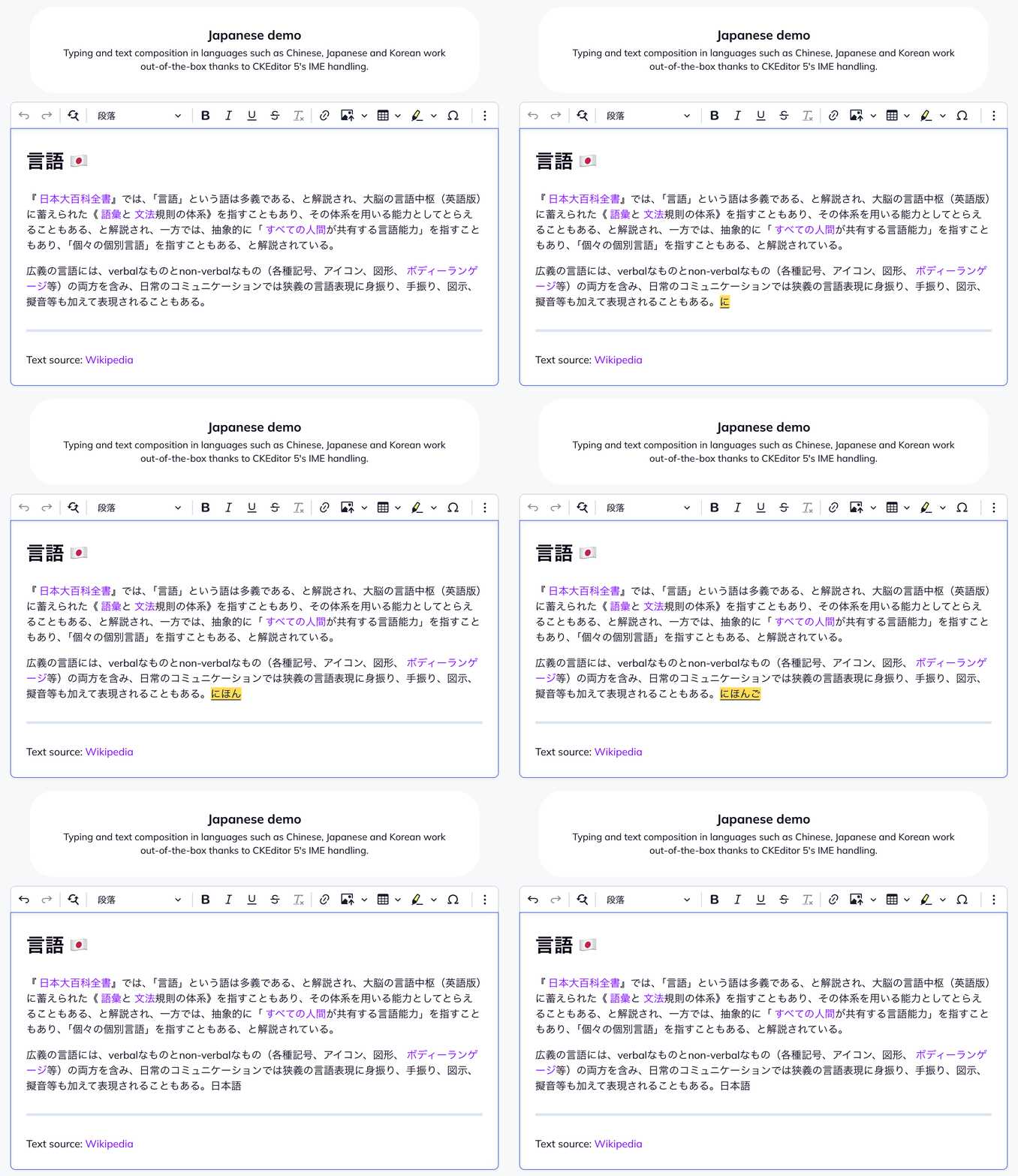
- Open the live multilingual editor demo.
- Type the Japanese word from your corpus through your own IME.
- Run the commit, undo and formatting rows from the table above.
- Repeat on an Android phone.
Your integration check: run the Android rows with your own autosave and plugins, because on Android composition reaches the model before commit.
Requirement 3 - Complex scripts and text boundaries
One visible character is often several Unicode code points, so test deletion, selection and counting against grapheme clusters. Emoji alone make the point: 2,563 of the 3,960 emoji in Unicode Emoji 18.0, about two in three, are built from more than one character.
Launch risk: a Backspace that removes half a character leaves text nobody typed, in employee names, product terms and the emoji people add to comments.
Grapheme clusters and combining characters
A grapheme cluster is what a reader sees as one character; Unicode Standard Annex #29 specifies where the boundaries fall.
| Fixture | Expected result | Common failure |
| Emoji with a skin-tone modifier | One Backspace deletes the whole emoji | The modifier is stripped, leaving a differently colored emoji |
| Emoji ZWJ sequence (a family emoji) | One Backspace deletes the whole sequence | The sequence splits into two or three separate emoji |
| Flag emoji | One Backspace deletes the flag | A single regional-indicator letter is left behind |
| Devanagari conjunct, Thai with vowel marks, Latin letter with a combining accent | Deletion removes the unit your corpus specifies, agreed with a native reviewer | An orphaned mark renders on a dotted circle, producing text nobody typed |
Some scripts conventionally delete a vowel sign at a time, so write the expected unit for each script into the corpus before you assert it.
Selection and deletion across grapheme clusters
- Double-click a word, drag across an emoji sequence and shift-arrow through a conjunct: every selection boundary must fall between clusters.
- A mid-cluster boundary looks fine until the next copy, cut or type-over corrupts the string.
- Test Delete and Backspace separately, because the two keys can follow different rules.
What to verify for complex scripts
- One Backspace or Delete removes exactly the unit your corpus specifies.
- Selection boundaries never fall inside a cluster.
- Your character counters and length validators count what the user sees: ten family emoji count as ten.
- Search and replace finds a cluster as a whole.
- Test once per editor build rather than once per locale, because cluster handling usually lives in typing and deletion logic, not in a language pack.
CKEditor 5 evidence for complex scripts
What matters: selection that moves by user-perceived character, and complex emoji that delete as one unit.
| What CKEditor 5 does | Evidence |
| Moves the selection by user-perceived character by default: a base character and its combining marks, and both halves of a surrogate pair, move as one unit | Selection source code |
| Detects emoji sequences, including flags, keycaps and ZWJ sequences, so they can be handled as a single unit | Unicode utilities source code |
| Deletes ZWJ sequences and skin-tone emoji with a single Backspace or Delete, a fix tracked in public with recordings of the original behavior | Issue #6504 |
- Verify for your scripts: run the Devanagari, Thai and combining-accent rows in the internationalization demo with a native reviewer, because the expected deletion unit is a script convention, not an editor setting.
Requirement 4 - Tables, lists and sophisticated structures
Correct behavior in a paragraph predicts nothing about a table cell, so re-run the direction, input and undo tests inside every structure your users build, from nested lists to table editing.
Launch risk: in the example launch, HR policies live in tables and nested lists, so a direction or composition bug there breaks the documents the customer cares about most.
Nested lists in RTL documents
- Fixture: a three-level list in an RTL document, with one item in the opposite direction and one item holding a second paragraph.
- Action: indent and outdent items, then inspect.
- Pass: markers and indentation sit on the right, the odd item keeps its own direction, and the multi-paragraph item keeps its numbering.
- Common failure: indentation on the left, which means direction is handled at the wrong level of the document tree.
Tables and nested tables in RTL documents
- Fixture: an RTL document with a table that has a header row, one English cell, and a second table nested inside a cell.
- Action: navigate with Tab, then inspect column order, headers and cell direction.
- Pass: the first column sits on the right, Tab moves in reading direction, header cells keep their semantics, the English cell reads left to right, and the nested table behaves like the outer one.
- Common failure: cell direction inherited from the document, so the English content renders backwards.
Multilingual input inside structured content
- Fixture: the Japanese corpus word, composed inside a table cell inside a nested list item.
- Pass: the composition commits correctly at depth, with the same undo behavior as in a plain paragraph.
- Also check: no undo step silently crosses a structural boundary, and a paragraph with dir and lang keeps both after conversion to a heading and back.
- Why it matters: this is the shape of a translated policy table, and the test teams most often skip.
CKEditor support for rich document structures
What matters: nested tables, block content inside cells and list items, and header semantics in the stored HTML.
| What CKEditor 5 does | Evidence |
| Nests tables inside other tables' cells, formatted like any regular table | Tables docs |
| Allows block content (lists, headings, paragraphs) inside table cells | Tables docs |
| Assigns a scope attribute to header cells automatically, from their position | Tables docs |
| Allows any content inside list items, including paragraphs and tables, with numbering and indentation kept continuous | Lists docs |
| Stores language marks on the text itself, so they move with the text when a paragraph becomes a heading | Text part language docs |
- In the example launch: the HR policy table, with an English column header, a nested list inside one cell and a second table inside another, is one CKEditor 5 document, and its header cells carry scope in the stored HTML.
- Your integration check: run the three tests above with your production plugins and styles.
Requirement 5 - Paste and imported enterprise content
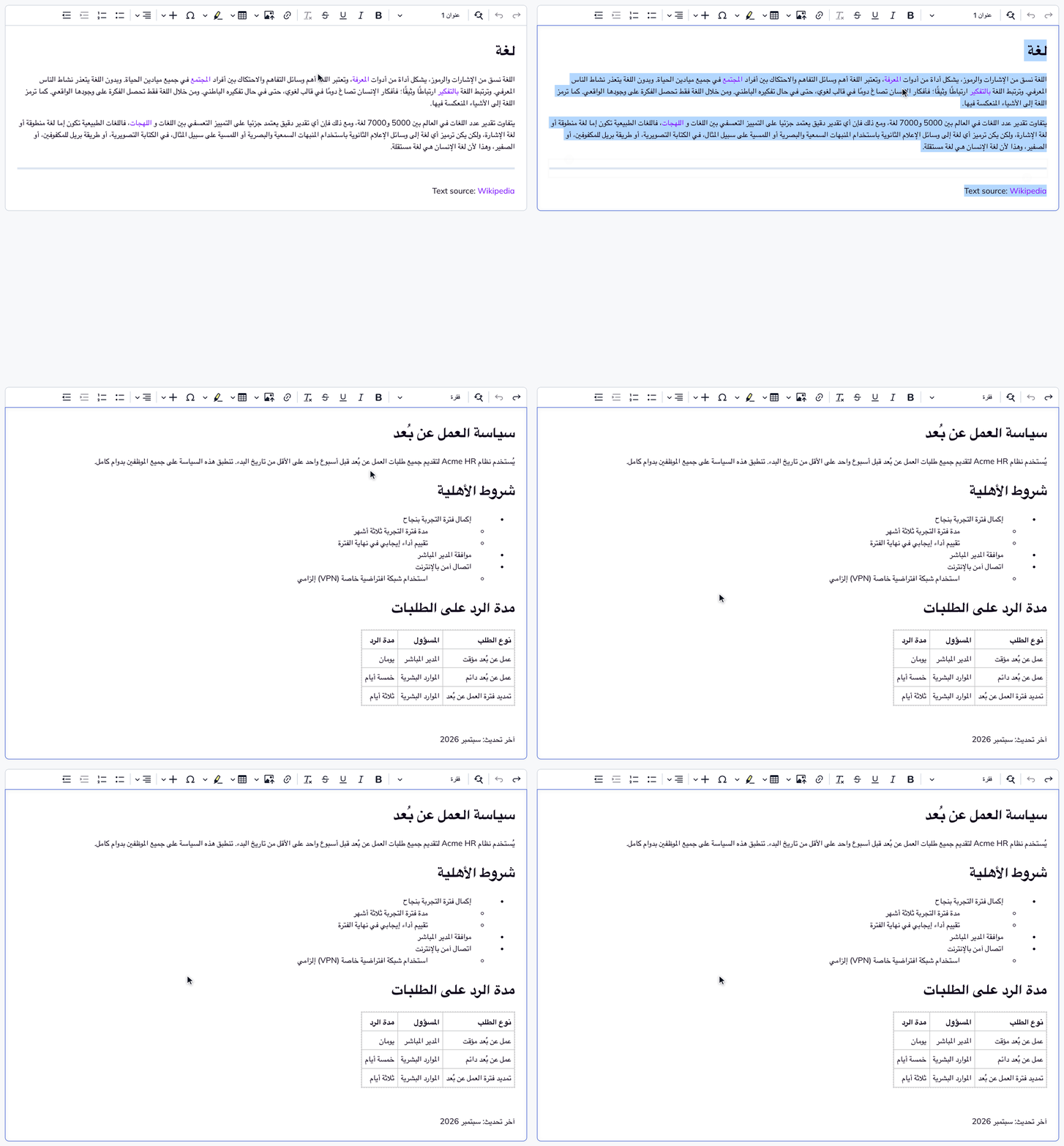
Enterprise content often arrives from Word, and paste is a separate code path from typing, so test it with real .docx files and pass it only when the stored HTML matches the expected result.
Launch risk: in the example launch, a paste path that drops direction or structure turns the Word handbook import into manual cleanup.
Method for every paste test:
- Use a real Arabic or Japanese Word document with styled headings, bold and italic, a nested list and a table.
- Paste it into the editor.
- Save and reload.
- Diff the stored HTML against the expected result.
Word lists on paste
- Fixture: a three-level numbered list with a restart partway through and one bulleted sublist.
- Pass: nesting depth, marker type, numbering restarts and, in RTL documents, indentation side all survive.
- Common failure: Word’s list representation and the editor’s list model disagree, and the mismatch grows in RTL.
Word tables on paste
- Fixture: a table with merged cells, a header row and one cell in the opposite direction.
- Pass: merges and headers arrive as real table structure, and per-cell direction is preserved.
- Common failure: the table survives structurally and loses per-cell direction.
Formatting and structure on paste
- Pass: Word headings arrive as headings and Word lists as lists, not as paragraphs styled to look like them.
- Why it matters: screen readers, translation tools and export pipelines depend on the semantics that survive paste.
Multilingual and mixed-direction content on paste
- Fixture: a document with RTL and LTR paragraphs, plus an English paragraph with a phrase Word has marked as Japanese.
- Pass: each paragraph keeps its own direction, and the marked phrase arrives with a lang attribute.
- Common failure: direction inferred from the first character of the pasted block and applied to everything after it.
How CKEditor 5 handles Paste from Office and Word import
What matters: a dedicated Word pipeline that converts clipboard content into the editor’s own model instead of inserting raw HTML.
CKEditor 5 offers three routes for Word content, so match the route to the job.
| Route | Tier | What it carries | Evidence |
| Paste from Office | Open source | Text styling, heading levels, links, lists, tables and images from Word; footnotes when enabled; Google Docs content | Paste from Office docs |
| Enhanced Paste from Office | Premium | Adds Word styles, and carries Word's language formatting into text part language | Enhanced Paste from Office docs |
| Import from Word | Premium | Converts complete .docx files through a dedicated converter service instead of the clipboard | Import from Word docs |
- Maturity: Word paste has been a core CKEditor 5 capability since 2018, when the editor introduced Paste from Word.
- Direction on paste: allow dir on paragraphs through General HTML Support, which keeps enabled attributes on paste.
- Test material: the Paste from Office docs provide sample Word and Excel documents to paste into the demo.
- Your integration check: paste with your production plugin list, because Paste from Office preserves only the formatting your editor setup includes, and run the Word list and mixed-direction fixtures with your own documents.
Requirement 6 - Accessible authoring
A rich text editor is an authoring tool as well as a content surface, so it answers to ATAG as well as WCAG, and language metadata is where internationalization and accessibility become the same test.
Launch risk: missing language marks and keyboard traps fail WCAG 2.2, which enterprise buyers check before they sign, and the European Accessibility Act wherever you sell into the EU.
| Standard | What it covers | Editor relevance |
| WCAG 2.2 | Content people read and interfaces they use | Published output and the editor interface |
| ATAG 2.0 Part A | Accessibility of the authoring interface itself | Toolbar, dialogs, keyboard access |
| ATAG 2.0 Part B | Support for authors producing accessible content | Language control, header semantics, text alternatives |
| EN 301 549 | European ICT accessibility standard used in public procurement | EU deals |
| European Accessibility Act | EU law applying since 28 June 2025 | In-scope products and services |
Keyboard interaction for accessible authoring
- Fixture: an Arabic document.
- Action: reach the toolbar, open a dialog, insert a table and move through its cells without a mouse.
- Pass: every action is reachable, focus never gets trapped, arrow keys follow reading direction, and Tab can move focus out of the content as well as indent.
- In CKEditor 5: dialog fields carry accessible input labels, so screen readers announce what each field is for.
- Reference: CKEditor’s approach to keyboard navigation and screen reader support.
Language metadata (Language of Parts)
- Fixture: an English paragraph with one Japanese phrase.
- Action: mark the phrase as Japanese with the editor’s own control, save, inspect the stored markup, then load the page in a screen reader.
- Pass: a lang attribute on the run, and pronunciation that switches at the boundary, as WCAG 2.2 success criterion 3.1.2 requires at Level AA.
- Common failure: no language control, or one that applies a visual style with no lang in the output.
- In CKEditor 5: the control is the text part language feature, part of the editor since 2021.
Accessible document structure
- Pass: header cells associated with their rows and columns, heading levels in sequence, and real lists in the saved markup.
- Why it matters: the same structure serves screen readers, translation tools and export.
- Beyond the editor: our step-by-step guide on how to make a website accessible covers the rest of the page.
Conformance evidence for accessible authoring
Conformance is the part of accessibility that procurement checks on paper, so four things need to be in place before launch:
| What to check | Why it matters |
| A current Accessibility Conformance Report (VPAT) against WCAG 2.2 AA | Enterprise and public-sector buyers expect it before they sign |
| Coverage of EN 301 549 | It is the European standard for ICT accessibility used in public procurement |
| Authoring-side coverage (ATAG Part A and Part B) | Most conformance work covers only published output, not the editor people write in |
| Documented storage of dir and lang | Language of Parts depends on what the editor saves, not on what it shows |
For the compliance background, see our guide to rich text editor accessibility; for authoring-side practice, see our tips on accessible authoring in a WYSIWYG editor.
How CKEditor 5 handles accessible authoring and conformance
What matters: a current conformance report, a documented keyboard model and a Language of Parts control.
CKEditor 5 is compliant with WCAG 2.2 levels A and AA and with Section 508, unless stated otherwise in its Accessibility Conformance Report, which is published as a downloadable VPAT (CKEditor 5 v44.3.0, March 2025).
The most important keyboard shortcuts for this requirement:
| Keyboard action | Windows shortcut |
| Move focus to the toolbar | Alt+F10 |
| Move focus to the menu bar | Alt+F9 |
| Move focus in and out of a dialog | Ctrl+F6 |
| Close balloons, dropdowns and dialogs | Esc |
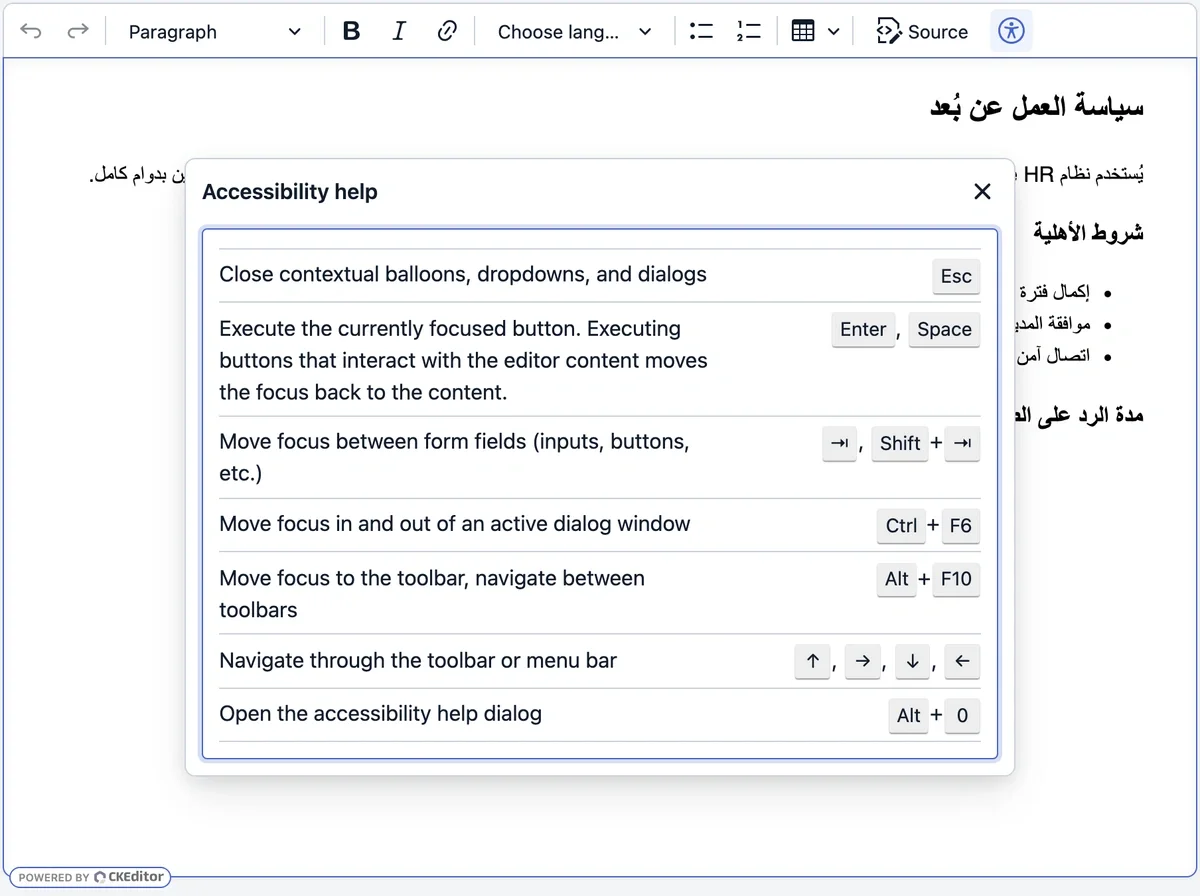
| Open the accessibility help dialog listing every shortcut | Alt+0 |
- Defaults: keyboard support is on by default for all editor types and core features; macOS equivalents are in the CKEditor 5 accessibility docs.
- Screen-reader pairs: the documentation recommends Chrome with NVDA on Windows and Safari with VoiceOver on macOS.
- Language of Parts: text part language implements WCAG 3.1.2.
- Structure: header cells receive a scope attribute automatically.
- Authoring support: keyboard navigation, ARIA attributes and focus handling cover the authoring interface itself, and text part language and automatic header scope help authors produce accessible content.
How CKEditor maps to the Global Editing Readiness Checklist
Measured against the six requirements, CKEditor 5 covers the engine side of each one with a mechanism you can inspect in documentation or source code.
Every requirement comes down to a few engine behaviors. This is what matters for each one, how CKEditor 5 is built for it, and where you can see it. The internationalization walkthrough in our use-case guide shows the same behaviors in a live demo.
| What matters | How CKEditor 5 is built for it | Where to see it |
| Direction handled at interface, document and phrase level | Mirrored interface, content language per instance, lang and dir stored on phrases | UI language and text part language docs |
| An input layer engineered for CJK and Android | Typing and composition on beforeInput, with dedicated Android handling | Release note and typing source code |
| Selection and deletion by user-perceived character | Combining marks, surrogate pairs and emoji sequences handled as units | Engine and Unicode utilities source code |
| Structure-aware editing | Nested tables, block content in cells and list items, automatic header scope | Tables and lists docs |
| A dedicated Word pipeline | Paste from Office, an enhanced tier and Import from Word | Paste and import docs |
| Current accessibility conformance | WCAG 2.2 A and AA plus Section 508, with a published VPAT | Accessibility docs |
| An engine layer that keeps up with browsers | 3 to 4 regular releases a year, and an LTS Edition with a 3-year support window | LTS page |
Direction (RTL and bidirectional text)
- CKEditor 5: mirrored interface, content language per editor instance, text part language writing lang and dir, and General HTML Support for block attributes.
- Your integration test: the published container’s dir and lang.
Input methods (CJK IME)
- CKEditor 5: an input layer built on beforeInput for Chinese, Japanese and Korean, updating the model at commit on desktop and handling Android separately.
- Your integration test: your autosave, counters and plugins on Android, and your WebView.
Structured documents
- CKEditor 5: nested tables, block content in cells and list items, automatic header scope, and language marks that travel with the text.
- Your integration test: RTL and IME inside nested structures with your production styles.
Paste fidelity
- CKEditor 5: Paste from Office for Word and Google Docs, an enhanced tier for Word styles and language formatting, and Import from Word for whole files.
- Your integration test: Word lists and mixed-direction documents from your own content.
Accessibility
- CKEditor 5: WCAG 2.2 A and AA with a published VPAT, a documented keyboard model and a Language of Parts control.
- Your integration test: keyboard authoring in RTL inside your application, and your procurement’s ATAG and EN 301 549 requirements.
What still needs integration-level testing
Seven checks live in your application:
- The container that renders saved content carries the right dir and lang.
- Autosave, character counters, collaboration and custom plugins leave provisional IME text alone.
- The WebView or in-app browser you ship into behaves like its parent browser.
- Your paste configuration includes every feature your users' Word documents need.
- Your General HTML Support configuration allows dir and lang where your documents need them, instead of allowing all markup, which the docs flag as a security risk.
- Script-specific deletion conventions, run against your own corpus.
- The mandatory matrix cells, on physical devices.
Automate the assertions about stored markup and keep people on the input path; our guides to automated accessibility testing and manual accessibility testing show the same split for accessibility.
Global Editing Readiness Checklist: how CKEditor supports each requirement
Run this localization testing checklist before you ship to RTL and CJK markets: 25 checks that decide whether global users can write in your product. Each row states what to check, when it passes, what it costs you if it fails, and how CKEditor 5 is built to handle it.
Before you start:
- Build the corpus: the seven fixtures from the test matrix, each with an expected result.
- Define the matrix: the six mandatory cells plus the cells your target locales justify.
- Prepare a test bed: a live CKEditor 5 instance runs your corpus before your own build is wired up, and the Paste from Office docs provide sample Word documents.
- After launch: re-run the checklist against every editor upgrade.
Right-to-left and bidirectional editing checks
| # | Essential check | Pass when | Why it matters | How CKEditor 5 handles it |
| 1 | Caret and selection follow reading order | Arrow keys, Home, End and Shift+arrow move logically across embedded English, and copy keeps typed order | Users lose track of where text lands, and copied text arrives scrambled | RTL supported out of the box since 2019, with the interface mirrored for RTL languages |
| 2 | Mixed content renders correctly | Parentheses, digits and URLs sit on the correct side inside Arabic and Hebrew sentences | Every mixed-language document looks broken | Text part language marks each run's language and direction in the content |
| 3 | Direction survives save and reload | dir and lang are in the stored HTML, not only on screen | Content looks right in the editor and publishes left to right | Content language set per instance; lang and dir stored on phrases; block attributes kept through General HTML Support |
| 4 | Interface and content language are independent | An English interface edits Arabic content, each following its own setting | Global teams rarely write in their interface language | Separate interface and content language settings, with 41 fully translated interface languages |
Japanese, Chinese and Korean input checks
| # | Essential check | Pass when | Why it matters | How CKEditor 5 handles it |
| 5 | Composed words are stored once | One committed word, one undo step | Duplicated characters and broken undo in every CJK market | Typing and composition built on the browser's beforeInput events, rebuilt specifically for Chinese, Japanese and Korean |
| 6 | Unfinished text stays out of saves and counts | Autosave and counters see only committed text | Half-typed candidates get saved into documents | On desktop, composed text reaches the data model only when composition ends |
| 7 | Android keyboards match desktop | Identical stored output with predictive text on | Mobile users see words rewritten or duplicated | Dedicated Android composition handling in the typing layer |
| 8 | Safari, WKWebView and Chromium agree | Identical stored output across engines | iOS apps ship on WKWebView, not on Safari | One input path built on browser-standard events |
| 9 | Formatting survives composition | Bold, links and headings keep their boundaries after commit | Formatting leaks into the next sentence | Composition goes through the same data model that owns formatting |
Complex script checks
| # | Essential check | Pass when | Why it matters | How CKEditor 5 handles it |
| 10 | Emoji delete as one character | One Backspace removes a ZWJ sequence or skin-tone emoji | Emoji visibly break into pieces | Backspace and Delete treat complex emoji sequences as single units |
| 11 | Selection never splits a character | No boundary lands inside a combining sequence, surrogate pair or emoji | Copy, cut and type-over corrupt text several steps later | Selection moves by user-perceived character, keeping base characters with their combining marks |
| 12 | Script conventions match native expectations | Devanagari conjuncts, Thai vowel marks and combining accents behave as native reviewers expect | Native users see characters nobody typed | Unicode-aware selection model; confirm each script's convention in the demo with a native reviewer |
Table, list and structure checks
| # | Essential check | Pass when | Why it matters | How CKEditor 5 handles it |
| 13 | RTL nested lists behave | Markers and indentation on the right; each item keeps its own direction | Indented policies and procedures read mirrored wrong | List items hold any content, including paragraphs and tables, with numbering kept continuous |
| 14 | RTL tables and nested tables behave | Column order and Tab follow reading direction; English cells read left to right | Data tables become unreadable | Nested tables, and block content inside cells |
| 15 | IME works inside a table inside a list | Composition commits at depth exactly as in a paragraph | Translated policy tables break where they matter most | Tables, lists and composition all run through one data model |
| 16 | Attributes survive block changes | dir and lang intact after paragraph to heading and back | Direction silently disappears during formatting | Language marks are stored on the text, so they move with it |
Paste and import checks
| # | Essential check | Pass when | Why it matters | How CKEditor 5 handles it |
| 17 | Word structure survives paste | Headings, lists, tables, links and images arrive as real elements | Content teams rebuild documents by hand | Paste from Office converts Word and Google Docs content into clean, semantic HTML |
| 18 | Word lists survive paste | Depth, markers and numbering restarts preserved | Numbered procedures renumber wrongly | Word bullets and numbering converted into native editor lists |
| 19 | Word language marks become lang | The marked phrase carries a lang attribute | Screen readers mispronounce imported content | Enhanced Paste from Office carries Word's language formatting into text part language |
| 20 | Paragraph direction survives paste | Each pasted paragraph keeps its own direction | Mixed documents arrive entirely left to right | General HTML Support keeps allowed dir attributes on pasted paragraphs |
| 21 | Whole documents import cleanly | Complete .docx files convert with the same fidelity | Migration projects stall on manual cleanup | Import from Word converts full .docx files through a dedicated converter service |
Accessible authoring checks
| # | Essential check | Pass when | Why it matters | How CKEditor 5 handles it |
| 22 | Keyboard-only authoring works in RTL | Every action reachable, with no focus traps | Keyboard and screen-reader users are locked out | Keyboard support on by default: Alt+F10 toolbar, Ctrl+F6 dialogs, Alt+0 shortcut help |
| 23 | Language of Parts is met | lang in the stored markup, and the screen reader switches pronunciation | Fails WCAG 2.2 success criterion 3.1.2 | Text part language implements WCAG Language of Parts |
| 24 | Structure semantics are real | Header cells associated, heading levels in sequence | Tables are unusable with a screen reader | Header cells receive a scope attribute automatically |
| 25 | Conformance evidence is on file | A current ACR (VPAT) against WCAG 2.2 AA | Procurement stalls, especially in the EU | Compliant with WCAG 2.2 A and AA and Section 508, with a published VPAT |
Frequently asked questions
How do you automate localization testing for a rich text editor?
Turn every corpus fixture into a test case with its expected HTML. Load or paste the fixture, read the stored content with getting and setting data - editor.getData(), and assert on it: dir and lang present, lists and tables intact, one emoji removed per Backspace. Add pseudolocalization sweeps and keyboard-reachability scans to the same pipeline, and run the suite on every editor upgrade.
Copy linkLink copiedWhich RTL and CJK languages does the CKEditor 5 interface ship in?
The professional translations include Arabic (ar), Hebrew (he), Japanese (ja), Korean (ko), Chinese for China (zh) and Chinese for Taiwan (zh-tw), plus Thai (th) and Hindi (hi) for complex scripts. Each code is the value you pass to the editor's language setting. Community translations cover further languages and regional variants.
Copy linkLink copiedDoes spell and grammar checking work with mixed-language and RTL content?
Yes, with the WProofreader add-on for CKEditor 5. Set it to auto-detect and it recognizes the language of each sentence, works with text part language on mixed-language documents, and includes Arabic and Hebrew among its dictionaries, with grammar checking in more than 20 languages. Its floating dialog is designed for right-to-left users and can be operated from the keyboard. See the spelling and grammar checking docs.
Copy linkLink copiedCan CKEditor 5 translate content inside the editor?
Yes. CKEditor AI Translate translates content in the editor, with a dedicated interface for reviewing the suggested translations. It includes ten languages out of the box, among them Chinese (Simplified), Japanese and Korean, and you can add further languages, such as Arabic or Hebrew, to the list in the interface.
Copy linkLink copiedTags: