CKEditor AI Chat is a conversational AI assistant embedded directly in CKEditor. It reads the content you are working on, generates changes in the same structure and formatting, and proposes them as suggestions you review before anything lands. No separate tab. No copy and paste. No reformatting on the way back in.
A conversational AI assistant is a chat interface that lets you interact with an AI model, maintaining context across a single thread, so you can ask a question, react to the answer, and refine the outcome without constantly repeating yourself. Unlike single-shot AI tools, which respond once and forget the exchange, a conversational AI is multi-turn by design.
The difference between "rewrite this paragraph" and "now make it shorter and remove the passive voice" is only possible when the AI remembers what came before and understands what "it" refers to. In CKEditor, it's the live document itself: its content, structure, formatting, and the current state of what you're actively working on with other collaborators.
How CKEditor AI Chat Works
CKEditor AI Chat appears as a sidebar or overlay directly inside the editor. It reads your document as context, so you can ask questions about your own content and request changes without explaining what you're working on first. You can also start from a blank page and generate content from scratch, drafting and shaping it without leaving the editor.
Understanding the entirety of the document editor context, it edits in the same HTML the editor uses. Anything it produces arrives fully formatted, with no cleanup needed afterwards.
Loading...
Customer Support Metrics Report
Operational Summary – Second Half of 2025
Overview
This report summarizes customer support performance during the second half of 2025. It focuses on ticket volumes, response efficiency and common issue categories, based on internal operational data across all support channels.
The information below should be treated as an overview of observed trends rather than a detailed performance evaluation.
Support Process Overview
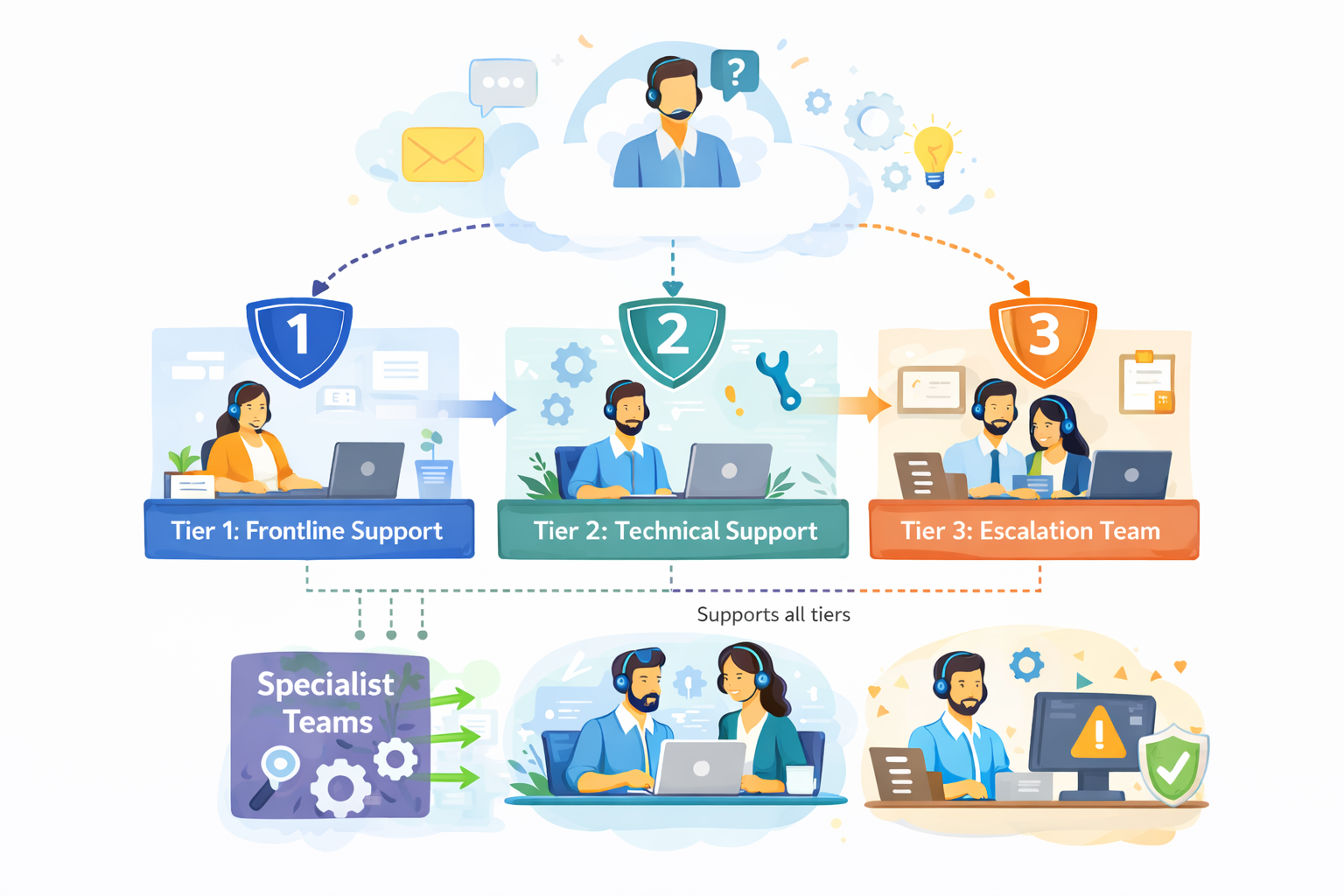
The diagram outlines our internal customer support process, showing how incoming requests are handled across multiple support tiers based on complexity.
Customer inquiries are initially managed by Tier 1: Frontline Support, which is responsible for triage and resolution of common issues. More complex cases are escalated to Tier 2: Technical Support, where deeper technical investigation is performed.
High-impact or unresolved issues are handled by Tier 3: Escalation Team, which coordinates with internal experts as required. Specialist Teams support Tier 2 and Tier 3 by providing domain-specific expertise, while typically remaining non-customer-facing.
The process is designed to allow flexible movement between tiers, supporting efficient resolution and appropriate escalation when needed.
Figure 1. Internal support workflow across frontline, technical and escalation teams.
Ticket Volume
During the reporting period, the support team processed 184,600 tickets, representing an increase of 11% compared to the previous period. Ticket volume peaked in September and gradually stabilized towards the end of the year.
The increase was primarily driven by onboarding-related questions and product configuration requests.
Channel Distribution
Channel
Share of Tickets
Change vs. Previous Period
Avg. First Response Time
Email
54%
-3%
3.1 hours
Live Chat
31%
+5%
1.2 hours
In-App Support
15%
-2%
2.4 hours
Email remained the dominant support channel, although live chat usage continued to increase, particularly among larger accounts.
Resolution Efficiency
Average response and resolution times showed minor improvement compared to earlier in the year.
Average first response time: 2.4 hours
Average resolution time: 18.7 hours
Tickets resolved within 24 hours: 68%
More complex cases, especially those related to integrations, required additional follow-up and were not consistently resolved within standard timeframes. While faster response times were generally appreciated, qualitative feedback indicates that communication consistency played an equally important role in overall customer perception.
"Faster responses were helpful, but consistency in follow-up communication had a bigger impact on our overall experience."
— Enterprise customer, post-resolution survey
Common Issue Categories
The most frequently reported issues were:
Account access and authentication
Billing and invoice related questions
Feature usage clarification
Integration setup
Performance-related concerns
Billing-related requests declined slightly, while integration-related inquiries increased towards the end of the period.
Customer Satisfaction
Customer satisfaction was measured through post-resolution surveys. The overall response rate remained stable throughout the reporting period.
Average CSAT score: 4.2 / 5
Survey response rate: 27%
Feedback most often referenced response time and clarity of follow-up communication as areas for improvement, particularly in cases involving multiple handovers or escalations.
Identified Bottlenecks
Internal review identified several operational areas that may require further attention:
Delays in ticket reassignment for escalated cases
Inconsistent categorization of incoming requests
Limited coverage during selected regional peak hours
While these issues did not materially impact aggregate performance metrics, they were visible in individual case handling and customer feedback.
"The issue was eventually resolved, although it was not always clear who was responsible for the case during escalation."
— Key account feedback, quarterly review
Summary
Overall support performance remained within expected operational ranges. Most key indicators were stable, with moderate improvements observed in response efficiency. At the same time, the data suggests that further improvements in communication clarity and escalation handling could positively impact customer experience in future reporting periods.
Better in Fullscreen
Open the demo in fullscreen to comfortably explore the editor and its features.
Note
Read more about the AI capabilities in the documentation.
Everything you need to work smarter with AI, built directly into your editor.
Multi-turn conversations
Every exchange is part of a thread. The AI remembers what you discussed earlier in the conversation, so iterative instructions — "make it shorter," "now add a data point," "use a more formal tone" — work exactly as you'd expect. Inside the editor, each of those turns works on the actual document, not a detached copy of it in a separate AI tool.
Context from documents and URLs
AI Chat reads your document automatically. You can extend that context further by providing URLs, uploading files, or connecting internal knowledge sources using MCP. Align copy with a brand guide, draft from a product brief, or pull data from a knowledge base, all without leaving the editor.
Chat history
Conversations are saved per thread and stay private to their author, so other collaborators in the document cannot see them. You can pin or rename threads and search across past conversations, so the ideas you explored are right where you left them.
Accept, reject, or copy output
CKEditor AI-generated changes never apply on their own. Each one is a reviewable suggestion you can accept, reject, or copy elsewhere for a formal review pass. Editorial control stays with the content author at every step.
Benefits for Writers
Faster ideation
Start from a blank document and think out loud. Ask for different approaches, draft a section, react to it, refine, all in one place. Since the AI assistant works on the actual output, good ideas become formatted content immediately.
No context switching
Every time you leave your editor to use a standalone AI tool, it costs losing your flow. You copy text out, generate something, copy it back, reformat it, and try to remember where you were. CKEditor AI Chat eliminates that loop. The conversational AI assistant is already available where you create and format content . You ask, you get a ready-to-insert response, you keep writing.
Full editorial and formatting control
AI output is a starting point, not a final draft. Track Changes feature integration means every AI suggestion is visible, attributable and reversible. Accept what works, reject what doesn't. The AI writes in the same HTML format the editor uses, so accepted suggestions carry all the formatting — bold, headings, lists — without a need for manual cleanup.
Benefits for Engineers
Drop-in integration
AI Chat is a plugin. Your job is to configure it, not to build it from scratch. You are not building a chat UI, and you are not building the layer that turns AI output into correctly formatted, reviewable editor content neither. The chat panel, conversation threading, history, context passing, and the suggestion-and-review flow are all handled.
It works in all editor types, including multi-root editors, and multiple editors sharing a single context. Whatever your architecture, you don't need to rethink it to add an AI chat for content creation.
Compatible with OpenAI, Anthropic, and Gemini
CKEditor AI Chat supports the models your team already uses. You connect your own API key. No vendor lock-in. You choose the model, control the cost, and swap providers without rebuilding your integration. If a better model ships next month, you update a config value.
Need a custom or fine-tuned model? The on-premises deployment lets you connect any LLM - including private models running entirely within your own infrastructure.
You can extend system prompts, the available chat actions, and the behavior of the assistant within your application. Serving a specific vertical such as legal, technical, or support content? Configure the assistant to match it, so content authors get a focused tool and you ship a product that fits your use case.
Why Choose CKEditor's Conversational AI Assistant?
CKEditor AI Chat is a part of an industry-tested system that was built to create quality content. It is full of features aimed at making content creation easier and consistent. AI integrates into that system rather than being bolted on top of it, and this difference shows up in a few specific ways.
It lives where writing happens.
The conversational AI assistant is embedded in the editor. Your writers never leave their workspace. Ideation, drafting, editing, and reviewing all happen in one environment.
It outputs HTML, not markdown.
CKEditor AI generates native HTML output. Bold stays bold. Tables stay structured. Lists stay formatted. You accept a suggestion and it lands in the document exactly as intended — no cleanup, no conversion layer.
It integrates with your editorial process.
Track Changes feature support means AI output enters your document as a reviewable suggestion, not a blind paste. Authors can see what the AI contributed, evaluate it, and approve or reject it. That's a meaningful difference for organizations that care about content quality and accountability.
On-premises deployment for full data sovereignty, SOC 2 Type 2 certification, and GDPR compliance — and you have an AI content workflow automation tool that meets enterprise security requirements without compromising on capability.
CKEditor AI Chat is part of a broader CKEditor AI features suite that includes AI Review for automated document review and AI Quick Actions for inline, single-shot text operations. You can use them independently or together, depending on how your writers work.
Frequently Asked Questions
Find answers to the most common questions about our features, data security, and integration options. If you need further assistance, our team is here to help.
What is a conversational AI assistant?
A conversational AI assistant is a chat-based interface that maintains context across multiple exchanges with an AI model. You ask a question, get a response, ask a follow-up, and refine — all in a single thread the AI remembers. Unlike single-turn tools, a conversational assistant lets you iterate without re-explaining your context every time.
How is CKEditor AI Chat different from ChatGPT or Claude?
CKEditor AI Chat is embedded inside your editor. It reads your document as context, generates changes as suggestions you review before accepting, and outputs native HTML — not markdown. Standalone tools like ChatGPT or Claude require you to copy content out, generate text, paste it back, and reformat it. AI Chat removes that entire loop.
Yes. CKEditor AI Chat generates HTML output natively. Your bold text, headings, tables, and lists survive the AI's response intact. When you accept a suggestion, it lands in your document with full formatting. No reformatting required.
Can I control what AI Chat changes in my document?
Yes. With the Track Changes plugin enabled, every AI-generated document edit appears as a reviewable suggestion. You accept or reject each change individually. Nothing applies to your document automatically. You stay in full editorial control.
Yes. CKEditor AI Chat connects to OpenAI, Anthropic, and Google Gemini via your own API key. You pick the model — GPT-4.1, Claude Sonnet 4, Gemini 2.5 Pro, or any other supported option — and you can swap providers without rebuilding your integration. No vendor lock-in. With MCP support you can connect any custom LLM.
Chat history is saved per conversation thread and is visible only to the author. Conversations are private by default — other document collaborators cannot see your AI Chat history. You can pin threads, rename them, and search across your history at any time.
CKEditor AI Chat supports OpenAI (GPT-4.1, GPT-5, GPT-5 Mini), Anthropic (Claude Sonnet 4, Claude 3.5 Haiku), and Google Gemini (2.5 Pro, 2.5 Flash). You connect your own API key and choose the model that fits your use case and cost requirements.
CKEditor AI Chat gives your writers a full conversational AI assistant without pulling them out of their workflow. It gives your team HTML-native output, Track Changes review, multi-model compatibility, and enterprise-grade security – as a drop-in plugin.
Try it free for 14 days
No credit card required.
Already building?
The full integration reference for the drop-in plugin lives in the docs.