Improve Writing
Enhances the quality of the selected text — refining word choice, flow, and clarity while keeping the original meaning intact.
WEBINAR:
Less time, fewer tokens, better effects
The official CKEditor support for AI coding agents

A content creator selects a sentence — or a whole section — and picks an action from the Quick Actions menu. The AI applies the transformation, and the result appears inline for review. The user can accept it, retry for an alternative, turn it into a suggestion, or reject it entirely. Nothing changes in the document until they explicitly say so.
Operational Summary – Second Half of 2025
This report summarizes customer support performance during the second half of 2025. It focuses on ticket volumes, response efficiency and common issue categories, based on internal operational data across all support channels.
The information below should be treated as an overview of observed trends rather than a detailed performance evaluation.
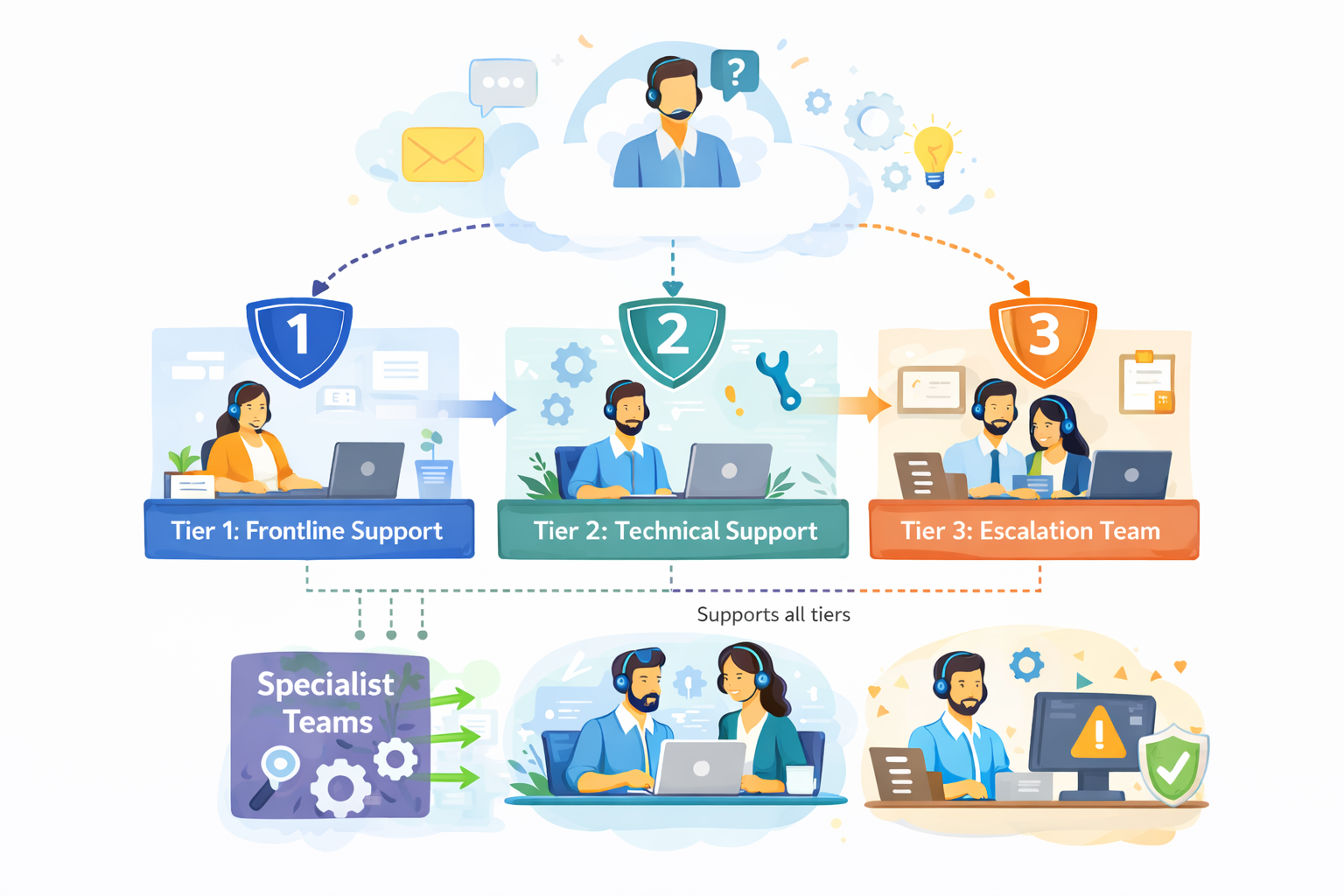
The diagram outlines our internal customer support process, showing how incoming requests are handled across multiple support tiers based on complexity.
Customer inquiries are initially managed by Tier 1: Frontline Support, which is responsible for triage and resolution of common issues. More complex cases are escalated to Tier 2: Technical Support, where deeper technical investigation is performed.
High-impact or unresolved issues are handled by Tier 3: Escalation Team, which coordinates with internal experts as required. Specialist Teams support Tier 2 and Tier 3 by providing domain-specific expertise, while typically remaining non-customer-facing.
The process is designed to allow flexible movement between tiers, supporting efficient resolution and appropriate escalation when needed.
During the reporting period, the support team processed 184,600 tickets, representing an increase of 11% compared to the previous period. Ticket volume peaked in September and gradually stabilized towards the end of the year.
The increase was primarily driven by onboarding-related questions and product configuration requests.
| Channel | Share of Tickets | Change vs. Previous Period | Avg. First Response Time |
|---|---|---|---|
| 54% | -3% | 3.1 hours | |
| Live Chat | 31% | +5% | 1.2 hours |
| In-App Support | 15% | -2% | 2.4 hours |
Email remained the dominant support channel, although live chat usage continued to increase, particularly among larger accounts.
Average response and resolution times showed minor improvement compared to earlier in the year.
More complex cases, especially those related to integrations, required additional follow-up and were not consistently resolved within standard timeframes. While faster response times were generally appreciated, qualitative feedback indicates that communication consistency played an equally important role in overall customer perception.
"Faster responses were helpful, but consistency in follow-up communication had a bigger impact on our overall experience."
— Enterprise customer, post-resolution survey
The most frequently reported issues were:
Billing-related requests declined slightly, while integration-related inquiries increased towards the end of the period.
Customer satisfaction was measured through post-resolution surveys. The overall response rate remained stable throughout the reporting period.
Feedback most often referenced response time and clarity of follow-up communication as areas for improvement, particularly in cases involving multiple handovers or escalations.
Internal review identified several operational areas that may require further attention:
While these issues did not materially impact aggregate performance metrics, they were visible in individual case handling and customer feedback.
"The issue was eventually resolved, although it was not always clear who was responsible for the case during escalation."
— Key account feedback, quarterly review
Overall support performance remained within expected operational ranges. Most key indicators were stable, with moderate improvements observed in response efficiency. At the same time, the data suggests that further improvements in communication clarity and escalation handling could positively impact customer experience in future reporting periods.
Open the demo in fullscreen to comfortably explore the editor and its features.
Read more about the AI capabilities in the documentation.
Check the source code for this demo.
CKEditor AI ships with a rich set of built-in Quick Actions covering the most common writing
transformations. They're organized into standalone actions and grouped categories. Each works
on any selected text and returns HTML output — formatting stays intact.
Enhances the quality of the selected text — refining word choice, flow, and clarity while keeping the original meaning intact.
Extends the selected text with a relevant continuation. Useful for expanding a sentence, fleshing out an idea, or keeping the narrative going.
Corrects grammatical errors in the selected text — spelling, punctuation, verb agreement, and sentence structure — without changing the meaning.
Two actions for controlling how much space content takes up:
Five tone presets to shift the register of selected text without rewriting the substance:
AI Translate functionality is available directly in the Quick Actions menu, allowing you to translate selected text instead of the entire document. Translate selected text into seven languages: English, Chinese, French, German, Italian, Portuguese, and Russian.
Three actions that bring your selection to AI Chat as context, with a predefined prompt run on it:
Opens the CKEditor AI Chat interface with your selected text as context. Use it when a one-click transformation isn't enough and you want a full, multi-turn conversation about the selection.
The interaction model is straightforward by design.
No changes land in the document without explicit confirmation. The review step is always there.
The content creator highlights any amount of text in the editor.
The CKEditor AI Quick Actions menu appears in the editor toolbar or inline context menu.
One click triggers the transformation.
The AI-generated output appears immediately; use "Show details" to see exactly what has been changed with a track changes UI.
The user applies the result directly or as a suggestion, generates an alternative, or discards the change entirely.


Common transformations are available instantly — no prompt writing, no training required.
Review every result before it touches the document.
Work faster without leaving the editor.
Maintain consistency across content with standardized custom actions.
Track AI-generated changes through the same workflow as human edits (with Track Changes).


Full configuration control — you decide which actions appear.
Works with OpenAI, Anthropic, Google Gemini, and custom LLMs — no lock-in.
Output is HTML, so formatting integrates cleanly with your document model.
On-premises deployment supported — keep processing inside your infrastructure.
Custom actions let you tailor the editor to your application's specific domain.
AI Quick Actions are one-click text transformations built into CKEditor. Select any text in the editor, choose an action — improve writing, fix grammar & spelling, continue writing, change tone, translate, and more — and the AI applies the transformation instantly. No prompt writing required. Results appear inline so you can review, retry, accept, or reject before any change lands in your document.
Copy linkLink copiedCKEditor includes a rich set of default AI Quick Actions: Ask AI, Improve Writing, Continue Writing, Fix Grammar & Spelling, Adjust Length (Make shorter, Make longer), Change Tone (Casual, Direct, Friendly, Confident, Professional), and Translate (into English, Chinese, French, German, Italian, Portuguese, and Russian). Each works on any selected text and returns output as rich HTML, preserving your document's formatting.
Copy linkLink copiedYes. You can configure any number of custom Quick Actions for your end-users using your own prompts. Examples include "simplify legalese," "convert to active voice," or "add citation format." Developers define the list of available actions — end users only see what you expose.
Copy linkLink copiedAI Quick Actions handle small, repeatable tasks with a single click. AI Chat is an open-ended conversation interface for deeper, multi-turn work — brainstorming, drafting from scratch, or iterating on complex content. You can escalate directly from Quick Actions to AI Chat whenever a task needs more nuance.
Copy linkLink copiedThey're four complementary parts of CKEditor AI, each built for a different job — and they all share the same LLM connection and the same inline, accept-or-reject review model.
AI Quick Actions handle small, repeatable edits on selected text with one click — improve writing, fix grammar & spelling, change tone, and more.
AI Chat is an open-ended conversation interface for deeper, multi-turn work like brainstorming, drafting, and iterating on complex content.
AI Review runs on-demand quality checks across the whole document — grammar, spelling, style, tone, and custom rules — and surfaces every suggestion as inline track changes.
AI Translate is a dedicated mode that translates the entire document in one pass, presenting each segment as a reviewable suggestion with the original visible in the sidebar.
Use Quick Actions for fast, in-place fixes; escalate to AI Chat when a task needs nuance; run AI Review before content ships; and reach for AI Translate when you need the full document in another language.
Copy linkLink copiedBoth translate content inside the editor, but they work at different scales.
Translate in AI Quick Actions is a one-click action on the text you've selected. It covers seven languages — English, Chinese, French, German, Italian, Portuguese, and Russian — and returns the result inline to accept, retry, or reject. It's built for quick, localized fixes like a heading, a sentence, or a snippet.
AI Translate is a dedicated translation mode for the entire document. It processes the whole document in one pass, presents each segment as an inline suggestion with the original visible in the sidebar for side-by-side comparison, and ships with 10 built-in languages plus configurable additional ones.
Choose the Quick Action when you need to translate a small piece without leaving your flow. Choose AI Translate when you're localizing a full document and want segment-by-segment review.
Copy linkLink copiedYes. Custom commands from the former AI Assistant map directly to AI Quick Actions on a one-to-one basis. Your existing prompt configurations carry over without rework.
Copy linkLink copiedYes. All Quick Action output is returned as HTML, so rich text formatting — headings, bold, lists, tables — is preserved throughout the transformation.
Copy linkLink copied