Proofread
Checks the text for errors in grammar, spelling, and punctuation.
WEBINAR:
Less time, fewer tokens, better effects
The official CKEditor support for AI coding agents

CKEditor AI Review analyzes your entire document on demand and surfaces every issue as an inline track change. You trigger it when you're ready, review suggestions one at a time or accept them all at once, and the editor preserves full rich-text formatting through every change.
Operational Summary – Second Half of 2025
This report summarizes customer support performance during the second half of 2025. It focuses on ticket volumes, response efficiency and common issue categories, based on internal operational data across all support channels.
The information below should be treated as an overview of observed trends rather than a detailed performance evaluation.
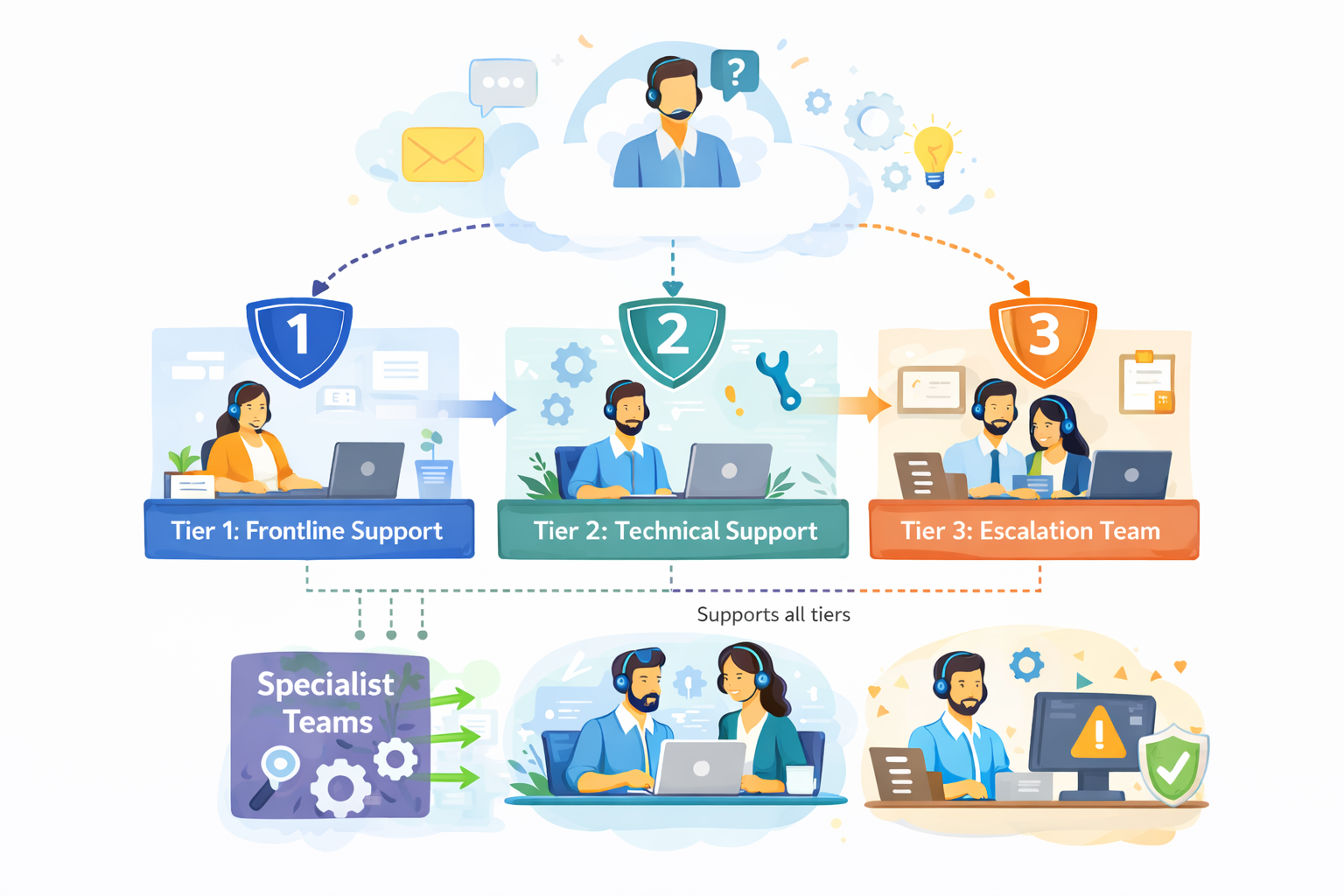
The diagram outlines our internal customer support process, showing how incoming requests are handled across multiple support tiers based on complexity.
Customer inquiries are initially managed by Tier 1: Frontline Support, which is responsible for triage and resolution of common issues. More complex cases are escalated to Tier 2: Technical Support, where deeper technical investigation is performed.
High-impact or unresolved issues are handled by Tier 3: Escalation Team, which coordinates with internal experts as required. Specialist Teams support Tier 2 and Tier 3 by providing domain-specific expertise, while typically remaining non-customer-facing.
The process is designed to allow flexible movement between tiers, supporting efficient resolution and appropriate escalation when needed.
During the reporting period, the support team processed 184,600 tickets, representing an increase of 11% compared to the previous period. Ticket volume peaked in September and gradually stabilized towards the end of the year.
The increase was primarily driven by onboarding-related questions and product configuration requests.
| Channel | Share of Tickets | Change vs. Previous Period | Avg. First Response Time |
|---|---|---|---|
| 54% | -3% | 3.1 hours | |
| Live Chat | 31% | +5% | 1.2 hours |
| In-App Support | 15% | -2% | 2.4 hours |
Email remained the dominant support channel, although live chat usage continued to increase, particularly among larger accounts.
Average response and resolution times showed minor improvement compared to earlier in the year.
More complex cases, especially those related to integrations, required additional follow-up and were not consistently resolved within standard timeframes. While faster response times were generally appreciated, qualitative feedback indicates that communication consistency played an equally important role in overall customer perception.
"Faster responses were helpful, but consistency in follow-up communication had a bigger impact on our overall experience."
— Enterprise customer, post-resolution survey
The most frequently reported issues were:
Billing-related requests declined slightly, while integration-related inquiries increased towards the end of the period.
Customer satisfaction was measured through post-resolution surveys. The overall response rate remained stable throughout the reporting period.
Feedback most often referenced response time and clarity of follow-up communication as areas for improvement, particularly in cases involving multiple handovers or escalations.
Internal review identified several operational areas that may require further attention:
While these issues did not materially impact aggregate performance metrics, they were visible in individual case handling and customer feedback.
"The issue was eventually resolved, although it was not always clear who was responsible for the case during escalation."
— Key account feedback, quarterly review
Overall support performance remained within expected operational ranges. Most key indicators were stable, with moderate improvements observed in response efficiency. At the same time, the data suggests that further improvements in communication clarity and escalation handling could positively impact customer experience in future reporting periods.
Open the demo in fullscreen to comfortably explore the editor and its features.
Read more about the AI capabilities in the documentation.
Check the source code for this demo.
AI Review ships with five built-in check types. Run them individually
or combine them in a single review session.
Checks the text for errors in grammar, spelling, and punctuation.
Improves the logical structure and precision of the text for a clearer message. Ambiguous, circular, or poorly sequenced content gets flagged and rewritten – same voice, sharper delivery.
Adjusts sentence structure and word choice for an easier read. Long, dense passages get reshaped for comprehension without altering the meaning.
Shortens or lengthens text as needed. Based on your choice, AI Review reshapes the content accordingly.
Modifies the text to a desired tone and style. Choose from five presets: Casual, Direct, Friendly, Confident, or Professional. Useful for aligning drafts or adapting content for different audiences.
Run a one-off review with a custom prompt, when the built-in reviews aren't enough. Type what you want checked, and the results come back in the same inline suggestion format as the built-in ones. Best for ad-hoc checks you don't need to save.
Every change AI Review makes, appears as a suggestion. Suggestions use the same UI as the Track Change feature CKEditor has for collaborative editing.
RBAC controls let your engineering team decide which users or roles can trigger AI
Review – so you can reserve it for editors, reviewers, or specific workflow stages.


AI Review brings automated content QA to every document, every time. As document volume grows – across products, markets, and contributors – errors multiply and review cycles get longer. Manual proofreading doesn't scale.
Review cycles are expensive. Every round of revisions adds time, introduces rework, and delays publishing. AI Review cuts that down by surfacing the most common issues during the drafting stage – before the document ever reaches a reviewer.
Teams using AI Review can expect:


AI Review is built to be configured. Engineers can define custom check prompts in the CKEditor AI configuration – no external tooling, no separate API integration, no custom UI to build.
If your organization requires full control over data processing, AI Review is available on-premises. Content never leaves your infrastructure. The same feature, the same configuration options, on your stack.
Standalone proofreading tools solve part of the problem. They live outside the editor, require copy-paste workflows,
browser integrations, and can't enforce your custom rules or integrate with your content management flow.
CKEditor AI Review is different:
CKEditor AI Review | Standalone tools | |
|---|---|---|
| Runs inside the editor | Available in CKEditor AI Review | Not available in Standalone toolsRequires copy-paste |
| Custom check prompts | Available in CKEditor AI Review | Rarely |
| Bulk accept/reject | Available in CKEditor AI Review | Varies |
| Track-changes UI | Available in CKEditor AI Review | Not available in Standalone tools |
| Large document support | Available in CKEditor AI Review | Often degrades |
| On-premises available | Available in CKEditor AI Review | Rarely |
| RBAC and access control | Available in CKEditor AI Review | Not available in Standalone tools |
| LLM-agnostic | Available in CKEditor AI ReviewOpenAI, Anthropic, Gemini, and custom LLMs | Not available in Standalone toolsVendor-locked |
AI Review also works alongside other CKEditor AI features such as AI Chat, AI Translate and AI Quick Actions – so your team has a full suite of AI writing tools in one editor, not a collection of disconnected apps.
AI Review is on-demand and comprehensive. Writers trigger it when they're ready, see all suggestions at once, and decide what to apply. That's a fundamentally different workflow from real-time correction, and it's designed for the realities of long-form, professional content production.
AI Review is an on-demand content quality feature built into CKEditor. It runs AI-powered checks for grammar, spelling, style, tone, and custom rules directly inside the editor and surfaces all suggestions as inline track changes – so you can review, accept, or reject them before applying anything.
Copy linkLink copiedA spell-checker flags individual words as you type. AI Review is a full-document, on-demand quality pass. It checks grammar, spelling, style, tone, clarity, and any custom rules you define – all at once, across the entire document – and delivers every suggestion through a single, reviewable interface.
Copy linkLink copiedYes. You can define custom check prompts to enforce domain-specific rules such as legal formatting, academic style, brand voice requirements, or compliance language. Each custom check runs alongside the built-in checks and surfaces suggestions through the same inline interface.
Copy linkLink copiedYes. AI Review is designed specifically for long-form content. It chunks large documents and processes them in parallel across multiple LLM calls, so documents 50+ pages long run without significant UX degradation.
Copy linkLink copiedEvery suggestion appears inline as a track change. You can accept or reject changes one at a time – reading the detailed feedback for each – or use bulk accept/reject to apply or dismiss all suggestions at once.
Copy linkLink copiedYes. AI Review is available both as a cloud service and as an on-premises deployment, giving your team full control over where content and AI processing happen.
Copy linkLink copied