CKEditor 5 v48.2.0 Release Highlights: AI Chat Improvements, Media Embed, and More
4min read
|We are entering the summer with another batch of CKEditor AI improvements, most notably General HTML Support integration and several enhancements to AI Chat. Multi-root and multiple editor AI support is now production-ready! The release also introduces media embed resizing and alignment, skip-level list support, and editor roots on paragraph-like elements.
General HTML support for CKEditor AINEW
CKEditor AI is now fully operational for editors configured with General HTML Support (GHS). Beyond the markup CKEditor’s dedicated features support natively, GHS lets you keep additional HTML, such as <section>, <div> elements, custom classes, styles and attributes. AI Chat, AI Quick Actions, and AI Review can now read, apply and suggest changes on content built with that markup, so AI works across a larger subset of HTML.
Media Embed improvementsNEW
The media embed feature now supports resizing via drag handles and styling options. Embedded videos and other media can be sized and positioned to fit the content around them, rather than sitting as fixed full-width blocks. Media can be aligned left or right with surrounding content flowing around it when text wrapping is enabled, or centered on its own line. Resize and style changes are also tracked as suggestions when Track Changes is active.
Editor roots on paragraph-like elementsNEW
An editing area no longer has to live inside a single wrapper. Now a heading, a paragraph, or a custom block (with its own classes, styles, and attributes) can be an editing area in its own right. That makes CKEditor a natural fit for CMSes and field-based apps: edit the title, the summary, and the body as separate fields, while they still share one editor, one toolbar, one undo history, and one collaboration session.
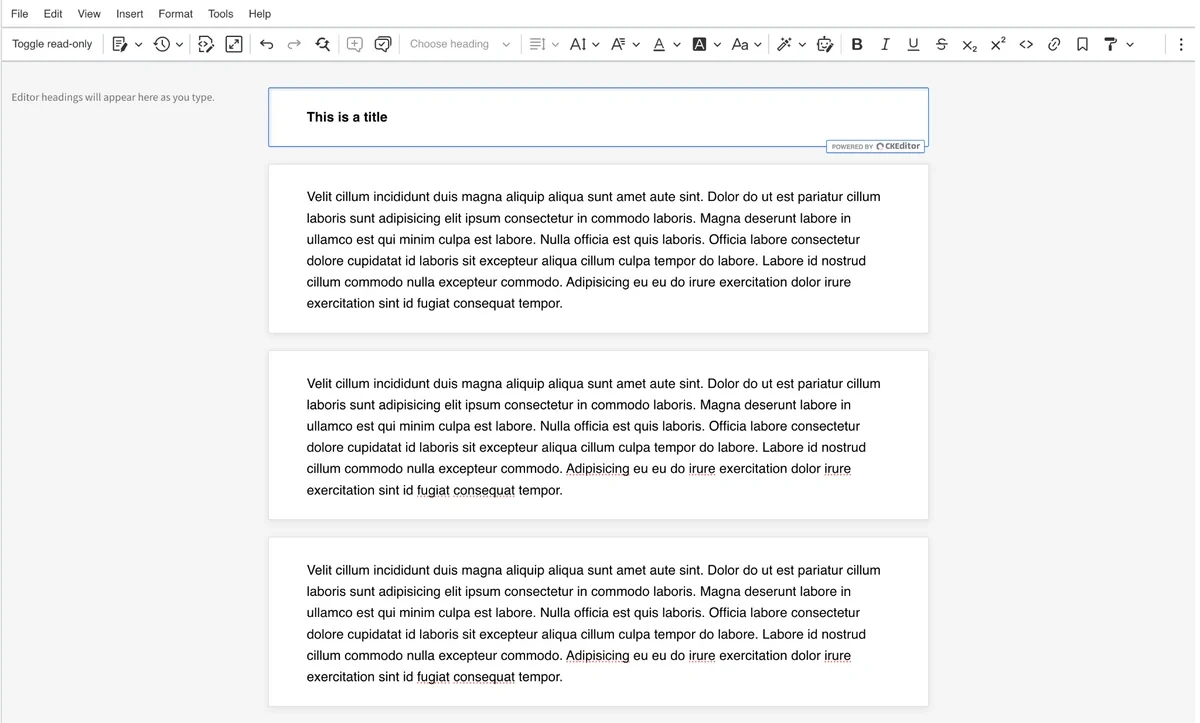 Because each field maps to a real element, it behaves exactly like the field it represents. A heading field stays a single heading: pressing Enter will not split it into two blocks, it will not accept a table or any other block element. The result is a more explicit, predictable editing experience. The editor communicates its own rules, users cannot create content that does not fit, and what they type maps cleanly to your data model. No malformed input to clean up later, no surprises downstream.
AI Chat
AI Chat gains several improvements in this release.
Paste and drag & drop supportNEW
Paste and drag-and-drop support is now available in the AI Chat input. Screenshots and images from the clipboard are added as context attachments, URLs are detected and displayed as link pills, and long pasted text is attached as a text file. The same applies to files and URLs dropped directly onto the prompt input area.
Resilient streamingNEW
Closing or reloading the page no longer interrupts a streaming reply in AI Chat. The response continues generating on the server and resumes in view once the conversation is reopened.
Typography
AI Chat responses have improved default typography, with clearer heading hierarchy, more spacing between list items, and distinct styling for code, tables, block quotations, and horizontal rules.
Skip-level listsNEW
The list feature now supports skip-level lists. List items can be nested at non-sequential indentation levels. For example, a third-level item placed directly under a first-level one, preserving the structure of documents imported or pasted from Word and HTML sources.
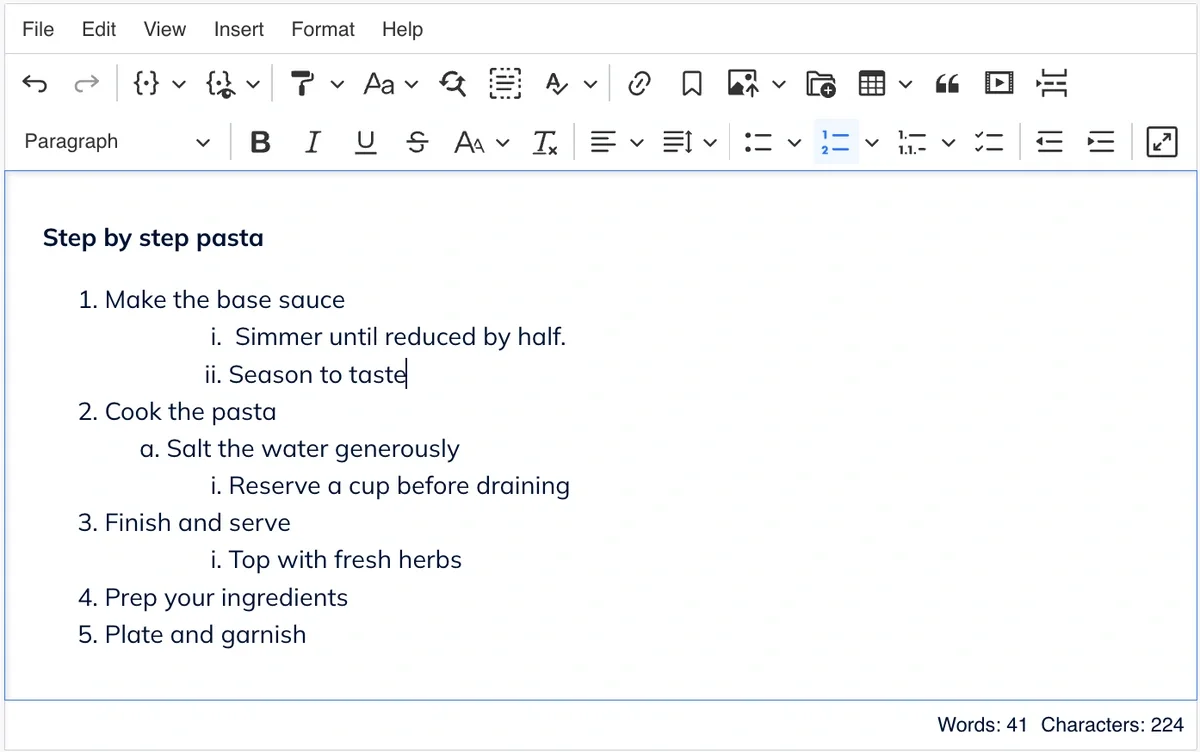
Skip-level nesting is an opt-in feature that can be enabled through configuration. You can learn more about the configuration options in the documentation.
Other updates
-
Track Changes now integrates with General HTML Support (GHS). GHS-produced elements and attributes are tracked as suggestions rather than applied silently.
-
Numbered list autoformat now accepts any starting number when typing a number followed by
.or)and a space. -
A new programmatic API for the AI Review plugin is now available. See Using CKEditor AI programmatically for details.
-
Tables with resized columns now keep their column widths when exported as email.
-
Several paste from Office fixes improve list indentation and nesting consistency when pasting from Word.
-
The
aipackage includes minor breaking changes to APIs used by custom workflows. Details are in the full changelog.
Quick links for CKEditor v48.2.0
Learn more about previous CKEditor 5 versions
-
CKEditor 5 v48.1.0 Release Highlights: CKEditor AI Chat Improvements and AI in Multi-root Setups
-
CKEditor 5 v48.0.0 Release Highlights: Installation Methods Transition Completed
-
CKEditor 5 v47.6.0 Release Highlights: CKEditor AI On-Premises and Improved AI Customization
-
CKEditor 5 v47.5.0 Release Highlights: AI Translate, Export to PDF v2 and more
-
CKEditor 5 v47.4.0 Release Highlights: Improvements for Tables, Email Layouts and more
-
CKEditor 5 v47.3.0 Release Highlights: CKEditor AI Improvements and Bug Fixes
-
CKEditor 5 v47.2.0 Release Highlights: Introducing CKEditor AI and Footnotes
Tags: