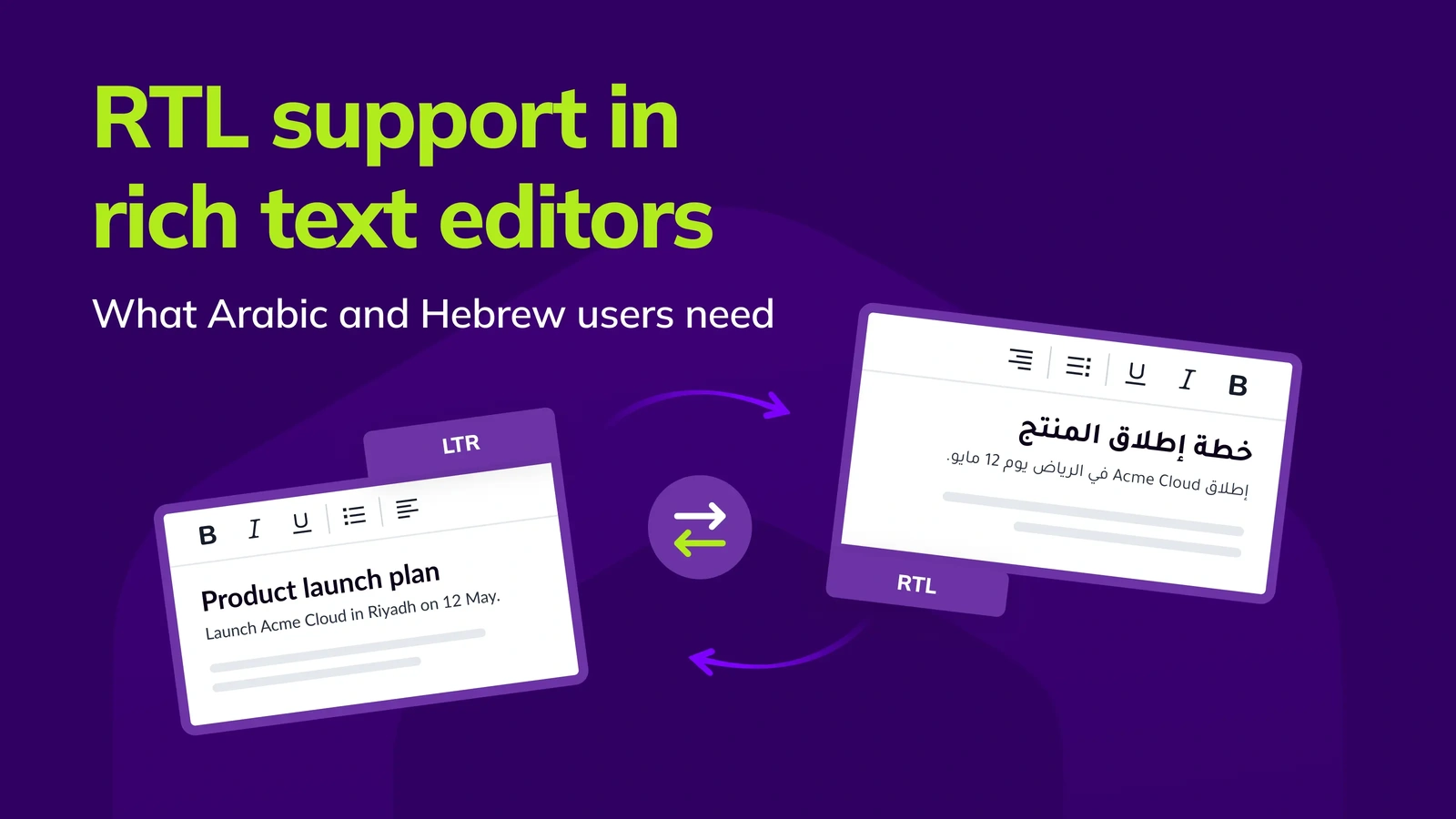
RTL support in rich text editors: what Arabic and Hebrew users need, and how CKEditor 5 delivers it
23min read
|Key takeaways
- RTL support goes beyond flipping the layout: Your editor needs to support right-to-left text throughout the interface, while also allowing users to switch between languages and text directions within the same document.
- Typing is where problems often show up: An editor might look fine in Arabic, but users can still run into issues when moving the cursor or selecting text. This is especially common when Arabic and English are mixed together.
- Language settings matter: Your editor needs to save both the language (lang) and text direction (dir) correctly. This helps ensure content displays properly and works with accessibility tools like screen readers.
- CKEditor 5 supports multilingual editing: It offers Arabic and Hebrew interfaces, separate language settings for content, and support for changing languages within a document. You can try it yourself in the live Arabic demo.
- Test with real content: Try mixing Arabic or Hebrew with English words, numbers and links. Make sure everything works across browsers and devices, and test again when browsers release updates.
Supporting Arabic and Hebrew users takes more than making your interface read from right to left.
Imagine someone writing a document in Arabic that includes an English product name or a website link. Everything might look fine at first, but then the cursor starts behaving strangely. Selecting text becomes difficult, or punctuation shows up in the wrong place.
These are the kinds of issues that can easily slip through testing, especially if your team primarily works in English.
Browsers are also continuing to change how they handle text editing. In May 2026, for example, the Chromium team shared plans to change how arrow keys move through text that mixes left-to-right and right-to-left languages.
In this guide, we’ll cover what good RTL support looks like in a rich text editor, with practical examples of what to test.
We’ll also look at how CKEditor 5 supports Arabic and Hebrew editing.
What RTL support means in a rich text editor
Right-to-left (RTL) support allows people to write and edit content in languages like Arabic and Hebrew.
For a rich text editor, this means more than displaying text from right to left. The editor also needs to support users who switch between languages within the same document.
It’s easy to assume that RTL support is simply a matter of flipping the layout or adding dir="rtl" to the code.
But think about how people actually use an editor. Someone writing in Arabic might include an English product name or a website link in the same sentence. They need to be able to move their cursor and edit that text without running into issues.
That’s why proper RTL support needs to account for how people actually write, not just how the text looks on screen.
Layer 1: An editor that works from right to left
When someone uses an editor in Arabic or Hebrew, the interface should feel natural to them.
This means the toolbar should start from the right, menus should open in the correct direction and buttons should behave as users expect. Even icons, like those used for indentation, may need to be flipped.
Your editor should handle this automatically when someone switches the interface language. Your team shouldn’t need to build a separate layout to make it work.
Layer 2: Making sure content displays correctly
The language someone uses in the editor doesn’t always match the language they’re writing in.
For example, someone might use an English interface to write a document in Arabic. The editor needs to support that without changing how the interface works.
This is where two settings matter:
- Language (
lang): Tells tools like screen readers and spell checkers which language is being used. - Text direction (
dir): Controls how text flows, including where punctuation appears when languages are mixed.
It’s also important to understand that text direction and alignment aren’t the same thing.
Someone writing in Arabic might want to center a heading or justify a paragraph. They should be able to do that without changing the direction of the text.
Your editor needs to keep these settings separate so users can format their content without unexpected issues.
Layer 3: passages with their own language and direction
Inside an Arabic article, an English product name is a left-to-right run. Inside an English report, an Arabic citation is a right-to-left run. This inline direction is where most visible bugs start. Correct output isolates each run and labels it, typically with inline markup like <span lang="en" dir="ltr">, or with <bdi> and dir="auto" for user-generated fragments whose direction you can’t know in advance. The W3C guide to inline markup and bidirectional text explains why isolation matters: without it, neighbouring characters get pulled into the wrong run.
Text that mixes the two directions is called bidirectional (bidi) text. The browser lays it out with the Unicode Bidirectional Algorithm (UAX #9), which computes display order from each character’s type and the paragraph’s base direction. That is why the same characters can appear in a different order depending on what surrounds them, and why the editor’s job is to give the browser the right base direction and isolation, not to reorder text itself.
Which languages and markets need right-to-left support
Arabic and Hebrew are probably the first languages that come to mind, but plenty of others are written from right to left.
These include Persian (Farsi), Urdu, Kurdish (in some writing systems), Pashto and Yiddish. According to the W3C’s reference list of languages, more than 200 languages use right-to-left scripts.
For product teams, RTL support often becomes a priority when expanding into markets like Saudi Arabia, the UAE or Israel.
It’s also something customers may look for before choosing a product. If someone needs to write in Arabic or Hebrew, they’ll want to know that your editor supports their language properly.
And if your product can’t offer that experience, it could be a reason they look elsewhere.
How CKEditor 5 handles right-to-left content
CKEditor 5 makes it easier to support users who write in right-to-left languages like Arabic and Hebrew.
It comes with built-in RTL support, so you don’t need to create a separate interface or rely on custom CSS. You can also set the language of your content independently from the editor’s interface and support multiple languages within the same document.
You can see how this works in the live Arabic demo.
Behind the scenes, CKEditor 5 uses its own document model to manage content. This gives the editor more control over how text is handled, including its language and direction.
RTL support has been part of CKEditor 5 since the v12.4.0 release in 2019, with continued improvements over the years.
For teams building products for international users, this means less time dealing with language-specific editing issues and more time focusing on the product itself.
Right-to-left in the UI and the content, out of the box
Load the Arabic or Hebrew translation and CKEditor 5 mirrors its own interface for you. The UI language documentation confirms that the editor supports right-to-left languages out of the box and adapts its UI by mirroring toolbars, dropdowns, buttons and other elements. There is no RTL stylesheet for your team to write or maintain.
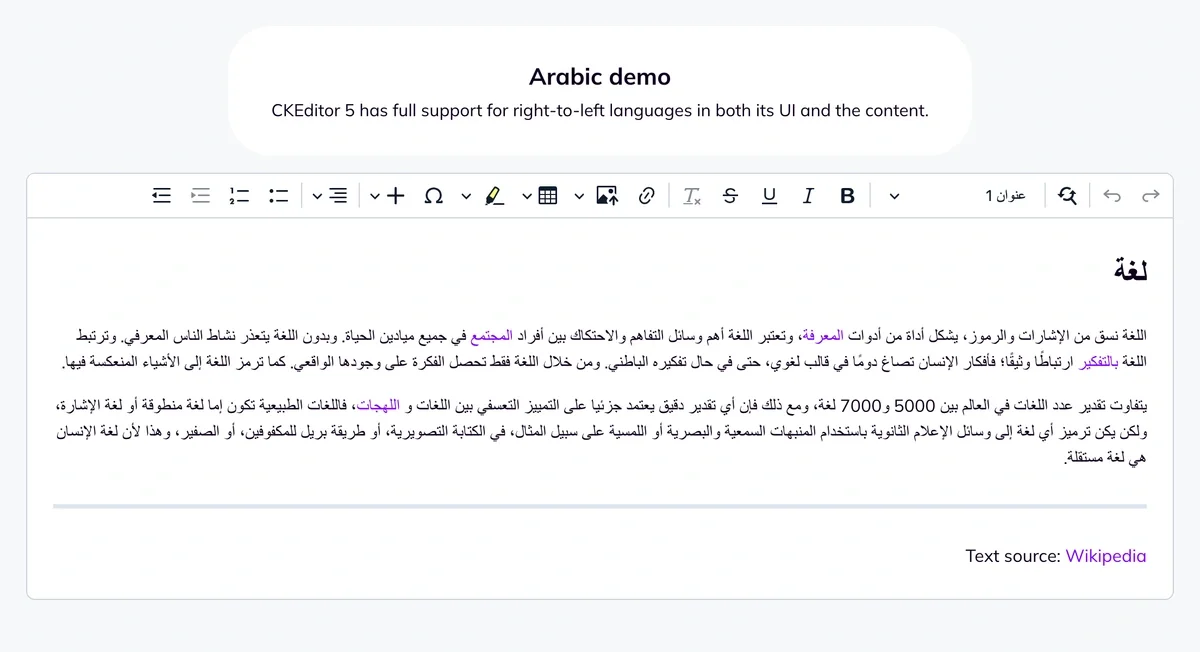
The interface is fully translated into 41 languages, including 38 professional translations, and the professional list includes Arabic (ar) and Hebrew (he).
Separate languages for the UI and the content
CKEditor 5 lets you configure the UI language and the content language separately:
language: {

    ui: 'en',       // English toolbar, menus and tooltips

    content: 'ar'   // Arabic content, edited right to left

}
That one setting covers the three deployments teams actually ship:
- English UI, Arabic or Hebrew content: a European or US operations team editing content for a Middle East market (ui: ‘en’, content: ‘ar’).
- Fully right-to-left: a product for users in the Gulf or Israel, with the interface and the content in the same language (ui: ‘he’, content: ‘he’).
- Bilingual: a platform where the document is Arabic but quotes English sources, handled with Text part language (below).
The content language is not cosmetic. The documentation notes that it affects screen readers and spell checkers, and that it sets the default alignment of the content, which is what makes right-to-left typing feel native. If you add the alignment feature, include the ‘right’ option for RTL content, as the text alignment documentation recommends. If you don’t set a content language, it follows the UI language, so set it explicitly in bilingual products.
You also don’t maintain a list of RTL languages yourself. CKEditor 5 recognises Arabic, Persian, Hebrew, Urdu, Kurdish, Uyghur and Dhivehi language codes as right-to-left and sets the direction accordingly (source on GitHub).
Language and direction for any passage with Text part language
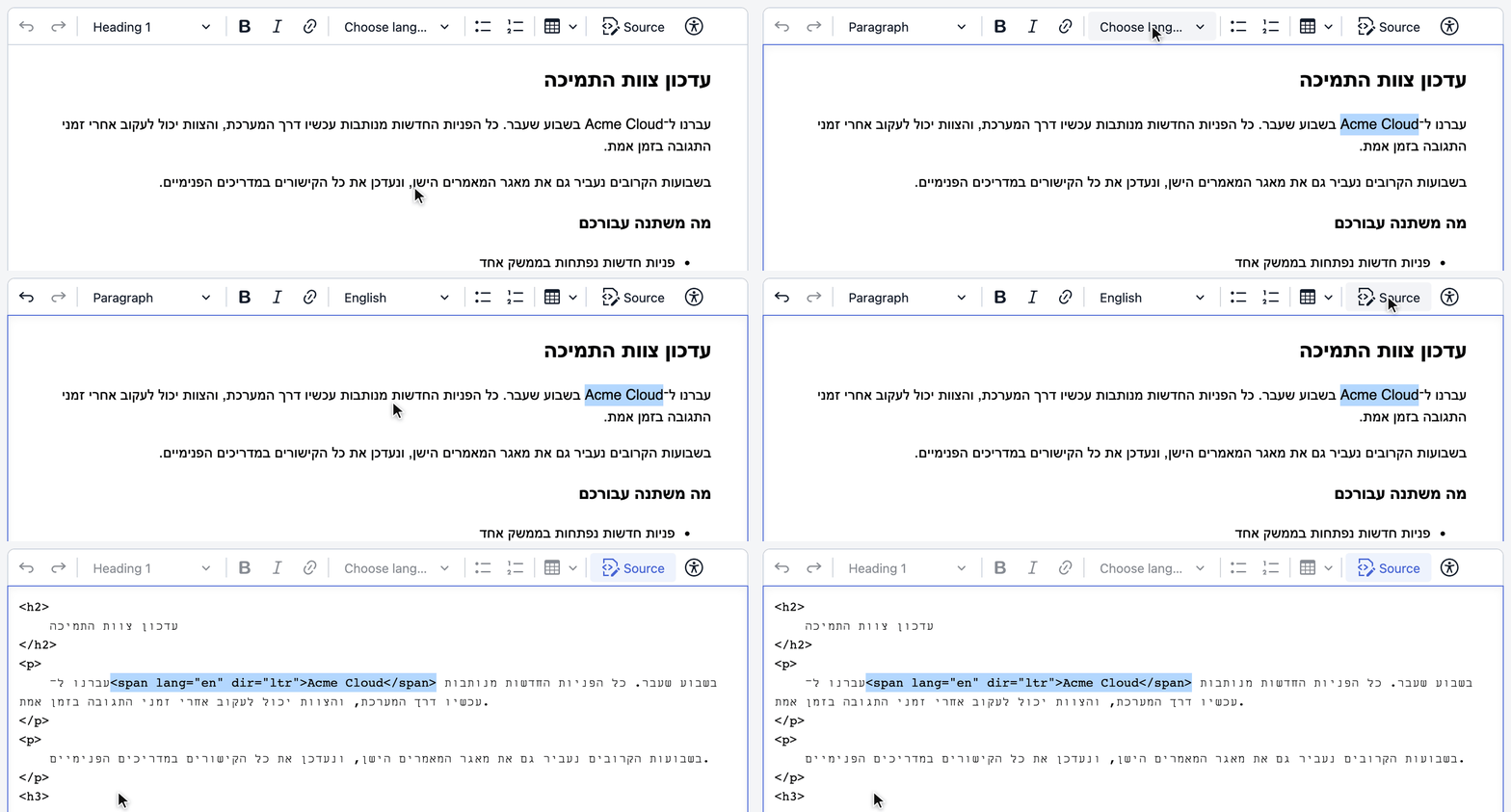
Add Text part language to your toolbar, and authors can select an English product name inside a Hebrew paragraph and mark it as English. CKEditor 5 wraps the fragment in a span with its own lang and dir attributes:
<p>עברנו ל־<span lang="en" dir="ltr">Acme Cloud</span> בשבוע שעבר.</p>The direction is detected automatically from the language code, or you can set it explicitly per language in the configuration. The documentation describes the feature as especially useful when content includes sections written in different text directions, and states that it implements the WCAG 3.1.2 Language of Parts specification. It first shipped in the CKEditor 5 v27.0.0 release in 2021 and is part of the open-source editor.
Integration in four steps
For front-end teams, RTL in CKEditor 5 is a short configuration task:
- Load the translations. From npm, import ckeditor5/translations/ar.js (or he.js) and pass it to translations; premium features have their own translation files in ckeditor5-premium-features. From the CDN, attach the translation scripts next to the editor scripts and the editor loads them automatically.
- Set language.ui and language.content explicitly for every editor instance, matching your locale strategy.
- Add Text part language to the plugins and toolbar, and include 'right' in the alignment options if you use alignment.
- Pass the same configuration through your framework. The React, Angular and Vue components take the editor configuration, including translations, through their config prop, so RTL behaves the same in each.
Because language is set per instance, several editors with different languages and directions can run on one page. The internationalization demo does exactly that, with German, Arabic and Japanese editors side by side.
RTL support continues to improve
CKEditor 5 has supported right-to-left languages since 2019, with regular improvements based on real issues reported by developers.
You can follow that work on GitHub, where the team publicly tracks RTL-related issues.
Over the years, updates have addressed issues with tables, toolbar navigation and other editing features when working with right-to-left text.
There’s still work being done, too. For example, automatic text direction for individual paragraphs has been tracked as an area for improvement.
One benefit of this approach is transparency. You can see which issues have been resolved and what’s still being worked on before deciding whether CKEditor 5 is the right fit for your product.
Check it yourself in the live Arabic editor
In the Arabic editor of the internationalization demo, type a sentence with an English product name, a number and a URL, and watch the toolbar, the alignment and where the punctuation lands. Then select a phrase in the Text part language demo and mark its language. Five minutes, and you have tested all three layers yourself.
Common issues with right-to-left editing
Some RTL issues are easy to spot during testing. Others only become apparent when people start using the editor.
This is especially true when users mix Arabic or Hebrew with English text. The way characters are stored can differ from how they appear on screen, which can sometimes cause problems with cursor movement or text selection.
Different browsers can also handle these situations differently, making the issues harder to catch.
You can learn more about why this happens in our article, ContentEditable: The Good, the Bad and the Ugly.
Below are some common RTL editing issues to watch out for and what your editor should do to prevent them.
Caret movement across direction runs
What users see: press the right arrow key inside a Hebrew word that sits in an English sentence, and the caret moves left. That is logical caret movement: the arrow keys move through the text in storage order, based on the paragraph’s direction. Firefox and Safari use visual movement instead, where Right always moves right on screen.
Chromium is the only major browser engine that still uses logical movement. In its Intent to Prototype: Visual order caret movement for Bidirectional text, posted on 4 May 2026, the Chromium team describes this failure with the example <p dir="ltr">Hello שלום world</p> and cites a usability study in which Arabic-English bilingual users overwhelmingly expected visual movement. The change also affects the Selection.modify() API.
What to require: consistent caret behaviour on every engine you support, re-tested when Chromium’s change lands, because any code that intercepts arrow keys is affected.
Selecting mixed-direction text
What users see: a single selection paints as two or more separate highlights when it crosses a direction boundary. Drag-selecting from an Arabic phrase into an English word grabs words the user never meant to include, and formatting then lands on a different span than the one they saw highlighted. In real-time collaboration, the same problem shows up in other people’s cursors and selections.
What to require: formatting and deletion that act on what the user selected, and remote cursors that land where each collaborator sees them.
Neutral characters: numbers, punctuation and URLs
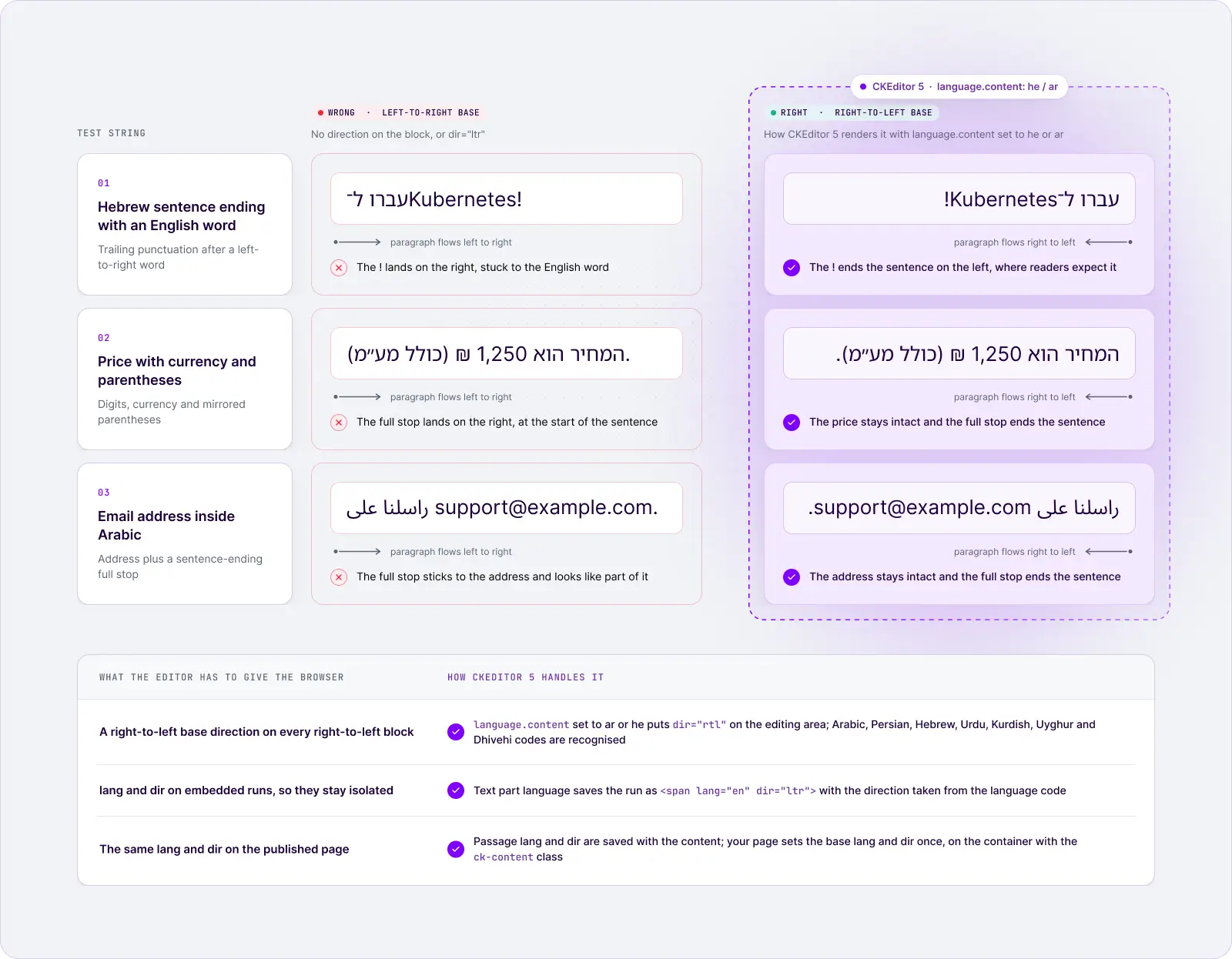
What users see: Unicode treats digits as weak characters and punctuation and spaces as neutral, so their position depends on their neighbours and on the base direction. Three failures show up in almost every product:
- A Hebrew sentence that ends with an English word and an exclamation mark, like עברנו ל־Kubernetes!, renders the ! on the wrong side when the paragraph’s base direction is wrong.
- Parentheses mirror in right-to-left text, so a price like 1,250 ₪ (כולל מע״מ) can come out with its brackets facing the wrong way when a run is misclassified.
- Phone numbers, email addresses and URLs such as support@example.com inside Arabic text can reorder their parts when they are not isolated.
What to require: a correct base direction on every block and language markup that isolates embedded runs, so the browser’s bidi algorithm has the right inputs.
Letter shaping and combining marks
What users see: Arabic letters join and change shape by position, and both Arabic harakat and Hebrew niqqud are combining marks stacked on a base letter. Backspace that removes a whole cluster when the user wanted one vowel mark, or the reverse, breaks trust immediately.
What to require: Backspace and Delete that behave as native users expect on vowelled text such as كَتَبَ, not only on plain consonants.
Lists, tables and embedded content
What users see: list markers stuck on the left, nested lists indenting the wrong way, “insert column left” adding a column on the right, cell navigation against the reading order, left-aligned image captions, and English code samples inside Hebrew text flipping their punctuation.
What to require: markers on the right with nesting that indents from the right, table commands and navigation that follow the reading direction, and embedded content that keeps its own direction. Enterprise documents are built from these structures, so give them their own test cases.
Content pasted from Word and other documents
What users see: a paragraph that was right-to-left in Word arrives left-to-right, a language tag disappears, or a mixed Hebrew and English run reorders once it loses its isolation. Word content often reaches the clipboard with inline styles but without the dir and lang information the editor needs.
What to require: paste that keeps language and structure, and a test for each of language, direction and structure separately.
Host-page CSS that fights the editor
What users see: the editor works in a sandbox and breaks inside the product. Global resets, utility classes or component-library styles (Bootstrap, Tailwind or Material UI themes, for example) override direction, text-align or flex-direction on the containers the editor renders into, so half the toolbar mirrors and the list markers don’t. The same editor can also behave differently inside an <html dir="rtl"> page and inside an LTR page that hosts one RTL editor.
What to require: editor styles that are scoped to the editor, and a host stylesheet that leaves the editor’s containers alone. Test the editor inside your real layout, in both page directions.
Paragraph direction in mixed documents
What users see: some documents alternate whole paragraphs, such as an Arabic policy with an English legal clause, or a Hebrew report with an English abstract. Each of those paragraphs needs its own base direction.
What to require: a clear answer to how the editor sets per-paragraph direction: automatically, by command, or through the document default. Treat it as a scenario to test explicitly with your own content.
Why your editor needs built-in RTL support
CSS can make your interface display from right to left, but it can’t handle everything that comes with editing in Arabic or Hebrew.
For example, CSS won’t fix a cursor that jumps to the wrong place or text that loses its formatting when pasted.
These issues need to be handled by the editor itself.
That’s why choosing a rich text editor with built-in RTL support matters. It saves your team from having to solve these problems on their own and helps ensure a better experience for users working in different languages.
Right-to-left text is one of the fastest ways global users surface editing complexity. CJK input through IME composition is another, and it lives in the same place: the editing engine, not the stylesheet.
| Criterion | CSS-only (direction: rtl on a container) | Editor-level configuration |
| What it controls | Layout: alignment, floats, margins | UI language and direction, content language and direction, passage markup |
| Lists, tables, embedded content | Depends on host stylesheet rules that break when the editor's markup changes | Handled by the editor's own features for the configured direction |
| Mixed-direction text | No language information; neutral characters resolve against whatever direction the container inherits | Base direction from the content language; marked passages carry their own lang and dir |
| Accessibility | No lang for screen readers or spell checkers | lang on the content and on marked passages (Language of Parts) |
| Paste and saved content | Direction and language are lost once content leaves the page | Passage language and direction are saved with the content |
| Upgrades | Patches break when editor class names or structure change | Configuration carries across upgrades |
| Caret and selection behaviour | Your team owns it, across three browser engines | The editor vendor owns it and re-tests it with each browser change |
For engineering managers, the last row is the one that matters. Owning RTL in-house means owning caret movement, selection, paste normalisation and structure-aware editing for Chrome, Firefox and Safari, and re-testing all of it whenever a browser changes behaviour, as Chromium’s caret intent shows. That is a permanent maintenance line, not a one-off project.
The same logic applies when you compare editors. Many modern editor frameworks handle right-to-left text inside the content, so “does it support RTL?” is the wrong question. The better question is how much of the finished experience ships with it. Headless frameworks leave the toolbar, dialogs, translations and the accessibility of that interface to your team by design. A complete editor ships those layers, so your team configures them instead of building and maintaining them.
Direction and language are separate signals
An editor that sets only one of them ships half the fix. dir decides reading order and alignment, at two levels: the base direction of a block, and the direction of an isolated run inside it. lang tells screen readers how to pronounce the text, spell checkers which dictionary to use, and browsers which fonts and typographic conventions to apply. A screen reader that meets Arabic text tagged as English reads it with English pronunciation rules. Persian, Urdu and Arabic share a script but use different digit forms and typographic conventions, and lang is how the browser knows which to apply.
Language of Parts (WCAG 3.1.2)
WCAG success criterion 3.1.2 Language of Parts is a Level AA requirement: the human language of each passage or phrase must be programmatically determinable, with exceptions for proper names, technical terms, words of indeterminate language and words that have become part of the surrounding language. For published content, the editor is where that markup gets created, which makes language marking an authoring-tool requirement, not only a template requirement. If accessibility compliance is part of your evaluation, our guide to an accessible rich text editor aligned with the EU Accessibility Act covers the wider picture.
How CKEditor 5 meets the RTL requirements of Arabic and Hebrew users
A rich text editor is right for Arabic and Hebrew users when it mirrors its own UI, keeps the content’s language and direction separate from the UI, marks the language and direction of any passage, and behaves predictably with mixed-direction text in lists, tables and paste. The table below turns those needs into a checklist you can use with any Arabic or Hebrew text editor, and shows how CKEditor 5 handles each one, with the documentation, demo, release note or source file that proves it.
✅ Built in means the capability ships in open-source CKEditor 5. Premium means it needs a premium feature. Test in your setup marks behaviour every team should confirm in its own integration, whichever editor it chooses.
| # | Requirement | Why your users notice | CKEditor 5 |
| 1 | Mirrored editor UI: toolbar, dropdowns, dialogs, keyboard navigation | An unmirrored toolbar is the first thing an Arabic user sees | ✅ Built in. The UI mirrors automatically for RTL languages, and has since 2019. Proof: UI language docs, v12.4.0 release, live Arabic editor |
| 2 | Professional Arabic and Hebrew UI translations | Machine-translated menus erode trust | ✅ Built in. 41 fully translated UI languages, 38 of them professional, including Arabic (ar) and Hebrew (he). Proof: translation list |
| 3 | Content language and direction independent of the UI | Operators often edit RTL content in an English UI | ✅ Built in. language.ui and language.content are set separately, and the content language drives direction, default alignment, screen readers and spell check. Proof: content language docs |
| 4 | Automatic RTL direction from the language code | Nobody should hand-maintain a list of RTL codes | ✅ Built in. Arabic, Persian, Hebrew, Urdu, Kurdish, Uyghur and Dhivehi codes switch the content to right-to-left. Proof: language.ts on GitHub |
| 5 | Alignment independent of direction | Centring a heading must not flip reading order | ✅ Built in. Default alignment follows the content language, and the alignment feature offers a 'right' option for RTL content. Proof: text alignment docs |
| 6 | Language and direction on any passage | Mixed-language sentences are the norm | ✅ Built in. Text part language wraps a passage in <span lang dir> and detects its direction from the language code. Proof: Text part language demo, v27.0.0 release |
| 7 | Accessible editing, including Language of Parts markup | Screen readers mispronounce unmarked passages | ✅ Built in. CKEditor 5 documents WCAG 2.2 A and AA and Section 508 conformance, and Text part language implements WCAG 3.1.2 Language of Parts; exceptions are listed in the VPAT. Proof: conformance docs, Accessibility Conformance Report |
| 8 | Several editors and frameworks, one configuration | Multi-tenant, bilingual and framework-based products | ✅ Built in. Language is set per editor instance, and the React, Angular and Vue components take the same configuration. Proof: internationalization demo (German, Arabic and Japanese editors on one page), React, Angular and Vue guides |
| 9 | Numbers, punctuation and URLs in mixed runs | Misplaced punctuation is the most visible bidi bug | ✅ Built in, then test. A correct base direction plus isolated passages give the browser's bidi algorithm the right inputs; confirm your own content with the test strings below. Proof: content language docs, Text part language |
| 10 | Lists and tables in RTL | Enterprise documents are structured | ✅ Built in, then test. Multi-level lists, nested tables and completed RTL fixes for table cell alignment, the table properties UI, grid keyboard navigation and column resize in Chrome. Proof: lists docs, tables docs, #6371, #6107, #12871, #14392 |
| 11 | Paste from Word keeps structure and language | Content arrives from Word first | ✅ Built in and Premium. Paste from Office (open source) keeps Word structure and formatting; Paste from Office Enhanced (premium) also carries Word's language formatting. Test direction on your own documents. Proof: Paste from Office, Paste from Office Enhanced |
| 12 | Export and collaboration on RTL documents | Output and co-editing must match what authors see | Premium, then test. Export to Word and PDF and real-time collaboration are available; include RTL documents and remote cursors in your acceptance tests. Proof: Export to Word, Export to PDF, collaboration features |
| 13 | Per-paragraph direction in mixed documents | Alternating Arabic and English paragraphs | Partly built in. The document direction comes from the content language, and any passage can carry its own through Text part language; automatic per-paragraph switching is an open, public feature request. Proof: #2008 |
| 14 | Caret and selection across direction runs | Arrow keys and selection are where users feel bugs | Test in your setup. Caret movement depends on each browser engine, so test on Chrome, Firefox, Safari and mobile, and again after Chromium's visual caret change. Proof: RTL issues tracked publicly under domain:rtl |
| 15 | RTL maintained over time | Browsers and your product keep changing | Maintained since 2019. Completed RTL fixes from 2020 to 2024, with open items listed publicly. Proof: domain:rtl label |
Every proof link opens a doc page, a demo, a release note or a public issue, so your evaluation rests on things you can check rather than on a vendor’s checkbox, and you see the open items before you sign, not after launch. That is the difference between an editor that lists RTL as a feature and one that ships the finished right-to-left experience, built for global users. For the wider evaluation, see the internationalization demo in our use-case guide and our rich text editor guide for enterprises.
What stays with your application
The editor owns everything between the keystroke and the saved content. Your application still owns the publishing side:
- The container that displays published content. CKEditor’s content styles are scoped to the ck-content class, so add that class to the element that renders saved content, as the styling guide explains, and set the same lang and dir on it as the editor’s content language.
- Host styles. Keep global resets and component-library rules away from the editor’s containers.
- Everything outside the editor. Your own strings, date and number formats, and the translation workflow for the rest of the product.
- The regression suite. The test plan below, run by a named owner.
How to test RTL editing before launch
A useful RTL test plan is small and repeatable: a dozen real Arabic and Hebrew strings with embedded English, numbers, punctuation and URLs, run on every browser and device you support, and re-run whenever the browser or the editor changes.
Test strings that expose bidirectional bugs
Keep these strings in your regression suite. Type each one, don’t only paste it, because typing exercises the input path your users actually take.
| String or content | What it exposes | Expected result |
| جرّب Acme Cloud 3 على https://example.com اليوم. | English name, number and URL inside Arabic | The name and URL read left to right, the sentence reads right to left, the full stop sits at the far left |
| עברנו ל־Kubernetes! | Trailing punctuation after an LTR word in an RTL sentence | ! stays at the end of the sentence, on the left |
| המחיר הוא 1,250 ₪ (כולל מע״מ). | Digits, currency and mirrored parentheses | Number stays intact, brackets face the right way |
| התקשרו ל־+1 (555) 010-2030 עד 17:00. | Phone number and time inside Hebrew | Digits and separators stay in order |
| راسلنا على support@example.com. | Email address inside Arabic | Address stays intact and clickable |
| كَتَبَ | Arabic combining marks | Backspace removes what the user expects, shaping stays correct |
| The button reads "حفظ كملف PDF" in the Arabic UI. | RTL quote with an LTR term, inside English | The quote reads right to left, "PDF" stays in place, the English sentence is unaffected |
| A three-item numbered list in Hebrew (ראשון, שני, שלישי), with one nested item | List markers and indentation | Numbers on the right, nesting indents from the right |
| A 3x3 table with Arabic headers | Cell alignment, column insert, cell navigation | Text right-aligned, "insert column" lands where the user expects, Tab follows reading order |
| An image with an Arabic caption, and an English code sample inside a Hebrew paragraph | Embedded content direction | Caption aligns right; the code keeps left-to-right order and punctuation |
| A centred Arabic heading | Alignment vs direction | The heading is centred and still reads right to left |
For each string, run the same actions: click and arrow through the direction boundary, Shift-select across it, apply bold, press Backspace from the end, copy and paste it back, then save and reload. In the saved HTML, check that passages you marked keep their lang and dir, and check that the page that displays the content applies the base language and direction. The published page is what readers see, so it is the only result that counts.
Browser, OS and device coverage
Cover Chrome, Firefox and Safari on desktop, because they disagree about caret movement today. Add iOS Safari and Android Chrome with the native Arabic and Hebrew keyboards, plus any in-app WebView you ship, since mobile keyboards produce different input events from desktop ones. Finish with one screen reader pass on a Language of Parts sample: NVDA with Chrome or Firefox on Windows, VoiceOver with Safari on macOS or iOS. Automated tools can confirm that lang attributes exist, but only a listening pass confirms the pronunciation switches, so this step complements automated accessibility testing rather than replacing it.
Native speakers and regression triggers
Before launch, give the editor to at least one native Arabic or Hebrew speaker for an hour of real writing: mixed English terms, a list, a table and a paste from Word. They find in minutes what a script misses.
After launch, RTL bugs come back through changes you don’t control. Re-run the suite on every editor upgrade, on major browser releases (with Chromium’s visual caret change at the top of the watch list), whenever you add a plugin that handles keys or paste, and whenever you add a new locale. Give the suite a named owner, usually QA or the PM who owns internationalization.
For the full pre-launch matrix across RTL, CJK input, complex scripts and paste, use our global editing readiness checklist.
Final thoughts
RTL support is three layers: the interface, the content and every mixed-language passage. The first layer is what design review sees. The other two are what your Arabic and Hebrew users feel every time they type an English product name into a sentence, and they are where global users surface complexity first.
Before you choose an editor, run the five-minute test: in the UI language your users actually use, type an Arabic sentence that contains an English product name, a number and a URL. Arrow through it, select across it, delete from the end, save, reload and look at the published page. If any step surprises you, it will surprise your users too.
And keep the test strings in your regression suite. The browsers are still changing how they move the caret through bidirectional text, so the editor you pick should be one whose right-to-left behaviour is configured, not patched, and maintained in the open.
Try it now: type in the live Arabic editor, then start with CKEditor for free. Evaluating for an enterprise rollout? Schedule a meeting with our team.
RTL support: frequently asked questions
What does RTL stand for in software?
RTL stands for right-to-left: scripts that are written and read from right to left, such as Arabic, Hebrew, Persian and Urdu. In software, "RTL support" means the product lays out, edits, stores and publishes that text correctly, including when it is mixed with left-to-right text such as English names, numbers and URLs.
Copy linkLink copiedIs RTL support included in open-source CKEditor 5?
Yes. The mirrored RTL interface, the separate content language setting and Text part language are all part of open-source CKEditor 5, available under the GPL or a commercial license. Paste from Office Enhanced, which also carries Word's language formatting into the editor, is a premium feature.
Copy linkLink copiedWhich right-to-left languages does CKEditor 5 support?
The interface ships professional Arabic and Hebrew translations among its official languages, and community translations cover more. For content, CKEditor 5 switches to right-to-left automatically for Arabic, Persian, Hebrew, Urdu, Kurdish, Uyghur and Dhivehi language codes, and Text part language can mark any passage in any language you configure.
Copy linkLink copiedDo you need a separate editor build for Arabic or Hebrew?
No. You load the translation file for the UI language you need, from npm or the CDN, and set the language option. The same build and the same plugins serve your left-to-right and right-to-left users, and the React, Angular and Vue integrations pass the same configuration through, so there is no second editor to maintain.
Copy linkLink copiedCan one document mix Arabic and English paragraphs?
Yes, with one caveat. The document has a base language and direction, and any passage inside it can carry its own language and direction through Text part language. Automatic per-paragraph direction switching is tracked publicly in issue #2008, so if your users alternate whole paragraphs, test that exact scenario before launch.
Copy linkLink copiedWhat should you re-test when Chrome switches to visual caret movement?
Re-test arrow keys across direction boundaries, Shift+arrow selection, word-by-word jumps (Ctrl or Option plus arrow), Home and End, and any custom key handling in your plugins. If you use real-time collaboration, check that remote cursors and selections still land where each user sees them.
Copy linkLink copiedTags: