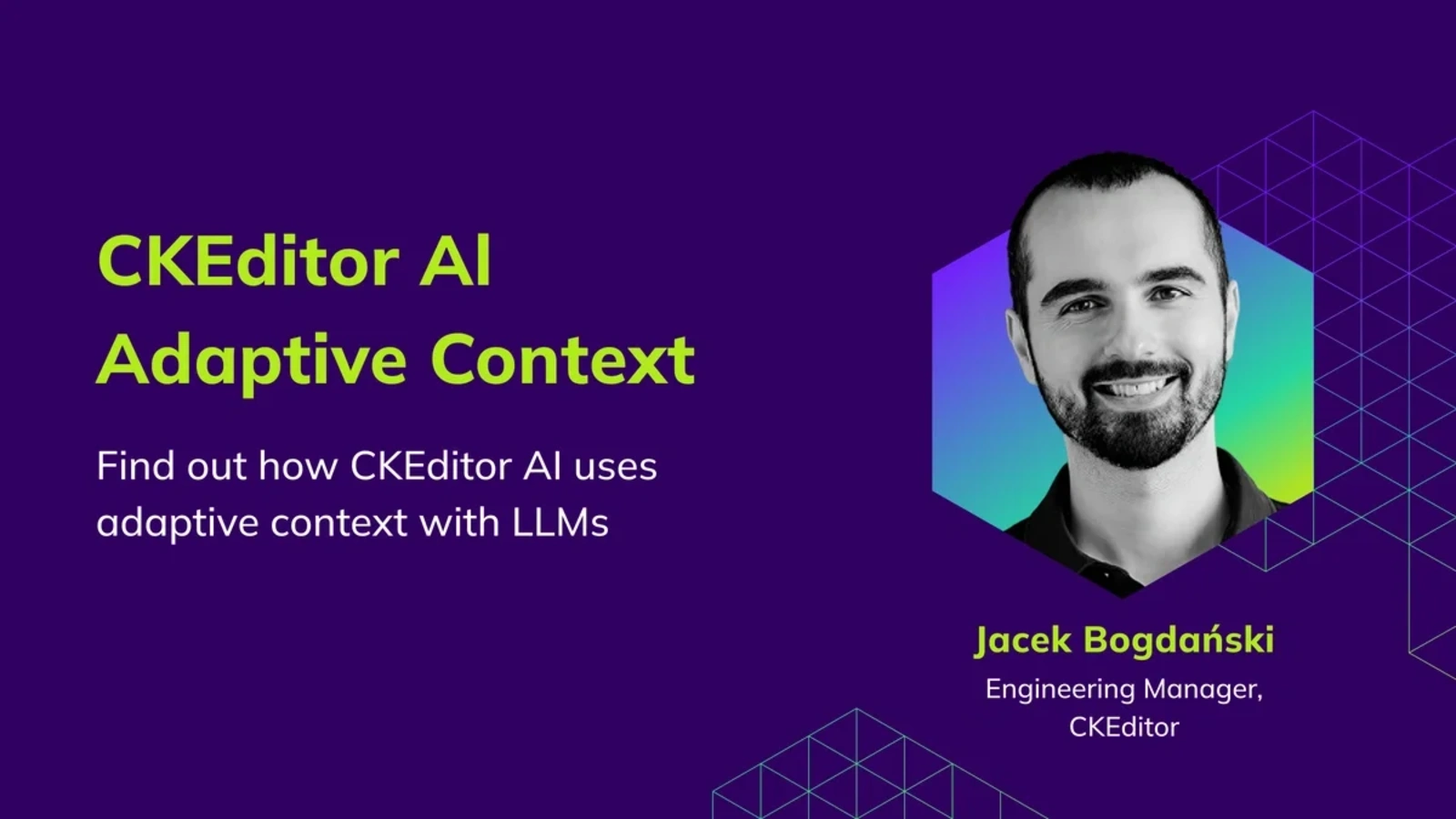
How Adaptive Context Works in CKEditor AI
8min read
|Adaptive context is the approach CKEditor AI uses to send the language model only the part of the document that’s relevant to each request, such as the selection, the surrounding section, or a referenced clause, rather than packaging the entire file every time. This matters because language models slow down, cost more, and lose accuracy as the input grows. By trimming each request to what’s actually needed, CKEditor AI responds faster, costs less, and produces more accurate edits, whether you’re tweaking a subject line or restructuring a chapter.
This principle runs through every part of the service: AI Chat, AI Review, AI Translate, and AI Quick Actions all rely on it. The speed isn’t because we picked a faster model. It’s because we engineered the system to fetch the right context at the right time.
Why your AI doesn’t need to read the whole document
Imagine you’re editing a 30-page contract. On page 12, there’s a sentence that needs rewording or a clause that’s too aggressive. You highlight it, open CKEditor AI, and type, “make this more collaborative in tone.”
The request feels small to the user, but behind the scenes, many AI integrations treat it like a full-document task. The simplest way to build an AI writing integration is to take the entire document, all 50,000 characters of it, package it up, and send it to the language model. Every single time. This happens even when the AI only needs to look at one sentence and its surroundings. That’s the default approach when context management isn’t a design priority.
The problem with using general AI chat tools for large documents is not just that they are slower, but that they put the burden of context management on the user. CKEditor AI is designed differently: it identifies what the model actually needs, so teams get faster, more relevant responses without manually packaging the document for every prompt.
The hidden cost of analyzing the whole document
When an AI assistant sends the full document on every request, three things go wrong.
Responses slow down. Language models process text token by token. The more you feed in, the longer it takes to produce a response. You won’t notice this when writing a short email. On a 40-page report, the delay is obvious, and it compounds across a multi-turn conversation where each follow-up re-transmits the same content.
Costs add up. LLM APIs charge per token, both input and output. If your team makes dozens of AI requests per document per day, and each request includes the whole document, you’re paying to re-read the same content over and over. For organizations with heavy editorial workflows, this becomes a real line item. A single paragraph-level edit in a large document might cost 10–20x more in tokens than it needs to.
Quality can actually suffer. You’d think more context would always produce better results. But language models have a well-documented attention pattern: they focus most on the beginning and end of their input, while content in the middle receives less weight. This phenomenon, sometimes called “lost in the middle,” means that a tightly scoped, relevant excerpt frequently outperforms the full document, especially when your edit lives on page 12 of 30.
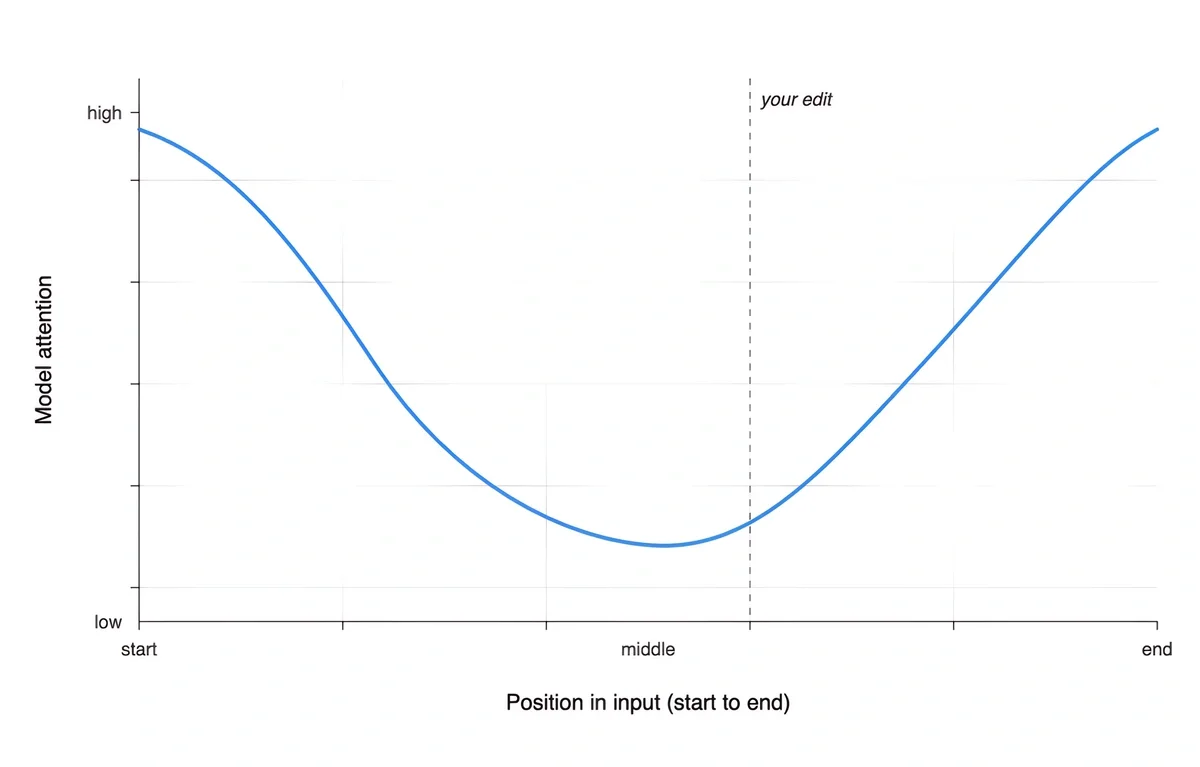
Most AI integrations in editors today take the straightforward path: send the document, attach the user’s instruction, call the API, and return the result. It works, but it doesn’t work well at scale.
How CKEditor AI handles context differently
We started with a question that shaped the entire design: what does the AI actually need to know at the moment of interacting with the document?
The answer is rarely “everything.” A request to soften a single clause doesn’t need the model to re-read fifty pages of legalese. A question about an introduction doesn’t need a conclusion. CKEditor AI takes that seriously: rather than treating every request the same way, it adapts what the model sees to the work in front of the user: the size of the document, what’s selected, and what’s being asked.
The mechanics shift behind the scenes; the experience stays smooth.
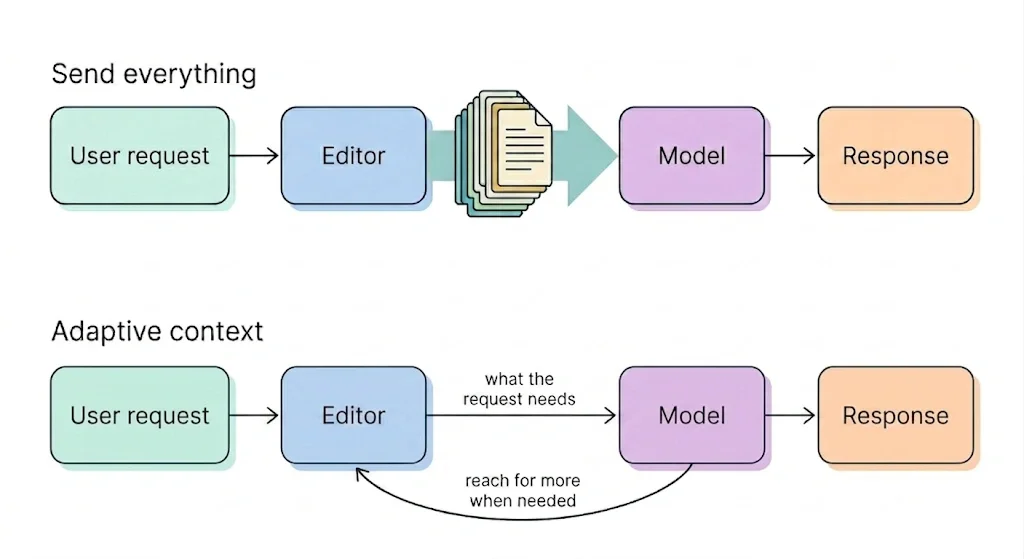
What that looks like in practice:
-
Selections actually matter. When a user highlights text in the editor, the AI treats that as a clear signal of intent. The model focuses on what was selected, not the rest of the document. Highlight a single paragraph and the AI works on that paragraph, not on forty surrounding pages it was never asked about.
-
The AI scales with the document. Short documents are handled in a simple way, because there’s nothing to optimize. Longer documents are handled with more care: the model gets what it needs to do the job well without being asked to wade through tens of thousands of characters that have nothing to do with the request. The experience feels the same on a one-page email and a hundred-page manual.
-
Nothing is permanently out of reach. Starting focused doesn’t mean cutting the model off. When a request genuinely depends on something elsewhere in the document, such as a cross-reference, a related section, or a defined term used five chapters earlier, CKEditor AI has a way to bring that content in. The user shouldn’t have to copy and paste pieces of their document into a prompt to get a good answer.
-
This isn’t truncation. Some tools trim documents to fit a context window, such as the first 5,000 characters or the first and last pages. That’s a blunt instrument that breaks down on real-world content. CKEditor AI’s approach is adaptive: the system understands what matters for each request and gives the model precisely the context it needs.
What this means when you’re working with large documents
The mechanics are invisible to you. What you notice are the effects.
-
Faster responses with long documents. Requests that involve a highlighted paragraph in a lengthy report come back noticeably quicker than they would if the system shipped the full document each time. The difference is most dramatic on documents that run to several thousand words: exactly where simplistic approaches start to struggle.
-
Longer conversations with large documents. Every message in a conversation consumes part of the model’s context window. When the full document isn’t included with every exchange, the window isn’t consumed as quickly. That means users can have more back-and-forth with the AI, such as iterating on tone, asking follow-up questions, or refining edits, before hitting model limits. On large documents, this can mean the difference between a conversation that runs dry after three messages and one that sustains a dozen.
-
More precise edits. When the model’s attention is focused on the content that actually matters, the output is more accurate. You run into fewer cases where the AI misunderstands the intent because of unrelated content 20 pages away. Because the model can read additional sections on demand when the task requires cross-referencing, precision doesn’t come at the cost of awareness.
-
Consistent behavior from one page to a hundred. Someone working on a short blog post and someone working on a 100-page technical manual both get a smooth experience. The system scales its approach to the document automatically: no configuration, no toggles, and no “optimize for long documents” checkbox.
-
Lower operational costs. If you’re running CKEditor AI across a full organization or customer base, the token savings compound. A request against a highlighted paragraph in a large document might send a few thousand characters to the model instead of tens of thousands. Multiply that difference by every interaction, every user, every day, and it becomes a meaningful reduction in API spend.
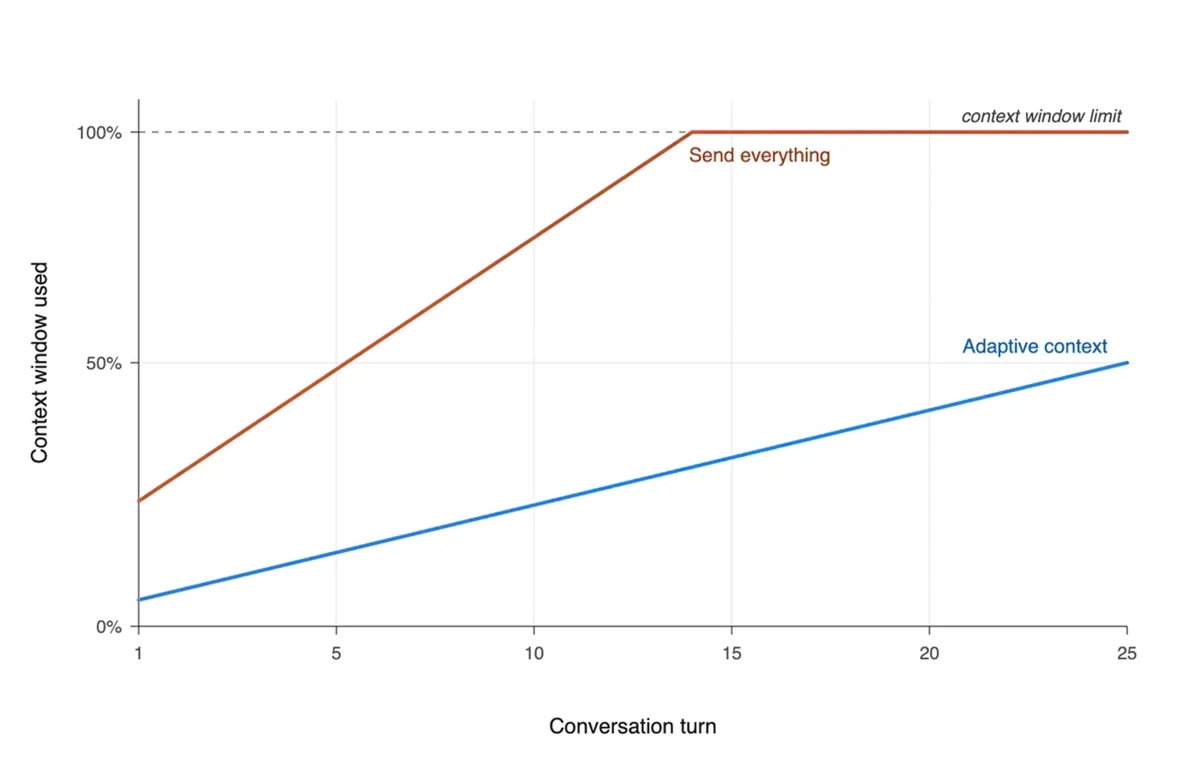
The clearest place to see this difference is in how a conversation evolves over time. Every turn consumes part of the model’s context window, and a turn that re-ships the whole document consumes far more of it than one that sends only what’s needed. Across a working session, that adds up to a very different ceiling.
Working across multiple documents
Real editing workflows don’t always involve a single file. A legal team might need the AI to reference a master agreement while editing an amendment. A technical writer might ask the AI to align terminology across several chapters.
The same adaptive approach extends to multi-document workflows. CKEditor AI tracks which document is which, scales each one according to its size, and can reference across them when the task requires it. A request like “make sure this section doesn’t conflict with the terms in the other document” gets handled directly, without forcing the user to copy and paste documents into the prompt to keep the AI in the loop.
Understanding intent, not just content
Context management isn’t only about what text to send. It’s also about understanding what the user is trying to do.
Before the CKEditor AI responds, it figures out what’s actually being asked for: a question about the content, an edit, or a structural change. The system shapes its response around that, with a clear answer when the user is asking or a precise edit when the user is editing, without the overhead of treating every interaction the same way.
The same understanding handles multilingual content correctly. If a user types an English instruction while editing a French document, the CKEditor AI replies in English and edits in French. The chat reply and the document edits track separate languages automatically — no mode switch and no manual configuration. Most AI integrations don’t separate the two, which is why responses sometimes drift back to the wrong language. CKEditor AI keeps them apart by design.
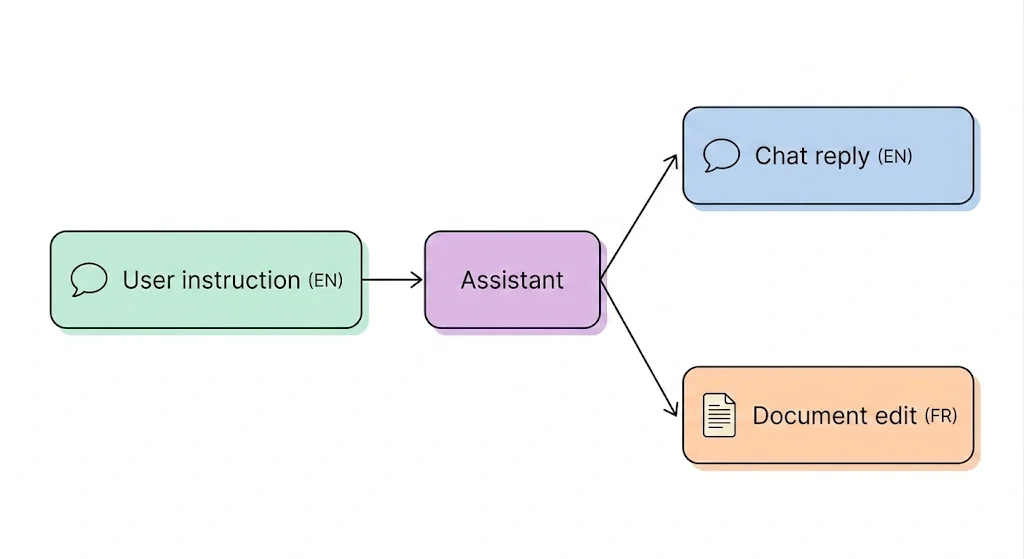
Multilingual handling is one example of a wider pattern. The same principle (to pay attention to what the request actually is, not just what it contains) shapes every part of how CKEditor AI manages context. Get the framing right, and the model can spend its effort on the substance, not on guessing what you meant.
Questions to ask when evaluating AI writing tools
Not every AI-powered editor has solved this problem. Some haven’t encountered it yet because their customers work with short-form content. Others have decided that raw model power will compensate: send everything and use a model with a bigger context window.
Bigger windows help, but they don’t eliminate the problem. A 200,000-token context window still processes more slowly and costs more when filled with irrelevant content. The “lost in the middle” attention pattern persists regardless of window size.
If you’re evaluating solutions for your team, these questions are worth raising:
What happens when the document is 50 pages long? Does the system still send the full content on every request? How does response time change as documents grow?
How does the system use selections? When a user highlights a specific paragraph, does the AI receive targeted context, or does it still process the entire document?
Can the AI access content on demand? If the model needs information from a section that wasn’t included in the initial context, can it retrieve it or is it limited to what was sent upfront?
How does it handle multiple documents? Can the AI reference across documents without loading all of them fully into context?
Does it understand user intent? Does the system differentiate between a question and an edit request, or does it treat every interaction the same way?
These are the kind of infrastructure decisions that separate tools that work in a PoC scenario from tools that work in production.
Try it for yourself
Solving context handling for large documents is not a glamorous problem, but it’s a real one, and getting it right makes a meaningful difference to the teams who work with long-form content every day. The result is AI that feels fast, focused, and reliable whether you’re editing a single paragraph or navigating a hundred-page document.
If your organization works with large documents and you want to see how CKEditor AI handles context in practice, we’d love for you to try it. Get in touch with our team or explore the documentation to see what’s possible.
Want to see it in action? Explore CKEditor AI features or talk to our team about how it fits your workflow.
Tags: