What actually happens to your content when AI edits it: data flow, training, retention and residency
18min read
|Key takeaways
- An AI edit sends the document, not just a prompt: the selected or full content, attached files and referenced pages reach the AI service and a model provider.
- Focus on these for every piece of content touched by AI:
- Who receives the content with the context attached
- Where it is stored and processed
- How long it is kept
- Whether it trains anything
- With CKEditor AI SaaS, content is stored in your US or EU region but processed by model providers in the US, kept for 12 months after last use, and not used to train AI models.
- You don't have to open your network to anyone.
- On SaaS, your network never connects to a model provider directly.
- On-premises, no CKEditor host connects in, and with a model you host, content stays inside your perimeter.
- Give your customers' security team a five-part pack: the data-flow diagram, subprocessors, storage and processing location, retention, and the training and staff-access rules.
Ask an AI vendor where your content goes and you often get a SOC 2 badge, GDPR compliance, encryption at rest. A security reviewer needs a map. One click on an AI button in a rich text editor can send a document to a model provider, a moderation service and a search provider, then store the conversation for months. This AI data security guide follows one AI edit through every hop, using CKEditor AI’s published data flow as the worked example, with a checklist for any vendor.
Ask four questions at every stage
AI data security is the protection of the content an AI feature reads and writes, from the moment it leaves the user’s browser until the last copy is deleted. Joint guidance from CISA, the NSA and the FBI, published in May 2025, covers the data used to train AI systems and the data used to operate them. Embedding someone else’s AI in your product is the operating case: you don’t control the model, so you need to know where your content travels and what happens to it at each stop.
Four questions cover every stop:
- Who receives the content? The vendor, its subprocessors, the model provider, and any search or fetch service.
- Where is it stored, and where is it processed? These are two separate answers, and they often differ.
- How long is it kept? Conversations, backups and traces can each run on their own clock.
- Does it train a model, and who else can read it? Training use, staff access for debugging, and separation between customers.
Behind the four questions sit six risks that security reviewers check for when AI runs inside an editor:
- Third-party exposure: the document reaches companies you have no contract with.
- Processing outside your region: a model works on the content in a country your customers didn’t agree to.
- Copies with no end date: conversations, backups and traces outlive the document they came from.
- Training and staff access: content trains a model, or people at the vendor can read it.
- Leakage across customers: one tenant’s content surfaces in another tenant’s results.
- Instructions hidden in documents: a file or web page tells the model to ignore its rules (prompt injection).
The answers depend on how the AI runs, so this guide follows three lanes throughout:
- SaaS: the vendor runs the AI service and calls the model providers for you.
- On-premises with your provider: you run the AI service and connect it to a model provider under your own contract.
- On-premises with your own model: you run the AI service and the model.
Defending the model itself against prompt injection belongs to AI security in the wider sense; this guide is about where the data goes. The same map is the case for embedded AI over copying documents into external chat tools, the habit often called shadow AI: in such case an AI feature inside the editor has a data path you can document, and a copy-paste habit does not.
For the wider control model this perimeter belongs to, see our piece on AI governance for document editing.
Trace one AI edit from the editor to the model
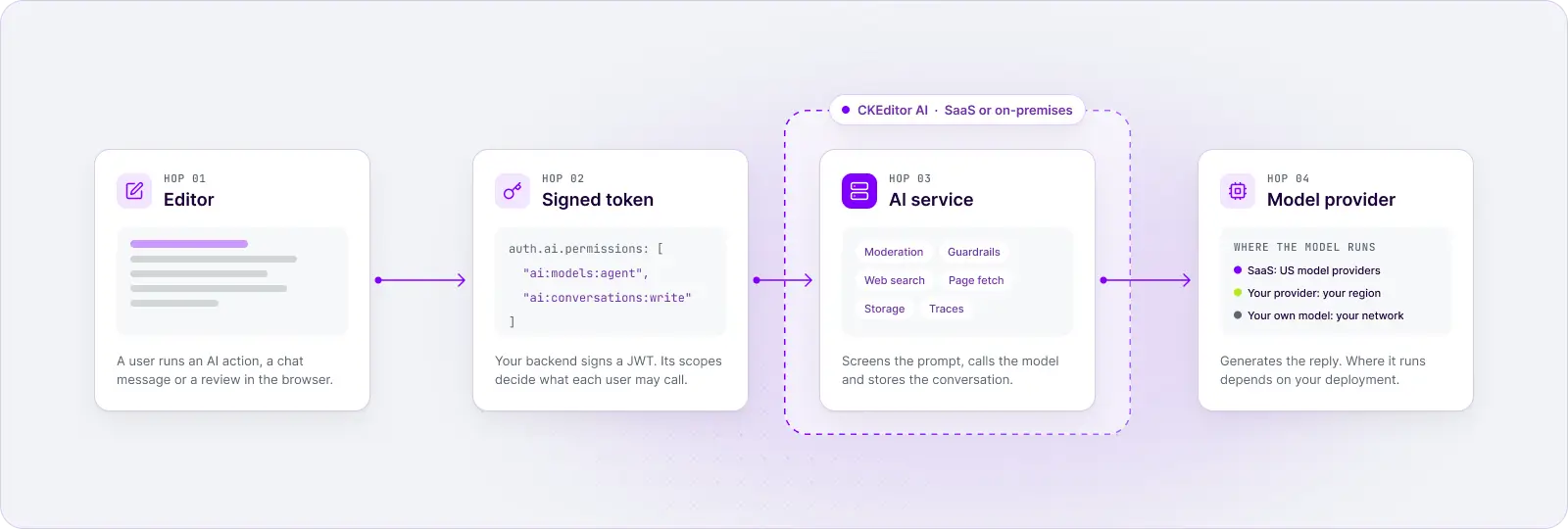
One AI edit takes four core steps, and the AI service makes side calls along the way. Each hop has a different recipient. This is the path in CKEditor AI, which documents every stage publicly:
- Editor: a user runs an AI action, a chat message or a review in the browser or programmatically.
- Signed token: the editor gets a JWT from your backend. Its auth.ai.permissions claim decides which features, models and web tools that user may call.
- AI service: the request reaches CKEditor Cloud Services in your environment's region on SaaS, or the same service you run yourself on-premises.
- Model provider: the service calls the model to generate the reply, which returns to the editor.
Around the model hop, the AI service makes four kinds of side calls:
- Moderation and guardrails: moderation screens the prompt for unsafe material, and guardrails can inspect untrusted input for prompt injection.
- Web search, page fetch, hooks, MCP tools, and MCP resources in contexts: only when a request needs them. MCP tools are available both as a SaaS and on-premises option, described in MCP support in CKEditor AI.
- Storage: the service stores the conversation and its files, encrypted.
- Traces: a debugging setting on SaaS, your own collector on-premises.
What travels is more than a prompt. The CKEditor AI data flow lists “the prompts your users write, the documents they attach, the files they upload, and the web resources they reference”. Treat every hop as receiving document content unless the vendor says otherwise.
The same path with the recipient in each lane, core stages first:
| Stage | What travels | SaaS recipient | On-premises recipient |
| Token | User identity and permission scopes | Your backend | Your backend |
| AI service | Prompt, document, files, referenced URLs | CKEditor Cloud Services on AWS, in your region | Your deployment |
| Model | Prompt and attached content | OpenAI, Anthropic or Google, in the US | The provider you configure, or your own model |
| Moderation | Prompt, uploaded images | OpenAI moderation API | OpenAI moderation API by default, your own endpoint, or off |
| Web search | The search query the model builds | Exa | Your web search gateway, if enabled |
| Web fetch | The URL the user referenced | Firecrawl | Your web resources gateway, if enabled |
| Storage | Conversation, documents, files | CKEditor Cloud Services, encrypted | Your database and file storage, encrypted |
| Traces | Prompts, replies, attached content | CKEditor staff, only while the debugging setting is on | Your database, enabled by default, encrypted if enabled and Langfuse (or other OpenTelemetry-compatible tool) instance, if enabled |
Know which subprocessors receive your content
On CKEditor AI SaaS, six named subprocessors can receive content, each for a specific reason and only in specific cases. On-premises, only the providers you configure receive it.
On SaaS, the service calls model providers from CKEditor’s infrastructure, “so your network never opens a connection to a model provider”. You write fewer egress rules and rely on the subprocessor list instead, which makes the CKEditor AI subprocessors and model providers table the format to ask every vendor for:
| Subprocessor | What reaches it | When |
| Amazon Web Services | The service and everything it stores, inside your environment's region | Always |
| OpenAI, Anthropic, Google | The prompt and the content attached to it, to generate a reply | When a request uses that provider's model |
| OpenAI (moderation API) | The prompt, uploaded image or context-library content being checked | On every AI call, and on checked uploads |
| Exa | The search query the model builds from the conversation | Only when the token allows web search and the request asks for it |
| Firecrawl | The URL your user referenced, which Firecrawl then fetches | Only when a request attaches a web resource |
Five external parties can look like a lot. The useful test is whether a vendor can produce a table like this at all, with what each party receives and when. Without one, a security review has nothing to check the integration against.
You can also shrink the list. With CKEditor’s AI features, the list is something you configure per user: the token your backend signs decides whether a request may use web search, attach a URL, or call a given provider or model, so leaving a scope out keeps that subprocessor off the path. This token from the CKEditor AI permissions docs allows chat on the Agent model with PDF and DOCX attachments, and nothing else: no actions, no reviews, no images and no URLs.
{
  "auth": {
    "ai": {
      "permissions": [
        "ai:conversations:read",
        "ai:conversations:write",
        "ai:models:agent",
        "ai:conversations:context:files:pdf",
        "ai:conversations:context:files:docx"
      ]
    }
  }
}
Moderation is the one hop you can’t remove on SaaS: content moderation runs in every environment and cannot be turned off.
Two more points belong in any LLM data security review of a SaaS lane:
- The provider contract isn’t yours. On SaaS, calls go to OpenAI, Anthropic and Google through CKEditor’s accounts and keys, “with no provider contract on your side”, so the provider relationship sits with the vendor.
- The model can change unless you pin it. The Agent model (agent-1) lets the service pick the model, move to a better one when it becomes available, and fall back to the next one if a model is down, the same thinking behind LLM model fallback.
Separate where content is stored from where it is processed
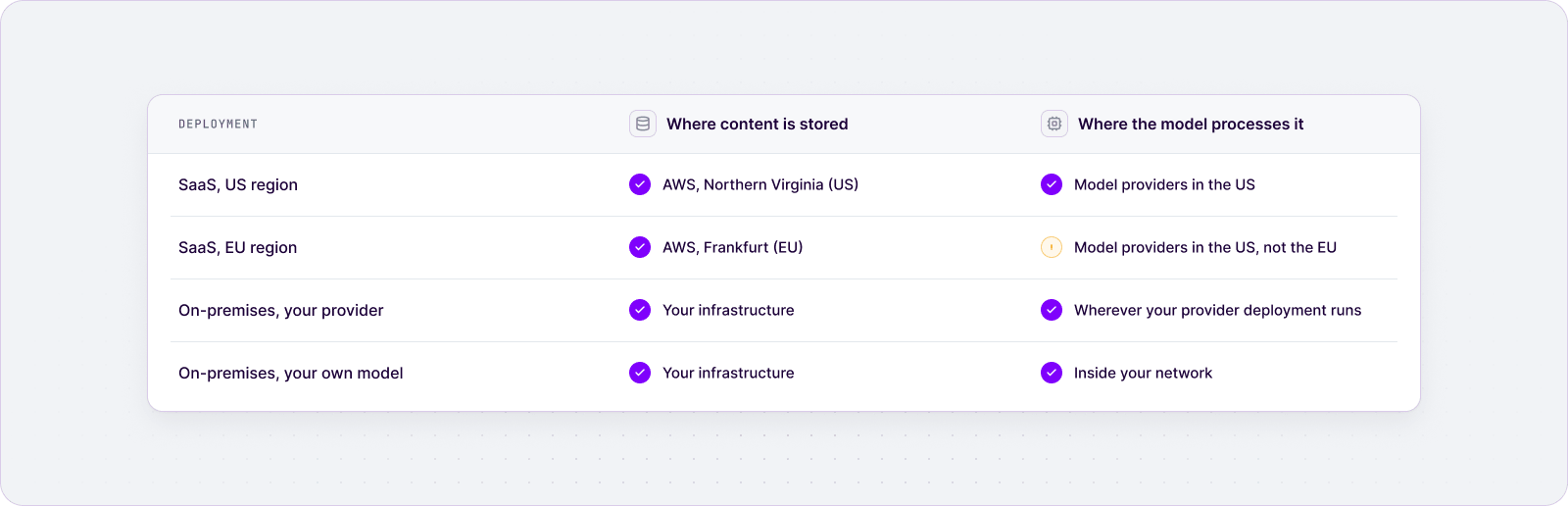
Data residency and processing location are two different answers. On CKEditor AI SaaS, an EU environment keeps stored data in the EU, but the model still processes the prompt in the US.
Three terms are worth keeping apart in any review:
- Data residency is where content rests: the database and file storage.
- Processing location is where the model runs inference on the prompt.
- Data sovereignty is whose law governs the data, which follows both of the above and every provider involved.
On SaaS, you choose a US or an EU region, hosted on AWS in Northern Virginia or Frankfurt. The region sets where data is stored. The SaaS regions and data processing docs are explicit: “Prompts and their attachments go to model providers in the US from both regions.” Environments in different regions are fully isolated, with no cross-region communication.
For an AI data residency review, that means SaaS meets a storage requirement, not a processing requirement. Take a platform whose customers require that content never leaves the EU or Switzerland, including while a model works on it. An EU environment gets the storage half right and the processing half wrong, and the honest answer is to say so before the reviewer finds it.
The same distinction drives AI data privacy reviews. Under the GDPR, making EU personal data available to an organisation outside the European Economic Area is a transfer, and it has to meet the conditions in Chapter V, such as an adequacy decision or appropriate safeguards, as the EDPB guidance on international transfers explains. If documents in your editor hold personal data, check that the vendor’s data processing agreement covers the model providers that process it.
The two on-premises lanes change the processing answer:
- With your provider, processing happens where that provider runs: an Azure OpenAI resource, an Amazon Bedrock region or a Google Vertex AI project you choose, within what that provider offers in each region.
- With your own model, the CKEditor AI LLM processing docs put it in one line: “With a model you host yourself, the data stays inside your network.”
Check how long AI content is kept
CKEditor AI keeps a conversation for 12 months after it was last opened, on SaaS. With on-premises, you can remove the conversation history with an API call, since it’s by default stored within the clients infrastructure. That is a clear, documented answer, and it also means the product is not zero data retention. Ask every vendor for the period, what starts the clock, and how to delete early.
The CKEditor AI storage and retention rules:
- A conversation, with its messages, documents, files and web resources, is deleted 12 months after a user last opened it.
- Actions and reviews are deleted 12 months after they ran.
- The period is fixed. To remove a conversation earlier, delete it through the API.
- The context library has no retention period: contexts, prompts and files stay until you delete them.
While content is stored, the service encrypts it with AES-256 under a key that belongs to your environment. That covers messages, prompts, documents, context-library content and uploaded files. Cloud Services enforces TLS 1.2+ in transit. On-premises deployments encrypt the same fields with the same algorithm, so data at rest in your own database and file storage is ciphertext. Cloud Services also keeps encrypted point-in-time recovery backups for up to 7 days, stored in multiple AWS locations.
Zero data retention (ZDR) is an arrangement in which a model provider does not store prompts or outputs once it has returned the response. It is a provider-side term: a product that keeps conversation history can’t be ZDR at the application layer, because the history is the feature. On-premises with your own provider, the provider’s retention terms are part of your contract, so you negotiate them directly.
The retention questions to put to any vendor:
- What is the period, and what starts the clock?
- What sits outside it (context libraries, backups, traces), and does on-demand deletion reach every copy?
Check training, staff access and tenant isolation
“We do not use customer data to train AI models.” That sentence in the CKEditor AI training policy settles the training question. Two questions remain: who can read your content when something breaks, and how one customer’s content is kept apart from another’s.
Start with staff access. A setting in the CKEditor Customer Portal, which you control, lets CKEditor inspect LLM traces for debugging. While it is on, authorized CKEditor staff may read selected interactions: the prompts, the responses and the content attached to them. Traces are turned on by default, but you can always deactivate them.
An on-premises deployment has no such setting. The service sends traces only to the database you own inside your infrastructure and to the OpenTelemetry collector or Langfuse instance you configure, and no prompt or response reaches CKEditor Cloud Services.
Then isolation, which is where most AI data leakage questions land. On SaaS, each environment is a separate tenant with its own access key, its own tokens and its own encryption key, and the content of one environment cannot be decrypted with another environment’s key. Inside an environment, a user sees only the conversations they created. Because customer data isn’t used for training, there is no shared model learning through which one customer’s content could surface in another customer’s results.
CKEditor Cloud Services has held SOC 2 Type 2 certification, which is the report to request when you need evidence that access controls like these operate in practice. Its Security and Privacy Overview adds two operational answers: audit logs of all actions taken in production environments, and an incident response plan with a post-mortem after each incident.
What to ask any vendor here:
- Is the no-training commitment written into the contract, not only the docs?
- Does the data processing agreement list the subprocessors, and how are changes to that list announced?
- When can staff read customer content, who switches that on, and is it logged?
- How are tenants separated, both in storage and in the model layer?
Audit what still leaves an on-premises deployment
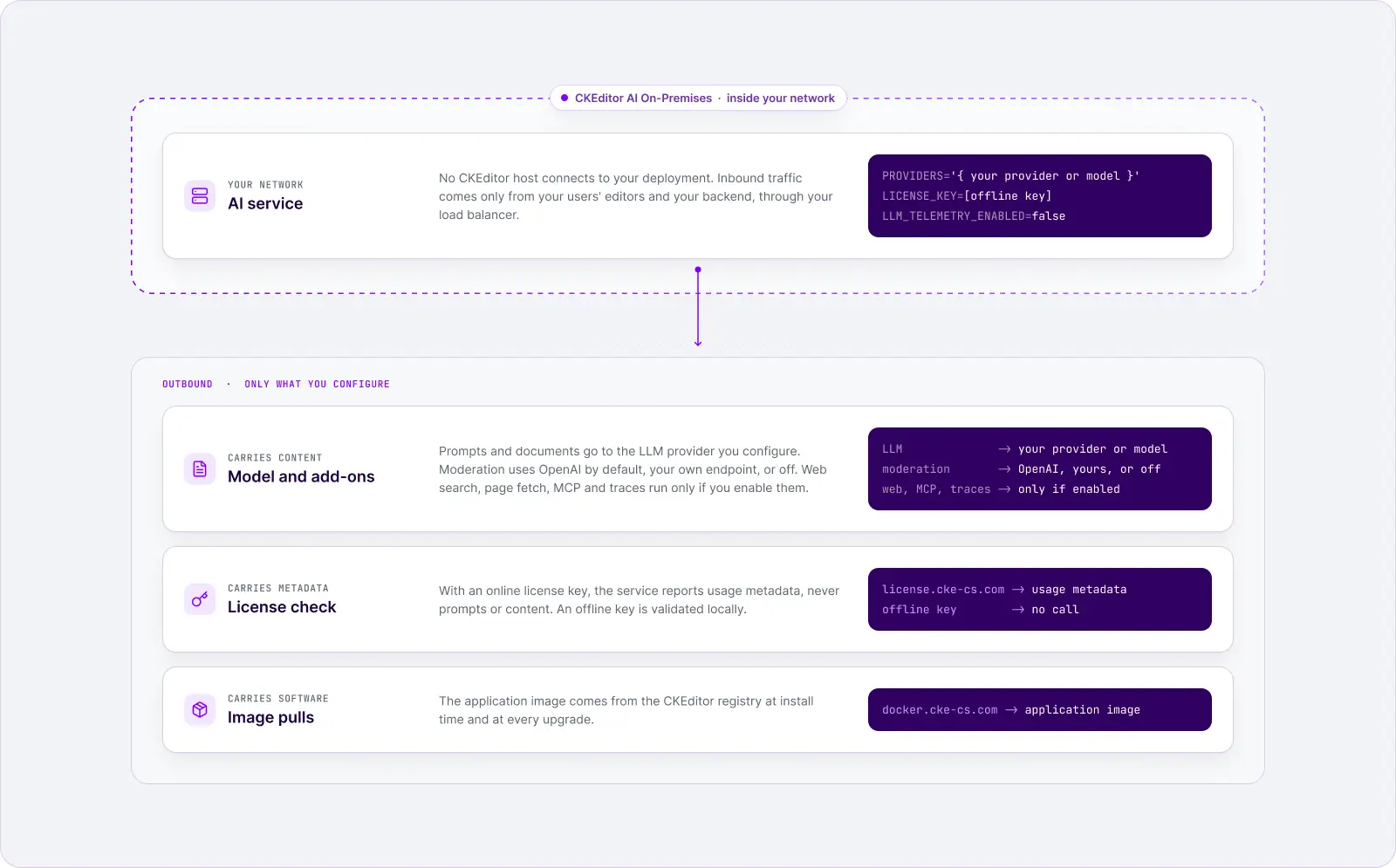
On-premises, “no CKEditor host connects to your deployment”: you don’t open an inbound path to CKEditor, and every outbound connection is one you configure. Run your own model and host or switch off moderation and the web features, and content stays inside your network.
There are two on-premises lanes, and they differ only at the model level:
- Your provider, your contract. A deployment in your own Azure or Google Cloud tenant, a model enabled in your AWS account, or an account you hold with a model vendor. CKEditor AI On-Premises has first-class Azure OpenAI, Amazon Bedrock and Google Gemini Enterprise Agent Platform support, alongside direct OpenAI, Anthropic and Google accounts.
- Your own model. Any service that exposes the OpenAI API, such as Ollama, LiteLLM or a gateway you run. Model traffic then stays inside your network.
The CKEditor AI on-premises network requirements list every outbound destination. Sorted by what each one carries:
| Outbound call | What it carries | When it applies | Your control |
| LLM provider | Prompts, files, and document content | Always (at least one provider) | Host an OpenAI-compatible model to keep it inside |
| Moderation (api.openai.com) | Prompts and uploaded images | SaaS by default On-premises off by default | Point it at your own endpoint, or switch it off |
| Web search gateway | Search queries | Only if web search is enabled | Your own gateway |
| Web resources gateway | Referenced URLs and fetched pages | Only if web scraping is enabled | Your own gateway |
| MCP servers | Tool calls and resources | Only for servers you connect | Your own servers |
| Traces (OTLP, Langfuse) | With AI spans on: prompts, documents, replies | Only if observability is enabled | Your collector, or a self-hosted Langfuse |
| License server (license.cke-cs.com) | Usage metadata, not prompts or content | With an online license key | An offline key is validated locally |
| Image registry (docker.cke-cs.com) | The application image | At install and at every upgrade | Happens only at install and upgrade time |
Inbound traffic comes only from your own users’ editors and your backend, through your load
AI spans are off by default; once on, a span records the full prompt including the document, so “your tracing backend receives your users’ documents”. The Langfuse export also defaults to Langfuse Docker instance until you set your own base URL.
This is the configuration for a reviewer who treats any data leaving the boundary as a deal-breaker, or a platform whose own clients are government agencies. What remains is image pulls at install and upgrade time. If a requirement goes beyond that, confirm the setup with CKEditor before you commit to it in a contract. CKEditor AI on-premises is available on Custom plans, and the wider case for running the editor stack yourself is in our guide to choosing an on-premises rich text editor.
Lock down the AI data path in your editor integration
Most answers in this guide are settings in your rich text editor integration, so a team can reduce what leaves, and who can send it, before the security review starts. Each control below addresses one of the six risks:
- Grant least privilege per user. Scope each token to the features, models, file types and URLs a user needs, and leave web search out unless the workflow requires it.
- Minimize what is sent. Personal data in a document travels with it. Limit attachments and referenced URLs for users who handle personal data, or run those workflows on a model inside your network.
- Pin the model when a review requires a specific provider, instead of letting agent-1 choose.
- Keep trace inspection off outside incidents, and record who switched it on and when.
- Pick the region for storage, and on-premises for processing, when your customers’ contracts name a country.
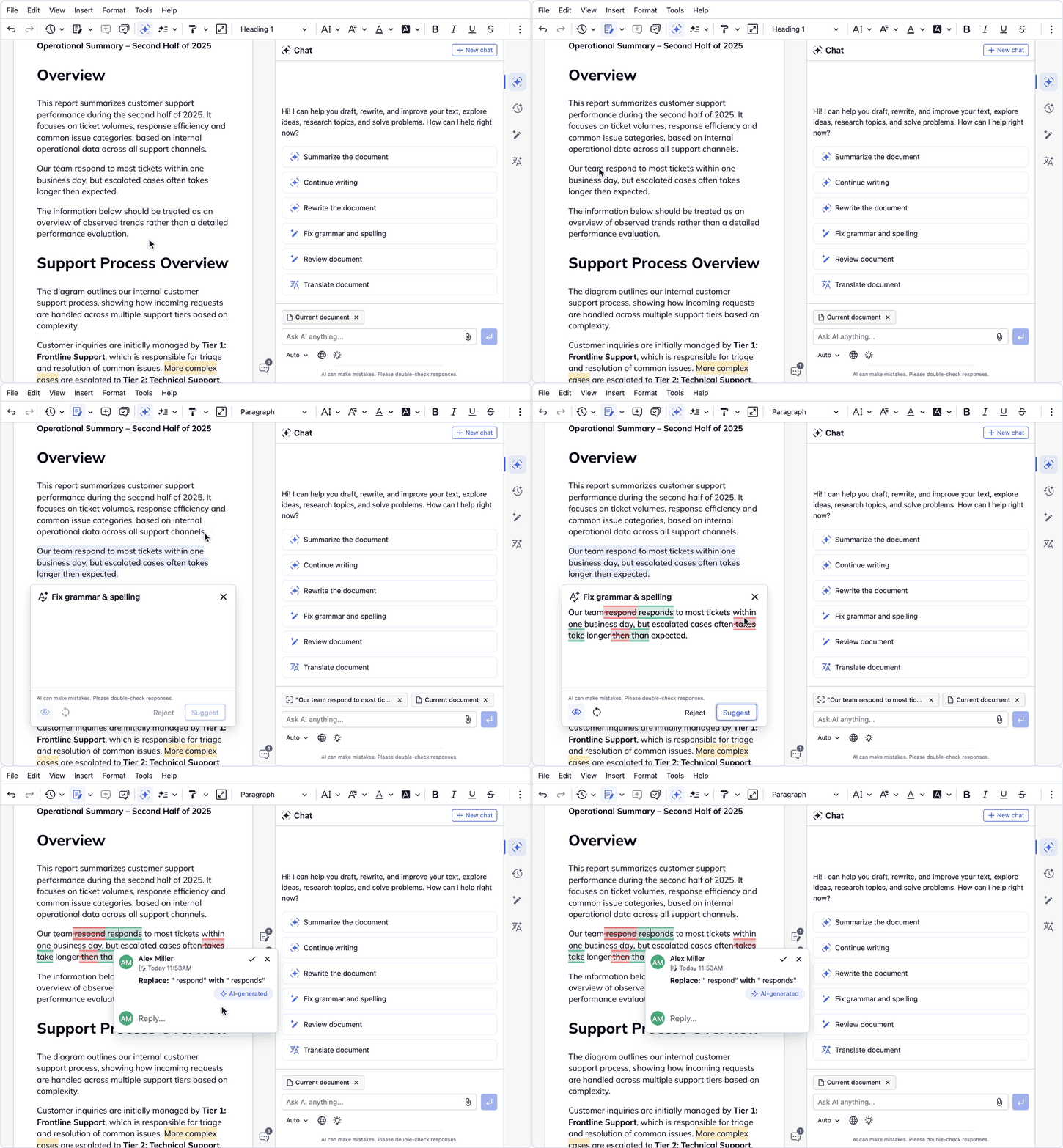
- Review AI changes before they land. Enable Track Changes in CKEditor 5, and AI features record their edits as suggestions a reviewer accepts or rejects, so no AI change becomes final content without a decision.
- On-premises, close the remaining paths: your own provider or model, your own moderation endpoint (or none), an offline license key, and traces to your own collector. If you also run Collaboration Server On-Premises, CKEditor AI On-Premises can share its database, Redis instance and environments, so editing and AI data sit inside one boundary.
None of these controls depends on the vendor’s goodwill: each one is a scope, a setting or a deployment choice that a reviewer can check. For the wider compliance requirements an editor has to meet beyond AI, see our guide to choosing a compliant rich text editor.
Pick the deployment that matches your boundary
Choose the lane by the strictest requirement in your review: SaaS when storage location is enough, on-premises with your provider when the processing location or the provider contract has to be yours, and your own model when content must not leave your network.
| Criterion | SaaS | On-premises, your provider | On-premises, your own model |
| Who receives content | CKEditor Cloud Services and the listed subprocessors | Your deployment and the providers you configure | Your deployment, plus any optional service you enable |
| Storage location | Choose a region: US or EU | Your infrastructure | Your infrastructure |
| Processing location | US model providers | Where your provider deployment runs | Inside your network |
| Retention | 12 months after last opened; delete early through the API | Same rule, in your database | Same rule, in your database |
| Training on customer data | Not used by CKEditor | CKEditor doesn't receive it; provider terms are in your contract | You control the model |
| Staff debugging access | Only while the Customer Portal setting is on | None: traces go only where you send them | None: traces go only where you send them |
| Provider contract | CKEditor's | Yours | None needed |
| What you operate | Nothing | Containers, SQL database, Redis-compatible store, file storage, upgrades | Containers, SQL database, Redis-compatible store, file storage, upgrades, plus model hosting |
CKEditor AI is built to run in any of the three lanes: as a service, or through its on-premises deployment option against the providers you already pay for or a model you host, with each feature behaving the same whichever model answers.
Turn the table into three decision rules:
- Choose SaaS when your review asks for storage in the US or the EU, a named subprocessor list and a SOC 2 Type 2 report, and accepts model processing in the US.
- Choose on-premises with your provider when the processing region or the provider contract must be yours, for example when you already run Azure OpenAI or Amazon Bedrock under your own terms.
- Choose on-premises with your own model when content must not leave your network at all.
The trade-off is operational: control moves the work in the last row of the table to you. For the broader trade-offs of running the editor as a service or yourself, see cloud or on-premises deployment.
Give your own customers’ security team the answers
If you build a product with an embedded editor, such as a FinTech platform, a GRC tool or a life sciences document system, your customers’ security teams will ask you these questions, often before they sign. Send a five-part pack instead of answering from memory:
- The data-flow diagram for the lane you run.
- The subprocessor list and data processing agreement, with what each party receives and when.
- The storage region and the processing location, stated separately.
- The retention and deletion rules.
- The training statement and the staff-access rule.
Add your own layer on top: which of your users can call which AI features, and why. Vendor risk continues after procurement, one of the vendor and API risks in enterprise AI governance that teams underestimate, so date the pack and refresh it when the subprocessor list changes.
The same material works in reverse as an enterprise AI security checklist. Ten questions to put to any embedded AI vendor:
- Who receives our content at each step?
- Which subprocessors receive what, and when?
- Where is our content stored?
- Where does the model process it?
- How long is it kept, and what starts the clock?
- How do we delete it early?
- Is it used to train any model, and is that in the contract?
- When can your staff read it, and who approves that?
- How are customers separated from each other?
- In a self-hosted deployment, which outbound calls remain?
“Which AI is best for data security?” is a common search, and this is the practical answer: the one whose answers to these ten questions are documented and fit your boundary.
Expect one more question that is about the editor rather than the AI: how it gets patched. If your product can’t absorb frequent major upgrades, CKEditor 5 LTS gives up to three years of security and compatibility fixes with no breaking changes. For teams selling into banks, insurers and other regulated buyers, our overview of rich text editors in regulated industries covers the editor side of the same review.
Final thoughts
Four questions, asked at every hop in the lane you actually run, answer most of what a security reviewer will ask.
Before you switch on any AI feature in your editor, fill in the per-stage table for your lane and attach it to the security review. It shows exactly which stage to change, or which control to set, if an answer doesn’t fit.
The uncomfortable answers (US processing on SaaS, a 12-month retention window, a debugging switch) are what make the rest credible, and the on-premises lanes change them when they don’t fit. Control for critical environments starts with knowing where the software runs, what it depends on, and who receives your content.
Planning an AI and content security review? Get answers for your deployment
FAQ
What is the difference between AI data security and AI security?
AI data security is about where content goes and who can read it. AI security is wider: it also covers attacks on the model itself, such as prompt injection and jailbreaks. CKEditor AI handles the second with guardrails, which inspect uploaded files, fetched pages and prompts for injection attempts, while the deployment and token scopes handle the first.
Copy linkLink copiedDo moderation and guardrails stop sensitive data from leaving?
No. Moderation screens prompts for unsafe categories such as harassment or violence, and guardrails screen for prompt injection. Neither is a data-loss control. The CKEditor AI guardrails docs also warn that both are probabilistic and fail open: if a check times out, the content goes through and the event is logged. Data boundaries come from the deployment you choose and the scopes in each user's token.
Copy linkLink copiedCan we restrict which models or providers each user can call?
Yes. Permission scopes in the token can cover a whole provider or a single model, and features such as chat, actions, reviews, translate, file types and URLs have their own scopes. A user whose token lacks a scope gets a 403 on the request, so an expensive or non-approved model can be limited to a named group of users.
Copy linkLink copiedWhich security reports can we request for CKEditor AI?
CKEditor Cloud Services has been SOC 2 Type 2 certified since January 2025 and complies with GDPR. Third-party experts run a penetration test of the infrastructure once a year, and automated scanners check it against the CVE database continuously. Request the reports from the CKEditor Trust Center or by email at security@cksource.com.
Copy linkLink copiedTags: