Human-in-the-loop AI editing: 3 patterns (suggestions, drafts, locks)
13min read
|Key takeaways
- Human-in-the-loop (HITL) AI editing means no AI change becomes the final content until a person has seen exactly what changed and decided on it.
- Review the change, not the output. A workflow approval step can only pass or block a whole draft. A rich text editor can show each AI edit as an inline diff, with its author and its AI origin.
- Suggestions: AI edits land as tracked changes marked "AI-generated", and a second person accepts or rejects each one. Best for customer-facing and supervised content.
- Drafts: Full AI output waits in a staging area until someone applies it.
- Locks: editable regions, RBAC for who can apply/reject changes, and per-user AI permissions keep the person who writes from being the person who approves.
AI now writes inside the documents your users send to clients, regulators, and auditors. In our previous blog post about Microsoft Research study, we wrote that even frontier models corrupted an average of 25% of document content over long delegated editing workflows. When AI applies its edits directly, the reviewer is the first human to read that output, often with no diff and no record of what the AI touched. In supervised industries, that is a compliance gap as well as a quality one.
Here are three human-in-the-loop patterns that close it, with CKEditor 5 configuration for each.
What human-in-the-loop means when AI edits a document
Human-in-the-loop (HITL) AI is a setup where a person reviews, corrects, or approves AI output before it takes effect. Human ON the loop is the weaker variant: the AI acts first and people monitor afterward. For AI that edits documents, human in the loop means no AI change becomes the final content until a person has seen exactly what changed and decided on it.
Every pattern in this guide is judged on three requirements:
- The reviewer sees the change in context. An inline diff against the existing text, not a block of fresh output pasted into the document.
- The reviewer decides per change. Accepting a ten-word fix and rejecting a rewritten disclosure must be two separate decisions.
- Evidence remains. Who prompted, what the AI changed, and who approved it are recorded after the decision.
The second requirement also guards against a well-documented human limit, the vigilance decrement: people are poor at monitoring for long periods, so approvals of mostly correct output drift toward rubber stamps. Small, visible decisions keep attention on the changes that matter.
Why human review belongs in the editor
Most human-in-the-loop guidance is written for automation: an agent or workflow pauses, a person approves or rejects the result, and the run continues. That model works for actions such as releasing a payment. It breaks down for content, because the unit of review is the change, not the output. Only the editor knows where a change sits, what it replaced, how it is formatted, who triggered it, and whether the surrounding text has moved since.
| Aspect | Content workflow approval step | Review inside the rich text editor |
| What the reviewer judges | The whole output | Each change, in place |
| What the reviewer sees | A block of new text | An inline diff against the existing document |
| Partial acceptance | Rarely: approve or reject everything | Accept some changes, reject others |
| Where the record lives | Workflow logs, apart from the document | In the document's suggestions and revision history |
| Other people editing at the same time | Not handled | Handled by the editor's collaboration layer |
Copy-paste from an external chat tool is the worst case: the text arrives as one block, with no diff and no record, and the content has already left your product in the first rounds of working with AI. That is the core argument for embedded AI over browser overlays.
CKEditor already provides the parts that make editor-level review work. Suggestions are stored in the document data itself, so they survive saving and reloading. The AI origin of a change is recorded when a revision is saved. Human and AI edits go through the same review UI, and reviewers can comment on suggestions to explain a decision. Since CKEditor is the only rich text editor with native drop-in asynchronous and real-time collaboration, the same review works whether a principal signs off the next morning or two reviewers work through a document together.
Building this on a bare editor framework, or generating it with AI coding tools, means designing a suggestion model anchored to the document, keeping it intact through concurrent edits and saves, attributing every change, and recording AI involvement in version history. That is editor infrastructure, and it has to keep working as the product around it changes.
Three patterns build on that infrastructure:
- Suggestions: AI writes into the document as tracked changes, and a person accepts or rejects each one.
- Drafts: Full AI output waits in a staging area, and nothing changes until a person applies it.
- Locks: limits on who and what can change content or approve AI changes.
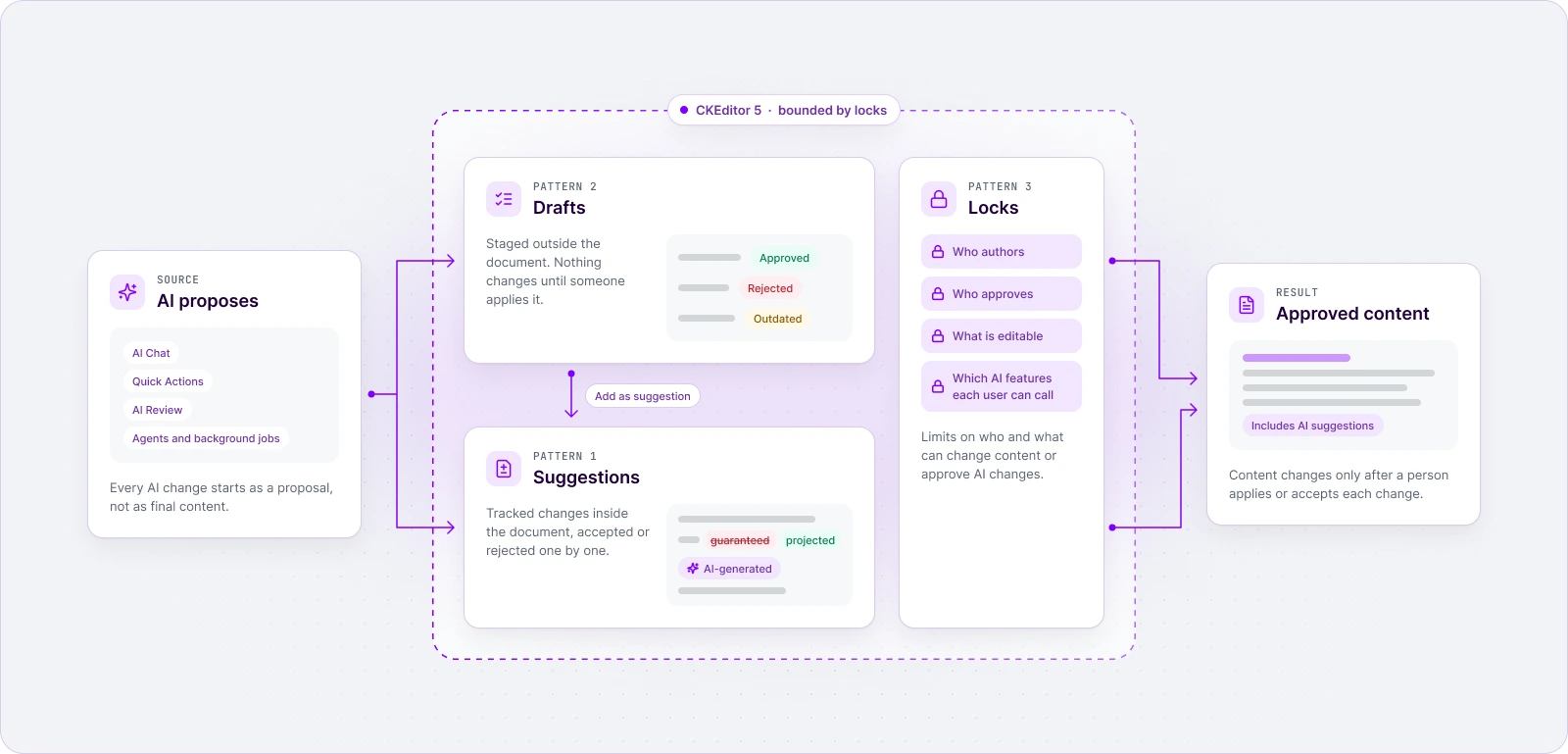
Pattern 1: route every AI edit through suggestions
In the suggestions pattern, AI changes land in the document as tracked changes, marked as AI-generated, so a reviewer accepts or rejects each one inline.
Turn on Track Changes in your CKEditor 5 configuration, and AI features write their edits as suggestions instead of changing the text. Each suggestion stays attributed and queued until a reviewer accepts or rejects it, individually or all at once, in the same UI your users already use for human collaborators.
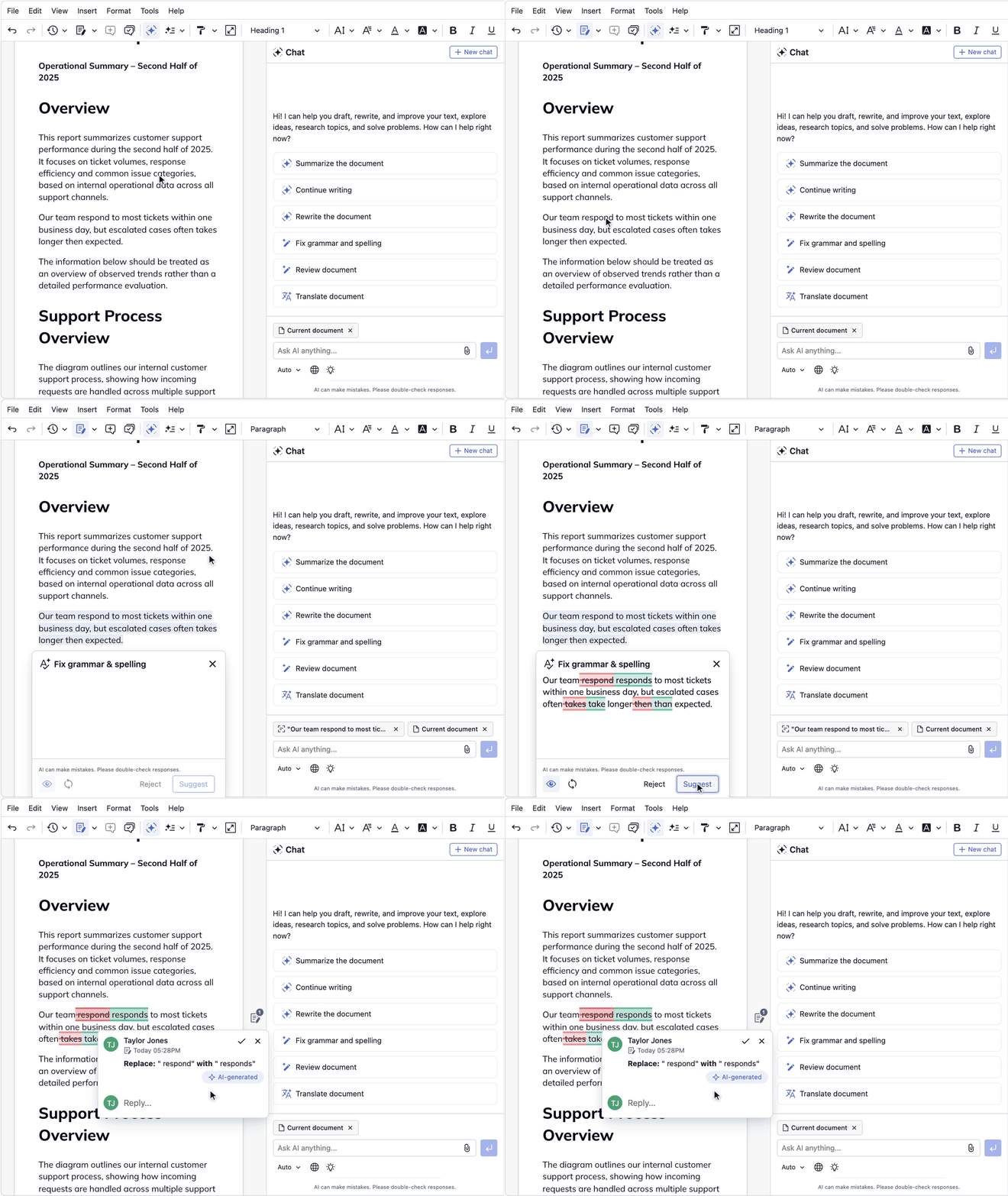
By default, an AI suggestion looks exactly like a human one. That fails the aforementioned requirement three, so make the origin visible with showAISource. The 'pill' value adds an “AI-generated” pill and keeps the human author who triggered the AI. The 'author' value swaps the displayed author for a view-only AI identity (the stored author is unchanged), which you can rename with aiAuthor:
ClassicEditor

    .create( {

        /* ... */

        trackChanges: {

            showAISource: 'pill'

        },

        revisionHistory: {

            showAISource: 'pill'

        }

    } )

    .then( /* ... */ )

    .catch( /* ... */ );
The revisionHistory setting matters as much. A suggestion’s annotation disappears once it is accepted, so the evidence has to live elsewhere. With it on, every revision containing AI-assisted changes shows an “Includes AI suggestions” pill, and the compare view describes each change as, for example, “Suggested by Joe using AI”. The editor records the AI origin at save time regardless of this option, which only controls display (for how the two features split the work, see our comparison of track changes and revision history).
To make suggestions the default route, force suggestion mode after the editor initializes, so every typed edit is tracked:
editor.execute( 'trackChanges' );
editor.commands.get( 'trackChanges' ).forceDisabled( 'suggestionsMode' );
Route AI output the same way: “Add as suggestion” or “Suggest all” in AI Chat, and applyMethod: 'suggest' rather than 'insert' when you apply results from code. Some AI surfaces can also apply changes directly (AI Chat’s Apply button, for example), so decide per role which of those stay available. Pattern 3 shows how.
How can this look in practice: an advisor on a wealth-management platform runs an AI proofreading pass on a client email and gets five suggestions marked with the pill. The supervising principal accepts three, rejects two with a comment, and the saved revision shows AI was involved. Suggestions fit best when a second person approves. Their weak point is “accept all” on a large rewrite, which Pattern 3 addresses.
Pattern 2: stage the full AI output as a draft before it touches the document
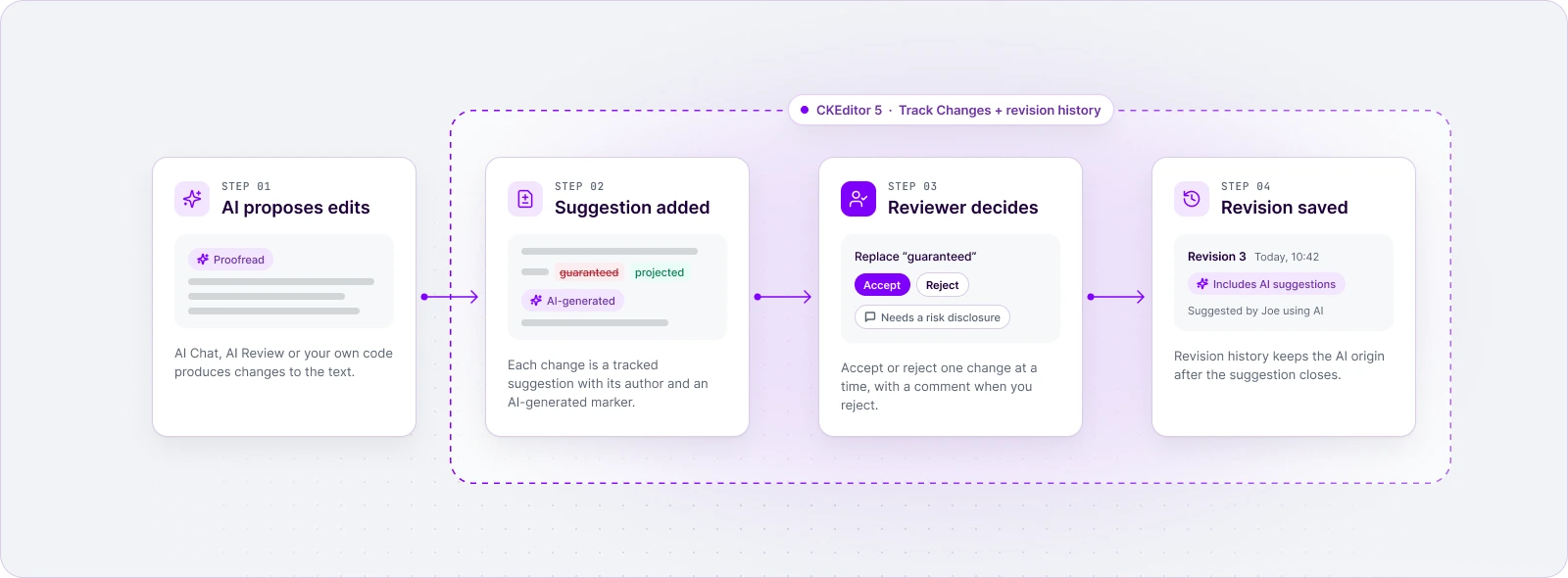
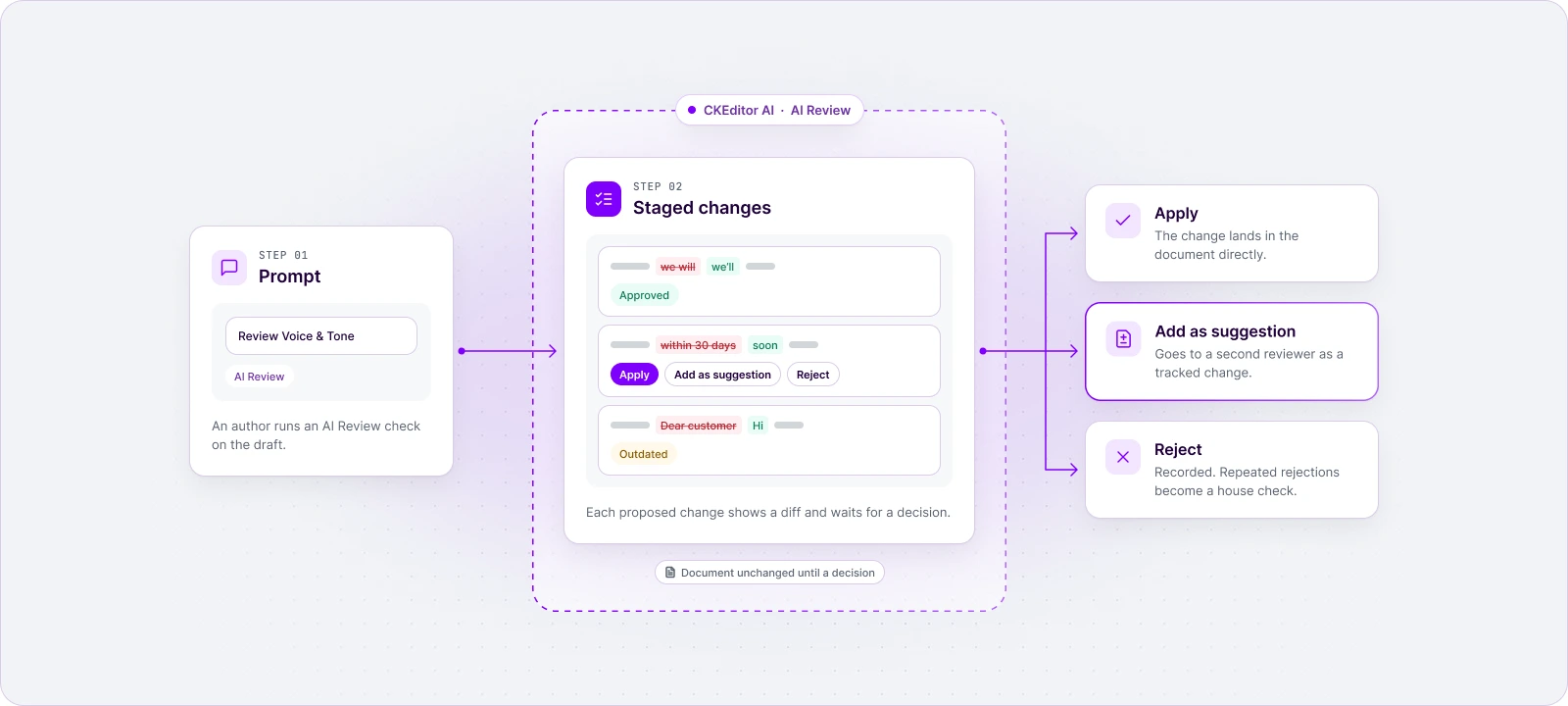
In the drafts pattern, the AI’s proposal lives in a staging area (a chat change list, a review session with suggestions) and the document does not change until a person applies, converts, or rejects each item.
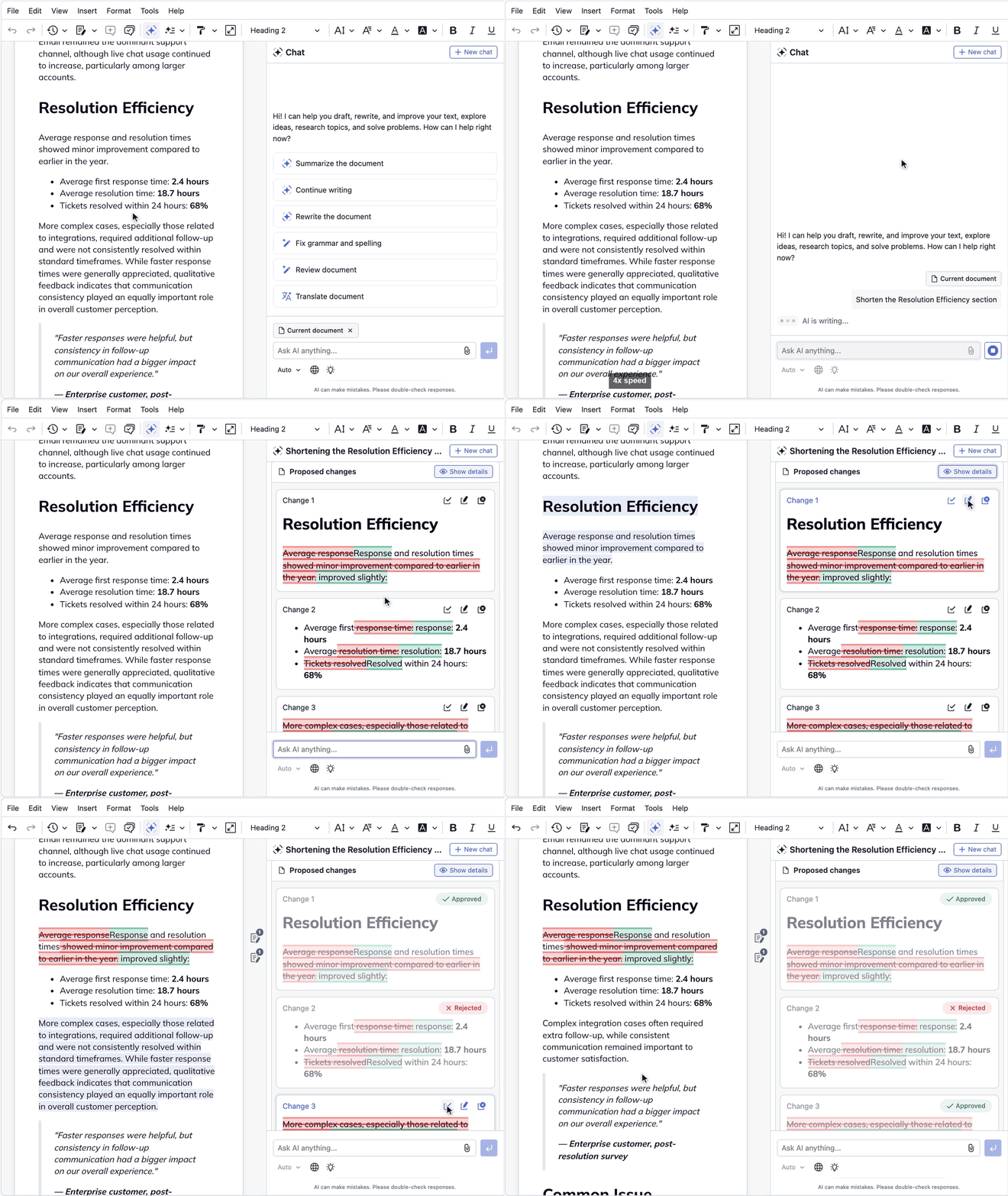
Three draft surfaces ship in the UI of CKEditor AI. In AI Chat, a request such as “shorten this reply” returns proposed changes rather than plain text. “Show details” marks additions, removals, and formatting changes, and each change has its own Apply, Add as suggestion, and Reject buttons. Decided changes show a status: Approved, Rejected, or Outdated (the document changed in the meantime, so the proposal can no longer be applied).
Quick Actions such as “Make shorter” open a window next to the selection with the AI’s answer for you to accept or reject.
AI Review is the third surface, built for quality checks. During a review the editor stays read-only; the reviewer accepts or dismisses each finding, then clicks “Finish review”. You decide which checks exist and can add house checks with a custom prompt:
ClassicEditor

    .create( {

        plugins: [ AIReviewMode, AIEditorIntegration, /* ... */ ],

        ai: {

            review: {

                availableCommands: [ 'disclosure-check', 'correctness', 'clarity' ],

                extraCommands: [

                    {

                        id: 'disclosure-check',

                        label: 'Disclosure check',

                        description: 'Flag performance claims without a risk disclosure.',

                        prompt: 'Suggest edits wherever the text promises returns or performance without a risk disclosure.'

                    }

                ]

            }

        }

    } )

    .then( /* ... */ )

    .catch( /* ... */ );
Load the AI Review plugin alongside AI Chat and every draft surface runs inside the document your users already work in, so the diff and the decision never leave the editor. The full set of features is available on the AI features page.
Treat rejected changes as data. When reviewers keep rejecting the same kind of AI edit, turn it into a house check like the one above in the code snippet. If the prompt lives in the Context Library instead of the editor configuration, the editorial or compliance team can update it and every review picks it up without a deployment. That is how you keep AI slop and hallucinations away from the documents that matter.
The programmatic approach is the most useful when it comes to producing whole drafts with AI suggestions waiting for the approver. A background review returns a result object, and the document has not changed yet. The gap between running and applying is where your own checks go:
const aiReviewGateway = editor.plugins.get( 'AIReviewGateway' );


const result = await aiReviewGateway.runReview( 'correctness' );


// Nothing in the document has changed yet. passesHouseChecks() is your own code.

if ( result.status === 'completed' && passesHouseChecks( result ) ) {

    aiReviewGateway.applyReview( result, { applyMethod: 'suggest' } );

}
For example, a support lead asks AI Chat to shorten a policy reply, rejects the one change that drops a required caveat, and sends the rest as suggestions to compliance. Nobody reads cold output; they read a diff against text they know. Drafts fit authors iterating with AI and bulk transformations. Their weak point is self-review: the person who prompted often clicks Apply. When a second reviewer must sign off, route the output to suggestions with “Add as suggestion” or “Suggest all”.
Pattern 3: lock what AI and each user can change or approve
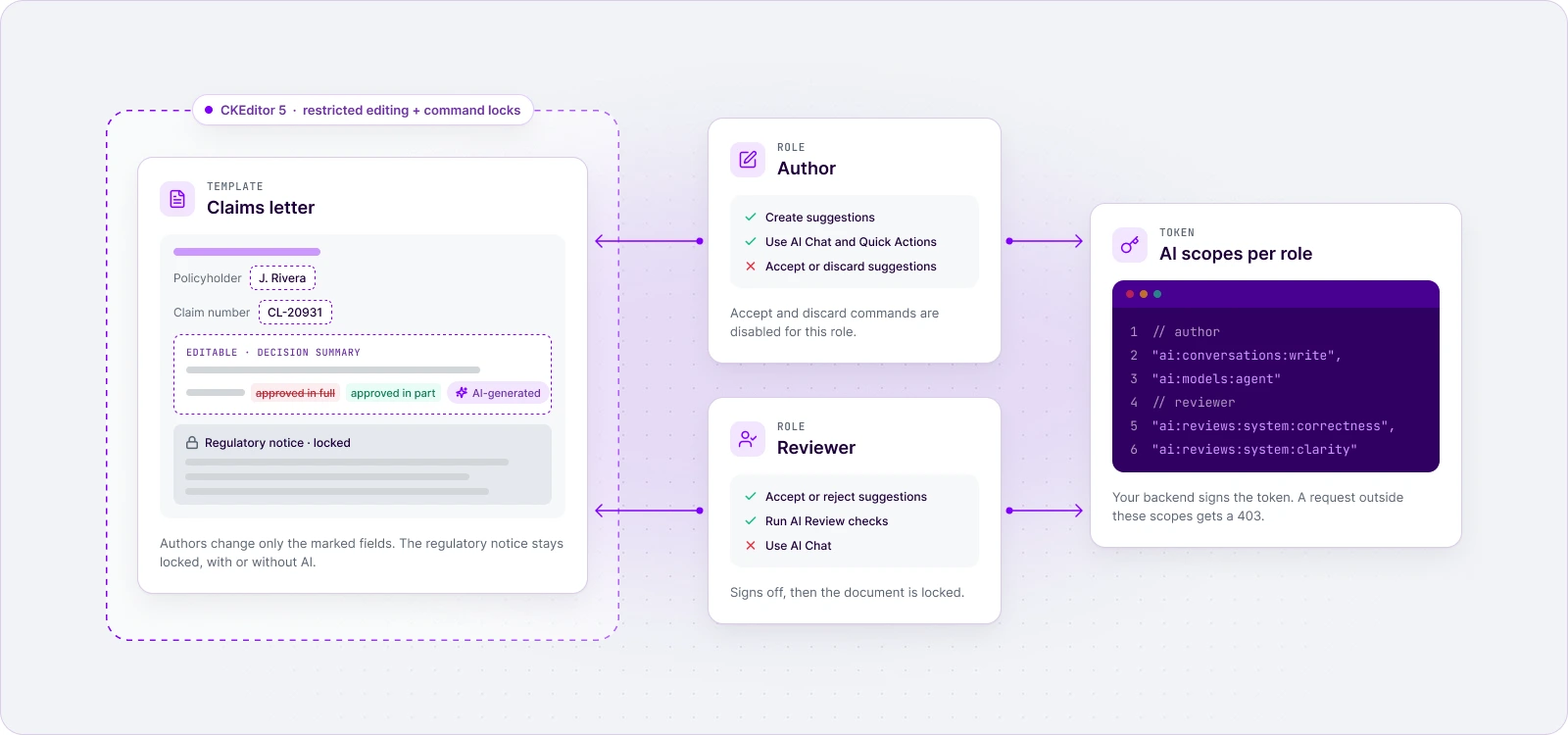
In the “locks” pattern, you constrain the review loop itself: which regions are editable, who can accept a suggestion, and which AI features each user can call, so the person who writes is not the person who approves.
Start with content regions. In restricted editing, a template author marks which fields stay editable, and users in restricted mode can change only those fields. Use it for disclosures, legal boilerplate, and approved claims. Our overview of restricted editing modes covers the options in detail. Once the supervising reviewer signs off, switch the editor to read-only mode, so any further change starts a new review cycle.
Next, separate authoring from approval. Keep suggestion mode forced on, and disable the accept and discard commands for anyone who is not a reviewer:
editor.execute( 'trackChanges' );

editor.commands.get( 'trackChanges' ).forceDisabled( 'suggestionsMode' );


// currentUser.canApprove comes from your own permission model.

if ( !currentUser.canApprove ) {

    [ 'acceptSuggestion', 'acceptAllSuggestions', 'discardSuggestion', 'discardAllSuggestions' ]

        .forEach( name => editor.commands.get( name ).forceDisabled( 'suggestionsMode' ) );

}
Command locks run in the browser. The document roles in the collaboration token (reader, commentator, writer) don’t separate suggesting from accepting: anyone who makes suggestions needs write access, and write access also allows accepting. Enforce the split between author and approver in your application and backend too.
Finally, scope AI per user. Hiding a command from the AI Review menu is not a lock, because background APIs can still run commands hidden from the UI. The real control is the token: CKEditor AI reads permissions from the auth.ai.permissions claim of the JWT you issue (ai:<type>:<value>), and a request outside those scopes gets a 403. A compliance reviewer who should run two checks and nothing else gets exactly that:
{

    "auth": {

        "ai": {

            "permissions": [

                "ai:reviews:system:correctness",

                "ai:reviews:system:clarity"

            ]

        }

    }

}
Never issue ai:admin to a browser. Each AI feature is also a standalone plugin, so a role that should not use AI Chat can run an editor without it.
An example use case - an insurer’s claims letter template locks the regulatory notice paragraph. Adjusters edit the case fields, and AI suggestions there wait for a team lead whose account can accept them. Locks never review anything on their own; they make suggestions and drafts trustworthy. Over-locking has a cost: if the approved path feels slower than a chat tab, users go back to copy-paste. This plan scopes as part of a real-life enterprise AI governance contingency.
Keep the same review when the AI is an agent
These patterns hold when the AI is an agent or a background job rather than a person typing a prompt. With CKEditor running server-side against a live collaboration document, an agent can write its results as tracked-change suggestions instead of overwriting content. The suggestions sync to everyone editing the document, and a person still accepts or rejects each one. That also covers bulk work, such as aligning the tone of a whole knowledge base, without giving up per-change review.
This matters more as automation grows. Agents that act without a person at the keyboard are where supervisors look first, so decide which agents may write directly at all. For supervised (hence business-crucial) content, the answer should be none: let agents propose, and let people decide.
Compare the 3 patterns and combine them
Suggestions give the strongest per-change evidence, drafts give the smoothest author experience, and locks give separation of duties. Regulated teams usually run all three in sequence.
| Aspect | Suggestions | Drafts | Locks |
| What the reviewer sees | Inline tracked changes with an AI-generated marker | A staged change list, answer window, or review session with a diff | Editable regions, available actions, and AI features for their role |
| When content changes | When a reviewer accepts a suggestion | When a person applies a staged change | Never directly; locks limit the other two |
| Evidence left behind | Attributed suggestions, comments, revisions marked as including AI | Change statuses (Approved, Rejected, Outdated); your own logs for programmatic runs | Role and scope configuration |
| Who decides | A second person, usually | Often the person who prompted | You, at design time |
| Best fit | Supervised, customer-facing content | Author iteration, bulk transformations | Templates, regulated documents, role-based workflows |
| Main risk | "Accept all" on large rewrites | Self-review | Over-locking pushes users to copy-paste |
| CKEditor 5 building blocks | Track Changes, showAISource, comments, applyMethod: 'suggest' | AI Chat, Quick Actions, AI Review, review and document processing gateways | Restricted editing, read-only mode, command locks, AI permissions |
Choose the mix by what your users produce:
| If your product serves | Typical AI-edited content | Pattern mix |
| FinTech, wealth and banking platforms | Client emails, account notices, market commentary | Drafts for the author, suggestions for the supervising principal, locks on disclosures |
| InsurTech and insurers | Claims letters, policy wording | Locked templates with editable case fields, suggestions for the team lead |
| GRC and risk software | Policies, control narratives, audit findings | Suggestions with comments, revision history as the change record |
| Life sciences software | SOPs and other controlled documents | Suggestions, locked approved sections, read-only after sign-off |
| Collaboration, digital workplace, and CMS products | Knowledge articles, support replies, web pages | Drafts with AI Review house checks; suggestions where a second reviewer is required |
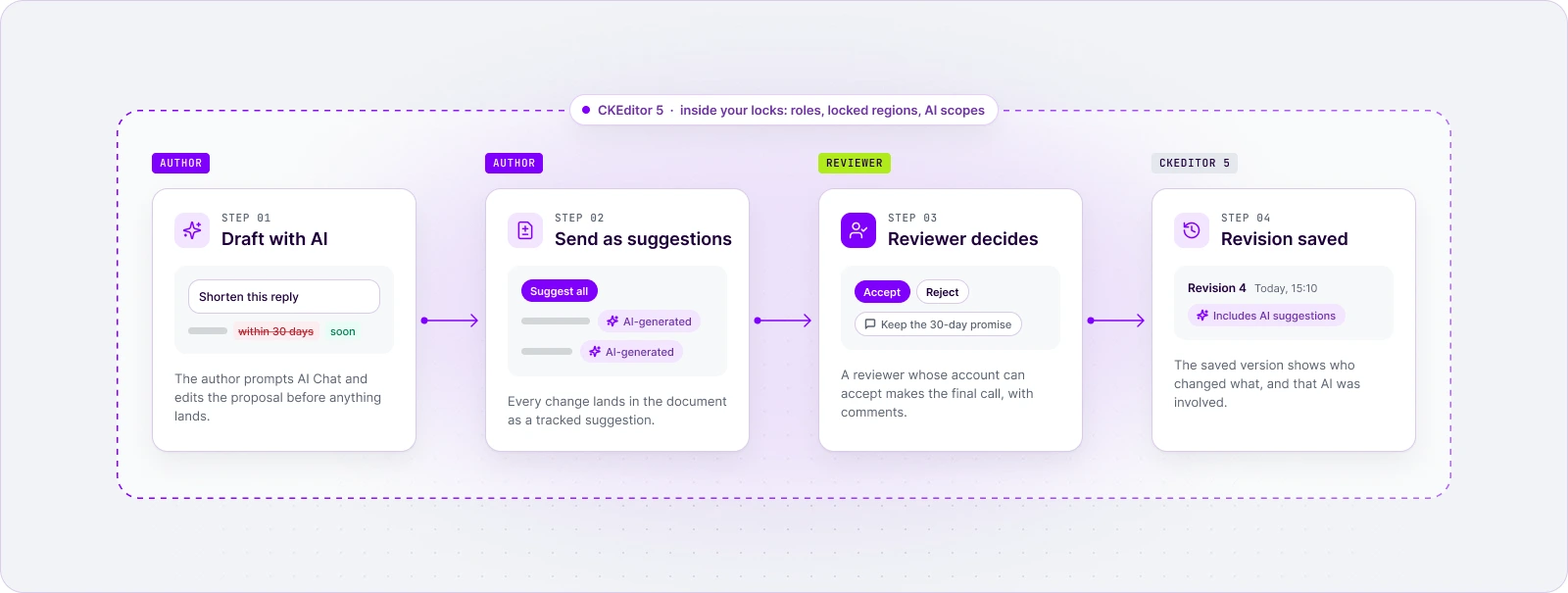
The combined flow looks like this: the author prompts AI Chat and edits the proposal as a draft, sends the result as suggestions, and a reviewer whose account can accept makes the final call. Close the loop with Revision History and business logs. Each saved revision version records who changed what, and with the AI marker on, which versions included AI suggestions. With business logs you can inquire about what action has been taken by which user on what document, using what LLM.
Final thoughts
Human review of AI edits is a UI decision before it is a policy decision. If the reviewer cannot see the diff, there is no loop, only an assumption that someone looked.
Before you ship AI writing in your product, answer three questions for each document type. Where does AI output wait before anyone accepts it? How does it land in the document? Who is allowed to make it final? The answers map directly to drafts, suggestions, and locks.
AI is becoming another collaborator in the document. Give its changes the same visibility, attribution, and approval you already require from a human editor.
See the review flow in a live editor in the collaboration demo.
To test CKEditor AI with Track Changes in your own application
FAQ
Can reviewers record why they rejected an AI change?
Yes. Reviewers can comment on a suggestion and start a thread on any given change, so the reason for a rejection sits next to the change itself rather than in a separate tool. For supervised content, make a comment part of every rejection of an AI suggestion.
Copy linkLink copiedDoes marking AI suggestions help when you must disclose AI use?
It gives you the facts a disclosure needs. Open suggestions show an "AI-generated" pill, and saved revisions show which versions included AI suggestions, so reviewers can see where AI touched the work. Whether that meets a specific disclosure duty to clients or regulators is a question for your legal team.
Copy linkLink copiedDo these patterns need real-time collaboration?
No. Track Changes and revision history both work as standalone plugins. Using AI features with Track Changes does require a minimal integration of the Users plugin, even in single-user setups, because every suggestion needs an author.
Copy linkLink copiedHow do you stop reviewers from rubber-stamping AI suggestions?
Keep each change small and visible, give "accept all" only to reviewer roles, and run house checks (custom AI Review commands or your own code in the programmatic flow) before the human step. That way, reviewer attention goes to judgment calls rather than typo fixes.
Copy linkLink copiedTags: