What Is CKEditor AI? A Guide for Product Teams
8min read
|Your users want AI inside your product, rather than having to bounce between tools. CKEditor AI puts it exactly where they already write. Not a browser tab they switch to. Not a paste-and-clean cycle that eats 20 minutes per document.
The problem is that building that experience is harder than it looks. Wiring an LLM to a rich text editor means handling HTML formatting, document context, user permissions, streaming output, and a polished UI all at once. Most teams that try it underestimate the scope by months.
CKEditor AI is a set of AI capabilities built natively into CKEditor. It gives product teams a production-ready AI writing experience, with features that include AI Chat, AI Review, AI Translate, and AI Quick Actions, that they can drop into their application without building the underlying infrastructure or user interface themselves.
What Is CKEditor AI?
CKEditor AI is a native AI writing assistant built directly into CKEditor 5, not bolted on alongside it. It gives end users AI Chat, AI Review, AI Translate, and AI Quick Actions without context-switching, copy-paste workflows, or broken rich text formatting.
Under the hood, CKEditor AI connects to your choice of LLM provider through a unified adapter layer. You configure the model; CKEditor AI handles everything between the model call and the rendered result.
What CKEditor AI is not: CKEditor AI goes way beyond other AI implementations. That means it’s not:
- A generic chatbot bolted onto a text field.
- A Markdown-based assistant that loses its formatting.
- A standalone SaaS tool requiring your users to leave your application.
CKEditor AI generates and modifies content in HTML, and it’s the only AI writing assistant that does this natively.
The integration operates both within the editor interface and on the server-side, eliminating the need to transfer content between the editor and external AI tools during the editing process. It can also enable AI-assisted content modification on the backend, which enables it to be integrated inside content workflows programmatically without using the user-facing editor features.
The Pain Points CKEditor AI Solves
Building a strong AI writing UX from scratch is expensive. Orchestrating LLM APIs, designing a prompt interface, managing session states, streaming responses into a rich text editor, and handling formatting edge cases is a multi-month engineering project.
Connecting an LLM to a rich text editor breaks formatting. Standard LLMs output Markdown. Rich text editors work in HTML. Every table cell, nested list, inline style, and tracked change is a compatibility problem waiting to happen. CKEditor AI is the only solution that generates native HTML output compatible with a rich text editor, so formatting survives the round trip intact.
AI doesn’t “know” the document. CKEditor AI reads document structure, injects relevant context automatically, and lets users attach files, URLs, and internal sources to ground responses. With MCP support, you’re able to use data from other AI agents and APIs as a part of your content-creation context.
LLM vendor lock-in is a real risk. Committing your AI layer to a single LLM vendor locks your product to that provider’s pricing, availability, and capabilities. CKEditor AI uses a unified adapter pattern: you can run models from leading providers like OpenAI, Anthropic, or Google models without rewriting your integration when you switch. With on-premises distribution, you can also connect custom LLMs.
Core Features of CKEditor AI
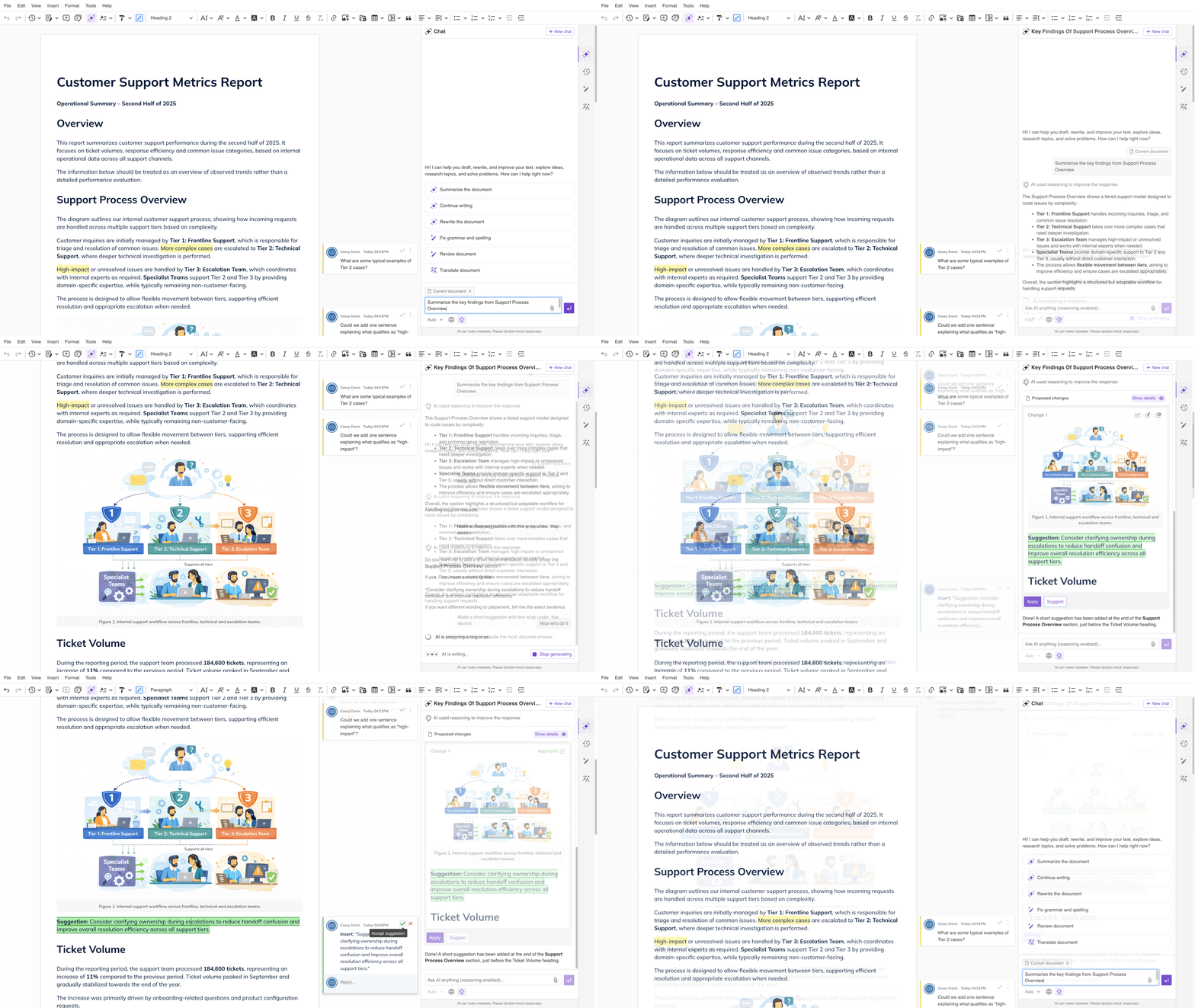
- AI Chat: In-editor conversation panel with web search, document context, file uploads, reasoning mode, and persistent chat history. Responses can be inserted directly into the document or presented as track-change suggestions.
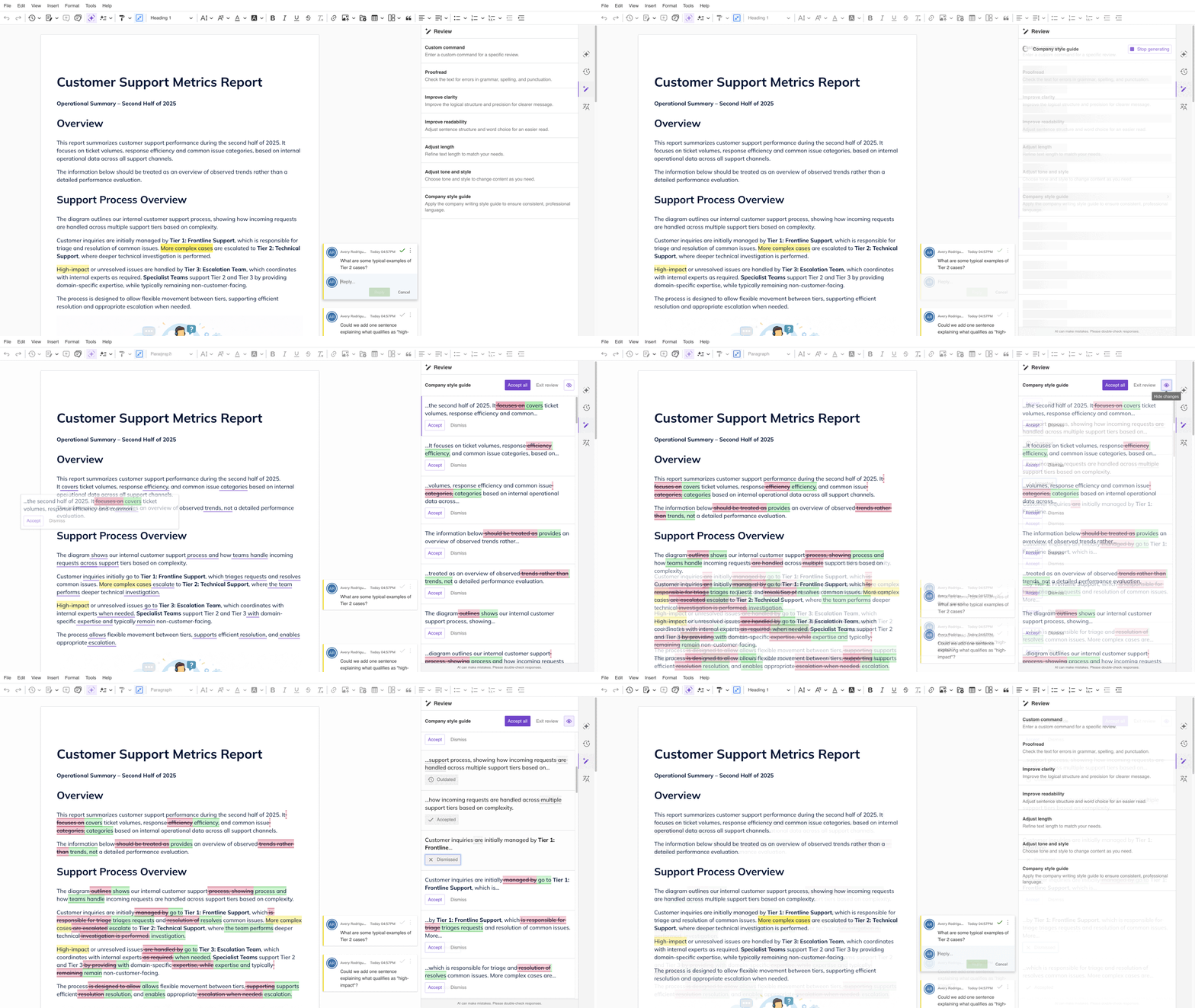
- AI Review: Document-level quality checks delivered as inline suggestions. These can include grammar, tone, clarity, brand compliance, and custom rules. Writers accept or reject changes individually using a dedicated UI.
- AI Translate: Translates the selected text into a chosen language, helping you quickly localize content without leaving the editor. The default list of languages includes: English, Spanish, French, German, Chinese (Simplified), Japanese, Russian, Portuguese, Korean, and Italian. The list can be fully customized.
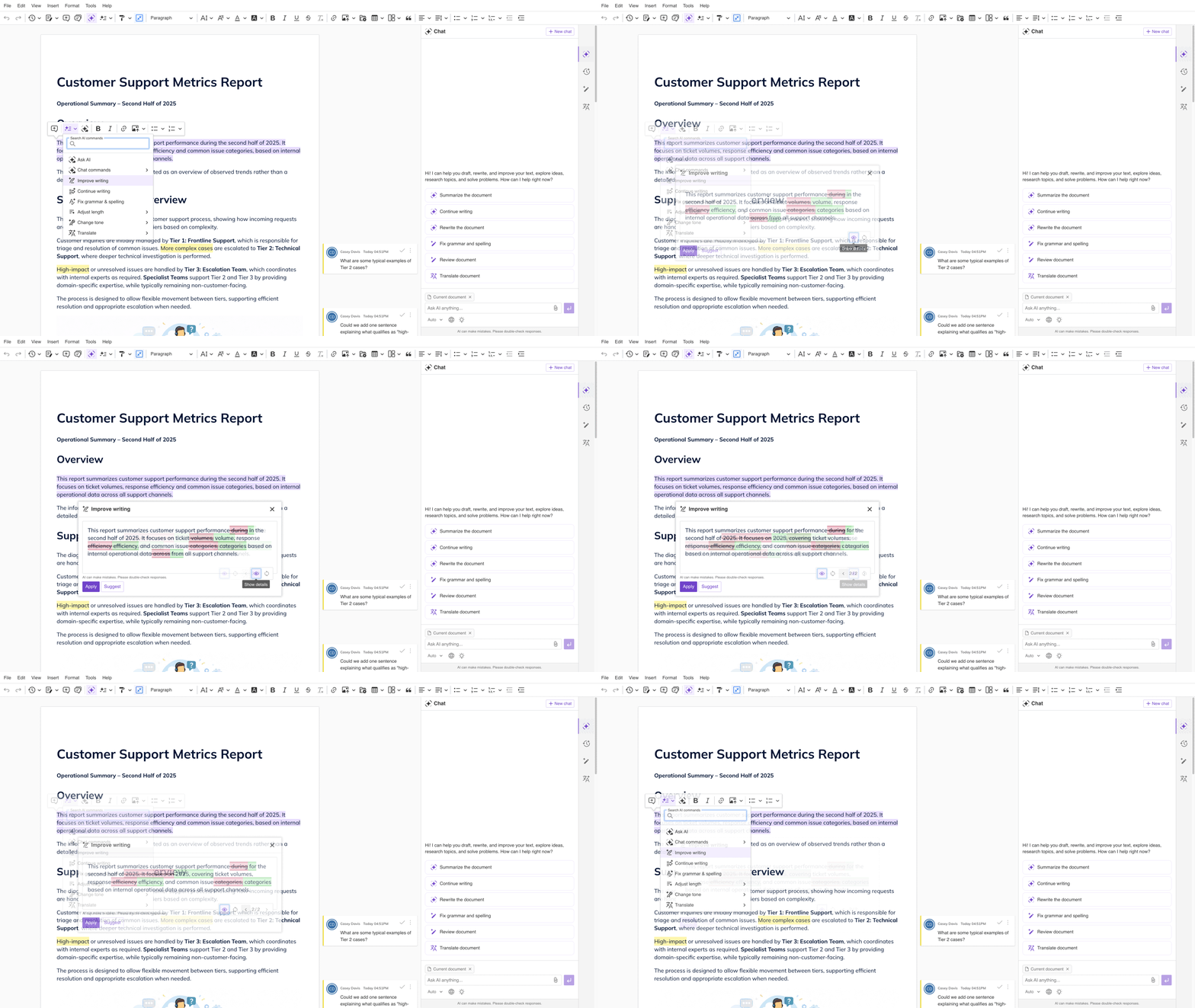
- AI Quick Actions: Inline transformations triggered on selected text. Standard actions cover the most common tasks, while custom actions let integrators define domain-specific workflows (e.g., convert legalese to plain English or reformat a support ticket).
- Custom LLM support: Choose between the different models from OpenAI, Anthropic, or Google, and even bring your own custom model. Your own API key support and custom model connections are available in the on-premises distribution.
- Context-aware generation: AI reads the document structure, not just an isolated prompt. Users can add external context via URLs and file uploads. MCP tool integration connects the editor to external tools, data sources, and AI agents in the on-premises distribution.
- Configurable UI: Choose between sidebar or overlay layouts, placed on the right or left of the UI. Add custom AI Chat shortcuts and choose how to display AI suggestions inside the editor. Customize the UI theme or replace it with your own. This is perfect for product teams that need the AI experience to match their application’s design.
How CKEditor AI Works (Developer Perspective)
CKEditor AI sits as a plugin layer between the editor and the LLM API. The architecture has two main parts: the CKEditor 5 plugin (frontend) and the CKEditor AI Service (backend, available as a Docker container for on-premises deployments).
Integration steps:
- Install the CKEditor AI plugin and AI service if you're running the on-premises distribution model.
- Configure your model adapter by specifying the provider, model, and API credentials.
- Define which AI Quick Actions and Review checks appear in your UI.
- Optionally customize context sources and UI layout.
The plugin integrates with real-time collaboration features and handles streaming output, rich text diffs, undo/redo states, and conflicts automatically. You configure, while CKEditor AI manages the complexity. See the CKEditor AI integration guide for full setup documentation.
Custom LLM adapter patterns: For teams having their own LLM API keys or running private or fine-tuned models, the adapter interface normalizes behavior across providers. Your integration does not change when you swap the model underneath.
MCP integration (on-premises): The on-premises distribution supports MCP tools, letting you connect CKEditor AI to external data sources, knowledge bases, and application-specific actions directly from the editor. Pull fresh external knowledge into every response, prompt external tools without leaving the editor, and connect to AI agents in your existing infrastructure.
CKEditor AI as a Programmatic Content Layer
For those with an organizational AI strategy in place, CKEditor AI fits in perfectly. It is not just a closed set of features you switch on for end users. It is also a programmatic content layer that product and engineering teams can wire into their existing AI infrastructure. If your organization has already committed to an LLM platform - OpenAI, Azure OpenAI, Anthropic, Google Vertex, or a private model - CKEditor AI is designed to sit on top of it, not replace it.
The REST API exposes CKEditor AI capabilities outside the editor interface entirely. That means you can trigger AI Review, translation, or content transformation operations server-side, as part of a pipeline, without a user having to open the editor. Think automated compliance checks before a document is published, bulk translation of a content library, or AI-assisted quality gates in a CI/CD-style content workflow.
The on-premises distribution takes this further. You can connect your own API keys or route requests to a private or fine-tuned model running inside your own infrastructure. The adapter interface normalizes behavior across providers, so your integration layer stays stable even as you swap or upgrade models underneath. Combined with MCP support, you can connect CKEditor AI to your existing knowledge bases, internal agents, CRM data, or any tool your AI stack already talks to - without rebuilding the integration from scratch.
This matters most for teams that already have an AI platform deployed in support of a wider organizational AI strategy and are looking for an authoring surface that connects to it, rather than a standalone AI product that operates in isolation. For these teams, CKEditor AI is not a replacement for their existing AI infrastructure; it is the layer that makes their AI infrastructure work inside real documents, with HTML-native output, rich text formatting preserved, and a human-review workflow built in.
The End-User Experience
From the writer’s perspective, CKEditor AI appears as a natural extension of the editor. No separate tab. No copy-paste. No formatting to repair.
Common workflows include:
-
Select a paragraph → Quick Action → “Improve clarity” → preview → apply
-
Open AI Chat → “Summarize the key findings from section 3” → insert result as suggestion
-
Run AI Review → “Check brand voice against style guide” → accept relevant changes
A polished in-editor experience drives adoption in ways that external tools cannot. When AI assistance is one click away, inside the tool users already trust, they use it consistently. That consistency turns an AI feature into a product differentiator.
Common Use Cases
- CMS and content platforms: Accelerate publishing workflows with inline rewriting, brand-voice checks, and AI-assisted drafting without switching tools.
- Customer support and knowledge bases: Help agents write clearer, more consistent responses. Run tone and accuracy reviews before content goes live.
- Email and document editors in SaaS products: Give users AI assistance that matches your product’s UX, rather than just offering a generic chat interface.
- Internal productivity and enterprise apps: Deploy AI writing features behind your security perimeter with on-premises distribution, SOC 2 Type 2 compliance, enterprise SLAs, and full audit trails.
CKEditor AI vs. Building Your Own AI Layer
| CKEditor AI | Custom build | |
|---|---|---|
| Time to first working feature | Days–weeks | Months |
| HTML-native output | Yes | Requires custom work |
| Rich text formatting preserved | Yes | Requires custom work |
| Multi-model support | Built in | Requires abstraction layer |
| Review/suggestion UI | Included | Build from scratch |
| Maintenance burden | Handled by CKEditor | Owned by your team |
Choose CKEditor AI when your team needs production-ready AI writing features inside a rich text editor and does not want to own the integration layer. Consider a custom build when your use case requires AI to control parts of the application beyond the editor, or when you need capabilities that no off-the-shelf plugin supports.
Frequently Asked Questions
Is CKEditor AI free?
CKEditor AI is a premium feature available on existing CKEditor plans, priced on a subscription-plus-usage model across three tiers (Small, Medium, and Large).
A 14-day free trial is available so you can evaluate usage before committing to a plan.
What LLMs does CKEditor AI support?
CKEditor AI natively supports models from OpenAI, Anthropic, and Google. The model list updates as new frontier models are released. Custom and fine-tuned model support is available in the on-premises distribution.
Does CKEditor AI require a specific CKEditor version?
CKEditor AI is built for CKEditor 5. It does not require a specific minor version, but you should be on a recent release to access the full feature set. Check the documentation for the minimum supported version.
Can I use CKEditor AI on my own infrastructure?
Yes. The on-premises distribution gives you full control over infrastructure, including your own LLM API keys, custom model adapters, and a self-hosted AI Service container. SaaS deployments use CKEditor Cloud Services.
Is CKEditor AI available on open-source plans?
No. CKEditor AI is a commercial, closed-source feature. It requires a paid CKEditor plan.
What is MCP and why does it matter for CKEditor AI?
Model Context Protocol (MCP) is a standard for connecting AI models to external tools, data sources, and actions. CKEditor AI supports MCP in the on-premises distribution, allowing you to connect the editor’s AI to your knowledge base, CRM, or internal APIs. This lets it pull live context directly from your systems and prompt external tools without users ever leaving the editor.
Ship AI Features Without Building the Infrastructure
CKEditor AI is the drop-in AI writing assistant for CKEditor offering production-ready AI Chat, Quick Actions, Translate, and Review features that your team can ship in weeks, not months.
Most teams complete their integration in two weeks. CKEditor is trusted by hundreds of paying customers, deployed at Fortune 500 companies, and SOC 2 Type 2 certified, so your security review won’t stall the project.
Start your 14-day free trial or request a demo to see how CKEditor AI fits your application. Not ready to start? Read the documentation first.
Tags: