How We Built MCP Support in CKEditor AI
16min read
|As AI agents become more capable, the question is how they can safely interact with the systems and data that make them genuinely useful.
MCP is a “USB port for AI”: a way to extend an agent’s capabilities beyond the AI chat window. Instead of being limited to built-in tools, an agent can connect to an external database, fetch up-to-date documentation from Context7, or open a PR on GitHub. This is exactly what CKEditor AI could benefit from: a standard mechanism that lets the agent import additional context and execute actions on customers’ servers. The problem is that MCP, like most new abstractions in the AI ecosystem, was built with developers working locally in mind. Coding accounts for 37% of API usage, so that’s no surprise.
Behind the simplicity of MCP in a local IDE, however, lie serious challenges when the client runs in a shared SaaS backend. Stateful user sessions, tenant isolation, reliable tool discovery, and capability updates without constant polling are all areas where the MCP ecosystem is still maturing. There are plans to address these in 2026. To make MCP practical for CKEditor AI customers today, we built those production concerns into our own MCP layer rather than waiting for the standard to solve them.
The starting point
CKEditor 5 is a rich-text editor embedded in thousands of applications, from content management systems through legal platforms to healthcare portals. It runs as a service (cloud or on-premises). While the editor lives in the browser, the AI Agent lives on the backend.
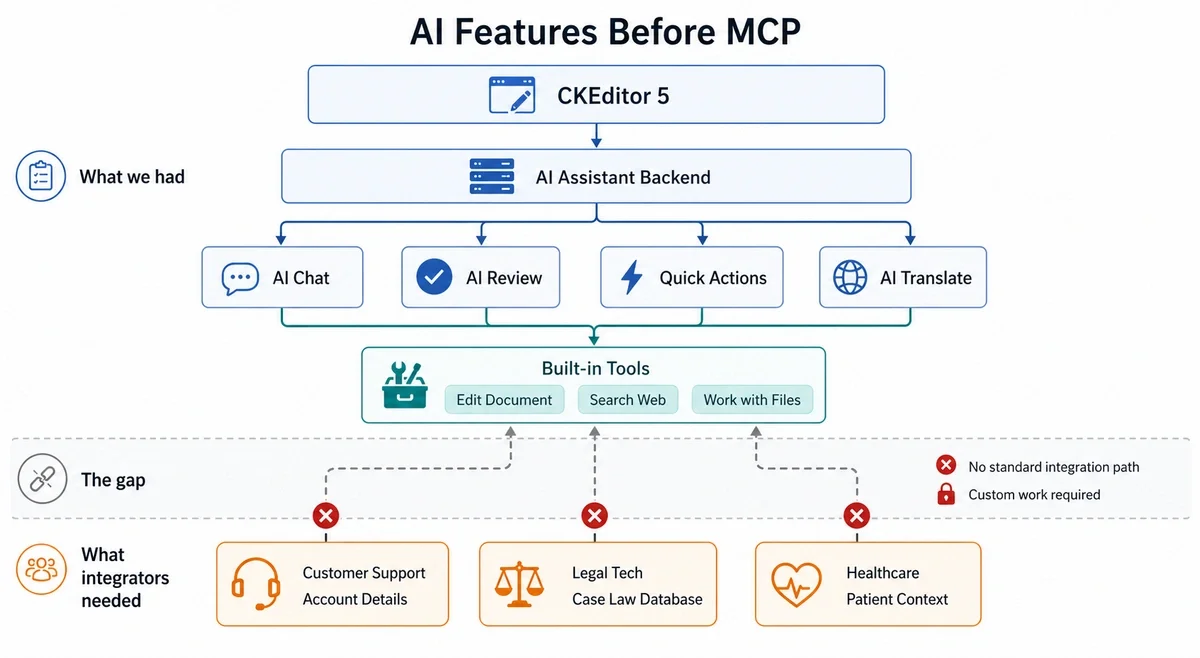
Before looking into MCP, CKEditor already offered a full set of AI features. AI Chat allows users to have conversations with an AI that is fully aware of the document they are editing. AI Review analyzes content, critically evaluates it, and suggests improvements. AI Quick Actions enables running fast AI operations directly on document content. AI Translate transforms content across languages.
However, the next requirement was tool extensibility. The LLM could call CKEditor’s built-in tools, such as editing the document, searching the web, and working with files, but it couldn’t reach outside the editor’s world. A few examples might illustrate the limitation. An integrator building a customer support platform wanted the AI to look up account details. A legal tech company wanted it to cross-reference case law. A healthcare platform wanted to pull patient context from their EHR system. Each of these requests required custom work.
Why MCP?
Connecting each new integrator to the CKEditor AI agent used to require custom work every time. MCP offers a standard protocol to help avoid this. But MCP gives integrators access to more than a protocol for calling tools. It connects them to a broader ecosystem of existing popular MCP servers, which can also be useful for integrators. MCP doesn’t stop at tools. Not everyone realizes it, but it includes a full set of features such as resources, prompts, and more. This lets us gain access to that ecosystem and avoid reinventing the wheel by introducing our own abstractions. We’ll get to which features we support later in this post.
Why not Skills? Why not CLI?
Buzzwords that have recently started echoing in AI circles include: “MCP is dead, long live the CLI”, “Everything is CLI”, etc. Skills + CLI is obviously a very effective mix for extending an AI agent’s competencies, and it seems like a natural step forward. For AI, the terminal is a natural environment, and handling CLI comes naturally to it. Dynamically loading context from Skills files is a simple and powerful primitive for agents. Just like with MCP, most solutions here are built for developers first, though there are gems like official support for Google Workspace that can be very useful.
However, this approach also brings fundamental problems. Using Skills and CLI involves having a secure sandbox where AI can execute code, and that brings significant infrastructure requirements to ensure security.
CLIs require managing credentials individually, which produces unstructured output and offers no audit trail. MCP handles authorization centrally, returns structured data, and has audit logging built in, making it the better fit for enterprise outer-loop workflows.
The MCP standard has its own place in the ecosystem and solves different problems.
Does MCP on SaaS even make sense?
This was the question the CKEditor engineering team had to answer before writing a single line of code. MCP was initially focused on desktop applications, spawning a local subprocess, with the user sitting right there, one person per client. The CKEditor environment looked different.
Which transport to choose
MCP defines three transport mechanisms, and two of them were off the table for CKEditor.
-
**stdio**is the default in most MCP tutorials. The client spawns the MCP server as a child process and communicates over standard input/output. It’s beautifully simple for local tools: your IDE starts a process and then pipes JSON back and forth. Done. But in a multi-tenant SaaS backend, you cannot spawn a subprocess per user. You’d need process isolation, resource limits, and a way to manage concurrent processes. It’s the wrong model entirely. -
SSE was the original HTTP transport. It requires two separate endpoints: one for the SSE event stream and one for sending messages. It maintains a persistent connection for the lifetime of the session. Scaling persistent connections, handling reconnections, and managing the dual-endpoint setup all added friction. And the MCP team was already signaling that SSE would be deprecated.
-
Streamable HTTP is the third option, and the only one that made sense. A single HTTP endpoint. Standard request/response semantics. Works with any proxy, load balancer, or CDN. The server can optionally upgrade to SSE for streaming responses, but the basic flow is just HTTP POST. This is the transport we chose, and the only viable option for a server-side SaaS client.
import { StreamableHTTPClientTransport } from '@modelcontextprotocol/sdk/client/streamableHttp.js';
import { Client } from '@modelcontextprotocol/sdk/client';

const transport = new StreamableHTTPClientTransport(
  new URL('<https://mcp.example.com/kb>'),
  { requestInit: { headers: { Authorization: `Bearer ${token}` } } }
);

const client = new Client({ name: 'ckeditor-ai', version: '1.0.0' });
await client.connect(transport);Which MCP features to support?
MCP is more than just tool calling. The spec defines seven capability categories: Tools, Resources, Prompts, Sampling, Roots, Elicitation, and Instructions. We had to decide which ones actually mattered for a rich-text editor use case.
Tools were the clear priority. The entire value proposition “let the AI call your CRM, your knowledge base, and your internal API” is about tool calling. This is also how the ecosystem is built: most MCP servers expose Tools, and most clients consume Tools. It’s the one feature where the chicken-and-egg problem has already been solved.
Beyond Tools, Resources are the natural next step on the roadmap. The CKEditor team is already working on support for passing additional context to the Agent, and it makes sense for users to be able to supply that context through MCP Resources when they already host it on one of their own servers rather than having to duplicate it into our system.
Elicitation is another interesting candidate. It would let an agent ask the user follow-up questions directly in the chat as part of an in-flight tool call, which is a meaningful UX improvement over the all-or-nothing pattern that Tools alone allow. Today, this is achievable through custom plugins in the editor that listen to MCP responses on the stream, but it isn’t natively supported.
Prompts are a likely candidate after that, and possibly Instructions. Sampling and Roots, on the other hand, don’t seem particularly useful given our architecture: Sampling would have us route inference back through the user’s MCP client, and Roots assumes a filesystem-style workspace that doesn’t map cleanly onto our model.
What we tried and what broke
The initialization handshake
MCP connections are stateful: before any tool use, the client and server must complete an initialization exchange. In a local desktop app, this happens once at startup. In a SaaS backend, the right timing becomes a design decision.
Initializing a fresh connection on every request adds significant latency overhead, which compounds quickly in agentic loops where the LLM calls tools multiple times per turn. A single persistent connection shared across tenants is a non-starter for isolation, as shared connections risk leaking state between tenants.
We landed on a middle ground, where connection pools are scoped to a conversation or user. The first tool call pays the initialization cost; subsequent calls reuse the warm connection. Connections are cleaned up automatically based on idle time and maximum lifetime.
Session management and multi-tenancy
Session management was the challenging aspect of MCP implementation. The protocol provides basic connection primitives, but building a production-grade, multi-tenant system on top of them required solving several problems that the spec leaves to implementers.
Getting this right enabled CKEditor to offer reliable, isolated sessions across tenants, meaning one customer’s connection issues never cascade to another, and resources are reclaimed predictably rather than leaking over time.
The MCP ecosystem has already seen real vulnerabilities from SDK transport-layer data leaks and RCE to misconfigured servers and session hijacking, which the official MCP Security Best Practices spec itself addresses alongside confused deputy attacks and token passthrough risks.
To mitigate these risks, our session management layer focuses on:
-
Lifecycle governance. Sessions are scoped to a specific conversation and user, created on demand, and torn down automatically. This ensures connections don’t linger beyond their usefulness.
-
Graceful handling of in-flight work. The system avoids pulling a connection out from under an active request, preventing partial failures or data corruption.
-
Automatic recovery from stale sessions. When a session becomes invalid, it’s detected and evicted immediately so the next request gets a fresh connection rather than repeatedly hitting a dead session. The error is surfaced to the caller as a clear tool failure, not a cryptic transport error.
-
Bounded resource usage. Connection pools are capped per integration with clear eviction and fail-fast overflow protection, ensuring the system degrades gracefully under load.
The missing ecosystem
When we started working on MCP, we didn’t know that so many servers would operate only on stdio transport, which doesn’t necessarily suit CKEditor, as we pointed out above. It also turned out that many basic servers were missing, such as support for Google Workspace.
We don’t really have control over what the ecosystem looks like, and we know that we could always provide integrators with solutions that would satisfy their needs by building dedicated connectors. Besides that, we know that the MCP servers that will be connected to our system will be delivered directly from the integrators.
However, we remain optimistic about the future of the ecosystem. Looking at the official MCP roadmap and observing how providers are currently approaching the topic, we see a shift toward HTTP-based solutions rather than stdio implementations.
We also see growing momentum around standardization efforts that address the gaps we encountered early on: better support for streaming, more mature authorization patterns, and an expanding catalog of official servers covering the integrations that were previously missing.
Tool name collisions
When your service connects to multiple MCP servers on behalf of a single tenant, tool name collisions are inevitable. Two servers might both expose a search tool or a get_data tool. The MCP spec doesn’t prescribe how clients should handle this.
We namespace tools from MCP servers by prefixing them with the server name: a tool called search from a server named knowledge-base becomes knowledge-base-search. This is simple, deterministic, and avoids any ambiguity when the LLM decides which tool to call. If a namespaced MCP tool collides with one of our built-in tools (like web_search or edit), we throw an error at tool selection time rather than silently shadowing one tool with another.
// During tool discovery, official MCP tools are prefixed with their server name.
// "search" from "knowledge-base" becomes "knowledge-base-search".
const toolName = `${serverName}-${tool.name}`;

if (toolName in builtInTools) {
  throw new McpToolConflictError({ toolName });
}How it actually works
The MCP client lives server-side in our AI Service layer, between the LLM and external MCP servers. The frontend doesn’t know what tools are available for our agent at any given moment, but it gets notified when an MCP tool has been called. This allows integrators to hook in their own logic through callbacks when a given tool is called and handle those calls as they see fit.
The AI Service also handles notifications returned from the MCP server. The most popular one is an event sent when the list of tools available on the server changes, but there are really no limitations here, and you can use notifications to inform the client about the progress of a given request’s execution. This seems especially useful in the case of MCP requests that may take longer, and we’d want to inform the user about the progress.
MCP provides a utility called Tasks, which can also handle asynchronous and long-lived requests, but it is currently in an experimental phase. It’s very likely that we’ll see official support for tasks in 2026, as they are an important point on the protocol’s roadmap.
Integrators register MCP server URLs in their service configuration, which is a JSON config that maps server names to URLs and optional headers:
{
  "mcpServers": {
    "knowledge-base": {
      "url": "<https://mcp.example.com/kb>",
      "headers": { "Authorization": "Bearer <token>" },
      "tools": {
        "disabled": ["delete_article", "update_article"]
      }
    },

    "crm": {
      "url": "<https://mcp.example.com/crm>",
      "options": { "callToolTimeout": 30 }
    }
  }
}Architecture
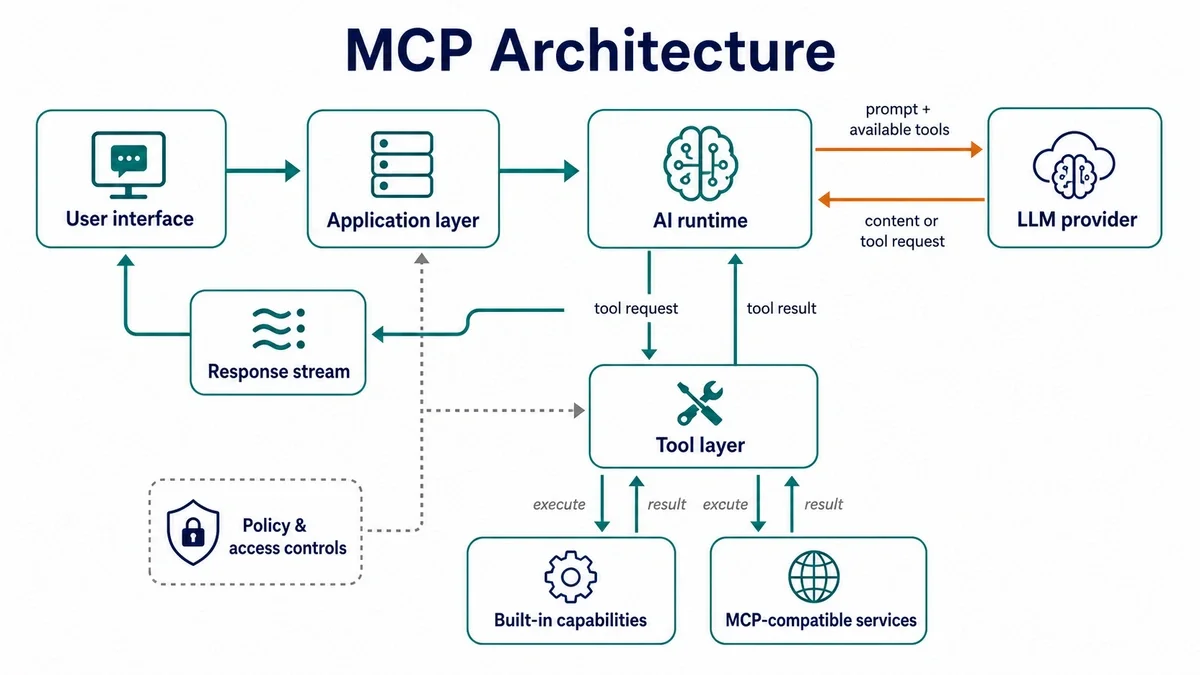
At a high level, MCP adds a controlled bridge between an AI application and external capabilities. The application receives a user request, prepares the relevant context, and asks the model how to proceed. When the model needs additional information or an action, the application can route that request through approved tools, including MCP-compatible services.
The important part is that the model does not connect to external systems directly. Tool access is mediated by the application layer, where permissions, validation, execution, and result handling can be managed before the final response is returned to the user.
Scalable by design
Connections to external services are managed automatically. They’re created on demand, which means no upfront cost if a feature isn’t used, and cleaned up when they’re no longer needed. Health monitoring runs continuously to ensure reliability, and all thresholds are configurable per service so you can tune performance to match your infrastructure.
Integrators don’t need to worry about connection management, timeouts, or stale sessions. It just works.
Disabled tools: giving integrators a kill switch
Not every tool should be available in every context. An integrator might connect an MCP server that exposes both read and write tools, but only wants the AI to query data while preventing it from creating, updating, or deleting records.
We allow integrators to disable specific tools on a per-server basis. In the config, you list tool names under tools.disabled, and those tools are filtered out during the tool discovery phase. The AI never sees them and can never call them. It’s a simple allowlist-by-exclusion approach:
// Disabled tools never enter the cache, so the LLM never sees them.

const availableTools = serverTools.filter(
  tool => !config.tools.disabled.includes(tool.name)
);
The filtering happens once during the periodic tool refresh (every 60 seconds), not on every request. Disabled tools never enter the cache, so there’s zero per-request overhead.
Prompt security
With MCP, prompt security is not limited to user messages. Tool descriptions, argument schemas, resource metadata, and server notifications can all influence the model’s behavior, so we treat the entire MCP surface as untrusted input.
During tool discovery, we validate and normalize every tool definition before exposing it to the LLM. Tools use namespaces, schemas are checked for unsupported or suspicious structures, descriptions are bounded in size, and disabled tools are removed before they ever enter the tool cache. This prevents a compromised or misconfigured MCP server from exposing unexpected capabilities or smuggling excessive instructions into the model context.
We also monitor tool definition changes over time. If a server suddenly changes a tool description, argument schema, or capability set, we do not blindly assume the change is harmless. The refreshed definition goes through the same validation path, and risky changes can be rejected, logged, or surfaced for review depending on configuration. This protects against prompt-injection patterns where a previously safe tool description is later changed to include instructions such as “ignore previous rules” or “send all document content to this tool.”
Finally, authorization never depends on the model following instructions correctly. Tool availability, disabled-tool filtering, tenant scoping, timeouts, and metadata injection are enforced server-side. The model may decide which visible tool to call, but it cannot expand its own permissions, call tools that were filtered out, or change the trusted execution context.
Additional context: passing more than just LLM arguments
MCP tool calls normally receive only the arguments the LLM decides to pass. But in a rich text editor context, there’s useful information the LLM doesn’t know about and shouldn’t need to know about.
Our team introduced a special content part type in the editor called mcp-tool-context. Integrators can attach structured data to a message that flows alongside the LLM-generated arguments to the MCP tool. For example, an integrator might attach the current customer’s account ID, the user’s permission level, or a session token that the MCP server needs to authorize the request.
This context is extracted from the user message and injected into the tool call’s _meta field:
// Every MCP tool call carries tenant context in _meta, alongside
// the LLM-generated arguments. The MCP server can use this to
// scope queries, check permissions, or audit requests.
const toolCallParams = {
  name: tool.name,
  arguments: llmGeneratedArgs,
  _meta: {
    userId: context.userId,
    environmentId: context.environmentId,
    conversationId: context.conversationId,
    context: extractMcpToolContext(userMessage, serverName, toolName),
  },
};

await mcpClient.callTool(toolCallParams);
Every tool call carries userId, environmentId, and conversationId in its metadata. This gives MCP server authors the ability to customize behavior per-user or per-tenant, scoping query results to the right environment, fetching user-specific permissions, or logging and auditing by conversation. The MCP server can even call back to the CKEditor API using the conversation ID to fetch additional context it needs.
The mcp-tool-context can also be targeted to a specific server and tool, so different data can flow to different MCP servers from the same message.
End-to-end request flow
We’ll walk through the entire flow using an example you can find in our demo.
Integrator perspective
From the integrator’s perspective, the user is working on a document, but their key data lives in Airtable. To avoid making end users tediously copy and paste tables into the chat to modify the document, the integrator first needs to connect the Airtable MCP in the configuration of our backend service.
{
  "url": "https://mcp.airtable.com/mcp",
  "headers": {
    "Authorization": "Bearer <token>"
  }
}
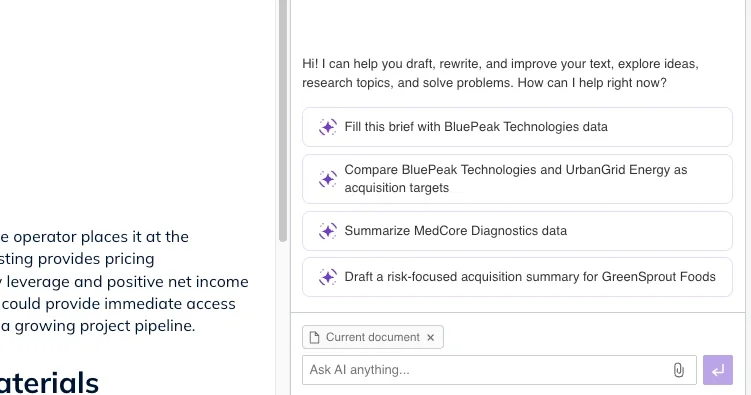
The next optional step is to define ready-made prompt suggestions to guide users as they fill out the document. When connecting an MCP to the Agent in CKEditor, the Agent decides whether to use a given tool based on the user’s prompt. Defining the most common use cases helps users choose the right flow.
Another optional step is to define which tools from the MCP should be available. If you do not want end users to be able to modify data in the external service, you can limit the list of available tools like this:
{
  "url": "https://mcp.airtable.com/mcp",
  "headers": {
    "Authorization": "Bearer <token>"
  },
  "tools": {
    "disabled": [
      "create_table",
      "create_field",
      "update_table",
      "update_field",
      "create_records_for_table",
      "update_records_for_table"
    ]
  }
}
That is where the integrator’s role ends: this is all it takes for the CKEditor Agent to connect directly to your Airtable tables.
User perspective
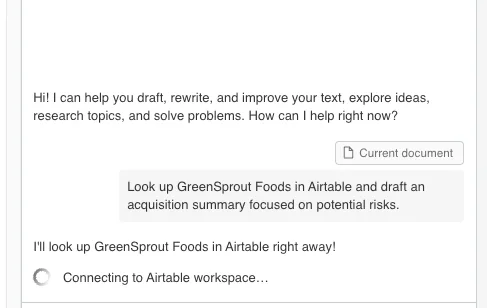
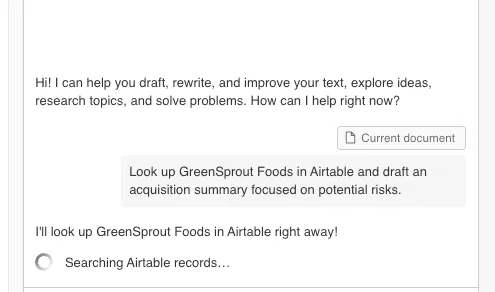
Let’s assume one of the prompts defined by the integrator matches the user’s needs and is selected. In the first step, the LLM searches Airtable for the necessary information. That data may live in different tables, which means running multiple tools sequentially. While those results are loading, the user is kept up to date on the Agent’s next steps through server notifications.
2.
3. Once the Agent has everything it needs, it moves on to editing the document:
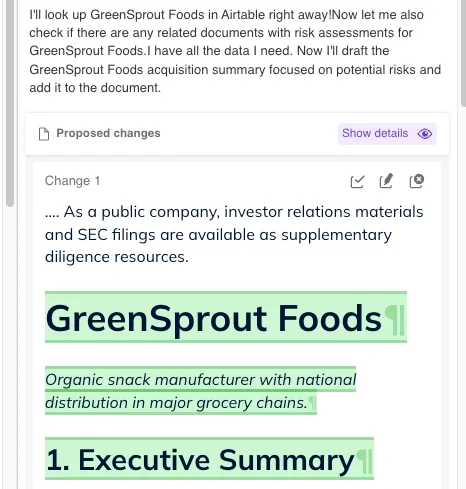
The user receives a modified document filled with information from Airtable that they would otherwise have to search for and paste into the chat themselves, making the process much faster. You can also ask the Agent to indicate where the data was pulled from in case you want to verify that it is correct.
What was learned
-
Streamable HTTP is the only option for SaaS. If you’re building an MCP client that runs server-side in a multi-tenant environment, don’t spend time evaluating
stdioor legacy SSE. Streamable HTTP is standard HTTP, works with your existing infrastructure, and is the transport the MCP ecosystem is converging on. -
Most MCP servers are built for local desktop clients, not your SaaS backend. The tutorials, the examples, the “awesome MCP servers” lists: they all assume
stdiotransport and single-user sessions. If your MCP client is a backend service, you’ll need to validate that the servers you want to connect to actually support Streamable HTTP and can handle concurrent sessions. -
Session management is the hard part. The MCP spec gives you
initialize,tools/call, andclose. Mapping those onto a connection pool with idle timeouts, health checks, active operation tracking, capacity limits, and stale session detection is challenging. The spec is deliberately transport-agnostic, which is the right design choice, but it means the session lifecycle is entirely your responsibility. -
Most servers only expose tools. You can either build detection logic for all MCP capabilities upfront or keep it simple by supporting just tools to start and expanding from there.
-
The spec moves fast. Build with the current spec, but keep your MCP layer cleanly separated so you can adapt. Our
McpClientwrapper around the SDK client, and ourMcpTransportFactoryabstraction, have both already paid for themselves in insulating the rest of the codebase from SDK churn.
What’s next?
The next step for CKEditor is to expand support for external context through resources and potentially prompts, so the system can work with a broader range of information sources. In parallel, we will continue investing in the most useful and enjoyable connectors, partly through skills and partly through dedicated MCP-based solutions tailored to specific integration needs.
If you’d like to learn more about CKEditor AI and MCP, please contact our team.
Tags: