CKEditor Docs for ChatGPT: Draft at AI speed, review with editor control
9min read
|CKEditor Docs: Write & Review puts a full document editor inside ChatGPT. Draft at ChatGPT speed, then review with editor control: AI edits arrive as a suggestion you accept or reject. Share the document with colleagues and their ChatGPTs work on it with you - all the changes visible and nothing lost on the way. It is built on CKEditor’s Editing Toolkit and shows one of its use cases, working with an agent app like ChatGPT. But the toolkit works beyond agent apps, wherever you build with CKEditor.
We write together with AI. The question is who stays in control
A proposal, a policy update, a client report: more and more of these start with a prompt. That is how a lot of work gets written today, and writing with AI is here to stay.
As AI-related security news make the headlines more and more these days, the questions people ask every day come down to control:
- Is this still what I wanted to convey, and can I see what the AI changed?
- Will my formatting, tables and comments survive the round trip?
- Who approved this sentence, a colleague or an AI model?
- Am I shipping something I reviewed, or something that just looks finished?
- Does this feel like my document, or like a chat transcript?
For one writer, those answers add up to control. For a company, they add up to governance, which is control at scale. Keeping both is what we have built CKEditor for, and CKEditor Docs lets you try it out for yourself, inside ChatGPT.
What is CKEditor Docs for ChatGPT
CKEditor Docs for ChatGPT is a plugin that puts a full document editor inside a ChatGPT conversation. Add it, sign in with Google account or your email address, and bring in the editor whenever you need it, whether you are starting a document from scratch or turning a conversation into one. It opens right in the chat, works like the editors you’re already familiar with, and keeps ChatGPT one prompt away.
Here is what you and ChatGPT can do together in CKEditor Docs:
- Draft a new document from a prompt or an outline.
- Ask ChatGPT for changes, and they arrive as tracked suggestions you accept or reject, one by one or all at once. Prefer to skip the review? Ask ChatGPT to apply them directly.
- Leave your own comments, and ask ChatGPT to work through them, replying in the thread or with adding suggestions.
- Ask ChatGPT to comment instead of editing. Each point AI wants to make gets its own thread, so every conversation stays tied to the part of the document it is about.
- Use CKEditor’s ready-made AI Quick Actions to apply the most common text changes with a single click.
- Share the document. Colleagues edit and comment live, themselves or through their own ChatGPT, and everyone explicitly sees who proposed what, human and AI alike.
- Export your document to PDF or Word with formatting intact.
- Format it like a real document, with fonts and colors, tables, images, code blocks, lists (bulleted, numbered, to-do and multi-level ), line height and a format painter.
- Compare earlier versions with CKEditor’s revision history.
When you want more room, open the same document in the CKEditor Docs web app. Your chat keeps working on it, and you get the full-featured editor: CKEditor AI Review, document conversion with all formatting retained, and the details long documents need, like footnotes, bookmarks, page breaks and a table of contents. ChatGPT is still there, waiting in the toolbar until you call it.
We build editors that keep people in control. You may not be familiar with our brand, but if you have answered a support ticket, published a web page or written a report in a dedicated application, there is a good chance you typed it in CKEditor. To name two examples, millions of support agents write in it inside Zendesk, and it is the default editor in Drupal CMS. For more than 20 years, we have helped other companies give their users a modern, reliable writing experience, and that means having to adapt continuously to an ever-changing web: by introducing real-time collaboration in 2019, and AI assistance in 2023. CKEditor Docs is the first time we bring the benefits of our embeddable rich text editor directly to you, the end user.
Every AI edit under your control
In CKEditor Docs, control comes from two places: where you write, and how changes reach your document.
CKEditor Docs makes ChatGPT a place where documents get written, reviewed and shared. A familiar editor, collaboration with colleagues and their ChatGPT, and AI edits you approve one suggestion at a time. Great to see it in the ChatGPT plugin directory.
Arpan Shah, Enterprise Verticals, OpenAI
Why an editor, not a chat window
Creating content in a chat window rarely feels like writing. In an editor, AI moves into a supporting role, and the writing process is yours again. The difference sounds small, but it shapes how much control and ownership you have over the result.
People wrote by hand for thousands of years and have typed into editors for a few decades. Writing through AI chat prompts is only about three years old. Researchers who studied the AI ghostwriter effect found that people do not feel they own text an AI generated for them, even when they put their name on it, and that the feeling of ownership grows the more they shape the text themselves.
An editor is where that shaping happens: you see the structure, move things around and decide what stays. CKEditor Docs keeps ChatGPT’s speed and gives you a proper place to do that work.
Why suggestions, not rewrites
Anyone who has let a model loose on a formatted document knows the two ways it goes wrong. You ask for one fix and get a whole new version back, with no way to tell what changed. Or the model meets a footnote, a multi-level list or any formatting rule it does not understand, drops it, and nobody notices for weeks.
With AI agents acting on files on their own, it can go even further. Earlier this month, a law professor shared how an AI assistant when asked fix the page numbers, deleted a year of his lecture notes and his syllabus.
So far, that is just one person. Add colleagues, and it gets harder: your colleague copies the document into their own ChatGPT, changes it, pastes it back and leaves comments in a separate tool. The document bounces back and forth, and it gets harder to tell which version is right, and who made the change — a person or ChatGPT.
In CKEditor Docs for ChatGPT, all of that happens in one document:
- You and your ChatGPT, working on the draft.
- You and your colleagues, editing and commenting live.
- Your colleagues' ChatGPTs, joining the same document, with their changes arriving as suggestions too.
Collaboration usually gets sold on its shinier side: speed, teamwork, everyone in one place. What makes it succeed is control, and that is the part most often overlooked. Every change, from a person or a model, shows up where it happened, under the name of whoever proposed it, waiting for approval.
How it works
Let’s get technical. When it comes to your data, your conversation with ChatGPT stays in ChatGPT. Only the document is shared with CKEditor Docs. CKEditor Docs keeps it in CKEditor cloud, which is what makes real-time collaboration possible. That is how the same document can be open in your ChatGPT, in your colleague’s ChatGPT and in the web app simultaneously. Everyone sees the same version, and edits made at the same time are merged in real-time instead of overwriting each other.
Behind the scenes, all of this is made possible by the Editing Toolkit, which any team building on CKEditor can use for much more than a ChatGPT plugin. It has two parts:
- Compare runs in the editor. It works out the differences between two versions and applies them directly or as suggestions for review.
- Coauthor (CKEditor MCP) lets AI agents, like ChatGPT in CKEditor Docs, read and edit documents on the server, through MCP. It gives agents skills that describe how the editor works, and tools to read, edit and verify content.
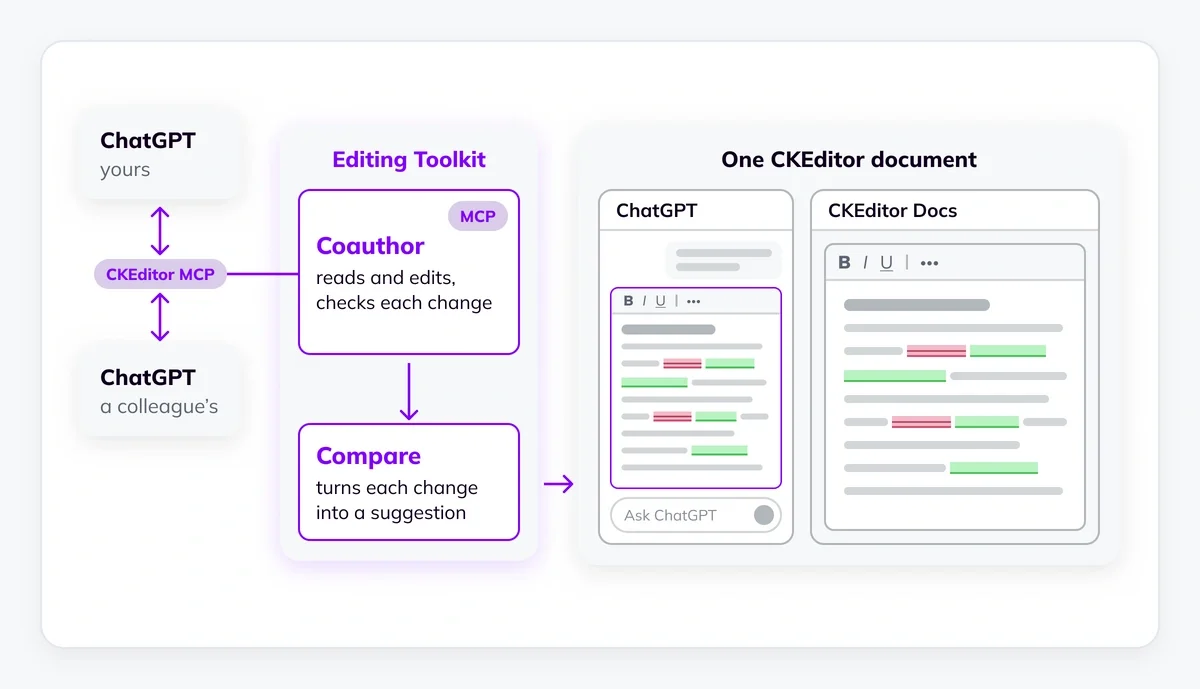
So in CKEditor Docs, when ChatGPT edits the document, yours or a colleague’s, it reaches it through Coauthor and makes the edit. Coauthor makes sure every edit is something CKEditor Docs can hold, and turns down the ones it cannot, explaining why so ChatGPT can fix them. Compare then applies each edit the way you asked: directly, or as suggestions. Suggestions are granular and everyone sees them live: change one table cell, and only that cell is marked, not the whole table. Every round of changes and suggestions is kept in revision history, a record of who changed what and when, ready for reviews and compliance checks.
Your application, your CKEditor
ChatGPT was our first stop: as a lot of writing starts there today, it let us show what CKEditor’s Editing Toolkit can do in a product anyone can try. It is also the first time we meet the people who write in CKEditor directly, not the teams who build with it. But nothing here is tied to ChatGPT.
Take CKEditor Docs as a starting point, or build something entirely your own with CKEditor, fully integrated with your application. It’s all on your own terms: plugins, configuration, permissions, AI and storage. Everything stays yours and your users never need to leaving your application. Here is how.
Editing Toolkit, beyond agent apps
CKEditor Docs is our own app built on Editing Toolkit, inside ChatGPT, an agent app. You can build similar solutions of your own, for other agent apps too, or connect an agent app straight to Coauthor (CKEditor MCP). But agent apps are not the only thing you can build with the Editing Toolkit:
- Custom chat. Run your own assistant next to your documents, connected to your own systems, with each change approved in the editor.
- Backend agent workflows. Let one agent draft and another review on the server, with no browser open, while people decide on each suggestion later.
- Scripts and external versions. No AI needed: review a product rename across documents, or compare the current document with an updated Word file.
CKEditor AI
You can find AI Review feature in CKEditor Docs web app. In your own application, you can have all the CKEditor AI features: AI Chat, AI Review, AI Translate, AI Quick Actions.
Behind these features the AI is your choice: use one of the models we support, or bring your own. You can use the Context library to keep your style guide and reference files in one place, connect the chat to your own tools and data through your MCP servers, and trigger AI from your code with editor and REST APIs. CKEditor AI also works with Editing Toolkit for whatever you build around it.
CKEditor, all of it
CKEditor is built to be shaped: customizable and extensible down to its core, which is why it fits into so many different products.
Your application can use any of CKEditor’s 300+ features and pick a ready-made editor UI to start from: a classic toolbar, a Notion-style balloon block editor, or several editable areas on one page. This video on editor types shows what each one looks like.
Everything is reachable from code, through editor and REST APIs so you can extend the editor with custom plugins and workflows. Try your choice of UI and own combination of features in the CKEditor 5 Builder.
Your documents, on your servers
Where your documents live is one of the first and most important governance decisions you make for your application. CKEditor and its features, including real-time collaboration and CKEditor AI, can run on your own servers. Everything stays inside your infrastructure, under your own security policies and compliance rules.
Interested in a private deployment of an editor like CKEditor Docs, or a solution shaped around your own features and setup, perhaps something that does not involve ChatGPT at all? Talk to us to get started.
What comes next
Editing Toolkit is part of a wider plan for AI writing: you bring your AI, and we bring the editing. The first pieces are already here. Compare already shipped in CKEditor 5 v49.1.0, Coauthor is in early access now, both in the cloud and on-premises, with general availability planned for Q1 2027.
Want to build with Editing Toolkit before general availability? Request early access.
Add CKEditor Docs in ChatGPT and try it out. CKEditor Docs is just getting started, and we want to grow it with your feedback. Tell us what you would like to see next with the Give feedback button in the web app.
Start in ChatGPT today, build it into your own product when you are ready, and keep every AI edit your call. Let’s get humans and AI on the same page.
Tags: