CKEditor 5 Now Supports Shadow DOM: When and How to Use It
9min read
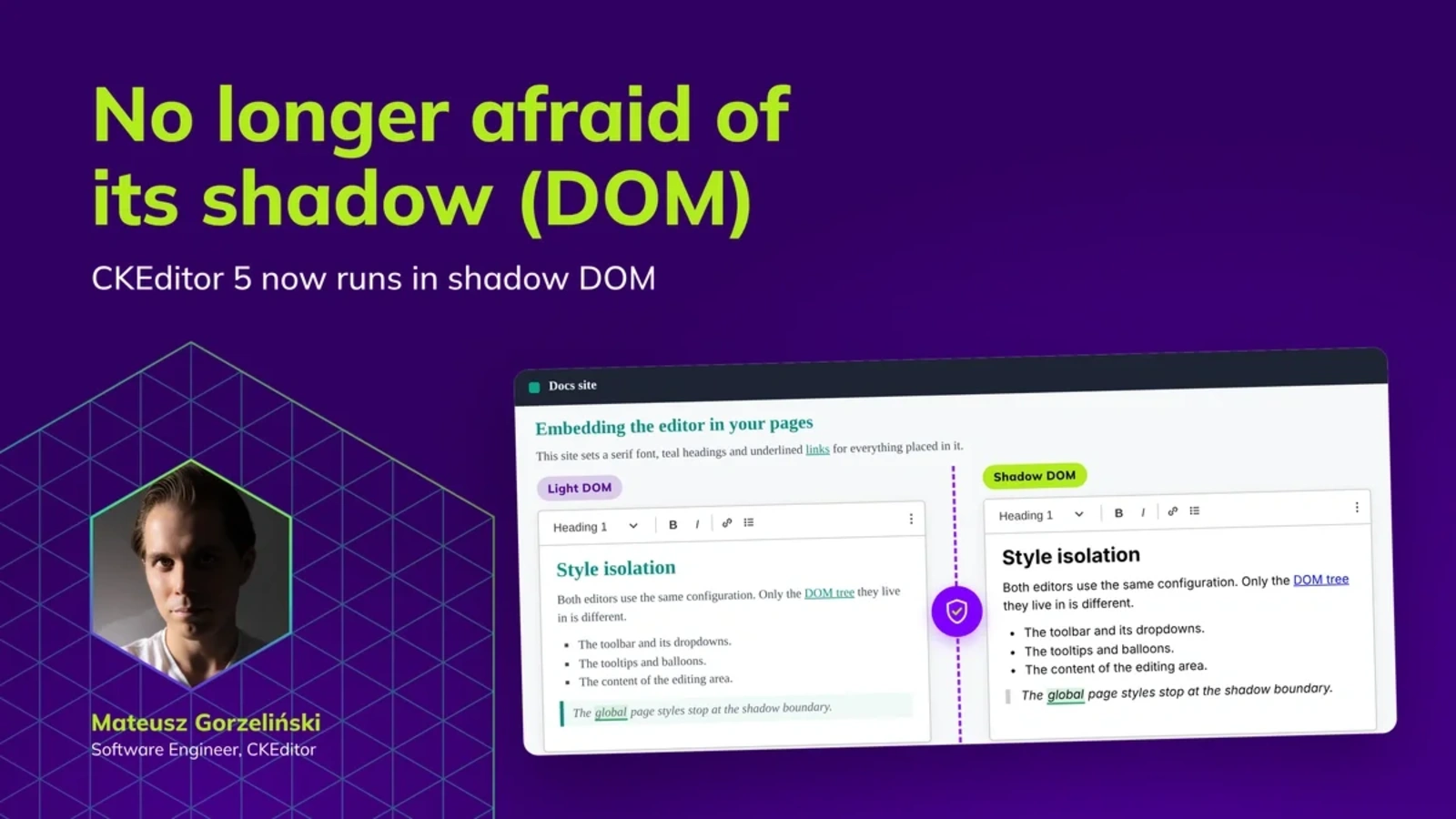
|CKEditor 5 now supports shadow DOM. In our docs, there is a demo with the editor running inside a shadow DOM. It also demonstrates the style-leaking problem described below. The demo breaks on purpose! In contrast to our website demos. We’ve been fighting with some style leaking too. Ugh.
“Works for me.” You’ve probably heard the phrase multiple times being in the IT space. Someone gives you a script, a CMS template, or a pixel-perfect component, and they swear that it just works™️. It drives you nuts because it just doesn’t work for your page. You embedded the component, and some random button inside is 10 pixels taller than expected.
It can also go the other way around—you’ve attached some script, and part of your site looks odd, though nobody involved did anything wrong. In this case, it actually worked for them. Your site was fine too. You can hide your grudge. The problem was the interference between two sets of styles.
Over the years, we refined the CSS ecosystem to avoid such issues. The language itself is getting better with features such as @layer or @scope. We have solutions like BEM convention, CSS Modules with generated classes, or CSS-in-JS to avoid style collisions. But, even in neatly designed systems, some styles can leak. Sneaky button { padding: 16px } can break all the buttons.
CSS tools scope selectors. Shadow DOM scopes the tree.
Shadow DOM is a browser feature built for exactly this concern. It gives an element its DOM tree with a styling boundary around it. Page CSS cannot reach in; your CSS cannot leak out. If you are fighting similar issues, you may consider checking it out.
For some tech stacks, it is not even a preference. Salesforce Lightning web components render into a shadow root. So do many custom elements and some micro-frontend shells. If your integration lives there, “we would rather not” was never one of the options.
Until recently, the lack of shadow DOM support ruled out CKEditor 5 for such use cases. It does not anymore.
Shadow DOM in ninety seconds
For the purpose of this blog post, two rules cover most of shadow DOM characteristic traits.
- Selectors do not cross the boundary. A page stylesheet matches nothing inside the shadow tree, and rules inside do not leak out onto the page. Inherited properties are the exception—fonts, colors, and custom properties still flow in from ancestors.
- The document cannot see inside the shadow tree.
document.querySelector()will not find an element inside a shadow root. Neither willgetElementById(). From the outside, the entire subtree is a single element.
You can create a shadow tree by attaching the shadow root to a host element.
const host = document.querySelector( '#editor-host' );
const shadowRoot = host.attachShadow( { mode: 'open' } );

shadowRoot.innerHTML = '<div id="editor"></div>';
'open' or 'closed'. The open shadow root allows external code to read and modify the shadow tree. The closed mode hides tree internals from the outside JavaScript code.
This is a very brief overview of the shadow DOM API. If you want the full tour, including syntaxes, slots, shadow boundary, and more—I wrote a longer piece on it: Every DOM Element Casts a Shadow.
Why has implementing shadow DOM taken so long?
The request to run CKEditor inside a shadow root was filed in November 2016. Almost a decade later, CKEditor 5 in version 49.0.0 supports shadow DOM.
We would rather not play victim here, but we were bound by web platform constraints. For example, the getComposedRanges() method became newly available in August 2025. It’s the only standard way to read a selection across a shadow boundary. As you may expect, selection is pretty important for a WYSIWYG editor. The other essential editor feature—the caret—also started working reliably in shadow DOM only recently. The shadowRoots option that lets caretPositionFromPoint() drop a caret inside a shadow tree reached Safari only in version 26.2. Before those, the editor could use a Chromium-only API or features that quietly did the wrong thing. The platform is now ready, and so is CKEditor.
The editor runs inside an open shadow root: selection, focus, balloon positioning, scrolling, dragging, dropping, and the floating user interface all work there.
A
<slot>lets a component accept content from outside. You place the editor in the component’s markup, and the component decides where inside its shadow tree to render it.
You can technically make the editor work in the closed shadow root, but the functionality will be limited. How so? Slotted content is a blocker here. The editor has to find which <slot> it was placed in through Element#assignedSlot. The closed root does not report the slot, and the DOM standard offers no alternative here. Without it, the editor cannot tell which element really scrolls and clips it. Balloons anchor to the wrong ancestor, and scrolling the selection into view scrolls the window rather than your container.
In practice, it does not cost you much. Component frameworks usually attach open roots by default.
The document cannot see in the dark
CKEditor 5 leans on DOM APIs that resolve against the document. For twenty years that was the only tree there was. You can use document.activeElement to track focus. The window.getSelection() reads selection. Node#contains() and Node#parentNode can tell what elements are inside the editor.
Things have changed. The mentioned APIs work differently for shadow DOM. They return the host element instead of the node you meant, or nothing whatsoever. In a shadow root, the document is the wrong tree.
Additionally, none of those APIs throw anything. The editor feature can just stop reacting. The symptom surfaces a long way from the initial call. Problems may vary: a dropdown that will not close or a balloon that is anchored to a wrong element. We gathered those issues in the troubleshooting section of the shadow DOM deep dive guide. We categorized them as observed symptoms rather than what caused them. It may help you if you spot such issues in your shadow DOM editor setup.
That’s also why we couldn’t add shadow DOM support as a simple patch. That was a whole project that spanned across many nooks and crannies of the CKEditor 5 codebase.
Running CKEditor in shadow DOM
Let’s say you’re not a feature developer and just want to run CKEditor inside shadow DOM. The process is simpler, but two things won’t happen by themselves.
- The editor stylesheets have to reach every tree that holds some part of the editor UI.
- The floating UI needs a place to live.
Styles are scoped to a specific tree, so we need to load them into the shadow root through the adoptedStyleSheets property. “The value is an array of CSSStyleSheet instances that must have been created using the CSSStyleSheet()…” MDN says. That’s what the setup requires—constructed stylesheets. That’s important because the <link> or <style> element can’t produce the constructed sheets this property requires. Bundlers inject CSS into the document by default, placing styles in the wrong tree in our case.
Balloons, dialogs, and tooltips render outside the editing area so nothing clips them. They mount in whatever tree the editor is in, and the tree may clip them. To avoid such issues, give the floating UI elements their shadow root at the end of the body. It’s not the most intuitive solution, but what can I say? “It is what it is.” The shadow DOM API solves many issues but isn’t always the easiest to implement.
const overlayHost = document.body.appendChild( document.createElement( 'div' ) );
const overlayContainer = overlayHost.attachShadow( { mode: 'open' } );

overlayContainer.adoptedStyleSheets = editorShadowRoot.adoptedStyleSheets;

ClassicEditor.create( {
	attachTo: editorElement,
	ui: { overlayContainer }
} );
If you forget about the container, I won’t blame you. “Would you kindly add it?” The editor will remind you with the ui-overlay-container-not-configured warning. The comments sidebar, the presence list, and the AI interface each accept a container of their own too, falling back to the shared one when you do not set it.
Then you override CSS variables on the shadow host because the :root selector matches nothing inside a shadow DOM. Finally, you add your custom class to every host that holds editor UI to style it.
.my-editor-shadow-host {
	--ck-radius-base: 16px;
}
The full setup, including React, Vue, and Angular, is in the Running CKEditor 5 inside a shadow DOM guide.
Should you actually migrate to shadow DOM?
We’ve just explored how to integrate CKEditor 5 with shadow DOM. But should you actually do this? The answer is a bit nuanced and depends on your setup.
1. If you have no choice, you have no choice
Using shadow DOM in some setups is not a design decision you make. Salesforce Lightning web components render into a shadow root, and so do many custom elements and some micro-frontend shells. CKEditor 5 should no longer be a blocker in such environments. You can head straight to the next section; the rest of this section is for people who still have a choice. You also have a choice to stay and learn more. ✨ The more you know, the better. ✨
2. If you are embedding into pages you do not control, it is the right tool
Shadow DOM can help you avoid the style interference described earlier. If you have a widget on customer sites, an editor inside a CMS whose theme you inherit, or anything behind an embedded script, shadow DOM may be useful. It’s the only browser mechanism that actually gives a real boundary between trees. Class-name prefixing or CSS-in-JS scoping protects against collisions, but mostly between your own rules. They do not protect from host pages that style something globally.
3. If you own the page, you probably do not need it
Even in this case, you most certainly have some global styles: resets, typography defaults, design tokens on :root or some scroll styling. The difference here is that you own them—when the rule breaks the editor, you can change the rule. Shadow DOM exists to solve those issues with global styles, but on your page you already have a cheaper fix for it. A neatly designed styling system can avoid style collisions.
There is a cost for using shadow DOM: stylesheets loaded into every tree that holds editor UI, a separate home for the floating interface, variables overridden on the host instead of :root, and a boundary to reason across every time you open devtools.
At the same time, it’s a real boundary. The shadow boundary may help in complex setups with many editor instances across pages whose styles move on their schedule. Our website demos are such a case—we are moving them into shadow roots as I write this, and it will dramatically simplify their styles.
One boundary beats a long tail of small fixes.
Whatever you decide, audit what goes in the root
Shadow DOM costs do not land on whoever chose it—they land on every component that goes inside. Most third-party code has never been tested in a shadow tree. All the failures have a similar shape—a library queries document for its interface and finds nothing. Or it injects its styles into document.head, which is now the wrong tree. Or a popup renders unstyled because it lives outside the boundary. Nothing throws in any of those cases. Only subtle bugs may appear in unexpected places.
We know this pretty well, having spent four months polishing those rough edges. We also wrote lint rules that flag every DOM API that silently changes meaning inside a shadow root and a guide to porting a feature that uses them. They help, but they do not catch everything, so expect a few subtle glitches.
Before you commit, list everything you plan to mount inside the boundary and check it one by one. Our troubleshooting guide is indexed by symptom rather than cause, which is what you need when the code is someone else’s.
Shadow boundary, shadow limits, shadow changes
There are some things we cannot fix. Safari and Chromium do not report the direction of a selection made with the mouse inside a shadow root. Backward selection can look like forward. Interfaces anchored to the selection, such as the balloon toolbar, therefore, can appear in the wrong place. At the time of writing, there is no workaround for modern Internet Explorer. Chromium offers a non-standard API in some cases. Overall, the browsers do not expose what we require.
The scope of work on shadow DOM was pretty big, and it required us to move a few defaults, regardless of you touching shadow root. The body collection attaches later now, so a document.querySelector( '.ck-body-wrapper' ) can come back empty. Some page-level rules moved out of the theme stylesheet, and the fullscreen mode has a new default container. The full list of changes is available in the v49 update guide.
Try shadow DOM support yourself
If you have been holding an integration back because the editor could not live inside a shadow root, that blocker is gone as of v49.0.0.
- Shipping into Salesforce Lightning, a custom element, or a micro-frontend shell? The decision was made for you. Shadow DOM is basically required. Start with the setup guide.
- Embedding into pages you do not control? Shadow DOM is the only mechanism that provides an actual boundary. Avoiding style leaking problems may be worth the setup cost.
- Own the page? You probably do not need it—unless the page’s styles keep moving underneath you. Shadow DOM may be beneficial for complex setups with many editor instances.
- Either way, audit what else goes in the root. The editor may work in Shadow DOM, but your plugin, or library may not. Check if it works as expected.
CKEditor 5 is no longer afraid of its shadow, and you shouldn’t be either.
Tags: