Collaboration Features Decomposed in Rich Text Editors

9min read
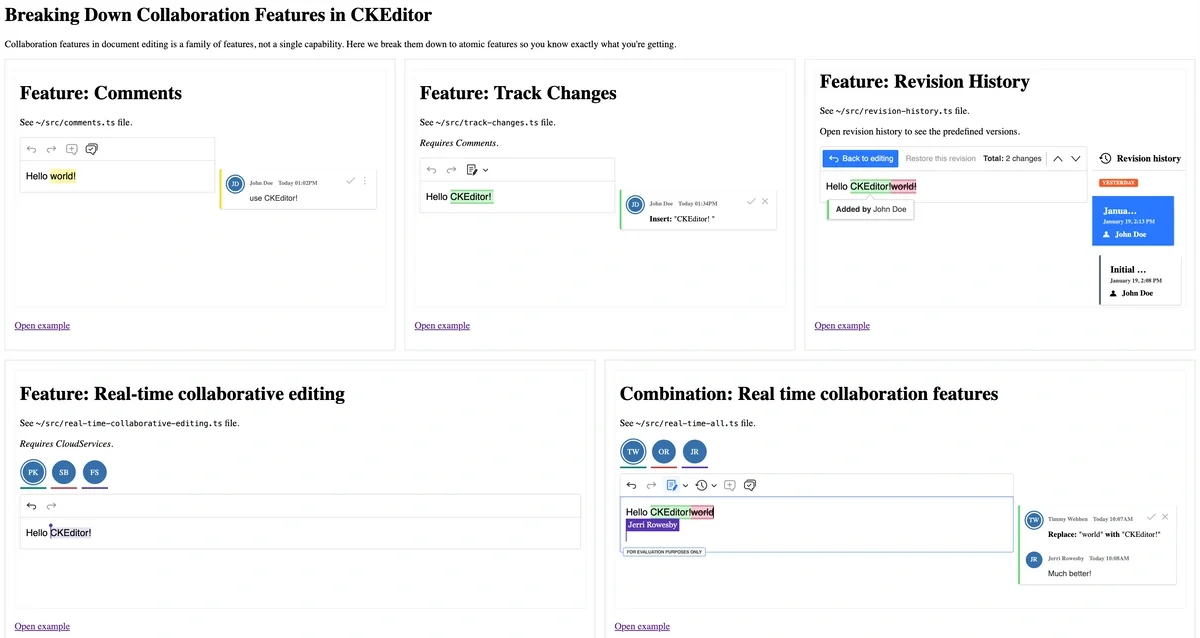
|Here’s a common scenario: Someone says they need collaboration features and everyone in the room nods. Yet, later, you find out that nearly everyone had different ideas of “collaboration features” in mind. I’ve been there. One person pictures Google Docs-style simultaneous editing, another wants tracked changes like Word, and someone else just wants to leave comments.
Collaboration features in rich text editors
The truth is, the “collaboration features” in a rich text editor are not a single thing: they’re a full family of capabilities. And understanding exactly what you’re getting (and what you need) makes all the difference between a smooth implementation and weeks of confusion.
Let’s break it down.
The two paths: asynchronous vs. real-time
Before diving into specific features, there’s one fundamental decision you’ll need to make: do you need asynchronous or real-time collaboration?
-
Asynchronous collaboration: Users work on documents at different times. Changes, comments, and suggestions are saved and synced when users come back to the document.
-
Real-time collaboration: Multiple users edit the same document simultaneously, seeing each others’ cursors and changes in real-time.
Here's the gotcha: don’t mix real-time and asynchronous collaboration. While the “why” of this is outside of the scope of this piece, just know that combining both together causes issues.
Pick one path based on your workflow needs. If you start with asynchronous collaboration and later need real-time, there's a migration path from async to real-time collaboration features available.
Want to follow along with an interactive playground? Clone CKEditor Collaboration Features Decomposed repository and check it out:
git clone https://github.com/ckeditor/devrel-collaboration-features-decomposedAll the samples in this article implemented in mentioned repository use CKEditor Premium features. To use them, you’ll need a license key. Don’t have one? Grab a 14-day free trial to follow along.
CKEditor asynchronous collaboration features
Let me walk you through each feature individually. You’ll see what it requires, what it offers, and how the data is structured. Understanding the data format helps you plan your database schema and integration approach.
Each feature offers two storage integration options:
-
Simple “load and save”: This option involves loading all data at once and saving it when the user submits (like a form save).
-
Adapter integration: This option involves hooking into the entity lifecycle to react to individual actions in real-time (offering more granular control).
The companion repository uses the simple “load and save” approach for demonstration purposes.
Comments
The Comments plugin lets users attach discussions to specific content, whether that’s a word, a sentence, or even an image. Comments support threaded replies, so conversations can develop naturally.
Key requirements include:
- User identification: The editor needs to know who is commenting.
- A sidebar container: For displaying comment threads (it’s also possible to use inline balloons for comments, but the samples use the sidebar approach).
- The
comments.editorConfigproperty: Defines the configuration of the editor used for comment text management. If you don’t set it, you’ll see a console warning informing you that the default setup will be used.
Here’s what a comment looks like in your document’s HTML:
<p>
  Hello
  <comment-start name="ed5f0080a67ce5873dd66a09504e180ed:2dfbc"></comment-start>
  world!
  <comment-end name="ed5f0080a67ce5873dd66a09504e180ed:2dfbc"></comment-end>
</p>
Here’s the corresponding comment thread data in JSON:
[
  {
    "threadId": "ed5f0080a67ce5873dd66a09504e180ed",
    "context": {
      "type": "text",
      "value": "world!"
    },
    "unlinkedAt": null,
    "resolvedAt": null,
    "resolvedBy": null,
    "archivedAt": null,
    "comments": [
      {
        "commentId": "e3d9c9e56f083b1485eb3456e8dd488a7",
        "content": "<p>use CKEditor!</p>",
        "createdAt": "2026-01-19T12:02:19.773Z",
        "authorId": "user-1",
        "attributes": {}
      }
    ],
    "attributes": {}
  }
]
Notice how the comment markers in the HTML reference the thread ID. When the commented content is deleted, the comment thread moves to the archive instead of disappearing entirely.
The integration requires a UsersIntegration plugin that tells CKEditor about your users:
class UsersIntegration extends Plugin {
  static get requires() {
    return ['Users'];
  }

  init() {
    const users = this.editor.plugins.get('Users');
    users.addUser({ id: 'user-1', name: 'John Doe' });
    users.defineMe('user-1');
  }
}
Voila! 🪄 Users can now leave feedback directly in the document.
Track Changes
Track Changes brings that familiar “suggestion mode” you know from word processors. When enabled, every edit becomes a suggestion that can be accepted or rejected, perfect for review workflows.
Key requirements:
-
Everything Comments needs (Track Changes builds on the Comments infrastructure)
-
User identification for attributing suggestions
If you're using Track Changes, I'd recommend enabling Comments, too. Otherwise, reviewers might make "dummy" changes just to start a conversation about something that doesn't need editing.
The track changes mode can be toggled on and off. When off, the editor works normally. When on, changes appear as suggestions:
<p>Hello
    <suggestion-start name="insertion:e684c7669b45e2da28fefe820b5f03b09:user-1"></suggestion-start>
    CKEditor
    <suggestion-end name="insertion:e684c7669b45e2da28fefe820b5f03b09:user-1"></suggestion-end>
    <suggestion-start name="deletion:ec8c751661ca38b067e705d0119c1eca9:user-1"></suggestion-start>
    world!
    <suggestion-end name="deletion:ec8c751661ca38b067e705d0119c1eca9:user-1"></suggestion-end>
</p>
The suggestion data in JSON format:
[
  {
    "id": "ec8c751661ca38b067e705d0119c1eca9",
    "type": "deletion",
    "authorId": "user-1",
    "createdAt": "2026-01-19T12:34:28.345Z",
    "hasComments": false,
    "data": null,
    "attributes": {}
  },
  {
    "id": "e684c7669b45e2da28fefe820b5f03b09",
    "type": "insertion",
    "authorId": "user-1",
    "createdAt": "2026-01-19T12:34:28.347Z",
    "hasComments": false,
    "data": null,
    "attributes": {}
  }
]
A nice feature is the preview mode – you can see exactly what the document will look like if all suggestions are accepted.
One more thing: suggestions can have comments attached. If you’re wondering how they connect – the suggestion’s id becomes the comment thread’s threadId.
Revision History
Revision History lets you create named versions of your document and browse through them with a dedicated viewer. Think of it like Git commits for your content.
Key requirements include:
-
Container elements for the revision viewer UI.
-
The Track Changes infrastructure (used for visualizing differences between versions).
Here’s an interesting use case: you might want revision history without exposing Track Changes in the editor. This gives you governance and audit capabilities – similar to commits in Git – while keeping the editing experience simple.
Unlike Comments and Track Changes, Revision History doesn’t add markers to your document content. It stores revision data separately:
[
  {
    "id": "initial",
    "name": "Initial revision",
    "creatorId": "user-1",
    "authorsIds": [],
    "diffData": {
      "main": {
        "insertions": "[{\"type\":\"c\",\"name\":\"p\",\"attributes\":[],\"children\":[\"Hello world!\"]}]",
        "deletions": "[{\"type\":\"c\",\"name\":\"p\",\"attributes\":[],\"children\":[\"Hello world!\"]}]"
      }
    },
    "createdAt": "2026-01-19T13:08:42.824Z",
    "fromVersion": 1,
    "toVersion": 1
  },
  {
    "id": "e98f14da2fc3745c54eb39ef3086bfc73",
    "name": "",
    "creatorId": null,
    "authorsIds": ["user-1"],
    "diffData": {
      "main": {
        "insertions": "[{\"type\":\"c\",\"name\":\"p\",\"attributes\":[],\"children\":[\"Hello \",\"CKEditor!\"]}]",
        "deletions": "[{\"type\":\"c\",\"name\":\"p\",\"attributes\":[],\"children\":[\"Hello \",\"world!\"]}]"
      }
    },
    "createdAt": "2026-01-19T13:13:44.870Z",
    "fromVersion": 1,
    "toVersion": 11
  }
]
Notice the diffData field in the second revision. It contains the insertions and deletions as serialized data, which the viewer uses to highlight what changed between versions.
CKEditor real-time collaboration features
Now let’s explore the other path: real-time collaboration, where multiple users edit simultaneously.
Important reminder: As mentioned above, don’t mix real-time and asynchronous collaboration. Choose one approach based on your workflow. Real-time collaboration requires CKEditor Cloud Services to handle the synchronization between multiple users.
Real-time collaborative editing
This is (almost) the minimal setup for real-time collaboration, allowing two or more people to edit the same document simultaneously. I used the Users presence list as an optional addition to indicate users who are a part of a collaborative session which is invaluable when multiple people are editing at once.
Key requirements include:
-
Cloud Services credentials (token URL and WebSocket URL).
-
A channel ID to identify the collaborative session.
-
Recommendation: Use Presence List to indicate who is editing the content.
ClassicEditor.create(document.querySelector('#editor'), {
  plugins: [
    Essentials, Paragraph,
    CloudServices, RealTimeCollaborativeEditing,
    PresenceList,
  ],
  cloudServices: {
    tokenUrl: 'YOUR_TOKEN_URL',
    webSocketUrl: 'YOUR_WEBSOCKET_URL'
  },
  collaboration: {
    channelId: 'your-document-id'
  },
  presenceList: {
    container: document.querySelector('#presence')
  }
})
For storing document data, you have two options:
Cloud Services for collaboration data only: You manage your own document storage and just use Cloud Services for the real-time sync.
Document Storage from CKEditor: Let Cloud Services handle everything, including document persistence.
The second option is more convenient and future-proof, though it requires uploading your editor bundle to Cloud Services. But this is a one-time setup investment.
Real-time comments, track changes, and revision history
And now you can combine everything! Real-time collaboration works beautifully with Comments, Track Changes, and Revision History. Multiple users can:
-
Edit simultaneously.
-
Leave comments and have threaded discussions.
-
Make suggestions that others can accept or reject.
-
Browse the document’s version history.
If you use RealTimeCollaborativeEditing, always import the plugins in pairs:
-
Comments&RealTimeCollaborativeComments -
RevisionHistory&RealTimeCollaborativeRevisionHistory -
TrackChanges&RealTimeCollaborativeTrackChanges
ClassicEditor.create(document.querySelector('#editor'), {
  plugins: [
    Essentials, Paragraph,
    // Plugin pairs
    Comments, RealTimeCollaborativeComments,
    TrackChanges, RealTimeCollaborativeTrackChanges,
    RevisionHistory, RealTimeCollaborativeRevisionHistory
    CloudServices, RealTimeCollaborativeEditing,
    PresenceList,
  ],
  toolbar: ['undo', 'redo', 'trackChanges', 'revisionHistory', 'comment', 'commentsArchive'],
  cloudServices: {
    tokenUrl: 'YOUR_TOKEN_URL',
    webSocketUrl: 'YOUR_WEBSOCKET_URL'
  },
  collaboration: {
    channelId: 'your-document-id'
  }
})
Want to see it in action without and coding? Try the CKEditor Builder with its interactive preview. For advanced configuration, fork the companion repository and start customizing!
Making your decision
Before implementing, work through this checklist:
-
Do you need asynchronous or real-time collaboration?
-
Asynchronous: Choose between simple “load and save” or adapter-based storage.
-
Real-time: Choose between Cloud Services document storage or handling your own persistence.
-
-
Decide on the visual style of annotations: sidebar, inline, or wide sidebar.
Still not sure which path is right for you? The State of Real-Time Collaboration Report 2025 has insights from hundreds of teams that might help you decide.
Wrapping up
“Collaboration features” isn’t a single checkbox: it’s a toolkit. These include:
-
Comments for threaded discussions anchored to content.
-
Track Changes for suggestion-based review workflows.
-
Revision History for version management and audit trails.
Each feature stores its data in a specific format, which means you can plan your integration knowing exactly what to expect in your database.
🚀 Let’s get to it!
Tags: