14 Updates from CKEditor to Help You Move Faster in 2026
Technology moves fast. Each year brings rapid innovations and changes that reshape the business landscape. It’s easy to miss developments and fall behind.
In 2025, CKEditor released exciting new capabilities at a rapid clip. Whether you need more AI-driven productivity, improved security and compliance, or a better user experience, CKEditor’s work this past year has you covered.
With 2026 now here, it’s worth looking back on recent releases so you can stay current with the latest innovations (and prepare for CKEditor’s upcoming releases). This roundup will highlight new capabilities and improvements released in 2025 and how they help.
New use cases
In 2025, CKEditor didn’t just refine the editor. It expanded how people can use it. Key features now help teams move faster with AI, image optimization, and email creation. The result? Greater content velocity where users already write.
CKEditor AI
Employees increasingly use AI. Yet too often, they have to switch between multiple tabs to piece together their work. This context switching slows them down and introduces errors.
With CKEditor AI, you get all the AI tools needed to create content right in the editor. This includes:
-
AI Chat: Get summaries, ask questions, or even co-create full sections of the document with an AI chatbot located in a sidebar. You can even have it add sections directly into the editor so there’s no switching between windows or tabs. Plus, you can enrich its answers with more context by uploading documents or linking to URLs. AI generates reviewable suggestions as well, so you’re in charge of whether to accept or reject suggestions.
-
AI Quick Actions: By choosing a piece of text and selecting from a list of pre-defined, context-aware actions, you can have AI rewrite a line of text or check for grammar inline. These actions can be reviewed as well.
-
AI Review: Turning on AI review mode will give you feedback on grammar, tone, clarity, and style, providing suggestions that you can accept or decline. It also helps you create custom reviews using AI prompts that worked for you in the past. All reviews are added as suggestions, allowing you to accept or reject them instead of having the AI make changes. You remain in control.
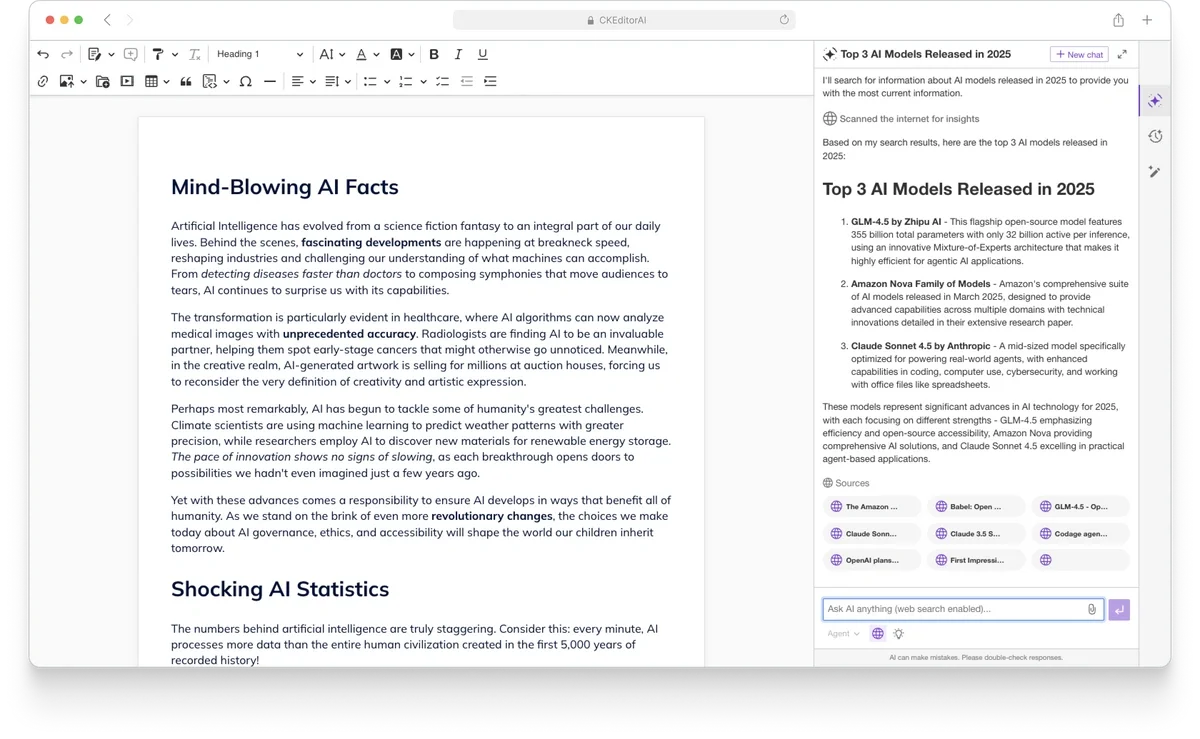
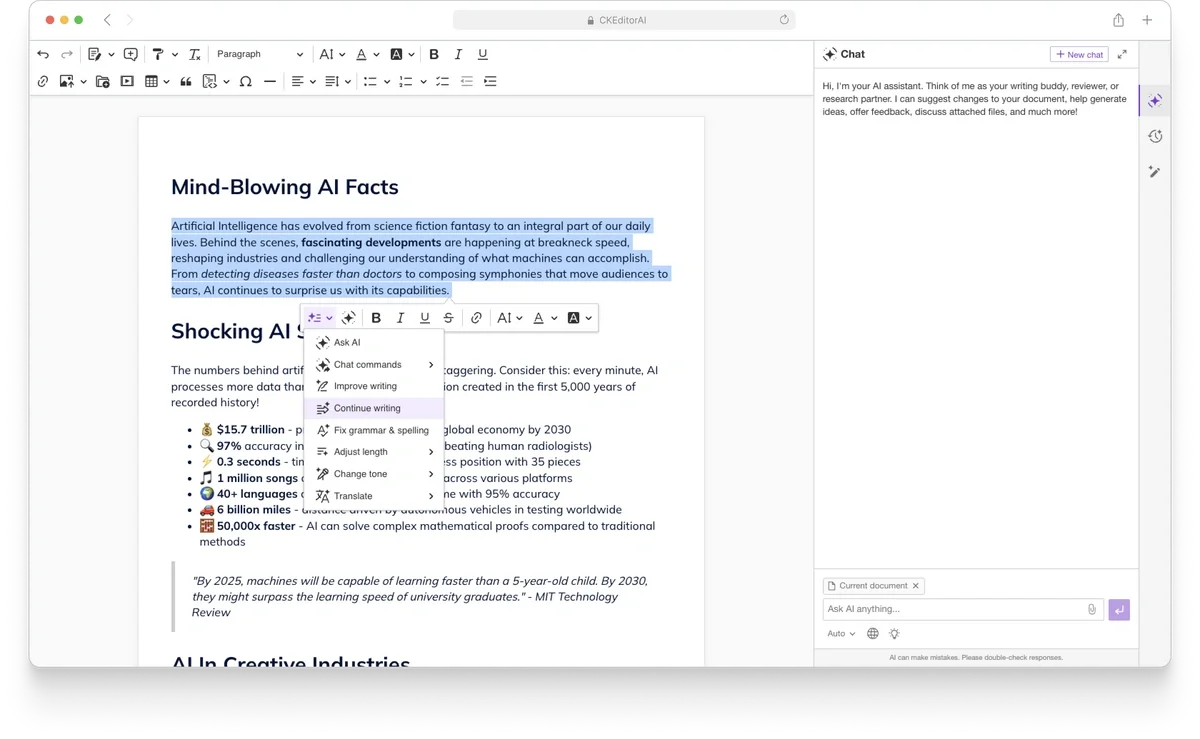
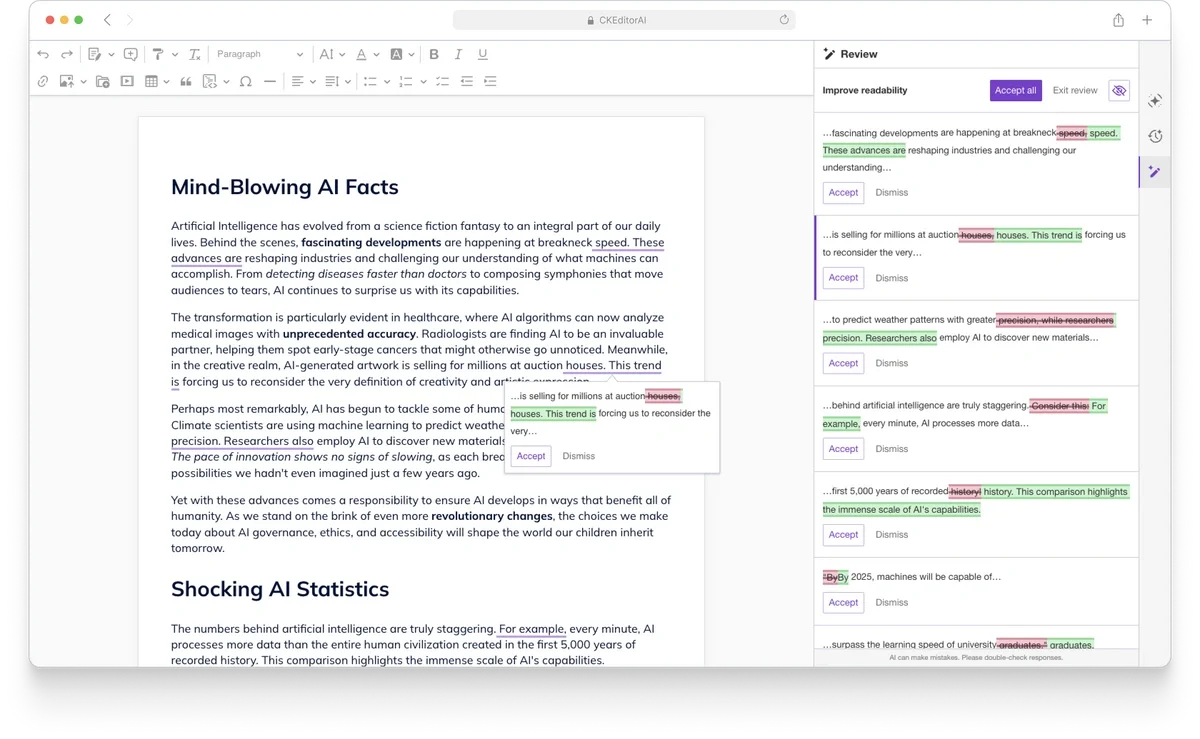
This embedded AI approach gives your applications a complete set of AI content tools and, critically, does so while accelerating workflows, not slowing them down.
Dive deeper:
Email editing
If creating an RTE from scratch is like developing on “hard” difficulty level, email editors are switched to “nightmare” mode. You have to create the editor, deal with clunky table layouts, and support responsive outputs across clients and devices. The burden doesn’t stop at development: end users often need designers to step in and help when creating emails. It’s a time sink from all angles.
In April 2025, CKEditor released new plugins for WYSIWYG email editing. It’s simple for developers to add and allows end users to create responsive emails easily (even with complex layouts). These three plugins include laying out tables, exporting with inline styles, and an email configuration helper. End users of email editing can create emails with a simple toolbar, lay out tables, add dynamic text, reuse templates, and even import content from sources like PDFs, Google Docs, or Word. Just add a few lines of plugin code to your editor, and end users have a full-featured email creation suite that puts them in charge of the final output.

Dive deeper:
Image Optimizer, powered by Uploadcare
Images slow down page load times. This frustrates users, often causing them to bounce before they get to your page. Plus, page load time is a ranking factor for SEO, so this can tank your traffic.
Optimizing an image often requires design teams. When your teams get stretched thin, timelines expand and employees get pulled from other important projects.
In September 2025, CKEditor released Image Optimizer, powered by Uploadcare, to cut out the in-between, allowing content creators to edit images and reduce file size in real time. All images added to Uploadcare (and by extension, Image Optimizer) are responsive by default. This ensures users have optimized images without siphoning valuable design team work.

Dive deeper:
Trust and enterprise readiness
Businesses need more than just features: They need a partner that offers the robust infrastructure and practices that help them scale. To support them, CKEditor focused on capabilities that make the editor easier for internal stakeholders to approve, including supporting compliance and simplifying long-term maintenance.
SOC 2 Type 2
Cyberattacks rise year over year. Data breaches can make headlines, damaging a company’s reputation. Even companies that sidestep news stories still face customer churn, reputational hits, and compliance fines. According to IBM and Ponemon Institute, the average cost of a breach was $4.4 million worldwide in 2025.
Cybersecurity’s increased difficulty doesn’t just come from cyberattackers. Software has grown more complex by depending on components from multiple third-party developers. While this speeds development, it can lead to blind spots in your security posture. Too often, breaches begin with a compromised component in the software supply chain. So, you must choose vendors that take security seriously.
In early 2025, CKEditor became SOC 2 Type 2 certified. This certification is awarded to organizations that demonstrate audited security and operational controls operating effectively over time. This demonstrates CKEditor’s commitment to security, reducing risk over time and helps security teams rest easy while offering stronger assurance for regulated organizations.
Dive deeper:
EU cloud and multi-region support
Sometimes, you find the perfect component for your application. It checks all the feature boxes, solves stakeholder requests, and will meet your customers’ goals. But then you discover that the solution doesn’t store data in your region, which can run you afoul of regulators or prevent you from acquiring customers who need storage in specific locations. That becomes a deal-breaker if you want a cloud-based solution; you’ll have to bring things in house and self host.
In July 2025, CKEditor released support for an additional cloud region in the European Union. You can choose between the US (Northern Virginia), the EU (Frankfurt), or both regions thanks to multi-region support. This lets you satisfy data regionality requirements for compliance or for localized performance.
Dive deeper:
CKEditor 5 Long Term Support Edition
Over the past few years, the pace of technology change has only accelerated (especially with the widespread adoption of AI). Most organizations want to release the latest features to their users quickly, ensuring they have the most up-to-date tools.
Not everyone can move this fast. Many organizations prioritize stability over feature release velocity. For them, frequent updates can introduce risks or issues across dependent systems and require additional validation across complex environments. They need one stable and secure release over the long haul to add predictability, reduce maintenance, and simplify compliance.
October 2025 brought the release of the CKEditor 5 Long Term Support (LTS) Edition, which offers a long-term, stable release option for up to three years. LTS will have two phases:
-
The active development phase lasts the first six months, and will offer the latest features developed during that time (including CKEditor AI for both cloud and self-hosted environments).
-
The ongoing maintenance phase, which lasts the following 2.5 years and prioritizes only ongoing security, maintenance, and compatibility upgrades.
Dive deeper:
End user experience
In mission-critical applications, UX improvements compound. In 2025, CKEditor focused on offering faster performance and broader features for end users creating documents.
Document load time enhancements
CKEditor is a strong solution for enterprises. Yet, because CKEditor lives in many mission-critical applications, it has to process some complex, lengthy documents. Between that and the feature-richness of the editor, load times could be a trade-off under some circumstances.
CKEditor heavily invested in performance improvements around document load times, leading to up to a 2,000% increase in some cases against previous benchmarks. These gains come from optimizing messy, tag-heavy HTML into the editor’s internal document model. This doesn’t just affect load times, it makes everyday editing faster and smoother, too.
Dive deeper:
-
Part One: Learn how CKEditor improved load times by up to 2,000%
-
Part Two: Learn How CKEditor improved load times by up to 2,000%
Enhanced source code editing
Rich text editors abstract HTML to simplify the editing process. This works well for most users and increases reliable rendering across devices and browsers. But developers and power users still often want direct access to source code (which can also boost their confidence that code remains clean and compliant).
In 2025, CKEditor offered enhanced source code editing to support those users looking for greater control. The enhanced source code editing capability enables improved handling for complex HTML, puts in safeguards to prevent invalid or breaking markup, and offers better readability and usability when working in the source view. This can be particularly helpful when using the editor in CMS platforms, regulated environments, or workflows with strict HTML requirements.
Dive deeper:
Greater interoperability with Word and PDF
Many organizations still heavily rely on Word and PDF documents, often supplementing other document formats. Yet, far too often, transforming documents from one format to another leads to extensive layout issues or fails to meet organizational standards.
In 2025, CKEditor expanded its Word and PDF converter capabilities. The additions include support for multi-level lists in both formats, the ability to add both watermarks and Word-native tables of contents to exported Word documents, and headers and footers when importing from Word. These additions simplify document structure and formatting when transforming documents between Word and PDF and make it even easier to implement CKEditor into document-centric workflows.
Dive deeper:
-
What’s New in CKEditor 5’s Converters: Introducing Support for Multi-level Lists and More
-
What’s New in CKEditor’s Converters: Introducing Support for Headers and Footers and More
Additional feature enhancements
Finally, we continued adding highly requested feature updates. These include:
-
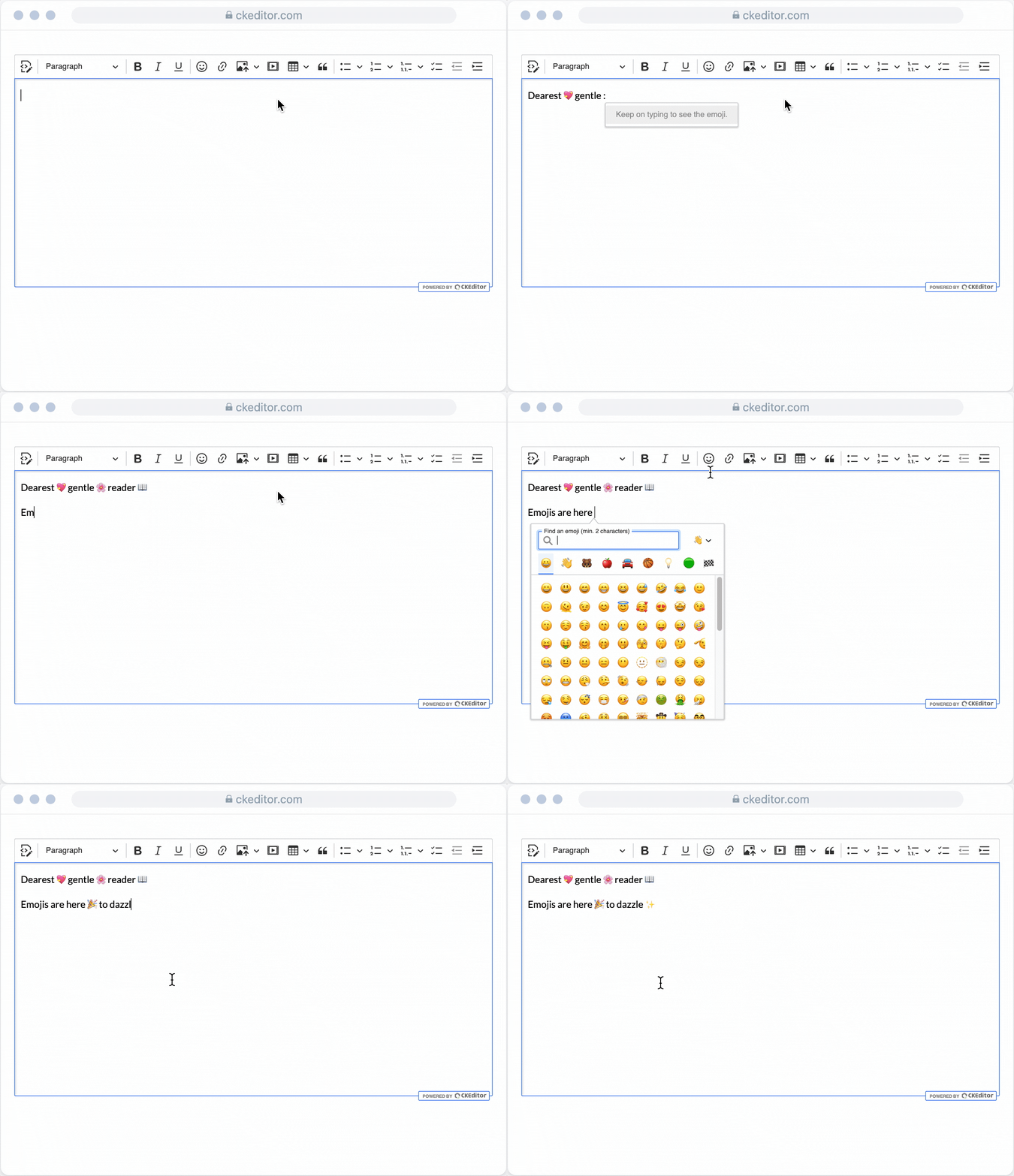
Emoji: Select emojis to add flair to documents. This helps end users communicate emotions to reviewers and can be critical for marketing content (as trends show more use of emojis).
-
Fullscreen: Expand the editor to your full browser. Fullscreen mode gives users more room to edit, makes documents easier to see (aiding accessibility), and helps provide greater focus on a document.
-
Footnotes: Add either footnotes or endnotes to documents. This ensures readers can check sources at their leisure without interrupting their reading flow.
-
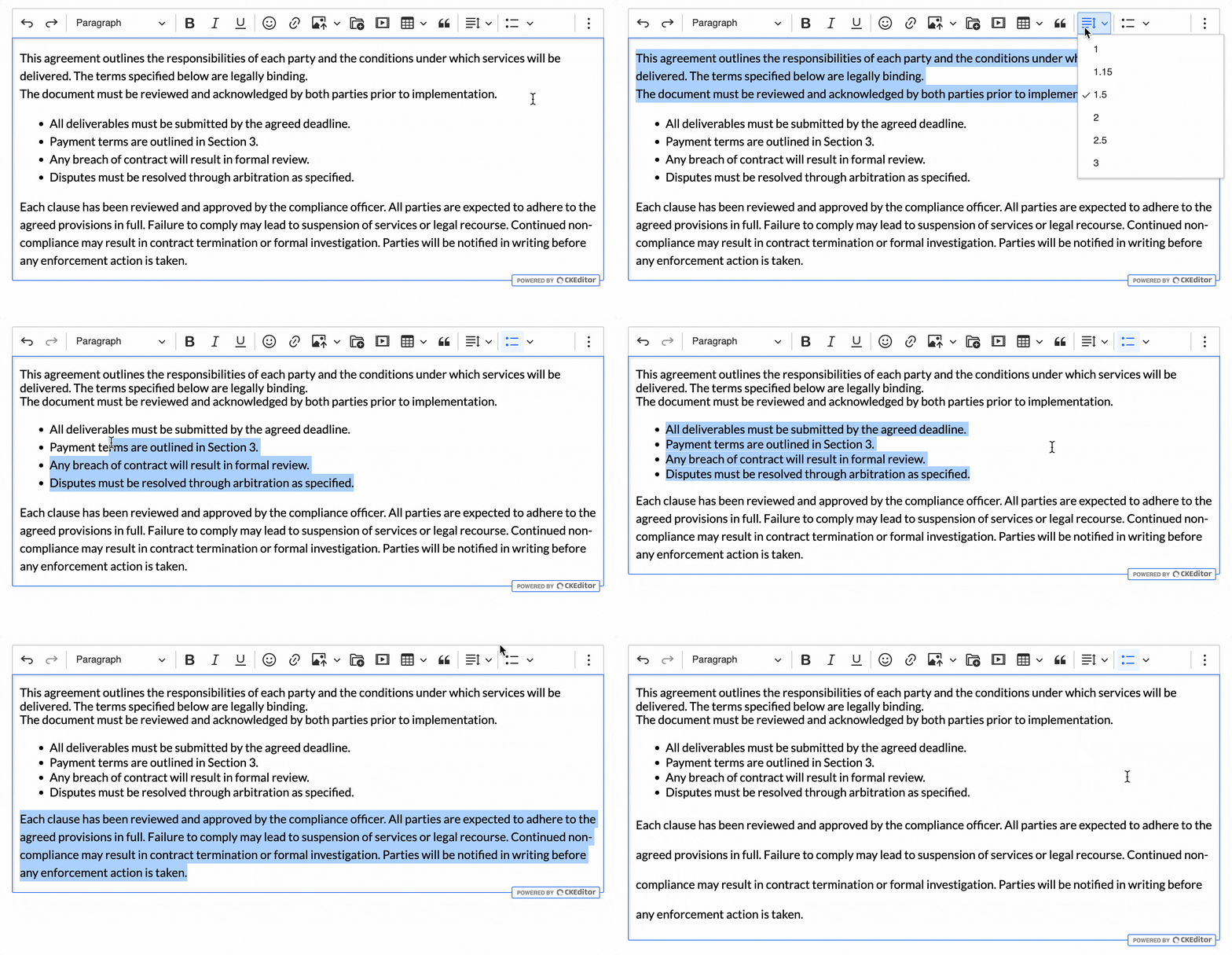
Line height: Choose how much space to add between each line of text in a paragraph. This feature aids readability for the readers of a produced document, which can also be critical for accessibility.
Dive deeper:
Developer experience improvements
CKEditor is a developer-focused rich text editor, and the team constantly works to improve the developer experience. These updates emphasized making CKEditor easier to install, customize, and extend with backend workflows.
Modernized installation methods
JavaScript tooling and best practices have changed rapidly over the last few years. Approaches that were considered state of the art a decade ago can now add unnecessary complexity, increase maintenance costs, or limit flexibility. To stay aligned, CKEditor started a multi-year effort to modernize installation and customization workflows.
In 2024, the team introduced modern installation methods designed to match current frontend ecosystems. These approaches reduced setup friction, embraced standard package management workflows, and made CKEditor easier to integrate into modern frameworks and build pipelines. The result was a faster onboarding experience and more predictable upgrades—especially for teams working with modular, component-based architectures.
In 2025, we took this further by improving import paths across the editor’s APIs, making them more stable and intuitive for integrators using the new installation methods. The company also added a mechanism to replace icons without forking packages, giving teams more control over branding and UI consistency while staying fully aligned with upstream updates.
As part of this push, CKEditor deprecated predefined builds. While convenient in the past, they introduced fragmentation and made it harder to reason about editor configuration across projects. Moving away from them ensures a more unified and predictable setup experience.
Looking ahead: final deprecations in 2026
The modernization effort will conclude with the final deprecation of old installation methods in April 2026, with the v48 release. This includes deprecating:
-
Webpack-dependent custom builds via src imports
-
DLLs setups
These changes fully align CKEditor 5 with modern JavaScript tooling.
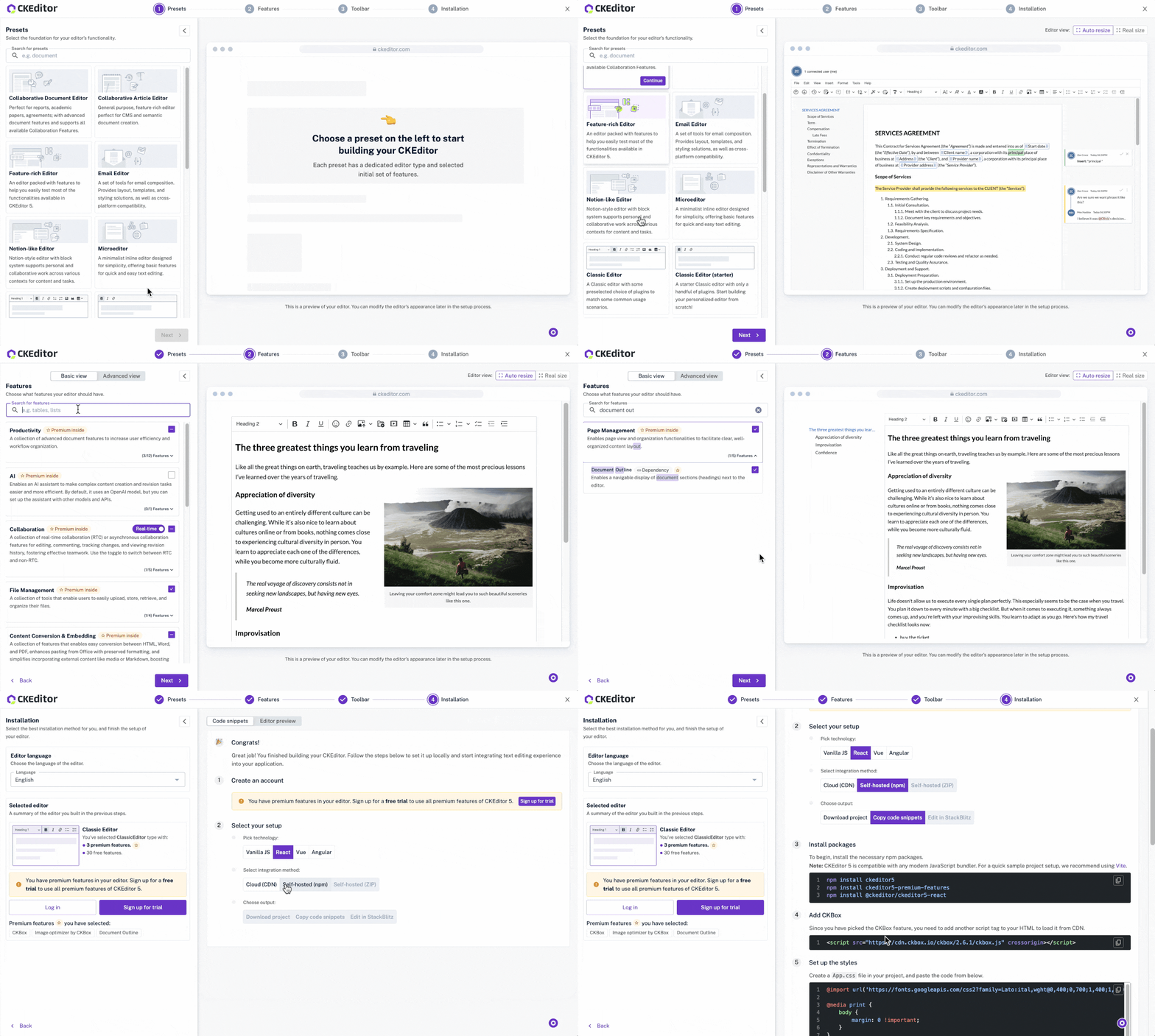
Throughout the process, the development team also significantly expanded the number of presets and ready-made setups available in the Builder. Developers should experiment there first—it’s the fastest way to explore configurations, validate ideas, and see how different setups behave before integration.
Dive deeper:
Server-side editor API
As businesses grow increasingly distributed and project delivery cycles face more pressure, real-time collaboration has becomes essential. People need to mark up documents, add comments, and work together no matter where they are. Yet, sometimes, you want to be able to make changes on the backend without causing conflicts.
In July 2025, we released our server-side API that allows you to do backend edits, including directly editing content, without disrupting any live sessions. This enables you to build services that can operate at scale, such as automating workflows, securely processing content, redacting sensitive information, or applying style formatting, all without breaking real-time collaboration. These actions can be completed programmatically and in bulk, allowing you to automate content changes without disrupting live editing sessions.
Dive deeper:
Enhanced Drupal support
Supporting the broader development community has always been a core mission for CKEditor. Fulfilling this mission includes supporting the tools developers already use.
CKEditor added multiple new plugins to its Drupal modules. These include:
-
Merge fields: Now, you can add dynamic merge fields in content directly in Drupal. This makes it easier to create standardized templates for content types like newsletters, emails, or customer communications.
-
Export with inline styles: Export Drupal content into CKEditor using inline styles, rather than style sheets. This helps you convert content created in Drupal to email-friendly layouts that render across email client types.
-
Dark mode for source code editing: This enhancement to the Enhanced Source Code Editing plugin allows for a dark-mode theme that reduces eye strain.
-
Media embed plugins: Now, the ability to embed rich media such as YouTube videos into the editor can extend to Drupal modules as well.
-
Email configuration helper: This plugin for Drupal automatically flags any HTML content that may not render correctly across email clients directly in your developer console.
-
Layout tables: This plugin allows tables optimized for layout and design. This further optimizes the experience of creating emails in Drupal.
-
Improved fullscreen mode: CKEditor released a new fullscreen mode to improve the user experience.
Dive deeper by visiting:
TYPO3 support
TYPO3 plays a key role in the open-source CMS community, particularly for teams prioritizing flexibility and stability. Similar to many other content management systems, TYPO3 integrations can require deep custom work. CKEditor has demonstrated its commitment to the developer community by offering support for TYPO3. Developed in partnership with T3Planet, this plugin makes it easy for TYPO3 teams to adopt CKEditor using a streamlined, admin-friendly configuration experience.
Dive deeper by visiting:
-
TYPO3 CKEditor Pack, developed in partnership with T3Planet
-
TYPO3 CKEditor short video from CKEditor’s Developer Relations Manager
Where should you start?
CKEditor released a lot in 2025 and this will only continue. These capabilities can help teams create content faster, ship applications in enterprise environments, and reduce challenges for both developers and end users. Whether it’s CKEditor AI adding productivity, multi-region cloud support, or the server-side API for offering back-end editor services, CKEditor gives you a lot to work with in your mission-critical applications.
If you want to learn more about any capabilities you see here, please contact sales. If you’re new to CKEditor, you can always start with a free trial.