CKBox Version 2.12 and 2.13: Refreshed UI, File Versioning and more
4min read
|CKBox 2.12 and 2.13 bring a significant set of updates across two releases. The 2.12 release centers on a major refresh of the user interface alongside new PDF thumbnails and the ability to overwrite assets directly through the UI. The 2.13 release builds on this with file versioning, keyboard navigation improvements, and an extended SDK for server-side integrations.
The two releases complement each other for a set of well-rounded improvements. The refreshed UI brings clearer navigation, more consistency, and better accessibility, while refined keyboard navigation makes the interface smoother to move through. File versioning extends what asset overwrite started: instead of only updating a file in place, users can now keep track of its full history and restore earlier versions when needed, all while preserving existing URLs and metadata.
-
CKBox version 2.12.0 was released on May 11, 2026.
-
CKBox version 2.13.0 was released on June 16, 2026.
Quick links
-
CKBox changelog for details about all releases
-
CKBox On-Premises changelog for specific updates for on-premises deployments
-
CKBox documentation for in-depth guides
-
Contact us page to set up a meeting to answer any questions you may have
File versioning and asset overwriteNEW
As of CKBox 2.13, CKBox keeps a full history of an asset’s content under a single identifier. If your use case involves regularly updated files referenced across live content, CKBox keeps the URL, name, metadata, tags, and category intact when you update a file, with no manual upkeep needed. An image embedded in a blog post or newsletter, for example, can have its underlying file swapped out while the link stays valid, with no broken references or 404s.
This builds on asset overwrite, introduced in 2.12, which lets users replace an asset’s content. A file can be overwritten in several ways: by replacing it with a new file through the Overwrite button, saving edits over an existing image in the image editor, or programmatically changing the file through the REST API.
Now, each of these actions creates a version automatically. The previous content is preserved, so updating a file no longer means losing what came before. From the asset’s properties panel, users with the right permissions can review a file’s chronological history, preview earlier versions, restore a previous version as the current one, or remove versions to keep the history tidy.
UI refresh
With the 2.12.0 release, the CKBox user interface has been updated across multiple areas to improve consistency, accessibility, and the overall experience. Whether you are browsing assets, managing files, or administering the platform, the changes make everyday interactions more intuitive and predictable.
Search and navigation
Finding and selecting assets is now more efficient. The Search and Expand buttons have been moved to the global container top bar, making them available from any view without needing to navigate away. The Search button now displays a preview of the current search phrase, so users can see their active query at a glance without opening the search field. Recent searches are now easier to access from the taskbar, letting users quickly return to a previous query and find information again.
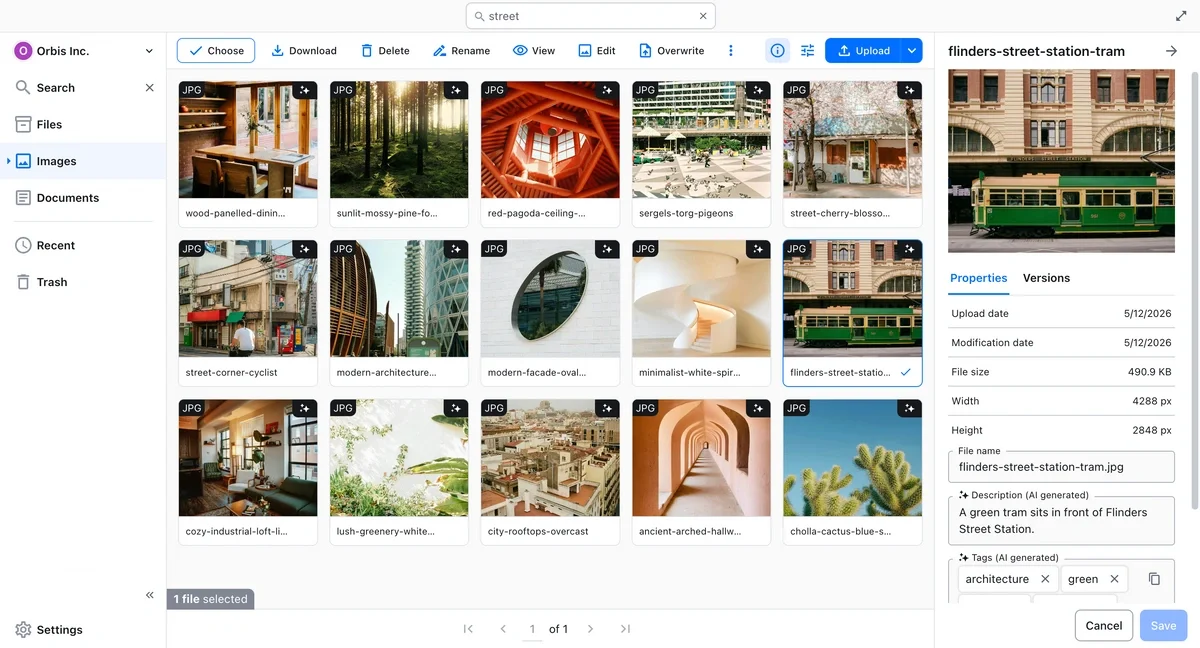
In the search view, the asset’s source location is now displayed as an interactive button in the Asset Properties Drawer, allowing users to navigate to the asset’s origin directly from the search results.
The “Choose” button has been relocated from the pagination bar to the asset top bar to make it faster to locate.
Consistency and actions
Before the 2.12 release, action buttons could behave differently depending on which view you were in. The same task sometimes worked one way in folders and another way in search results. Action buttons in the top bar now behave consistently across categories, folders, recent assets, and search results, so users no longer need to adapt their workflow when switching contexts.
Information and guidance
The interface now provides clearer visual and contextual cues to support both everyday users and administrators. UI colors have been adjusted to reinforce a clearer visual hierarchy, bringing focus to primary actions and improving navigation clarity.
Administrators benefit from a new knowledge base integration across all administration and superadmin views. Section headers, descriptions, and direct links to documentation are now embedded in the interface, reducing the need to look up guidance externally.
Keyboard navigation
Introduced in CKBox 2.13, keyboard navigation and accessibility have been refined across the interface, improving focus handling and making CKBox easier to operate. Users can navigate between categories, folders, and assets, and perform common operations such as copying, moving, and deleting items entirely from the keyboard. This is a faster alternative for power users and an essential one for anyone who cannot use a pointer device. The full list of supported keystrokes is available in the keyboard shortcuts documentation.
Extended SDK package
The @ckbox/sdk-node package has been extended in CKBox 2.13, bringing it closer to feature parity with the CKBox API. Server-side integrations can now manage assets, categories, and folders directly through the SDK, without falling back on raw HTTP requests. The new methods add full category and folder management, including listing, lookups, and create, update, and delete operations, along with extra asset operations such as copy, move, metadata updates, name existence checks, and AI search. Category mutations are protected by an admin and superadmin guard.
PDF thumbnailsNEW
Thumbnails for PDF files are now generated and displayed directly in the asset grid and the Asset Properties Drawer. This makes it easier to identify document content at a glance, without needing to open the file.
Other improvements
CKBox 2.12.0 and the earlier 2.11.1 release both include updates to selected dependencies, improving performance and security.
Feedback and support
If you have specific questions or would like to report an issue, please contact us.
How to get CKBox
-
New users can try all advanced CKBox features with our 14-day free trial.
-
CKBox is available on Essential, Professional, and Custom CKEditor plans. CKBox requires a subscription plan that includes the storage, bandwidth, and file handling capacity to meet your needs.
-
CKBox is also available for enterprise customers or teams with custom licensing needs. Contact us to explore tailored plans.
Tags: