CKEditor 5 v48.0.0 Release Highlights: Installation Methods Transition Completed
CKEditor 5 v48.0.0 marks a significant milestone: the official completion of the transition to the new installation methods, as the old installation methods are now fully retired. This release also brings improvements to CKEditor AI, a new default for Export to PDF, a unified root configuration structure, and expanded table capabilities.
Old installation methods sunset
With v48.0.0, the transition to modern installation methods is complete. First introduced in v42.0.0 in June 2024, the new installation methods were designed to simplify the developer workflow, reduce configuration overhead, and enable faster, more consistent updates.
Getting here took nearly two years of work across the entire ecosystem, including deprecation notices, migration guides, and consistent communication with every release. With this chapter now closed, there is more capacity to invest in what comes next: new features and performance improvements.
If your project still relies on old installation methods, and you want to continue receiving CKEditor 5 updates, now is the time to act:
-
Migrate to the new installation methods to continue receiving updates from this version onwards.
-
If near-term migration is not feasible, CKEditor 5 LTS extends support for legacy installation methods.
Tables
This release brings significant additions to table capabilities, covering layout control, semantic markup, and compatibility with legacy HTML content.
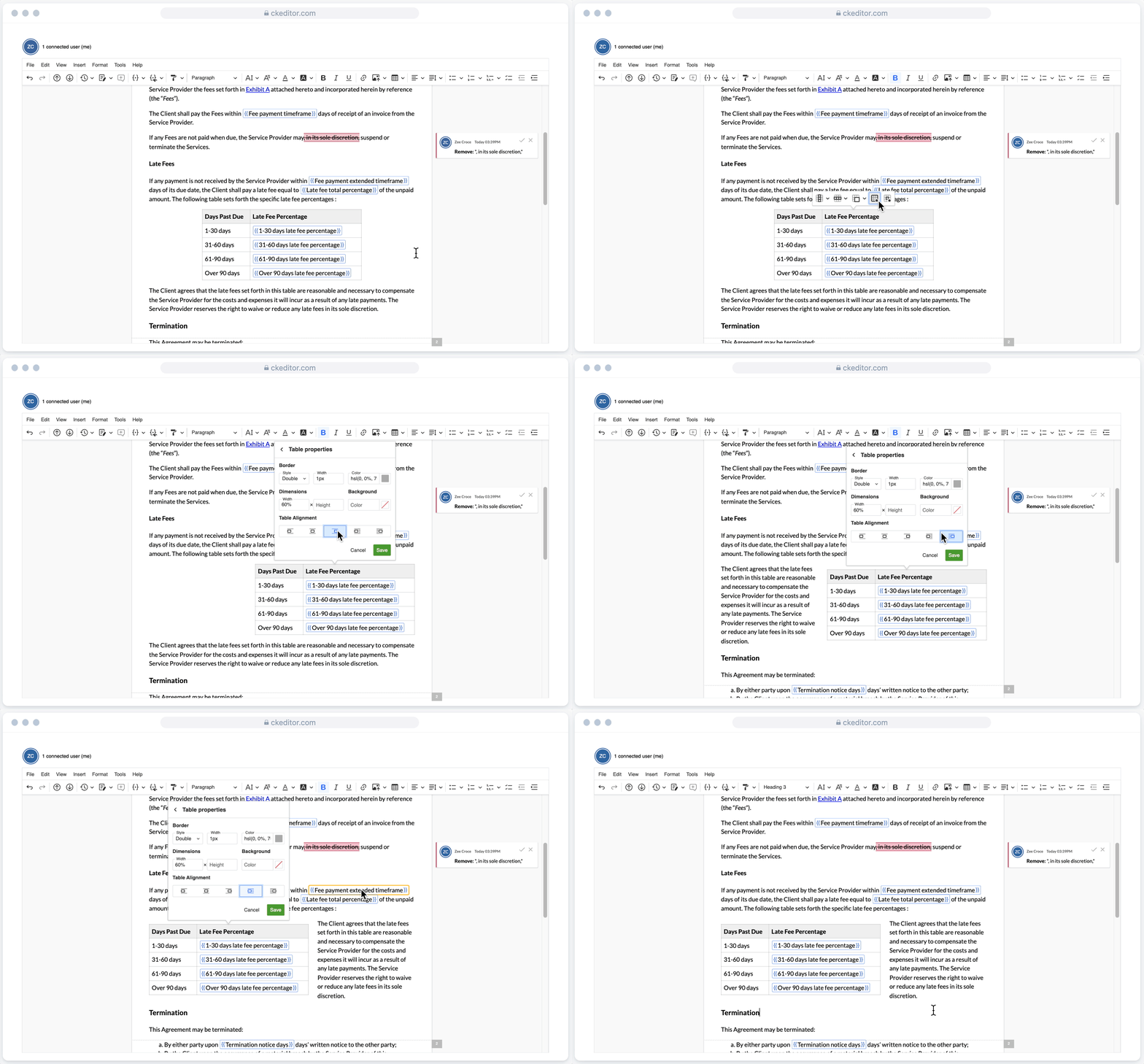
NEW Table alignment
Tables can now be aligned left or right with full text wrapping support, bringing back a behavior familiar to CKEditor 4 users and one of the most frequently requested additions. By default, alignment is handled through CSS margin-based positioning and set in the editor’s output using CSS classes, with an option to fall back to inline styles for teams migrating from CKEditor 4.
NEW Table cell types and scope
Authors can now switch table cell types between header and data cells directly from the Cell Properties panel. Additionally, header cells can be semantically linked to their corresponding row or column using the scope attribute, available through dedicated “Row header” and “Column header” options. This improves how screen readers interpret table structure.
Legacy HTML compatibility
The editor now preserves table styling from older HTML content during upcasting, improving compatibility with CKEditor 4. Border width and cell padding defined through legacy HTML attributes are now correctly carried over into the editor model.
Other table improvements include:
-
Tables with the border=“0” attribute are now converted to borderless tables by default.
-
Authors can also now designate footer rows within a table thanks to a contribution from our community.
CKEditor AI
This release brings a set of improvements to the visual consistency, performance, and customizability of CKEditor AI.
Suggestion previews across AI Chat, AI Review, AI Quick Actions, and AI Translate now more closely follow the styling of the content in the editing area, making the experience feel more cohesive. For integrators, colors across the AI package are now available through a shared CSS variable palette, making it easier to customize AI components to match your application’s design.
AI initialization has also been optimized, as the model requests are now cached, reducing redundant network calls and improving load performance. The release also introduces a new programmatic API guide for integrators who want to control AI features from code rather than relying solely on the built-in editor UI. It covers two approaches:
-
An experimental front-end editor API for triggering AI Chat messages and Quick Actions directly from the editor instance.
-
A REST API for calling the AI service from your frontend to build AI-powered features around the editor.
This is particularly useful for building custom UI, automating content workflows, or embedding AI capabilities into your application logic in ways that go beyond the default toolbar.
NEW Export to PDF v2 set as default
The support for the version 2 of the HTML to PDF converter API was introduced earlier in v47.5.0. As a natural expansion, the Export to PDF feature now defaults to the new converter API. This means advanced capabilities, including header and footer variants, custom page sizes, PDF metadata, password protection, and digital signature support, which are all available out of the box.
Since v2 may produce slightly different output than v1, reviewing your current configuration is recommended. To keep using v1, you can set the version property in the exportPdf configuration object or check the Export to PDF documentation for more details on the configuration.
Unified root configuration structure
Root-related configuration options such as initialData, placeholder, and label are now grouped under config.root for single-root editors and config.roots for multi-root editors. This provides a cleaner, more consistent structure across editor types.
The previous top-level options remain functional, but are now deprecated. Details about the change can be found in the update guide.
Major & minor breaking changes
Please note that CKEditor 5 v47 remains the LTS release. If you are an LTS customer, stay on this version. The v47.x maintenance phase, which will be covering security fixes and compatibility updates for the next 2.5 years, comes into effect soon in April 2026 and will be available exclusively for CKEditor Long-term Support Edition customers.
V48.0.0 includes a handful of breaking changes, primarily related to the installation methods sunset and AI configuration updates, while some of these changes also lay the groundwork for upcoming releases.
Some highlights of the major breaking changes are:
-
DLL builds are no longer available.
-
CKEditor 5 packages no longer ship source and theme directories.
-
Several AI configuration properties have been renamed or restructured.
-
Table alignment now outputs as CSS classes by default rather than inline styles.
The highlights of the minor breaking changes include:
-
Root configuration options deprecation in favor of the new unified structure.
-
Export to PDF defaults to v2.
-
A number of previously experimental table behaviors are now enabled by default.
For the full list of changes and migration steps, see the v48.0.0 update guide and the changelog.
Quick links for CKEditor v48.0.0
Learn more about previous CKEditor 5 versions
-
CKEditor 5 v47.6.0 Release Highlights: CKEditor AI On-Premises and Improved AI Customization
-
CKEditor 5 v47.5.0 Release Highlights: AI Translate, Export to PDF v2 and more
-
CKEditor 5 v47.4.0 Release Highlights: Improvements for Tables, Email Layouts and more
-
CKEditor 5 v47.3.0 Release Highlights: CKEditor AI Improvements and Bug Fixes
-
CKEditor 5 v47.2.0 Release Highlights: Introducing CKEditor AI and Footnotes
-
CKEditor 5 v47.0.0 Release Highlights: Introducing Long-term Support Edition