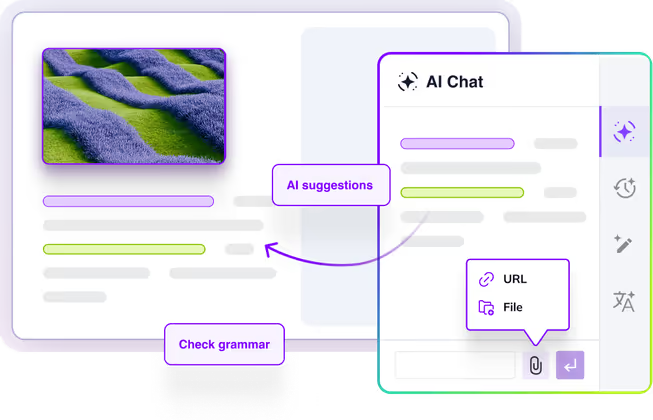
CKEditor AI is a fully integrated, AI writing assistant that optimizes content creation workflows by keeping teams in their editing environment rather than jumping between external platforms. Beyond providing a powerful user experience, it is a programmatic enterprise governance layer that leverages APIs and MCP support to securely connect external AI agents while enforcing content compliance and preserving rich text formatting.
In this demo you can test CKEditor AI hands-on. Start a chat in the AI side panel and use the chat history feature to switch between different document conversations. Use the Review feature to run grammar and style reviews, or use Quick actions, like rewriting and summarizing, directly on the text inside the editor.
Loading...
Customer Support Metrics Report
Operational Summary – Second Half of 2025
Overview
This report summarizes customer support performance during the second half of 2025. It focuses on ticket volumes, response efficiency and common issue categories, based on internal operational data across all support channels.
The information below should be treated as an overview of observed trends rather than a detailed performance evaluation.
Support Process Overview
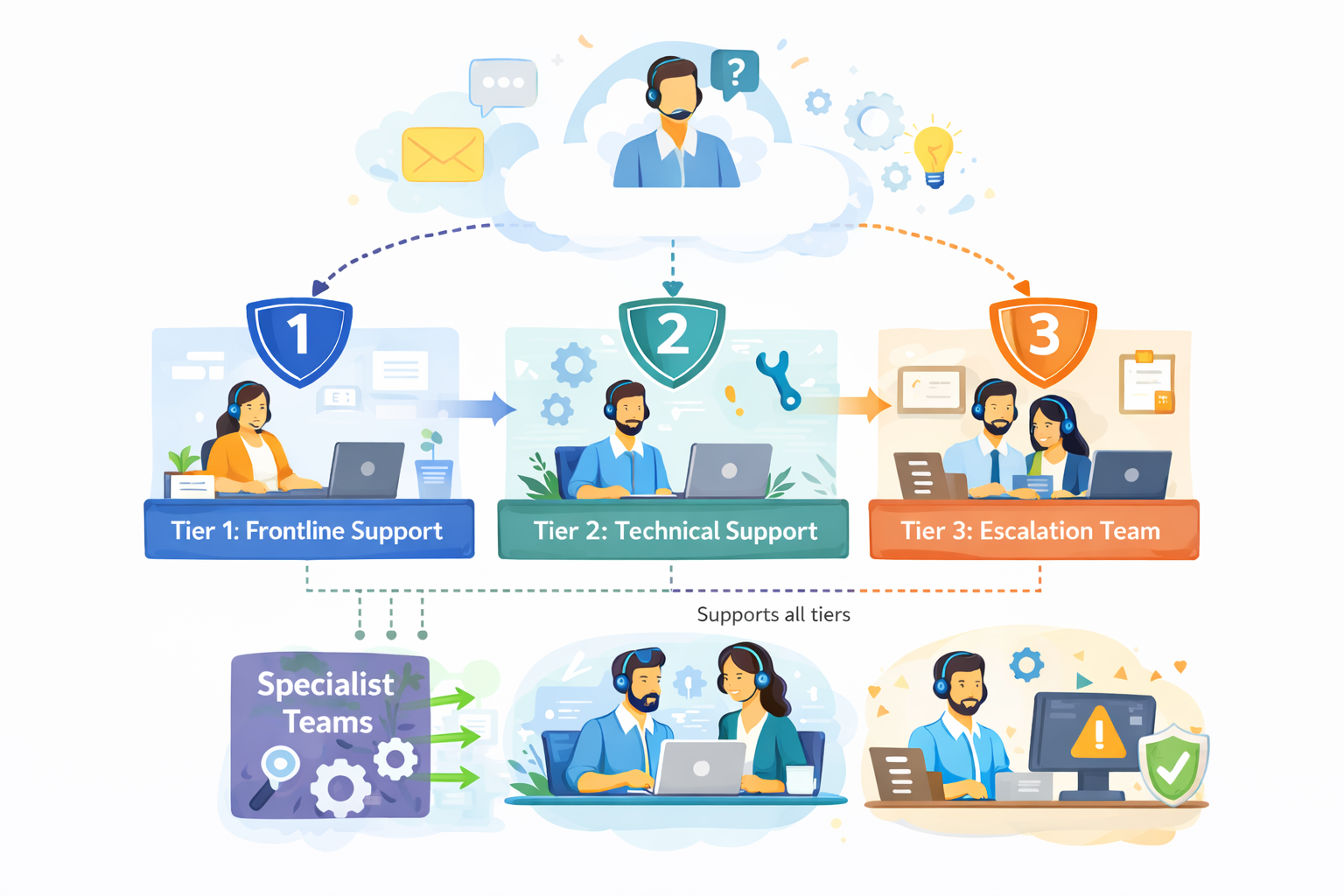
The diagram outlines our internal customer support process, showing how incoming requests are handled across multiple support tiers based on complexity.
Customer inquiries are initially managed by Tier 1: Frontline Support, which is responsible for triage and resolution of common issues. More complex cases are escalated to Tier 2: Technical Support, where deeper technical investigation is performed.
High-impact or unresolved issues are handled by Tier 3: Escalation Team, which coordinates with internal experts as required. Specialist Teams support Tier 2 and Tier 3 by providing domain-specific expertise, while typically remaining non-customer-facing.
The process is designed to allow flexible movement between tiers, supporting efficient resolution and appropriate escalation when needed.
Figure 1. Internal support workflow across frontline, technical and escalation teams.
Ticket Volume
During the reporting period, the support team processed 184,600 tickets, representing an increase of 11% compared to the previous period. Ticket volume peaked in September and gradually stabilized towards the end of the year.
The increase was primarily driven by onboarding-related questions and product configuration requests.
Channel Distribution
Channel
Share of Tickets
Change vs. Previous Period
Avg. First Response Time
Email
54%
-3%
3.1 hours
Live Chat
31%
+5%
1.2 hours
In-App Support
15%
-2%
2.4 hours
Email remained the dominant support channel, although live chat usage continued to increase, particularly among larger accounts.
Resolution Efficiency
Average response and resolution times showed minor improvement compared to earlier in the year.
Average first response time: 2.4 hours
Average resolution time: 18.7 hours
Tickets resolved within 24 hours: 68%
More complex cases, especially those related to integrations, required additional follow-up and were not consistently resolved within standard timeframes. While faster response times were generally appreciated, qualitative feedback indicates that communication consistency played an equally important role in overall customer perception.
"Faster responses were helpful, but consistency in follow-up communication had a bigger impact on our overall experience."
— Enterprise customer, post-resolution survey
Common Issue Categories
The most frequently reported issues were:
Account access and authentication
Billing and invoice related questions
Feature usage clarification
Integration setup
Performance-related concerns
Billing-related requests declined slightly, while integration-related inquiries increased towards the end of the period.
Customer Satisfaction
Customer satisfaction was measured through post-resolution surveys. The overall response rate remained stable throughout the reporting period.
Average CSAT score: 4.2 / 5
Survey response rate: 27%
Feedback most often referenced response time and clarity of follow-up communication as areas for improvement, particularly in cases involving multiple handovers or escalations.
Identified Bottlenecks
Internal review identified several operational areas that may require further attention:
Delays in ticket reassignment for escalated cases
Inconsistent categorization of incoming requests
Limited coverage during selected regional peak hours
While these issues did not materially impact aggregate performance metrics, they were visible in individual case handling and customer feedback.
"The issue was eventually resolved, although it was not always clear who was responsible for the case during escalation."
— Key account feedback, quarterly review
Summary
Overall support performance remained within expected operational ranges. Most key indicators were stable, with moderate improvements observed in response efficiency. At the same time, the data suggests that further improvements in communication clarity and escalation handling could positively impact customer experience in future reporting periods.
Better in Fullscreen
Open the demo in fullscreen to comfortably explore the editor and its features.
Note
Read more about the AI capabilities in the documentation.
Generate text from scratch using natural, multi-turn conversations - powered by your prompts, existing editor content, and uploaded resources.
Collaborative ideation: Brainstorm, ask questions, or co-create content within the chat.
Output control: Review, accept/reject, or copy AI suggestions before implementing them.
Smart prompting: Use predefined commands and enrich prompts with web search, contextual links, and documents for context.
Chat history: Browse and reuse past AI conversations for better prompt crafting and easier access to valuable insights.
Context awareness: Add context to your AI chat interactions using URLs and files.
Get CKEditor AI-powered quality assurance. Run checks for grammar, style, tone, and more.
Visual review: See where each suggestion applies and preview changes in context.
Standardized editorial compliance: Ensure each document aligns with editorial or brand guidelines.
Support for custom checks: Define prompts for unique types of checks tailored to your area of expertise (e.g., legal formatting, academic style, etc.).
Translate your content into any language with AI.
Out-of-the-box languages: Select from English, Spanish, French, German, Chinese (Simplified), Japanese, Russian, Portuguese, Korean, or Italian.
Add additional languages: Customize the list of available translation languages in the UI.
A dedicated UI: Use an intuitive interface for reviewing and managing AI-suggested translations.
Apply pre-defined transformations exactly where writers need them with AI Quick Actions. Configure actions like rewrite, simplify, expand, summarize, or tone adjustments to your content workflow.
Speed and convenience: Instantly apply common writing and editing changes inside the editor.
Reviewable changes: View changes inline and decide whether to approve or reject.
Seamless escalation: Move a selection to the chat interface for more nuanced edits or brainstorming when needed.
Configurable actions: Use a standard set of actions or define custom ones tailored to your application.
CKEditor AI Benefits
Benefits for Engineering Teams
Effortless integration of AI features via CKEditor’s plugin architecture, leading to a substantial reduction in time to market
Fine-grained control over AI interactions, enabling contextual prompts and UI customization
Compatibility with a variety of LLM providers as well as custom LLMs via a common interface
On-premises deployment for compliance and data ownership assurance
MCP server support that enables AI agents and RAG
Extensibility with server-side endpoints and custom prompt templates to meet domain-specific needs
Benefits for Content Authors and Editors
Actionable AI rewrites, grammar fixes, and feedback delivered as suggestions users can review and apply with full control
Intelligent content improvements directly in the editor, offering an uninterrupted editing workflow without needing to switch to external applications
Rich-text formatting stays intact during AI-assisted improvements, reducing cleanup time compared to using external tools
Governance layer for your AI content workflows that ensures compliance and human oversight
Adaptable to various content types, from legal documents and marketing content to academic and technical documentation
Increased writing quality and confidence for non-native writers and domain experts without editorial expertise
Programmatic Control
Automated pipelines - trigger AI operations on documents programmatically from your backend, without requiring a user in the browser. See the programmatic APIs in action.
Batch Operations
Perform operations like AI Review in background pipelines, so your users have results ready for them when they open the document.
Agentic Flows
Equip AI Agents in your system with CKEditor AI capabilities, produce content that is always compatible and leverages CKEditor features like suggestions and comments.
AI infrastructure built for rich-text editing
CKEditor AI isn’t just a connection to an LLM. It’s an AI layer purpose-built to use with a platform for structured content editing, document workflows, and enterprise environments.
AI that understands structured content
Large language models struggle with rich text content. CKEditor AI uses structured HTML enriched with complex editor-specific markup, ensuring reliable rendering and output.
CKEditor AI backend provides:
Specialized tools and instructions for LLMs to generate valid, structured HTML
Support for precise content modifications and formatting, instead of destructive rewrites
Continuously growing compatibility with advanced features and editor-specific formatting
Business logic that translates AI output into editor-safe operations
This ensures CKEditor AI suggestions work reliably with
Tables and lists
Headings
Links
Images
Track Changes
Custom features and structured content blocks
Built-in state management for content workflows
AI interactions are more than just single prompts - they're a full, multi-turn conversation. CKEditor AI takes care of it all.
Conversation history
Uploaded context files
External knowledge
Document state
Multi-turn interactions
Visualization of AI-suggested changes
Advanced prompt engineering with business logic
Sending user prompts directly to an LLM is not enough for an enterprise-grade content workflow.
Optimized system prompts
Feature-specific AI logic (Chat, Quick Actions, Reviews)
Structured response shaping
Multi-change and long-document optimization
Intelligent task splitting for performance
Quality control with LLM evaluation suite
Customize CKEditor AI for your app
Get AI features fast with out-of-the-box defaults. Fine-tune prompts, connect MCP tools, and tailor AI Review checks to your brand voice and guidelines.
The Model Context Protocol enables developers to build secure, two-way connections between external systems. CKEditor AI on-premises supports the MCP standard.
Connect CKEditor AI to an MCP server and prompt external tools from the CKEditor AI Chat or by using custom AI Reviews or AI Quick Actions
Enable external data sources like retrieval-augmented generation (RAG) to fetch and incorporate new information
Communicate with your AI agents from the CKEditor AI Chat
Customizable look and feel
Adjust the CKEditor AI features on the frontend to fit your use case and application UI.
Choose from different UI placement models
Toggle, maximize, or hide on initialization
Choose how to display AI suggestions inside the editor
Customize the UI theme or replace it with your own
Compatible with leading AI models and custom LLMs
Connect your own LLMs, whether they’re in the cloud, on-prem, or from an external LLM provider.
Access the latest AI models, kept up to date automatically with the SaaS distribution of CKEditor AI.
Claude Opus 4.8
Claude Opus 5
Claude Opus 5.5
Claude Fable 5
Claude Fable 5.1
Claude Opus 4.7
Claude 5 Sonnet
Claude 4.6 Sonnet
Claude 4.5 Sonnet
Claude 4.5 Haiku
Gemini 3.1 Pro
Gemini 2.5 Flash
Gemini 3 Flash
Gemini 3.5 Flash
Gemini 3.6 Flash
Gemini 3.7 Flash
Gemini 3.8 Flash
GPT-6 Astra
GPT-6 Sol
GPT-6 Luna
GPT-5.6 Sol
GPT-5.6 Terra
GPT-5.6 Luna
GPT-5.5
GPT-5.4
GPT-5.2
GPT-5.1
GPT-5
GPT-4.1
GPT-5 Mini
GPT-5.4 Mini
GPT-4.1 Mini
CKEditor AI on-premise distribution supports custom models and your own API keys to the widely available ones.
AI cost control and observability
Manage and control AI costs and prevent them from spiraling quickly.
Prompt result caching to avoid redundant calls
Smart rate limiting
Delegation to faster/cheaper models where appropriate
Model flexibility without LLM vendor lock-in
Future-proof your application with effortless adaptation to the constantly evolving AI landscape.
Easy switching between models
Unified output format compatible with CKEditor
Fallback chains if a provider goes down
Continuous quality control with LLM evaluation suite
Ensure consistent, production-ready model performance without introducing risk, as every model is tested via a proprietary evaluation suite.
Benchmarking models on real CKEditor use cases
Validating output quality and formatting integrity
Ensuring regressions are caught before deployment
Enterprise-grade security and safety
On-premises deployment option: CKEditor AI can be deployed on-premises for organizations with strict compliance and data-control requirements.
Content moderation: Every request is screened for inappropriate content before reaching the model.
Permissions system: Granular control over user, feature, and model access.
Encryption at rest: All conversations, documents, and uploaded files are encrypted, including in on-premises deployments.
Resilience and reliability: Rely on provider fallback chains, stream error recovery, and automatic retry strategies. SOC 2 Type 2 and GDPR compliant.
Constant evolution: Benefit from ongoing improvements to prompts and logic, support for new models and APIs, and adaptation to new AI standards.
Business partnership program
Want to have your say in CKEditor AI product development? Partner with us to develop the AI content editing framework aligning with your use case.
Early access: Start using the new features ahead of general availability.
Faster feedback loops: Provide direct input to our team, helping shape feature priorities.
Engineering support: Collaborate with our engineering team to streamline-implementation and resolve technical challenges.
Ready to Participate?
If you’re building business-critical AI content editing workflows, we’d like to hear from you.
Introduces an all-in-one AI-driven editing experience and review process inside your application without friction
Increases team productivity by reducing manual editing, review cycles, and context-switching delays
Enhances content quality, clarity, and brand alignment across large teams
Saves the costs of months of research and development by introducing drop-in AI writing features inside your app
Future-proofs the content pipeline with scalable AI features that evolve with your business goals
Offloads operational burden and reduces the workload of AIOps teams
Reduces costs associated with external copyediting, QA, or manual rewrites
Speeds up publishing turnaround times and supports instant content personalization
Preserves organizational knowledge and reduces duplication with persistent AI chat history
Frequently Asked Questions
Find answers to the most common questions about our features, data security, and integration options. If you need further assistance, our team is here to help.
CKEditor AI is a set of in-editor configurable AI features—AI Chat with chat history, AI Quick Actions, and AI Review—that enhance writing, formatting, and reviewing content.
I am already using CKEditor AI Assistant. Do I have to migrate to CKEditor AI?URL Copied
CKEditor AI Assistant will still be available and maintained for our current customers. However, if you’re looking to implement a more robust set of AI writing features inside your application, then CKEditor AI is the way to go.
CKEditor AI is offered as an add-on to existing editor plans, using a simple and scalable subscription-plus-usage pricing model. Customers choose from three service tiers, each with a fixed monthly or annual fee that includes a credit allowance for AI-powered actions. If customers exceed their monthly allowance, predetermined overage fees apply.
How can I know how much a specific CKEditor AI operation would cost in terms of credits?URL Copied
This comparison table will help you navigate the credit usage for different LLMs and specific operations.
Technical & Security
Is there a CKEditor AI on-premises distribution?URL Copied
Which LLM providers are available and which models can we use in CKEditor AI?URL Copied
We start with models from three major providers: OpenAI, Anthropic, and Google Gemini. The LLM market evolves rapidly, so CKEditor AI has a built-in mechanism for the introduction of new models quickly, as long as they can support the features of the editor.
Can I use my own API keys or custom LLMs?URL Copied
Does CKEditor AI support MCP tools and RAG?URL Copied
Yes, with the on-premises installation you can connect MCP tools and enable retrieval-augmented generation (RAG). Find out how from CKEditor AI documentation.
Can I use my custom commands from the original CKEditor AI Assistant?URL Copied
The original AI Assistant is similar to Quick Actions in CKEditor AI. However, you can transfer AI Assistant actions to CKEditor AI.
No, it’s not. We take your data privacy seriously and never train our own models on your data. Your data remains yours.
Where is my data stored and how is it processed?URL Copied
Everything is stored in CKEditor Cloud Services and follows the same rules and patterns as other data we store for the editor features. For a full security breakdown, please visit the security section on our homepage. However, bear in mind that your queries to LLMs, together with all the data required to perform the operation, are processed by the selected LLM provider.
How can I monitor the activity of my users and their usage?URL Copied
Customers can use the Insights Panel to access Audit Logs after turning them on in customer portal settings.
How can I see the number of tokens each of my end-users are consuming when using the AI functionality?URL Copied
Our business logs contain information about the credits usage per request, including user IDs. Logs can be accessed in the Insights Panel in our Customer Portal and are also available via our Insights API.
Consuming data from Insights API should allow tracking of high-level usage trends in their application to prevent significant overusage or abuse, but it doesn't guarantee 100% accuracy so it should not be used as input for any precise, usage-based billing logic.
Bring AI where content happens
Whether you’re building content automation tools or regulated documentation workflows, CKEditor AI reduces the friction between ideation, creation, and compliance without forcing you to maintain an AI stack outside of your application.