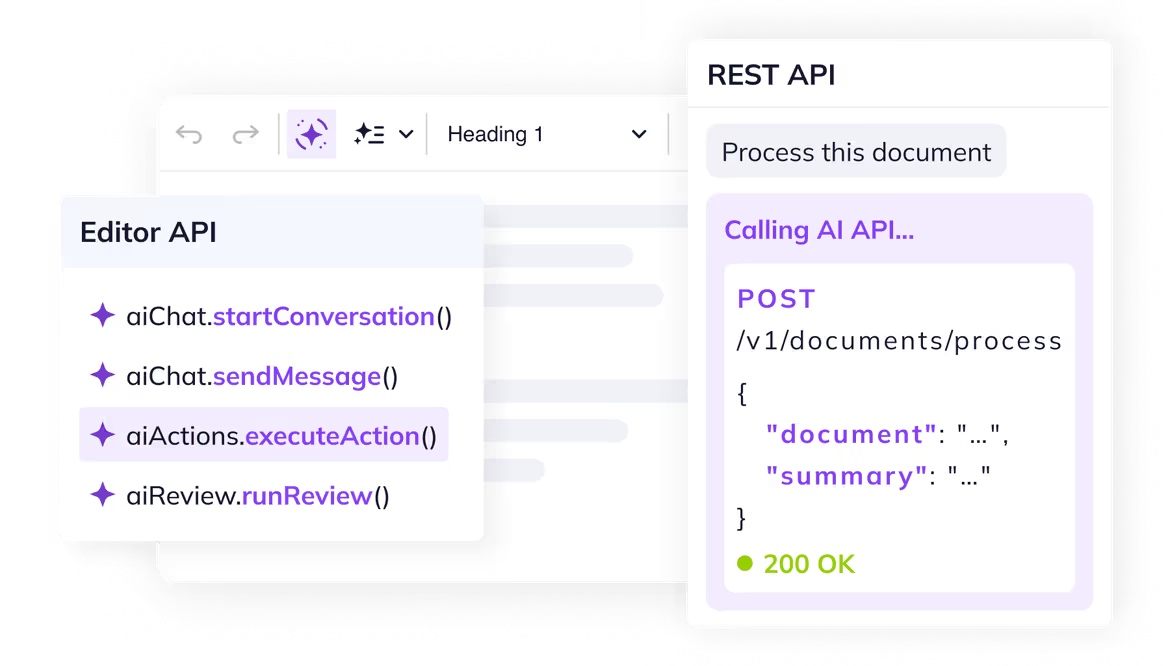
Three integration patterns, each with a live example: the JavaScript Editor API for in-editor control, the REST API for server-to-server or browser-based calls, and the Document stateless API for backend pipelines – no active editor instance required. Select a tab to get started.
The Frontend Editor API lets you execute AI prompts directly from your application. A single prompt can rewrite and restructure an entire document without opening AI Chat. See the full API reference.
Personalize the customer follow-up
Something went wrong while generating the suggestions. Please try again.
Customer Follow-up
Thank you for discussing your infrastructure modernization project with us. Based on your current environment and expected growth, we recommend a cloud deployment that provides reliable performance, operational resilience, and predictable operating costs.
The proposed solution includes a production-ready environment with redundant networking, managed compute resources, encrypted storage, and continuous monitoring. This approach is intended to support future expansion while minimizing operational complexity.
The deployment will be completed in several phases, including environment preparation, infrastructure provisioning, validation, and production rollout. The exact implementation plan can be adjusted based on your business priorities.
We look forward to discussing the recommended approach in more detail and refining the deployment plan together.
The Actions endpoint runs stateless transforms on any content you pass to it, with responses streamed over Server-Sent Events. This demo calls it from the browser to generate a title and a meta description for a blog post. The same call works from your backend. See the full API reference.
Why Streaming Became the Default for AI Responses
Just two years ago, calling an AI model meant sending a request, waiting four seconds, and receiving a response in one chunk. Today, almost every AI feature you use streams its output token by token — and the entire industry has converged on Server-Sent Events as the way to deliver it.
The Latency Problem
Large language models can take anywhere from a few seconds to over a minute to produce a full response. From a system standpoint, that's normal — the model is computing one token at a time. From a user standpoint, it's a deal-breaker. A blank screen for ten seconds feels broken. The same response, streamed word-by-word starting at 200 milliseconds, feels fast.
The metric that started mattering wasn't total response time. It was time-to-first-token.
Why SSE Won Over WebSockets
WebSockets were the obvious candidate for streaming, but they brought complexity nobody needed: bidirectional channels, custom framing, proxy issues, no native HTTP semantics. Server-Sent Events offered the opposite — plain HTTP, automatic reconnection, easy to debug, and trivial to terminate when the user clicks Cancel.
What integrators get from SSE today:
- A standard
text/event-streamresponse that any HTTP client can handle - Native browser support via
EventSource, no library required - Compatibility with existing HTTP infrastructure — proxies, load balancers, auth headers
- Clean cancellation semantics: closing the connection stops the generation
What Comes Next
Streaming is no longer an optimization. It's the contract. Users expect partial results, regenerate buttons, and the ability to cancel mid-response — and they expect it to feel instant. The next frontier isn't faster models. It's tighter integration between streamed output and the surfaces where that output actually lives.
The Document Processing endpoint takes a prompt and an HTML document and returns a transformed version. It is designed for server-side workflows like CMS publish hooks, content pipelines, and batch translation. This demo runs the flow in the browser for visibility, but the same call is at home in your backend. This endpoint is experimental. See the full API reference.
Translations
Click Translate to generate 5 language versions
Customer Support Metrics Report
Operational Summary – Second Half of 2025
Overview
This report summarizes customer support performance during the second half of 2025. It focuses on ticket volumes, response efficiency and common issue categories, based on internal operational data across all support channels.
The information below should be treated as an overview of observed trends rather than a detailed performance evaluation.
Support Process Overview
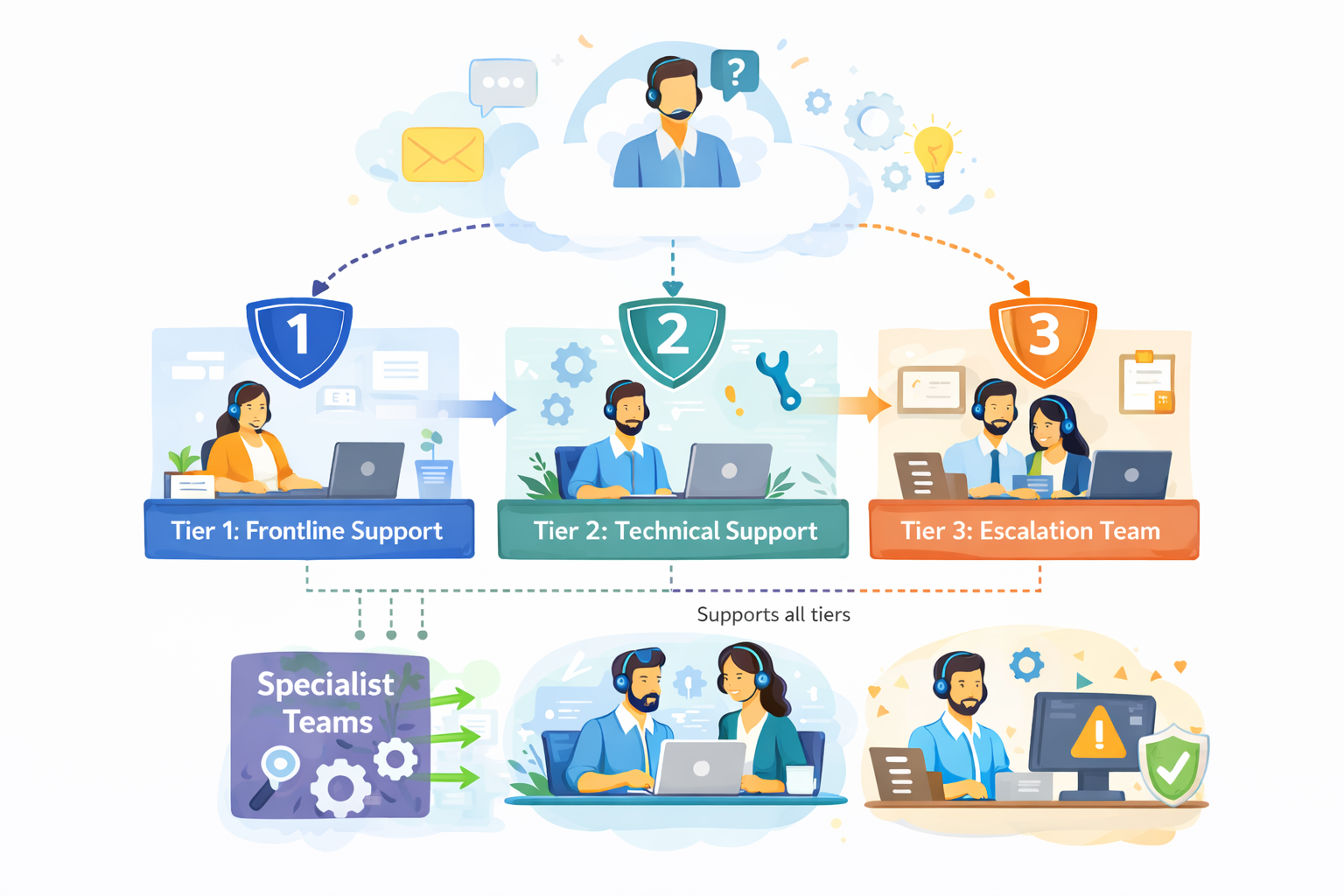
The diagram outlines our internal customer support process, showing how incoming requests are handled across multiple support tiers based on complexity.
Customer inquiries are initially managed by Tier 1: Frontline Support, which is responsible for triage and resolution of common issues. More complex cases are escalated to Tier 2: Technical Support, where deeper technical investigation is performed.
High-impact or unresolved issues are handled by Tier 3: Escalation Team, which coordinates with internal experts as required. Specialist Teams support Tier 2 and Tier 3 by providing domain-specific expertise, while typically remaining non-customer-facing.
The process is designed to allow flexible movement between tiers, supporting efficient resolution and appropriate escalation when needed.
Ticket Volume
During the reporting period, the support team processed 184,600 tickets, representing an increase of 11% compared to the previous period. Ticket volume peaked in September and gradually stabilized towards the end of the year.
The increase was primarily driven by onboarding-related questions and product configuration requests.
Channel Distribution
| Channel | Share of Tickets | Change vs. Previous Period | Avg. First Response Time |
|---|---|---|---|
| 54% | -3% | 3.1 hours | |
| Live Chat | 31% | +5% | 1.2 hours |
| In-App Support | 15% | -2% | 2.4 hours |
Email remained the dominant support channel, although live chat usage continued to increase, particularly among larger accounts.
Resolution Efficiency
Average response and resolution times showed minor improvement compared to earlier in the year.
- Average first response time: 2.4 hours
- Average resolution time: 18.7 hours
- Tickets resolved within 24 hours: 68%
More complex cases, especially those related to integrations, required additional follow-up and were not consistently resolved within standard timeframes. While faster response times were generally appreciated, qualitative feedback indicates that communication consistency played an equally important role in overall customer perception.
"Faster responses were helpful, but consistency in follow-up communication had a bigger impact on our overall experience."
— Enterprise customer, post-resolution survey
Common Issue Categories
The most frequently reported issues were:
- Account access and authentication
- Billing and invoice related questions
- Feature usage clarification
- Integration setup
- Performance-related concerns
Billing-related requests declined slightly, while integration-related inquiries increased towards the end of the period.
Customer Satisfaction
Customer satisfaction was measured through post-resolution surveys. The overall response rate remained stable throughout the reporting period.
- Average CSAT score: 4.2 / 5
- Survey response rate: 27%
Feedback most often referenced response time and clarity of follow-up communication as areas for improvement, particularly in cases involving multiple handovers or escalations.
Identified Bottlenecks
Internal review identified several operational areas that may require further attention:
- Delays in ticket reassignment for escalated cases
- Inconsistent categorization of incoming requests
- Limited coverage during selected regional peak hours
While these issues did not materially impact aggregate performance metrics, they were visible in individual case handling and customer feedback.
"The issue was eventually resolved, although it was not always clear who was responsible for the case during escalation."
— Key account feedback, quarterly review
Summary
Overall support performance remained within expected operational ranges. Most key indicators were stable, with moderate improvements observed in response efficiency. At the same time, the data suggests that further improvements in communication clarity and escalation handling could positively impact customer experience in future reporting periods.
Translations will appear here
This demo contains just a small subset of available CKEditor features. You are free to add more features to CKEditor regardless what editor type/toolbar you choose.
Read more about the AI programmatic capabilities in the documentation.