What’s new in CKEditor Drupal modules: Footnotes, Restricted Editing and more
5min read
|We’re kicking off the year with the latest releases of CKEditor Drupal modules, introducing new features that enhance workflows and expand support for structured content, precise formatting, and controlled editing experiences in Drupal.
On January 7, 2026, we released updates to two modules:
-
CKEditor Premium Features module 1.7.0
-
CKEditor Plugin Pack module 1.5.0
The release focuses on improving document formatting and collaboration workflows, while maintaining reliability and compatibility with modern Drupal environments and the latest CKEditor 5 version. This update brings powerful additions like Restricted Editing, Footnotes, and Line Height, alongside improvements to existing plugins and a range of compatibility and stability fixes.
Premium Features Module
FootnotesNEW
Footnotes allow content authors to include citations, comments, or explanatory notes while keeping the main content clean and focused. In CKEditor, footnotes appear as numbered references and are listed at the end of the document, although users can change locations in the document.
The feature supports both simple and multi-block footnote descriptions, enabling complex content like lists or tables within a single note. Numbering formats are also customizable.
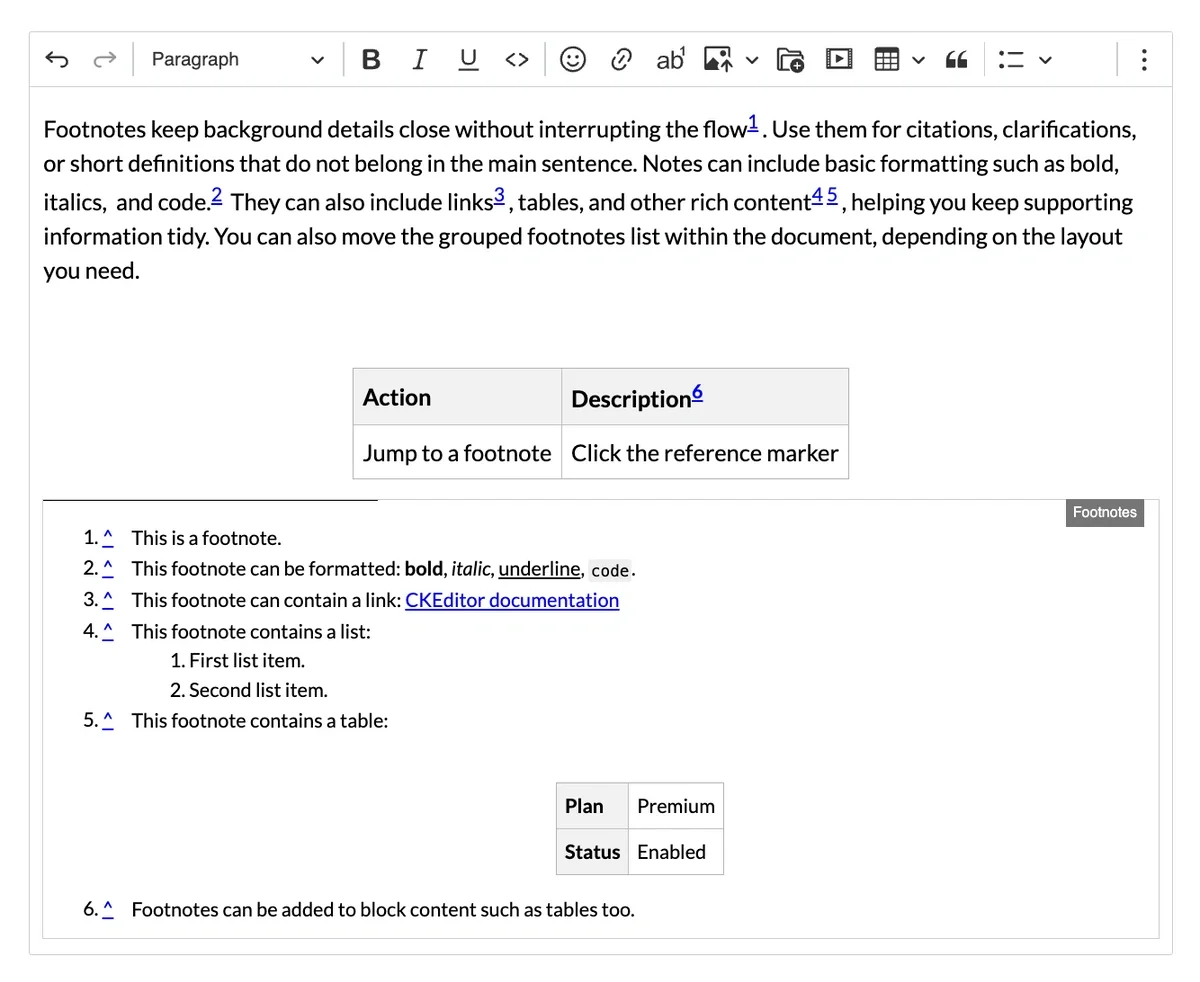
You can try Footnotes by starting a 14-day free trial. It is available in the Essential and Professional plans and also included in some Custom plans. Please contact us to learn more.
You can read all about the Footnotes in Drupal in the configuration guide.
Line HeightNEW
You can now control vertical spacing between lines with the new Line Height plugin. This addition helps ensure layout consistency across various publishing formats.
It supports default line heights, configurable presets (e.g., single, double), custom classes, and numeric values (e.g., 1, 1.15, 2), offering flexibility for branded templates and print-optimized documents. The plugin is also compatible with Import from Word, Export to Word, and Export to PDF workflows.
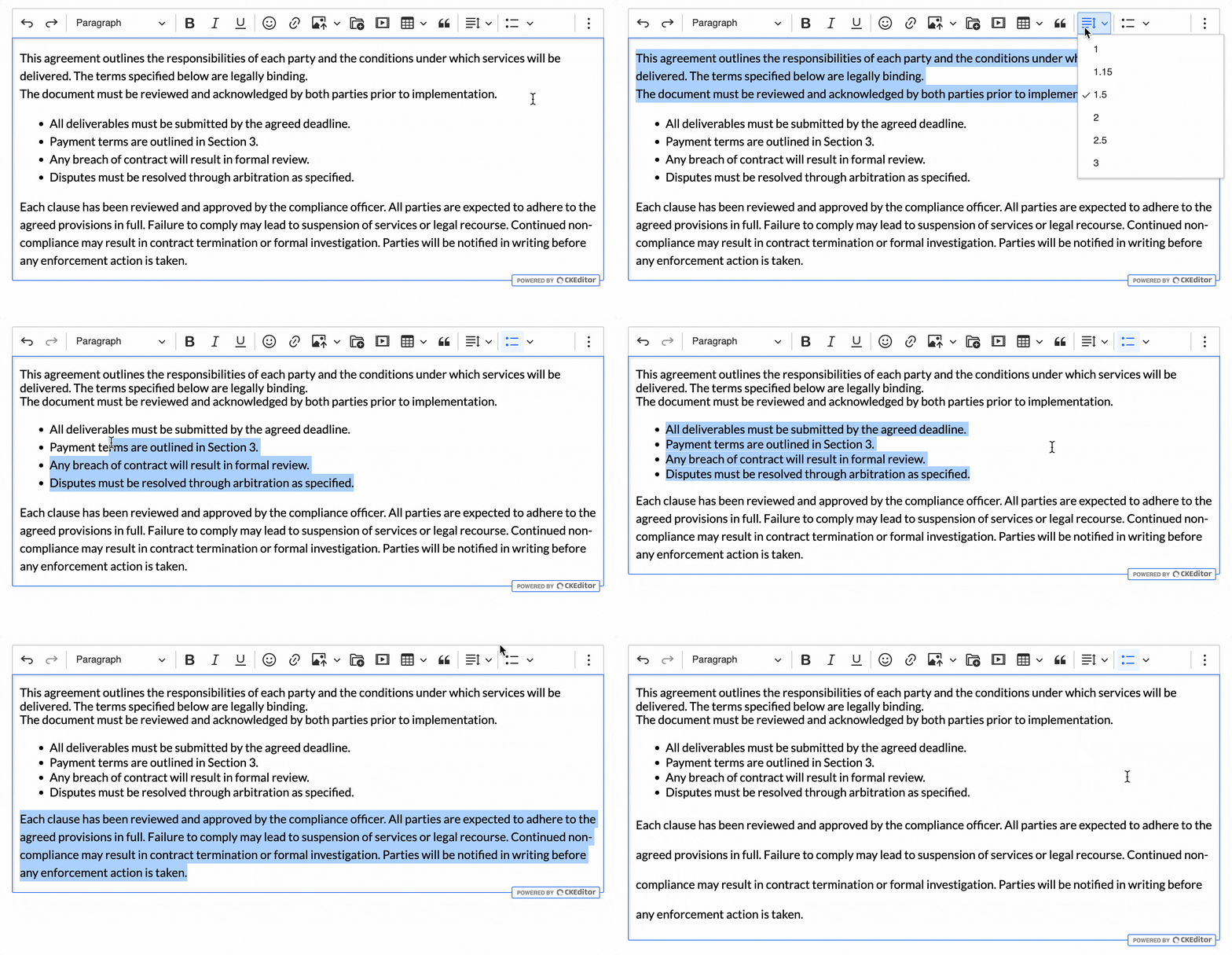
You can try Line Height by starting a 14-day free trial. It is available in the Essential and Professional plans and also included in some Custom plans. Please contact us to learn more.
You can read all about the Line Height in Drupal in the configuration guide.
Export to Word: Watermarks
Watermark support has been added to Export to Word, allowing you to embed branding or confidentiality markers or notices directly into exported documents.
You can try Export to Word by starting a 14-day free trial. It is available in the Essential and Professional plans and also included in some Custom plans. Please contact us to learn more.
You can read all about the Export to Word in Drupal in the configuration guide.
Full-screen mode
We would like to remind you that the custom Full-screen mode plugin included in earlier versions of the Premium Features module has been deprecated and will be completely removed in the future.
We highly recommend switching to the official Fullscreen mode plugin, available in the Plugin Pack module, as announced in v1.4.0. The change will ensure consistency and avoid potential conflicts in Drupal installations moving forward.
Other Improvements
The Premium Features module 1.7.0 also includes several smaller updates and fixes:
-
Track Changes: Fixed an issue where suggestions could not be accepted or rejected in some scenarios. Authors can now fully accept or refuse deletion and modification suggestions as expected.
-
Export to Word: Addressed alignment issues for text and images in exported documents.
-
Email editing: Resolved an issue with opening the Revision History window when the Export with Inline Styles plugin was active.
-
General: Compatibility and styling have been improved when using the Gin theme in dark mode.
Plugin Pack Module
Restricted Editing NEW
Restricted Editing is now available in the Plugin Pack. This feature allows site builders to set specific editable regions within the content, while locking down the rest. This prevents end users from making unauthorized changes and allows for consistency across sites and templates. It’s ideal for structured templates or compliance-driven workflows that require authors to make only limited, predefined changes. Authors can now edit inline text, paragraphs, tables, or sections for a wide range of protected content scenarios.
You can learn more about Restricted Editing in our documentation or the Drupal configuration guide.
Layout Tables
You can now disable the Table Cell Properties option for Layout Tables via configuration. This is useful in scenarios where you want to restrict visual overrides on layout-specific table structures.
Other Improvements
1.5.0 Plugin Pack release also includes a set of refinements and fixes:
-
Emoji: Resolved a bug where the Emoji plugin could prevent the editor from loading due to missing resource files (e.g., translation assets) under some Drupal configurations.
-
Link attributes: Fixed a JavaScript warning caused by a deprecated configuration format for the class attribute.
-
Highlight: Ensuring compatibility with upcoming PHP 8.4 changes by removing implicit nullable parameters.
-
Media embed: Added compatibility with “Limit allowed HTML tags and correct faulty HTML” text format filter.
-
General: Improved compatibility and fixed styling issues when using the Gin theme in dark mode.
Try the CKEditor 5 Premium Features Module
CKEditor offers incredible flexibility for users and developers, expanding the core benefits of Drupal. You can test all premium plugins including Collaboration, AI Assistant, Export/Import, and the new Email Configuration Helper with a 14-day free trial.
Start your trial or contact us for licensing options and technical support.
Quick Links and Resources
Feedback and Support
If you have specific questions or want to report an issue, please contact us.
Learn more about CKEditor in Drupal
Tags: