
I have been a huge fan of FCK for many years and I also can't wait to get started with the impressive CKed. 4.0 (downloaded on 21 Feb, 2013)
YES: the examples and the default 'show everything' textarea worked without problems. Like it!
Once I started to use an external custom config file with more limited settings everything went pearshape. No matter what I did, no matter how many working examples I pasted over my own settings, the style elements 'Styles', 'Format', 'Font', 'FontSize', 'TextColor', 'BGColor' just wouldn't give any pulldown with font/style/size etc. elements. I assumed it was just a cache problem so through F12 I tackled any cache issues on IE. No luck. Some (other) clueless person observed in some drupal forum that his (similar) problem spontaneously went away once the project was published on the internet.
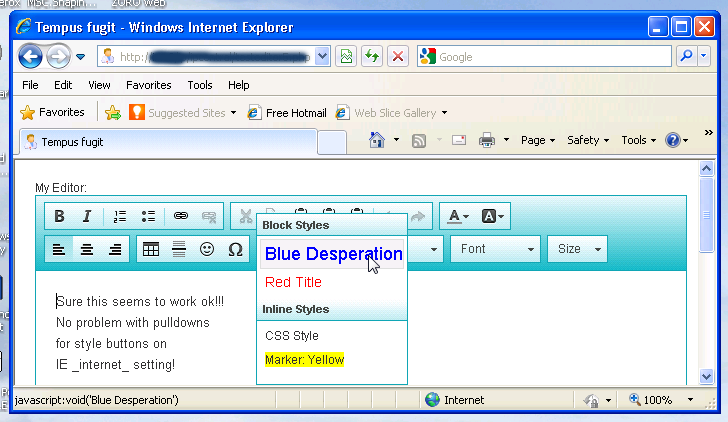
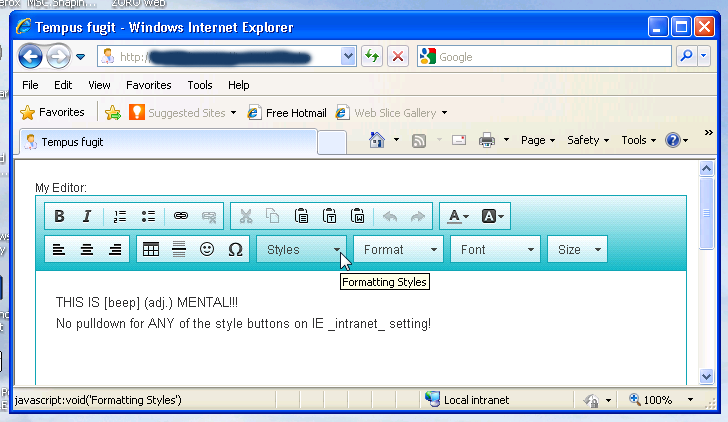
So I got a hunch that maybe my intranet settings for my projects could be a factor, once I moved the webproject out of intranet into internet from within security tab in IE, the style buttons had their pull downs and I also established that my original code/config were just fine. Revert a domain back to intranet and the pulldowns did not work again (see attached screenshots). I tested this on TWO totally different windoze machines, one with Vista 32bit/IE9 and the other on XP 32bit/IE8.
In stead of instructing my clients how to get around this problem I'm curious if there is a solution from within CKed. You would think that not using an external config file might do the trick but I tried putting all code in the same PHP page without luck. Just one more thing: all the OTHER buttons (symbol, paste, bold, lists etc. worked fine in both intranet and internet setting! Strange isn't it? It wouldn't surprise me if this behavior could be reproduced on many other machines, the point is that 'intranet' setting is not very common for the majority of users. Ultimately you could say this in an IE issue, but that is still the default browser for 90-95% of my clients. I also used the CHROME browser to test the the problem but with this browser I did not encounter any problem for both internet and intranet setting... Which is good news for Chrome users I suppose.
Thx for reading!

Hi,
Hi,
thanks for your report. You did not mention, however, which IE version you are using.
In any case, it would be great if you could submit your report to our tracker. Our QA/ developers only investigate issues that are reported there and they do not follow the forum/ blog comments etc. Thanks in advance!
Documentation Manager, CKSource
See CKEditor 5 docs, CKEditor 4 docs, CKEditor 3 docs, CKFinder 3 docs, CKFinder 2 docs for help.
Visit the new CKEditor SDK for samples showcasing editor features to try out and download!