
Hi
i have try to use CKFinder and i have add all my images into Folder Uploads and i can view it on CKFinder but i have Folder with name Images and each folder of them has my images i don't know how that happed ?! i want to display only one folder that Conatin my Images ??

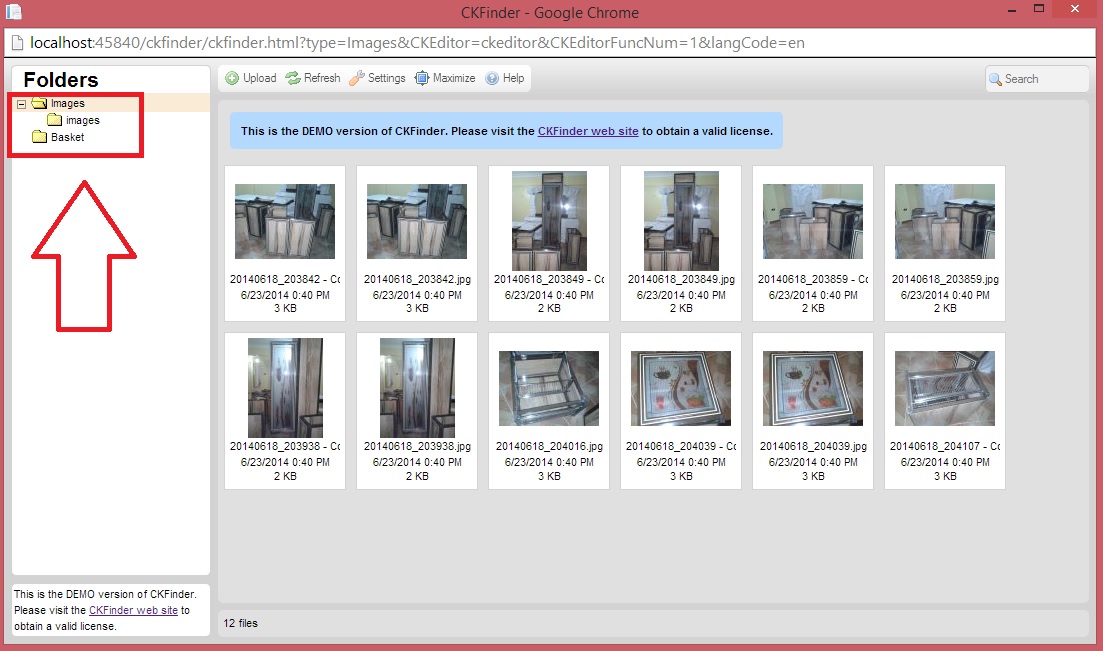
MY Config Code
<%@ Control Language="C#" EnableViewState="false" AutoEventWireup="false" Inherits="CKFinder.Settings.ConfigFile" %>
<%@ Import Namespace="CKFinder.Settings" %>
<script runat="server">

	/**
	 * This function must check the user session to be sure that he/she is
	 * authorized to upload and access files using CKFinder.
	 */
	public override bool CheckAuthentication()
	{
		// WARNING : DO NOT simply return "true". By doing so, you are allowing
		// "anyone" to upload and list the files in your server. You must implement
		// some kind of session validation here. Even something very simple as...
		//
		//		return ( Session[ "IsAuthorized" ] != null && (bool)Session[ "IsAuthorized" ] == true );
		//
		// ... where Session[ "IsAuthorized" ] is set to "true" as soon as the
		// user logs on your system.

		return true;
	}

	/**
	 * All configuration settings must be defined here.
	 */
	public override void SetConfig()
	{
		// Paste your license name and key here. If left blank, CKFinder will
		// be fully functional, in Demo Mode.
		LicenseName = "";
		LicenseKey = "";

		// The base URL used to reach files in CKFinder through the browser.
        BaseUrl = "/Uploads/";

		// The phisical directory in the server where the file will end up. If
		// blank, CKFinder attempts to resolve BaseUrl.
        BaseDir = "";

		// Optional: enable extra plugins (remember to copy .dll files first).
		Plugins = new string[] {
			// "CKFinder.Plugins.FileEditor, CKFinder_FileEditor",
			// "CKFinder.Plugins.ImageResize, CKFinder_ImageResize",
			// "CKFinder.Plugins.Watermark, CKFinder_Watermark"
		};
		// Settings for extra plugins.
		PluginSettings = new Hashtable();
		PluginSettings.Add("ImageResize_smallThumb", "90x90" );
		PluginSettings.Add("ImageResize_mediumThumb", "120x120" );
		PluginSettings.Add("ImageResize_largeThumb", "180x180" );
		// Name of the watermark image in plugins/watermark folder
		PluginSettings.Add("Watermark_source", "logo.gif" );
		PluginSettings.Add("Watermark_marginRight", "5" );
		PluginSettings.Add("Watermark_marginBottom", "5" );
		PluginSettings.Add("Watermark_quality", "90" );
		PluginSettings.Add("Watermark_transparency", "80" );

		// Thumbnail settings.
		// "Url" is used to reach the thumbnails with the browser, while "Dir"
		// points to the physical location of the thumbnail files in the server.
        //Thumbnails.Url = BaseUrl + "_thumbs/";
        //if ( BaseDir != "" ) {
        //    Thumbnails.Dir = BaseDir + "_thumbs/";
        //}
        //Thumbnails.Enabled = true;
        //Thumbnails.DirectAccess = false;
        //Thumbnails.MaxWidth = 100;
        //Thumbnails.MaxHeight = 100;
        //Thumbnails.Quality = 80;

		// Set the maximum size of uploaded images. If an uploaded image is
		// larger, it gets scaled down proportionally. Set to 0 to disable this
		// feature.
		Images.MaxWidth = 1600;
		Images.MaxHeight = 1200;
		Images.Quality = 80;

		// Indicates that the file size (MaxSize) for images must be checked only
		// after scaling them. Otherwise, it is checked right after uploading.
		CheckSizeAfterScaling = true;

		// Increases the security on an IIS web server.
		// If enabled, CKFinder will disallow creating folders and uploading files whose names contain characters
		// that are not safe under an IIS 6.0 web server.
		DisallowUnsafeCharacters = true;

		// If CheckDoubleExtension is enabled, each part of the file name after a dot is
		// checked, not only the last part. In this way, uploading foo.php.rar would be
		// denied, because "php" is on the denied extensions list.
		// This option is used only if ForceSingleExtension is set to false.
		CheckDoubleExtension = true;

		// Due to security issues with Apache modules, it is recommended to leave the
		// following setting enabled. It can be safely disabled on IIS.
		ForceSingleExtension = true;

		// For security, HTML is allowed in the first Kb of data for files having the
		// following extensions only.
		HtmlExtensions = new string[] { "html", "htm", "xml", "js" };

		// Folders to not display in CKFinder, no matter their location. No
		// paths are accepted, only the folder name.
		// The * and ? wildcards are accepted.
		// By default folders starting with a dot character are disallowed.
		HideFolders = new string[] { ".*", "CVS" };

		// Files to not display in CKFinder, no matter their location. No
		// paths are accepted, only the file name, including extension.
		// The * and ? wildcards are accepted.
		HideFiles = new string[] { ".*" };

		// Perform additional checks for image files.
		SecureImageUploads = true;

		// The session variable name that CKFinder must use to retrieve the
		// "role" of the current user. The "role" is optional and can be used
		// in the "AccessControl" settings (bellow in this file).
		RoleSessionVar = "CKFinder_UserRole";

		// ACL (Access Control) settings. Used to restrict access or features
		// to specific folders.
		// Several "AccessControl.Add()" calls can be made, which return a
		// single ACL setting object to be configured. All properties settings
		// are optional in that object.
		// Subfolders inherit their default settings from their parents' definitions.
		//
		//	- The "Role" property accepts the special "*" value, which means
		//	  "everybody".
		//	- The "ResourceType" attribute accepts the special value "*", which
		//	  means "all resource types".
		AccessControl acl = AccessControl.Add();
		acl.Role = "*";
		acl.ResourceType = "*";
		acl.Folder = "/";

		acl.FolderView = true;
		acl.FolderCreate = true;
		acl.FolderRename = true;
		acl.FolderDelete = true;

		acl.FileView = true;
		acl.FileUpload = true;
		acl.FileRename = true;
		acl.FileDelete = true;

		// Resource Type settings.
		// A resource type is nothing more than a way to group files under
		// different paths, each one having different configuration settings.
		// Each resource type name must be unique.
		// When loading CKFinder, the "type" querystring parameter can be used
		// to display a specific type only. If "type" is omitted in the URL,
		// the "DefaultResourceTypes" settings is used (may contain the
		// resource type names separated by a comma). If left empty, all types
		// are loaded.

		// ==============================================================================
		// ATTENTION: Flash files with `swf' extension, just like HTML files, can be used
		// to execute JavaScript code and to e.g. perform an XSS attack. Grant permission
		// to upload `.swf` files only if you understand and can accept this risk.
		// ==============================================================================

		DefaultResourceTypes = "";

		ResourceType type;

		type = ResourceType.Add( "Files" );
		type.Url = BaseUrl + "files/";
		type.Dir = BaseDir == "" ? "" : BaseDir + "files/";
		type.MaxSize = 0;
		type.AllowedExtensions = new string[] { "7z", "aiff", "asf", "avi", "bmp", "csv", "doc", "docx", "fla", "flv", "gif", "gz", "gzip", "jpeg", "jpg", "mid", "mov", "mp3", "mp4", "mpc", "mpeg", "mpg", "ods", "odt", "pdf", "png", "ppt", "pptx", "pxd", "qt", "ram", "rar", "rm", "rmi", "rmvb", "rtf", "sdc", "sitd", "swf", "sxc", "sxw", "tar", "tgz", "tif", "tiff", "txt", "vsd", "wav", "wma", "wmv", "xls", "xlsx", "zip" };
		type.DeniedExtensions = new string[] { };

        type = ResourceType.Add("Images");
        type.Url = BaseUrl + "images/";
        type.Dir = BaseDir == "" ? "" : BaseDir + "images/";
		type.MaxSize = 0;
		type.AllowedExtensions = new string[] { "bmp", "gif", "jpeg", "jpg", "png" };
		type.DeniedExtensions = new string[] { };

		type = ResourceType.Add( "Flash" );
		type.Url = BaseUrl + "flash/";
		type.Dir = BaseDir == "" ? "" : BaseDir + "flash/";
		type.MaxSize = 0;
		type.AllowedExtensions = new string[] { "swf", "flv" };
		type.DeniedExtensions = new string[] { };
	}

</script>