If so, I would recommend creating another stylesheet, perhaps called body.css. In that stylesheet, place the body styling you are using for your web page and remove any body styling from your main stylesheet. Then your web page will use both the main stylesheet and body.css while the editor will only use the main stylesheet.
If I've guessed the cause of your problem, what I've suggested would be a solution.
Okay, I tried putting the body's background in different stylesheets but it wouldn't work. If I put the style declaration inline in the body element it did, though. I wasn't very happy with that solution anyway. And I just fount out it is linked to the ckeditor module for drupal, in the settings there is the option to determine what stylesheets is the editor meant to use, so I changed that and it worked like a charm. So thank you anyway for the help and I leave this here just in case it can help someone else.


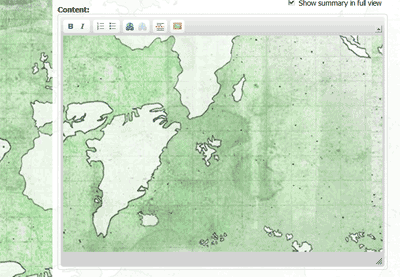
Re: textarea displays the page's body background?
body {
  background-image : url(someImage.jpg)
}
and you are doing something like this:
    ckEditor = CKEDITOR.replace("nameOfTextArea",{
      contentsCss : "stylesheet.css"
If so, I would recommend creating another stylesheet, perhaps called body.css. In that stylesheet, place the body styling you are using for your web page and remove any body styling from your main stylesheet. Then your web page will use both the main stylesheet and body.css while the editor will only use the main stylesheet.
If I've guessed the cause of your problem, what I've suggested would be a solution.
Re: textarea displays the page's body background?
If I put the style declaration inline in the body element it did, though. I wasn't very happy with that solution anyway. And I just fount out it is linked to the ckeditor module for drupal, in the settings there is the option to determine what stylesheets is the editor meant to use, so I changed that and it worked like a charm.
So thank you anyway for the help and I leave this here just in case it can help someone else.