
i have a form which sends a message,
type in username in a input field, and below is the message field which has CKeditor.
Now when typing in a letter in the input field i use wick autosuggest to make a dropdown under the input field with username suggestions.
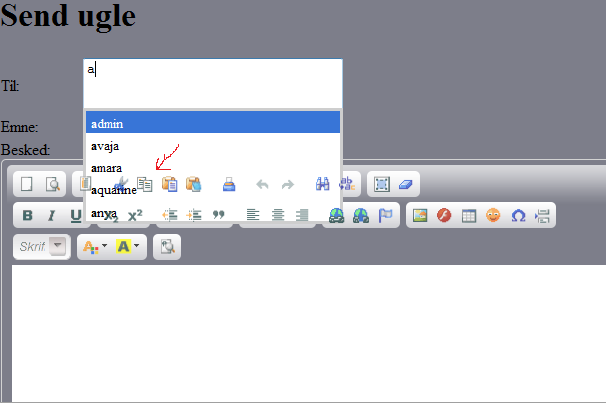
the suggestions box overlaps the CKeditor, and in FF, the button icons a shown over the box, but under the text in the suggestion box. Hehe hard to explain, i've attached a picture.
This is the css for the wick:
It works in IE, not in FF.
Any ideas?
type in username in a input field, and below is the message field which has CKeditor.
Now when typing in a letter in the input field i use wick autosuggest to make a dropdown under the input field with username suggestions.
the suggestions box overlaps the CKeditor, and in FF, the button icons a shown over the box, but under the text in the suggestion box. Hehe hard to explain, i've attached a picture.
This is the css for the wick:
.floater {
position:absolute;
z-index:500000000;
bottom:0;
right:0;
width: 250px;
background-color:white;
display:none;
padding:0;
}

.floater td {
font-family: Gill, Helvetica, sans-serif;
background-color:white;
border:1px inset #979797;
width: 250px;
color:black;
}

.matchedSmartInputItem {
font-size:0.8em;
padding: 5px 10px 1px 5px;
margin:0;
background-color:white;
cursor:pointer;
}

.selectedSmartInputItem {
color:white;
background-color:#3875D7;
}

#smartInputResults {
padding:0;margin:0;
width: 250px;
background-color:white;
}

.siwCredit {
margin:0;padding:0;margin-top:0px;font-size:0.7em;color:black;width: 250px;background-color:white;z-index:500000000;
}
It works in IE, not in FF.
Any ideas?

Re: FF bug: zindex on buttons