I will try check Joomla extension with your tamplate ASAP. Please be patient. This can be of course problem with template and extension compatibility. I will give you a note when I check this.
In what way you try 'center' image ? You use align option in image dialog or 'center' button in CKEditor buttons ? I tried 'center' button and it works fine with your template. What settings do you have in "Use template CSS" option in "Advanced Settings" tab in CKEditor component configuration ?
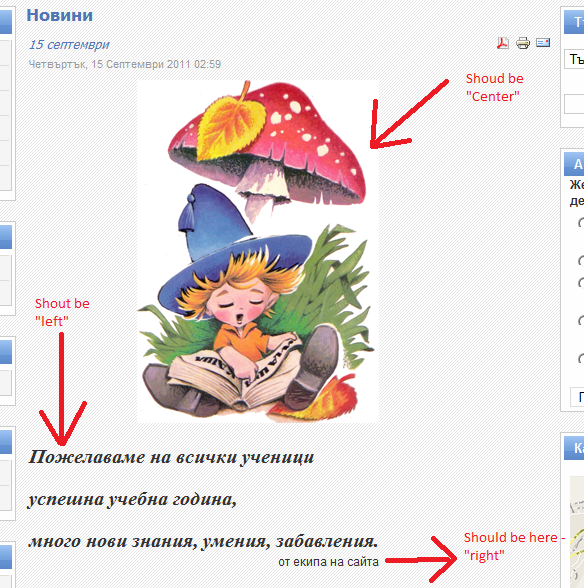
Hi @beBoss, I checked this and it works ok from editor's side, but you have right after save (on page) image isn't in center. The problem is with template.css. Please look at attached screenshot : the blue frame shows table inside which is 'p' tag. In this 'p' CKEditor put its content (which is center as you see). Because of
table class="contentpaneopen"
width image looks like not in center. In file pathToYourJoomla/templates/siteground-j15-14/css/template.css line 477 please change:


Re: Alignment doesn't work
http://extensions.joomla.org/extensions/edition/editors/12821
Re: Alignment doesn't work
link
link to article
Re: Alignment doesn't work
This can be of course problem with template and extension compatibility. I will give you a note when I check this.
Re: Alignment doesn't work
Re: Alignment doesn't work
EDIT:
Have you change anything in your template ?
Re: Alignment doesn't work
http://www.mediafire.com/?fc04thkc4eqwob2
Re: Alignment doesn't work
What settings do you have in "Use template CSS" option in "Advanced Settings" tab in CKEditor component configuration ?
Re: Alignment doesn't work
In edit article everything seems to be fine:
but it isn't..
My option for: Use template css is NO.
I also trying to position text in right (last text in the picture above).
Attachments:
Re: Alignment doesn't work
I checked this and it works ok from editor's side, but you have right after save (on page) image isn't in center. The problem is with template.css.
Please look at attached screenshot : the blue frame shows table inside which is 'p' tag. In this 'p' CKEditor put its content (which is center as you see). Because of width image looks like not in center.
In file pathToYourJoomla/templates/siteground-j15-14/css/template.css line 477 please change:
table.contentpane {
    margin: 0;
    padding: 0;
    width: auto;
}
to
table.contentpane {
    margin: 0;
    padding: 0;
    width: 100%;
}
than you will see that image is in center.
Attachments:
Re: Alignment doesn't work