
Developer's guideAPI documentation
CKEditor 3 HOWTO
Search the forum
Changing the appearance

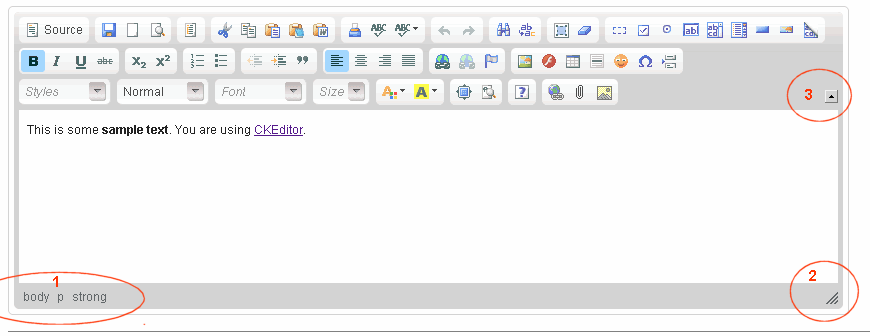
Q:How do I remove the name of elements at the bottom of the editor (Spot 1)?
Q:How do I remove the ability to resize the editor (Spot 2)?
Q:How do I remove the collapsing button of the toolbar (Spot 3)?
Q:How do I read/write the contents of the editor from javascript?
Q:How do I change the buttons in the toolbar?
Q:How do I change the contents of the 'Style' combo?
Q:How do I use the Styles combo to use classes?
Q:Why I can't use the styles combo with an image or a table or ...?
Q:How do I upload files/images with CKEditor?
Q:How do I make CKEditor output HTML code instead of XHTML (no '/>')?
Q:How do I change the contents of the xyz dialog?
Q:How do I set the default value for the xyz field in the zyx dialog?
Q:How do I know the name of the fields in the xyz dialog?
Q:
Use the CKEditor 3 Plugins subforum
Q:
design architecture
Q:How can I disable the spellchecker?
Q:What files and folders can I remove before uploading it to my production server?
Q:
Q:
Q:
Q:How do you get multiple instances of the CKEditor to use the same toolbar?
Q:How can I separate the toolbar of the text area?
Q:How can I use CKEditor with Asp.Net?
CKEditor 3 HOWTO
Search the forum
Changing the appearance
Q:How do I remove the name of elements at the bottom of the editor (Spot 1)?
Q:How do I remove the ability to resize the editor (Spot 2)?
Q:How do I remove the collapsing button of the toolbar (Spot 3)?
Q:How do I read/write the contents of the editor from javascript?
Q:How do I change the buttons in the toolbar?
Q:How do I change the contents of the 'Style' combo?
Q:How do I use the Styles combo to use classes?
Q:Why I can't use the styles combo with an image or a table or ...?
Q:How do I upload files/images with CKEditor?
Q:How do I make CKEditor output HTML code instead of XHTML (no '/>')?
Q:How do I change the contents of the xyz dialog?
Q:How do I set the default value for the xyz field in the zyx dialog?
Q:How do I know the name of the fields in the xyz dialog?
Q:
Use the CKEditor 3 Plugins subforum
Q:
design architecture
- long explanation trying to cover all the elements about creating a plugin for CKEditor
- another full explanation about plugins. Be warned that the page is automatically translated to your language, so it can be quite hard to understand what it says.
- another explanation of how to create a basic plugin and place it outside the CKEditor structure
- yet another one
- Basic explanation of a plugin and usage of iframeDialog
- using the iframeDialog
- simple guide
- modify Link dialog
- take a look at the posts, most of the ones that might interest you are marked as Tutorial, but others can be useful too.
- adding your entries to the context-menu
Q:How can I disable the spellchecker?
Q:What files and folders can I remove before uploading it to my production server?
Q:
Q:
Q:
Q:How do you get multiple instances of the CKEditor to use the same toolbar?
Q:How can I separate the toolbar of the text area?
Q:How can I use CKEditor with Asp.Net?

Re: FAQ. How to...
available configuration options
http://docs.cksource.com/ckeditor_api/symbols/CKEDITOR.config.html#.removePlugins
Re: FAQ. How to... have multiple instances of CKEditor in a
window.onload = function()
http://www.IT-Maverick.com
Re: FAQ. How to...
Re: FAQ. How to...
Re: FAQ. How to... have multiple instances of CKEditor in a
Re: FAQ. How to...
http://cksource.com/forums/viewtopic.php?f=11&t=19027&p=48313#p48313
Re: FAQ. How to...
Re: FAQ. How to...
I've added this:
A: To prevent the spellchecker to start automatically use this config:
To remove the plugin use this config:
Re: FAQ. How to...
Re: FAQ. How to...
Re: FAQ. How to...
Re: FAQ. How to...
Re: FAQ. How to...
i don't like the scayt showing its server information.i just wanna use something similar to this which is open source and we can modify them.This one is so ridiculous.Sorry for any offenses i have made.
Re: FAQ. How to...
http://blog.ale-re.net/2010/06/ckeditor ... -menu.html
Re: FAQ. How to...
http://blog.ale-re.net/2010/07/custom-i ... olbar.html
viewtopic.php?f=11&t=18876
Re: FAQ. How to...
http://docs.cksource.com/FCKeditor_2.x/ ... arLocation
Re: FAQ. How to...
viewtopic.php?f=11&t=19752&p=50332#p50332
Re: FAQ. How to...
Re: FAQ. How to...
Yes, I hate to modify the original source, but script code protection seems to be hardcoded and couldn't be easily prevented. Anyway if you have a better solution I'll be glad to read it and eventually write something about it.
~Aki
Re: FAQ. How to...
Re: FAQ. How to...
thanks
Re: FAQ. How to...
Thanks
Techspecialist
Re: FAQ. How to...
Re: FAQ. How to...
Re: FAQ. How to...
Using a plugin, how do I call a custom function every time an icon on the toolbar is clicked but not the plugin's icon (It has no icon,) as well as allowing what normally happens when the toolbar icon is clicked, without modifying each plugin to fire a custom event?
Specifically the 'newpage' command for example (Because it fires no event.)
I'm basically looking for a way to action something when a click event occurs on each or one specific toolbar icon.
editor.on( 'newpage', function() {
alert('newpage was clicked');
      } );
for example is no good because a 'newpage' event isn't fired when the newpage icon on the toolbar is clicked.
Anyone know?
Thanks,
Zanpakutō
Re: FAQ. How to...
Re: FAQ. How to...
Re: FAQ. How to...
Re: FAQ. How to...