THe plugin is installed, it shows up in the menu, my server Php configs are as requested, but when clicking, nothing happens. Like a window tries to open, then back.
I am having the same problem as describe by Sergelle. I have the new version of the plugin that includs api.destory(). I am actually getting a javascript error regarding this line.
Uncaught TypeError: Object #<Object> has no method 'destroy'
If anybody managed to have this plugin work, please, let me know. I have all the proper configs and updated files, I am blocked all the way by error messages. So far, with this plugin, I lost my time.
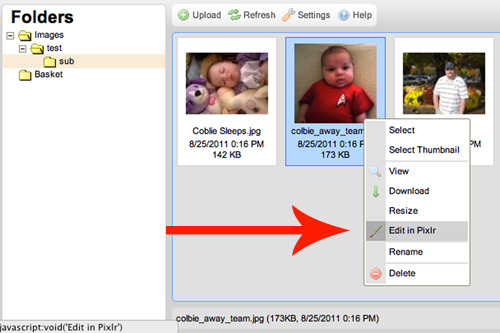
Hi, I'm in the same boat. I really need cropping capability in CKFinder. I installed this pixlr plugin, but the "Edit in pixlr" option isn't even showing up. I'm using CKFinder 2.3.1
I just installed the plugin and while I was able to edit and save the image, I did receive the below error messages.
Warning: unlink() [function.unlink]: No such file or directory in XX/editor/ckfinder/plugins/pixlr/process.php on line 102
Warning: Cannot modify header information - headers already sent by (output started at XX/ckfinder/plugins/pixlr/process.php:102) in XX/ckfinder/plugins/pixlr/process.php on line 104
I found how to fix it so the error messages do not show.

Re: pixlr image editing plugin
Please, let me know.
Re: pixlr image editing plugin
plugin.js
I've moved the whole updated thing to GitHub now
https://github.com/micah1701/ckfinder2pixlr
Re: pixlr image editing plugin
Uncaught TypeError: Object #<Object> has no method 'destroy'
Re: pixlr image editing plugin
Re: pixlr image editing plugin
Hi, I'm in the same boat. I really need cropping capability in CKFinder. I installed this pixlr plugin, but the "Edit in pixlr" option isn't even showing up. I'm using CKFinder 2.3.1
Re: pixlr image editing plugin
I just installed the plugin and while I was able to edit and save the image, I did receive the below error messages.
I found how to fix it so the error messages do not show.
In the process.php file in line 102 change
unlink($fp);
to
@unlink($fp);
That eliminated of the errors for me.