# Editing Toolkit with CKEditor AI
Use CKEditor AI Document Processing to edit document content from your own interface or agent. CKEditor AI processes the document HTML, and the Editing Toolkit compares the result with the original so users can review and apply the changes in the editor.
> **Unlock this feature with the Custom Plan**
>
> Try this feature for **free during your trial** — no credit card required.\
> After the trial, it’s available as a premium add-on in the [CKEditor Custom Plan](https://ckeditor.com/pricing/).
>
> [Sign up for a free trial ](https://portal.ckeditor.com/checkout?plan=free)[Contact sales](https://ckeditor.com/contact-sales/)
## Demo
Choose an action to send the document and an editing instruction to CKEditor AI. The Editing Toolkit compares the result with a snapshot and lists the changes in the panel next to the editor. Preview a change, then apply it directly, record it as a Track Changes suggestion, or reject it. The proposed edits do not change the document until you apply them. Reset the demo to try another action.
This demo presents a limited set of features. Visit the [feature-rich editor example](../../../examples/builds-custom/full-featured-editor.md) to see more in action.
## When to use this approach
Use this approach when you already use CKEditor AI and are building your own AI features or agent workflows. The Document Processing endpoint lets your agent delegate document editing to the CKEditor AI agent.
* Send an editing instruction and document HTML to CKEditor AI. Retained element IDs in the response let Compare match elements across versions.
* Let users review and pick individual changes in the Proposed changes UI before they reach the document.
* Mix in built-in CKEditor AI features where they fit, for example [Quick Actions](../../ai/ckeditor-ai-actions.md) for selected text, while the main conversation stays in your interface.
For a built-in chat interface in the editor, see the [AI Chat](../../ai/ckeditor-ai-chat.md) guide. To build AI features with your own agent and model, see the [custom chat implementation](editing-toolkit-custom-chat.md) guide, which uses [Coauthor](../editing-toolkit-coauthor.md).
## How it works
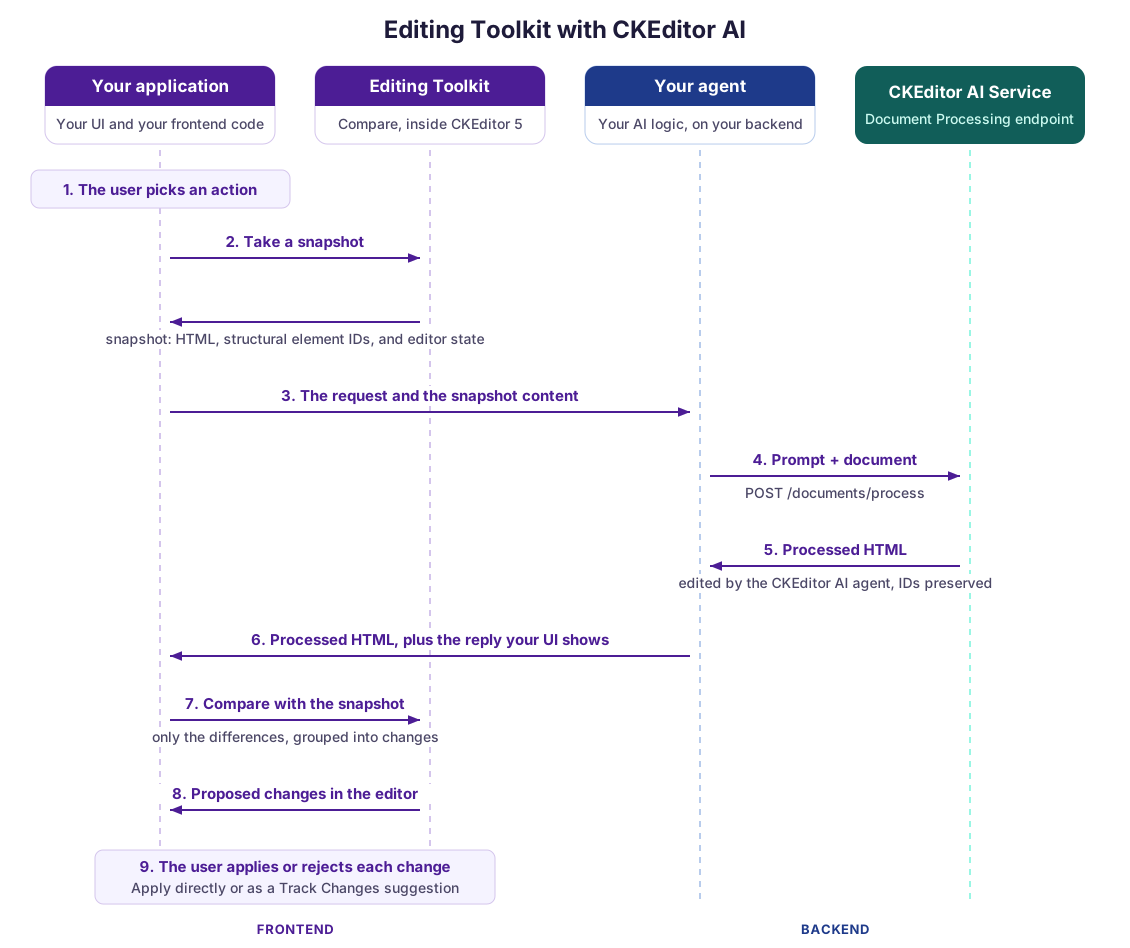
1. The user picks an action in your application or asks for something in your chat.
2. Your application takes a snapshot through the Editing Toolkit. It includes the document HTML, with IDs on structural elements, and the editor state needed to apply the differences later. The user can keep editing while the request runs.
3. Your application sends the request and snapshot content to your agent.
4. Your agent calls the [Document Processing endpoint](../../ai/ckeditor-ai-programmatic.md#calling-the-document-processing-endpoint) of the CKEditor AI service with the prompt and document HTML.
5. The service returns the processed HTML. Retained element IDs let the comparison match elements across versions.
6. Your agent returns the processed HTML to your application, together with any reply your interface shows the user.
7. Your application passes the processed HTML and original snapshot to the Editing Toolkit to compute grouped changes for review.
8. The toolkit displays the proposed changes without applying them to the document.
9. The user applies a change directly, records it as a Track Changes suggestion, or rejects it.
## What you need
* The `DocumentCompare` and `ProposedChanges` plugins from the Editing Toolkit, loaded in the editor with a license key. See the [Comparing documents](../compare/editing-toolkit-comparing-documents.md) and [Proposing changes](../compare/editing-toolkit-proposing-changes.md) guides for setup and API examples.
* Access to the CKEditor AI service and a token with the AI permissions. The [CKEditor AI integration](../../ai/ckeditor-ai-integration.md) guide covers the setup, and the [deployment options](../../ai/ckeditor-ai-deployment.md) guide covers Cloud and on-premises.
* The [Track Changes integration](../../collaboration/track-changes/track-changes-integration.md) if users should be able to record changes as suggestions.
---
Full index of the CKEditor 5 documentation: [llms.txt](../../../../llms.txt)