# Proposing changes
Use the `ProposedChanges` plugin of the [Editing Toolkit](../editing-toolkit-overview.md) to let users review changes from an AI agent, a script, or a service before anything reaches the document. The plugin provides the Proposed changes UI: a panel that lists the changes, with an optional preview in a balloon next to the affected content. Users can apply a change directly, record it as a Track Changes suggestion, or reject it. They can also apply or suggest all remaining changes at once.
The changes come from [Comparing documents](editing-toolkit-comparing-documents.md), which compares the new content with the current document.
> **Unlock this feature with the Custom Plan**
>
> Try this feature for **free during your trial** — no credit card required.\
> After the trial, it’s available as a premium add-on in the [CKEditor Custom Plan](https://ckeditor.com/pricing/).
>
> [Sign up for a free trial ](https://portal.ckeditor.com/checkout?plan=free)[Contact sales](https://ckeditor.com/contact-sales/)
## Demo
A script updates the event details in the demo below. Choose Propose changes to compare the result with the document and review the differences in the panel. Apply or reject each change, or preview it in the document. Reset the demo to start again.
This demo presents a limited set of features. Visit the [feature-rich editor example](../../../examples/builds-custom/full-featured-editor.md) to see more in action.
## How it works
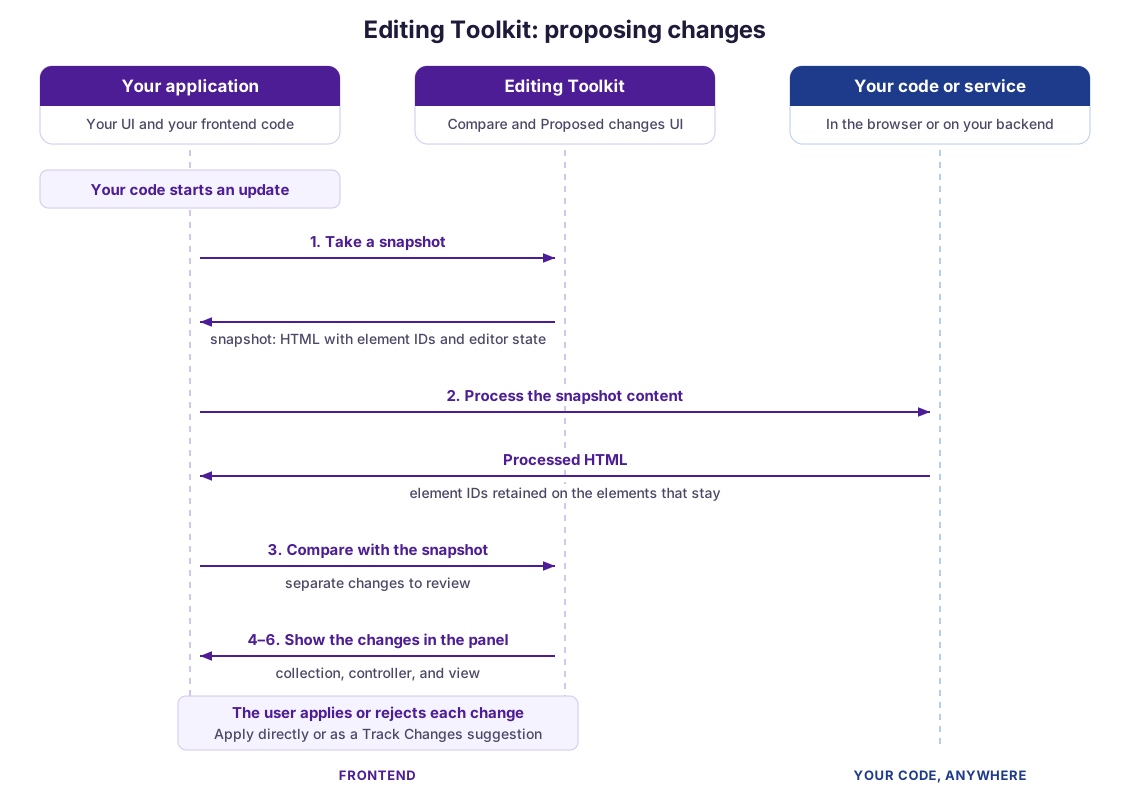
The UI is a standalone component that you place anywhere in your layout, for example in a sidebar, a dialog, or your own chat. It does not take HTML or patches directly. It takes the changes computed by `DocumentCompare`.
Proposing changes takes six steps:
1. **Snapshot** – [`makeSnapshot()`](../../../api/module_ai_toolkit_documentcompare-DocumentCompare.md#function-makeSnapshot) captures the current document. See [What a snapshot holds](editing-toolkit-comparing-documents.md#what-a-snapshot-holds).
2. **Process** – Your code or service transforms the snapshot content. See the [Comparing documents](editing-toolkit-comparing-documents.md) guide for details.
3. **Compare** – [`computeChanges()`](../../../api/module_ai_toolkit_documentcompare-DocumentCompare.md#function-computeChanges) compares the processed content with the snapshot and returns one change per reviewable part of the document. Unlike [`computePatch()`](../../../api/module_ai_toolkit_documentcompare-DocumentCompare.md#function-computePatch), which returns one patch for the whole document, it splits the differences so users can decide on each one separately.
4. **Collect** – A [`ProposedChangesCollection`](../../../api/module_ai_toolkit_proposedchangescollection-ProposedChangesCollection.md) holds the changes and tracks whether each one is pending, accepted, or rejected.
5. **Control** – [`createController()`](../../../api/module_ai_toolkit_proposedchanges-ProposedChanges.md#function-createController) binds the collection to the editor and provides methods to apply, reject, and preview the changes.
6. **Present** – [`createView()`](../../../api/module_ai_toolkit_proposedchanges-ProposedChanges.md#function-createView) creates the UI. Attach it to the controller and add its element to the page.
## Installation
After [installing the editor](../../../getting-started/installation/cloud/quick-start.md), add the `DocumentCompare` and `ProposedChanges` plugins to your plugin list. `ProposedChangesCollection` is a class you create in your code, not a plugin.
**NPM**
```js
import { ClassicEditor } from 'ckeditor5';
import { DocumentCompare, ProposedChanges } from 'ckeditor5-premium-features';
ClassicEditor
.create( {
attachTo: document.querySelector( '#editor' ),
licenseKey: '',
plugins: [ DocumentCompare, ProposedChanges, /* ... */ ],
collaboration: {
channelId: 'document-id'
}
} )
.then( /* ... */ )
.catch( /* ... */ );
```
**CDN**
```js
const { ClassicEditor } = CKEDITOR;
const { DocumentCompare, ProposedChanges } = CKEDITOR_PREMIUM_FEATURES;
ClassicEditor
.create( {
attachTo: document.querySelector( '#editor' ),
licenseKey: '',
plugins: [ DocumentCompare, ProposedChanges, /* ... */ ],
collaboration: {
channelId: 'document-id'
}
} )
.then( /* ... */ )
.catch( /* ... */ );
```
For [previews in the balloon](#balloon), also add the `AIChatBalloon` plugin. To apply changes directly, you do not need Track Changes or an AI service. To let users record changes as suggestions, also set up Track Changes, including registering the current user. See the [Track Changes integration](../../collaboration/track-changes/track-changes-integration.md) guide for details.
The editor must have `config.collaboration.channelId` set, even when you use a single editor without real-time collaboration. The controller uses it to match each change with its editor. Setting it does not enable Cloud Services or real-time collaboration. If it is missing, the editor throws an error.
## Running a review
The following example runs the six steps one by one. Replace `externalDataProcessing()` with your own processing:
```js
import { ProposedChangesCollection } from 'ckeditor5-premium-features';
const documentCompare = editor.plugins.get( 'DocumentCompare' );
const proposedChanges = editor.plugins.get( 'ProposedChanges' );
// 1. Capture the document.
const snapshot = documentCompare.makeSnapshot();
// 2. Process the content.
const processed = await externalDataProcessing( snapshot.content );
// 3. Compute the changes.
const changes = documentCompare.computeChanges( snapshot, processed );
// 4. Collect them.
const collection = new ProposedChangesCollection( changes );
// 5. Bind them to the editor.
const controller = proposedChanges.createController( collection );
// 6. Show the review.
const view = proposedChanges.createView();
controller.attachView( view );
document.querySelector( '#review' ).appendChild( view.element );
```
When the review ends, destroy the controller and the view:
```js
controller.destroy();
view.destroy();
```
To compare content that cannot keep the `data-id` attributes, such as Markdown or a converted Word file, take the snapshot with `useDataIds: false`. See [Comparing content without `data-id` attributes](editing-toolkit-comparing-documents.md#comparing-content-without-data-id-attributes).
## How changes are grouped
One reviewable change can contain several edits. The `computeChanges()` method groups related edits that are next to each other. All edits inside a table (except layout tables) or inside an element without paragraphs, such as an image with a caption, always form one change.
To change these rules, for example for your custom elements, use the [`isAtomic`](../../../api/module_ai_toolkit_documentcompare-DocumentCompareComputeChangesOptions.md#member-isAtomic) option of `computeChanges()`. It is called for every element that exists in both versions. Return `true` to keep all changes inside the element together, `false` to allow separate changes, or `undefined` to use the default rules:
```js
const changes = documentCompare.computeChanges( snapshot, processed, {
isAtomic: element => element.is( 'element', 'myCustomWidget' ) ? true : undefined
} );
```
## Marking changes as made by AI
If the processed content comes from AI, pass the `aiSource` option to `computeChanges()`. Changes that users apply or suggest are then marked as made by AI in Track Changes and revision history. The option works the same as in [Comparing documents](editing-toolkit-comparing-documents.md#marking-changes-as-made-by-ai), which also describes the related configuration.
```js
const changes = documentCompare.computeChanges( snapshot, processed, {
aiSource: 'myAgent'
} );
```
## Presentation modes
### Panel
The view returned by `createView()` is a panel that lists the changes. Each change has its own actions, and the panel also has actions for all changes at once. Place `view.element` wherever it fits your application.
Which actions the panel shows depends on Track Changes in the reviewed editors:
* The action to record changes as suggestions appears only if every reviewed editor loads the `TrackChanges` plugin.
* The action to apply changes directly disappears if a user turns on Track Changes in any reviewed editor.
The panel shows each change as a diff by default. Call [`controller.setShowDiff( false )`](../../../api/module_ai_toolkit_proposedchangescontrollertype-ProposedChangesController.md#function-setShowDiff) to show only the proposed content.
### Balloon
By default, users review the changes only in the panel. To also show a preview of each change in a balloon next to the affected content, pass the [`hasPreview`](../../../api/module_ai_toolkit_proposedchangescontrollertype-ProposedChangesControllerOptions.md#member-hasPreview) option to `createController()`. The preview requires the `AIChatBalloon` plugin:
```js
const controller = proposedChanges.createController( collection, {
hasPreview: true,
autoAdvanceDelay: 600
} );
```
The balloon opens when a user clicks a change in the panel. The editor scrolls to the affected content, and the balloon shows the change with buttons to apply, suggest, or reject it, and to move to the other changes.
After a user applies, suggests, or rejects a change, the preview moves to the next change. The [`autoAdvanceDelay`](../../../api/module_ai_toolkit_proposedchangescontrollertype-ProposedChangesControllerOptions.md#member-autoAdvanceDelay) option sets how long it waits first, so users can see the result. The default is 600 milliseconds. Set it to `0` to move on immediately. Calls to the controller methods never wait.
## Reviewing changes
Besides the UI, the [controller](../../../api/module_ai_toolkit_proposedchangescontrollertype-ProposedChangesController.md) lets you review changes from your own code. Changes are addressed by their index in the collection:
* [`applyChange()`](../../../api/module_ai_toolkit_proposedchangescontrollertype-ProposedChangesController.md#function-applyChange) – Applies a change directly with `applyChange( index, false )`, or as a suggestion with `applyChange( index, true )`.
* [`applyAllChanges()`](../../../api/module_ai_toolkit_proposedchangescontrollertype-ProposedChangesController.md#function-applyAllChanges) – Applies all changes that can still be applied, with one undo step per document.
* [`rejectChange()`](../../../api/module_ai_toolkit_proposedchangescontrollertype-ProposedChangesController.md#function-rejectChange) – Rejects a change and leaves the document as it is. There is no method to reject all changes at once.
* [`scrollToChange()`](../../../api/module_ai_toolkit_proposedchangescontrollertype-ProposedChangesController.md#function-scrollToChange), [`highlightChange()`](../../../api/module_ai_toolkit_proposedchangescontrollertype-ProposedChangesController.md#function-highlightChange), and [`previewChange()`](../../../api/module_ai_toolkit_proposedchangescontrollertype-ProposedChangesController.md#function-previewChange) – Help users find a change in the document.
### Change states
Each change has a [`state`](../../../api/module_ai_toolkit_proposedchange-ProposedChange.md#member-state): `pending`, `accepted` (applied directly or as a suggestion), or `rejected`. Undo in the editor sets an applied change back to `pending`.
A pending change cannot be applied when its content was removed or its editor was destroyed ([`outdatedState`](../../../api/module_ai_toolkit_proposedchange-ProposedChange.md#member-outdatedState)), when it has nothing to apply ([`emptyReason`](../../../api/module_ai_toolkit_proposedchange-ProposedChange.md#member-emptyReason)), or when its content is read-only ([`isReadOnly`](../../../api/module_ai_toolkit_proposedchange-ProposedChange.md#member-isReadOnly)).
Changes can only be applied in the [editing session](editing-toolkit-comparing-documents.md#editing-while-the-content-is-processed) in which their snapshot was taken. After a page reload, compute them again.
### Restoring the review
To rebuild a review from saved decisions, save the state of each change when it is updated. The collection fires the [`changeUpdated`](../../../api/module_ai_toolkit_proposedchangescollection-ProposedChangeUpdatedEvent.md) event for every update:
```js
collection.on( 'changeUpdated', ( evt, { index, change } ) => {
savedStates[ index ] = change.state;
} );
```
Then pass the states back with the changes when you create the collection:
```js
const collection = new ProposedChangesCollection(
changes.map( ( change, index ) => ( { ...change, state: savedStates[ index ] } ) )
);
```
Changes without a `state` start as `pending`. The editing session rule still applies: pending changes can only be applied in the session in which their snapshot was taken.
## Multi-editor setups
A single review can cover several editors. Load `ProposedChanges` in a `Context` shared by the editors, and `DocumentCompare` in each editor. Give each editor a distinct `config.collaboration.channelId`, so every change is matched with its document. See the [Using context with collaboration features](../../collaboration/context-and-collaboration-features.md) guide for more about the context.
```js
import { Context, ClassicEditor } from 'ckeditor5';
import { DocumentCompare, ProposedChanges } from 'ckeditor5-premium-features';
Context
.create( {
licenseKey: '',
plugins: [ ProposedChanges ]
} )
.then( context => Promise.all( [
ClassicEditor.create( {
context,
attachTo: document.querySelector( '#editor-a' ),
plugins: [ DocumentCompare, /* ... */ ],
collaboration: { channelId: 'document-a' }
} ),
ClassicEditor.create( {
context,
attachTo: document.querySelector( '#editor-b' ),
plugins: [ DocumentCompare, /* ... */ ],
collaboration: { channelId: 'document-b' }
} )
] ) )
.then( /* ... */ )
.catch( /* ... */ );
```
Compute the changes in each editor, then review them together with a controller created by the context:
```js
const collection = new ProposedChangesCollection( [ ...changesA, ...changesB ] );
const controller = context.plugins.get( 'ProposedChanges' ).createController( collection );
```
The `channelId` identifies the editor, while a change’s `rootName` identifies the root within that editor. For multi-root editors, see the [AI in multi-root and multi-editor setups](../../ai/ckeditor-ai-multi-root-multi-editor-support.md) guide.
If an editor is destroyed during the review, its changes become outdated with the `editor-removed` state.
## Related features
* [Comparing documents](editing-toolkit-comparing-documents.md) – Compute the changes that this UI presents.
* [Editing Toolkit overview](../editing-toolkit-overview.md) – Learn about all components of the toolkit.
* [Track Changes](../../collaboration/track-changes/track-changes.md) – Required only for recording changes as suggestions.
## Common API
The Proposed changes UI uses the following API:
* [`ProposedChanges`](../../../api/module_ai_toolkit_proposedchanges-ProposedChanges.md) – The plugin. Use [`createController()`](../../../api/module_ai_toolkit_proposedchanges-ProposedChanges.md#function-createController) to create a controller and [`createView()`](../../../api/module_ai_toolkit_proposedchanges-ProposedChanges.md#function-createView) to create the UI.
* [`ProposedChangesController`](../../../api/module_ai_toolkit_proposedchangescontrollertype-ProposedChangesController.md) – Applies, rejects, and previews changes, and connects the UI to the editors.
* [`ProposedChangesControllerOptions`](../../../api/module_ai_toolkit_proposedchangescontrollertype-ProposedChangesControllerOptions.md) – The `hasPreview` and `autoAdvanceDelay` options of the controller.
* [`ProposedChangesCollection`](../../../api/module_ai_toolkit_proposedchangescollection-ProposedChangesCollection.md) – The set of changes under review and their state.
* [`DocumentChange`](../../../api/module_ai_toolkit_proposedchange-DocumentChange.md) – A change computed by `DocumentCompare`.
* [`ProposedChange`](../../../api/module_ai_toolkit_proposedchange-ProposedChange.md) – A change in the collection, with its review state.
* [`ProposedChangeState`](../../../api/module_ai_toolkit_proposedchange-ProposedChangeState.md) – The possible review states.
---
Full index of the CKEditor 5 documentation: [llms.txt](../../../../llms.txt)