
   config.pubMeCustomTags = {
      youtube : {
         dtd : [ '$empty','$inline','$body','div' ]
      },
      testtag : {
         dtd : [ '$empty','$inline','$body','div' ]
      }
   };
// ... here is the original language file
pubme :
{
// ... here I have some more language definitions for my cms system
_pubme_extratags :
{
youtube :
{
fakeObjectTitle : "Video object (YouTube, Vimeo, Stream.cz)",
mainMenu : "Video (YouTube, Vimeo, Stream.cz)",
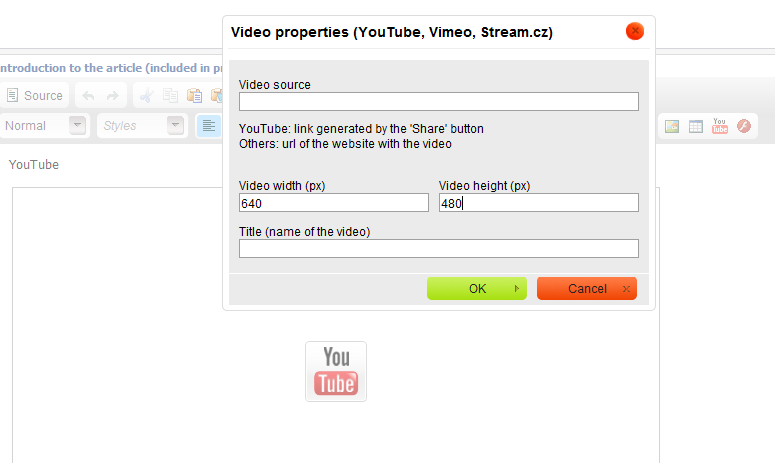
properties : "Video properties (YouTube, Vimeo, Stream.cz)",
source : "Video source",
explainsource : "YouTube: link generated by the 'Share' button<br />Others: url of the website with the video<br /> ",
width : 'Video width (px)',
height : 'Video height (px)',
title : 'Title (name of the video)'
}
}
}
preg_match_all ("/<youtube([^>]*)>/i",$Article,$Matches);
if (!empty($Matches[0]))
{
$DefaultWidth = 640; // 16/9 default
$DefaultHeight = 360;
$i=0;
while (isset($Matches[0][$i]))
{
$inner = $Matches[1][$i];
$attributes = Array ();
while ( strpos($inner,"=") !== false )
{
$pos = strpos($inner,"=");
$attribute = substr ( $inner, 0, $pos );
if (strpos($inner," ") !== false )
$attribute = substr($attribute,strrpos($attribute," ")+1);
$attribute = trim ($attribute);
$pos = false;
$pos1 = strpos($inner,"'");
$pos2 = strpos($inner,'"');
$pos3 = strpos($inner,'>');
if ($pos1 !== false)
$pos = $pos1;
if ($pos2 !== false && ($pos2<$pos || $pos === false) )
$pos = $pos2;
if ($pos3 !== false && ($pos3<$pos || $pos === false) )
$inner = "";
$useChar = substr ( $inner, $pos, 1 );
$inner = substr ( $inner , $pos + 1 );
if ( strpos ( $inner, $useChar ) !== false )
{
$pos = strpos ($inner, $useChar );
$attributeValue = trim (substr ( $inner, 0, $pos ));
$inner = substr ( $inner, $pos + 1 );
$attributes [ $attribute ] = $attributeValue;
}
else
$inner = "";
}
if ( empty ($attributes["width"]) && empty ($attributes["height"]) )
{
$attributes["width"] = $DefaultWidth;
$attributes["height"] = $DefaultHeight;
}
elseif ( empty ($attributes["width"]) )
$attributes["width"] = round ( $DefaultWidth / $DefaultHeight * $attributes["height"] );
elseif ( empty ($attributes["height"]) )
$attributes["height"] = round ( $DefaultHeight / $DefaultWidth * $attributes["width"] );
$usePlayer = "default";
if ( strpos ( $attributes["src"], "vimeo.com" ) !== false )
$usePlayer = "vimeo";
elseif ( strpos ( $attributes["src"], "stream.cz" ) !== false )
$usePlayer = "stream";
if ( strpos ($attributes["src"],"/") === false )
$attributes["src"] = "/" . $attributes["src"];
$attributes["src"] = substr ( $attributes["src"], strrpos ( $attributes["src"], "/" ) + 1 );
$title = "";
if ( !empty ($attributes["title"]) )
$title = " title = \"" . cms_htmlspecialchars ($attributes["title"]) . "\"";
switch ( $usePlayer )
{
case "vimeo":
$youtubeTag = "<iframe src=\"http://player.vimeo.com/video/{$attributes["src"]}?title=0&byline=0&portrait=0\" width=\"{$attributes["width"]}\" height=\"{$attributes["height"]}\"{$title} class=\"pubmevideo pubmevideo_vimeo\" frameborder=\"0\" webkitAllowFullScreen=\"true\" mozallowfullscreen=\"true\" allowFullScreen=\"true\"></iframe>";
break;
case "stream":
$youtubeTag = "<object value=\"http://www.stream.cz/object/{$attributes["src"]}\" width=\"{$attributes["width"]}\" height=\"{$attributes["height"]}\"{$title} class=\"pubmevideo pubmevideo_stream\">"
. "<param name=\"movie\" id=\"VideoSpot\">"
. "<param name=\"allowfullscreen\" value=\"true\">"
. "<param name=\"allowscriptaccess\" value=\"always\">"
. "<embed src=\"http://www.stream.cz/object/{$attributes["src"]}\" width=\"{$attributes["width"]}\" height=\"{$attributes["height"]}\" type=\"application/x-shockwave-flash\" allowfullscreen=\"true\" allowscriptaccess=\"always\">"
. "</object>"
;
break;
default:
if ( strpos ( $attributes["src"], "watch?" ) === 0 && strpos ( $attributes["src"], "=" ) !== false )
$attributes["src"] = substr ( $attributes["src"], strpos ( $attributes["src"], "=" ) + 1 );
$youtubeTag = "<iframe src=\"http://www.youtube.com/embed/{$attributes["src"]}\" width=\"{$attributes["width"]}\" height=\"{$attributes["height"]}\"{$title} frameborder=\"0\" allowfullscreen=\"true\" class=\"pubmevideo pubmevideo_youtube\"></iframe>";
break;
}
$Article = str_replace ( $Matches[0][$i], $youtubeTag, $Article );
$i++;
}
}
Malis @ Pub-Me Content Management System


Re: Custom tags (YouTube, Vimeo, Stream.cz)
Customer and Community Manager, CKSource
Follow us on: Facebook, Twitter, LinkedIn
If you think you found a bug in CKEditor, read this!
Re: Custom tags (YouTube, Vimeo, Stream.cz)
2) extraPlugins : '_pubme_extratags', section
2)placed in proper location in toolbar and
3) kept the folder in in ckeditor/plugins .
Still i m unable to get this plugin . Is there anything else to be done ?
Re: Custom tags (YouTube, Vimeo, Stream.cz)
Also note that the pugin name is _pubme_extratags (this comes to the config.extraPlugins) while the toolbar icon name is youtube. It is so because the plugin is actually designed for various extra tags to be processed (although at this very moment, it handles only youtube and other video formats).
Also note that if you use more extraPlugins, no spaces are allowed in the config.extraPlugins definition i.e. you must not put a space after the comma in the following:
The minimum config file should thus be:
CKEDITOR.editorConfig = function( config ) { config.extraPlugins = '_pubme_extratags'; config.toolbar_Full = [ [ 'youtube' ] ]; };Re: Custom tags (YouTube, Vimeo, Stream.cz)
Re: Custom tags (YouTube, Vimeo, Stream.cz)
Before displaying the page itself, you need to process the tag with php (or whatever programming language you use). The plugin description includes information on how to do it for the video formats mentioned in the heading of this thread.
Re: Custom tags (YouTube, Vimeo, Stream.cz)
Re: Custom tags (YouTube, Vimeo, Stream.cz)
// definition of custom tags
var pubmeCustomTags = {
   myvideo : {
      dtd : [ '$empty','$inline','$body','div' ]
   },
   youtube : {
      dtd : [ '$empty','$inline','$body','div' ]
   },
   mymusic : {
      dtd : [ '$empty','$inline','$body','div' ]
   }
};
http://pastebin.com/g2ygMKaS
Re: Custom tags (YouTube, Vimeo, Stream.cz)
Great plugin!
I'm using your (Leward) fix with 2 other tags and it works.
But when I switch from viewing the "source" and back, the icon changes back to "youtube"-icon..
The tag doesn't change, but when I click on it I'll get the youtube dialog..
What could be wrong?
Custom tags v 1.1
April 23, 2012 - v 1.1 - Plugin update and fix:
- Fixed: The first version was buggy if you tried to use it with more than 1 tag. This update fixes it.
- New: It adds a possibility of adding new tags from the config file - you do not need to edit the plugin itself at all. Just add a dialog script, some icons and register the new tag in the config file and that's it.
config.pubMeCustomTags = {
      youtube : {
         dtd : [ '$empty','$inline','$body','div' ]
      },
      othertag : {
         dtd : [ '$empty','$inline','$body','div' ]
      }
   };
Download
_pubme_extratags_1_1.zip
PS: Sorry for taking so long, I had some higher-priority work to do. But better late than never, right?
Attachments:
Re: Custom tags (YouTube, Vimeo, Stream.cz)