CKEditor for ASP.NET Released!
We are happy to announce the release of yet another official CKEditor integration, this time for ASP.NET. The CKEditor for ASP.NET Control makes integrating the most popular online WYSIWYG editor in the world with ASP.NET applications easier than ever before.
ASP.NET Support
Since its initial release in 2002 the ASP.NET web application framework has gained a lot of support among the developers. ASP.NET integration was already available for the predecessor of CKEditor, the acclaimed FCKeditor, and we are now proud to present the complete rewrite of this feature that is compatible with .NET Framework 2.0+.
- Full support for Microsoft Ajax environment.
- Straightforward configuration and customization.
- Ready-made samples that work out of the box.
- Clear and simple documentation.
Using CKEditor for ASP.NET
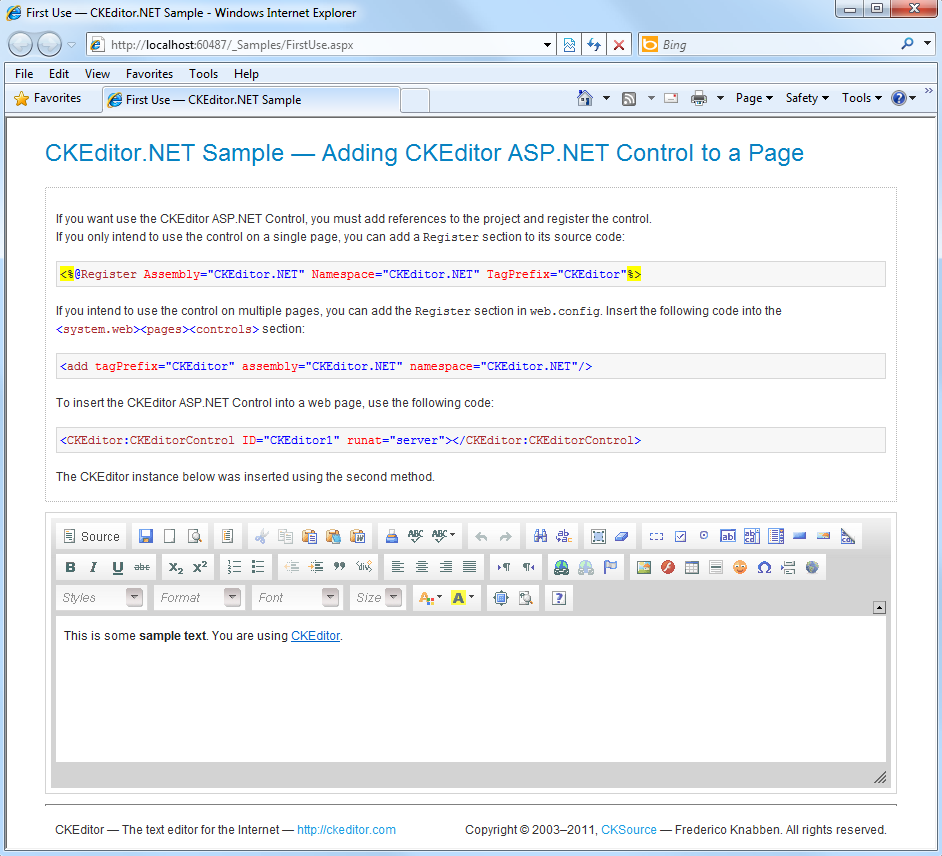
Adding a CKEditor instance to your ASP.NET application has never been easier. After you download the control, almost all you need to do is add it to your page using the code like the one below:
<CKEditor:CKEditorControl ID="CKEditor1" runat="server"> </CKEditor:CKEditorControl>
Complete step-by-step integration instructions are available in the documentation.
Download
Visit the CKEditor download page and download the CKEditor for ASP.NET Control as well as the latest CKEditor release.
Reporting Issues
We will be thankful for all feedback regarding the new integration of CKEditor as well as any suggestions on how to further improve it. Please note that this is the first public release of the product so be advised to try it out in a test environment first and use the CKEditor development web site to report issues and suggestions through tickets. Use the contact form from our website to send your questions and comments.
Support
Community support is available through our forums. Visit the support page for additional options.


I am working on asp.net from past two years.this new ckeditor will help me alot.
This is a BEST CK_Editor...its really great.....and never used before...!
can i use it in asp.net application and is it free?
Thanks a lot.!
Thank your for your kind words, we are glad to hear you liked our product!
See these articles for some information regarding CKEditor licensing:
http://docs.cksource.com/CKEditor_3.x/Howto/License
http://docs.cksource.com/CKEditor_3.x/Howto/Open_Source_License
You can use the free (Open Source) version of the editor as long as you comply to the terms of the Open Source license of your choice (GPL, LGPL, or MPL).
CKEditor for ASP.NET can be downloaded here: http://ckeditor.com/download
How to add new custom font-face in ckeditor.net?
I want to use this CK_Editor for e-mail formatting in my application and use this formatted
body of text from CK_Editor and send mail (like gmail) on button click in asp.net using C#.
plz provide sample code..to extract text from CK_Editor.
email: shekharshete_2005@rediffmail.com
Thanks !
Shekhar , blog comments are definitely *not* the best place to seek support. Use the community forum for that, please. There is a lot of documentation for CKEditor, too, see especially the Developer's Guide here: http://docs.cksource.com/CKEditor_3.x/Developers_Guide
ASP.NET-specific issues are explained here: http://docs.cksource.com/CKEditor_3.x/Developers_Guide#CKEditor_for_ASP.NET
please any body tell us that CKEditor for asp.net ,is it free ? can i use without license?
Yes, CKEditor for asp.net is free. Just download the Open Source version (top) and the asp.net control (bottom): http://ckeditor.com/download
Asp.net documentation is located at the bottom of this page.
Hola, está muy bacano el CKEditor, pero quería saber como se integra este con el CKFinder, para que puedan subir imagenes al servidor, al sitio y seleccionar imagenes. Muchas Gracias
Our guides on how to integrate CKFinder with CKEditor are located here. You will have to pick your CKFinder version and click on "CKEditor Integration". Sorry, no guides in Spanish. CKFinder needs a license. It's not Open Source.
I've found a bug:
The BasePath property of CKEditorControl doesn't support "auto-scheme" urls.
When we're using both Http and Https, to avoid security alerts from browser we can use a no-scheme url. I.E:
http://www.domain.com/scripts/ck.js - using HTTP
https://www.domain.com/scripts/ck.js - using HTTPS
//www.domain.com/scripts/ck.js - using HTTP or HTTPS according to browsers curent scheme ("auto-scheme")
The last option, //www.domain[...] will add the url again when render the page. With our current version is rendering //www.domain.com/www.domain.com/scripts/ck.js.
Thanks,
Marcos Lima
CKEditor 3.6.2 is the version with wrong behavior Regards,